Alt-tab-macos: Menu bar icon not showing
_This issue was opened by a bot after a user submitted feedback through the in-app form._
__Message:__
Menu bar icon not showing at all with latest update 4.17.2.
iMac 27" mid 2011, Mac OS 10.13.6.
App works fine...
 alt-tab-macos-bot
All 11 comments
There is a preference to hide it. If you select the last option in the list, it will not show the menubar icon:

Are you sure this preference is correctly set for you?
 lwouis
on 8 Aug 2020
lwouis
on 8 Aug 2020
Yes I had set it correctly but as you can see
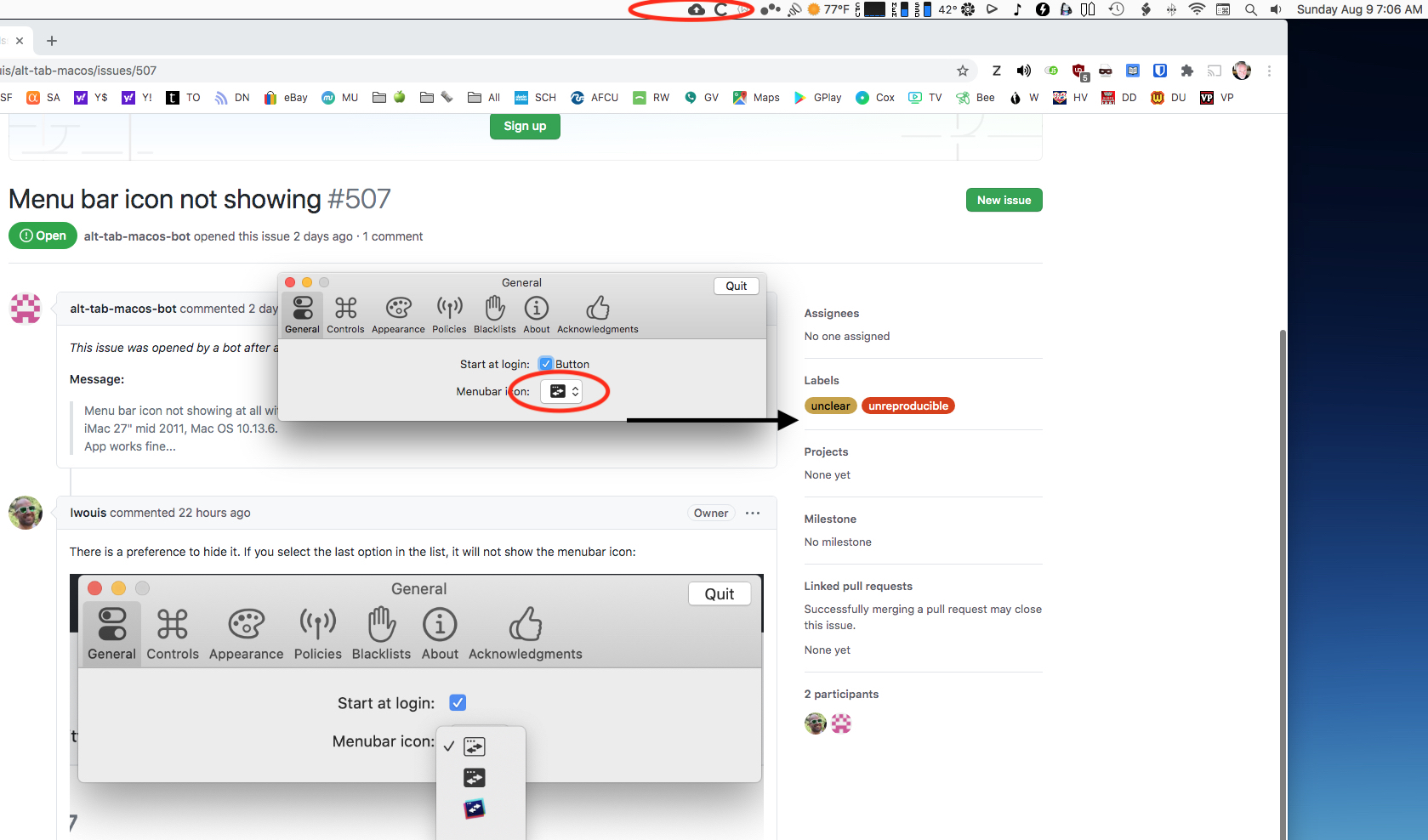
the menubar icon does not appear.
 farfel
on 9 Aug 2020
farfel
on 9 Aug 2020
This is puzzling. Could you please share the results of this command? defaults read com.lwouis.alt-tab-macos?
Also, you're not running any third-party app like Vanilla or Bartender to manage menubar icons, right?
lwouis
on 9 Aug 2020
Not running any third party apps described above.
Here's the readout:
MSAppCenter310AppCenterUserDefaultsMigratedKey = 1;
MSAppCenter310CrashesUserDefaultsMigratedKey = 1;
MSAppCenterAppDidReceiveMemoryWarning = 1;
MSAppCenterInstallId = "77FFC5F7-8EF6-40A3-AC5C-B0F5AABA3B3A";
MSAppCenterPastDevices = <62706c69 73743030 d4010203 04050665 66582476 65727369 6f6e5824 6f626a65 63747359 24617263 68697665 72542474 6f701200 0186a0af 10150708 0e14181e 4c4d4e4f 50515253 54555657 585c6155 246e756c 6cd2090a 0b0d5a4e 532e6f62 6a656374 73562463 6c617373 a10c8002 8014d30f 100a1112 135c7469 6d657374 616d704b 65795964 65766963 654b6579 80038005 8013d215 0a161757 4e532e74 696d6523 41c2701c bef043ee 8004d219 1a1b1c5a 24636c61 73736e61 6d655824 636c6173 73657356 4e534461 7465a21b 1d584e53 4f626a65 6374df10 171f2021 220a2324 25262728 292a2b2c 2d2e2f30 31323334 35363738 39373838 3d3e3838 38384344 45463838 494a4b59 6f735665 7273696f 6e5e7469 6d655a6f 6e654f66 66736574 58617070 4275696c 645f1015 6c697665 55706461 74655061 636b6167 65486173 685a6170 70566572 73696f6e 5f101177 72617070 65725364 6b566572 73696f6e 5b636172 72696572 4e616d65 5773646b 4e616d65 566c6f63 616c655f 10176c69 76655570 64617465 4465706c 6f796d65 6e744b65 795e6361 72726965 72436f75 6e747279 5a6f7341 70694c65 76656c5e 77726170 70657253 646b4e61 6d65576f 656d4e61 6d655a73 646b5665 7273696f 6e5c6170 704e616d 65737061 6365556d 6f64656c 5f101577 72617070 65725275 6e74696d 65566572 73696f6e 5f10166c 69766555 70646174 6552656c 65617365 4c616265 6c5a7363 7265656e 53697a65 566f734e 616d6557 6f734275 696c6480 0b800e80 10800080 12801080 00800080 06800d80 00800080 00800080 09800780 11800880 00800080 0f800a80 0c5f100f 61707063 656e7465 722e6d61 636f7355 332e332e 3158694d 61633132 2c325541 70706c65 556d6163 4f535731 302e3133 2e365831 37473134 30313955 656e5f55 5313ffff ffffffff fe5c5932 35363078 31343430 56342e31 372e325f 1018636f 6d2e6c77 6f756973 2e616c74 2d746162 2d6d6163 6f73d219 1a595a58 4d534465 76696365 a3595b1d 5c4d5357 72617070 65725364 6bd2191a 5d5e5f10 134d5344 65766963 65486973 746f7279 496e666f a35f601d 5f10134d 53446576 69636548 6973746f 7279496e 666f5d4d 53486973 746f7279 496e666f d2191a62 635e4e53 4d757461 626c6541 72726179 a362641d 574e5341 72726179 5f100f4e 534b6579 65644172 63686976 6572d167 6854726f 6f748001 00080011 001a0023 002d0032 0037004f 0055005a 0065006c 006e0070 00720079 00860090 00920094 0096009b 00a300ac 00ae00b3 00be00c7 00ce00d1 00da010b 01150124 012d0145 01500164 01700178 017f0199 01a801b3 01c201ca 01d501e2 01e80200 02190224 022b0233 02350237 0239023b 023d023f 02410243 02450247 0249024b 024d024f 02510253 02550257 0259025b 025d025f 02610273 02790282 0288028e 0296029f 02a502ae 02b802bf 02da02df 02e802ec 02f902fe 03140318 032e033c 03410350 0354035c 036e0371 03760000 00000000 02010000 00000000 00690000 00000000 00000000 00000000 0378>;
MSAppCenterSessionIdHistory = <62706c69 73743030 d4010203 04050627 28582476 65727369 6f6e5824 6f626a65 63747359 24617263 68697665 72542474 6f701200 0186a0a7 07080e14 181e2355 246e756c 6cd2090a 0b0d5a4e 532e6f62 6a656374 73562463 6c617373 a10c8002 8006d30f 100a1112 135c7469 6d657374 616d704b 65795c73 65737369 6f6e4964 4b657980 03800080 05d2150a 1617574e 532e7469 6d652341 c2701cbe e9b88880 04d2191a 1b1c5a24 636c6173 736e616d 65582463 6c617373 6573564e 53446174 65a21b1d 584e534f 626a6563 74d2191a 1f205f10 144d5353 65737369 6f6e4869 73746f72 79496e66 6fa32122 1d5f1014 4d535365 7373696f 6e486973 746f7279 496e666f 5d4d5348 6973746f 7279496e 666fd219 1a24255e 4e534d75 7461626c 65417272 6179a324 261d574e 53417272 61795f10 0f4e534b 65796564 41726368 69766572 d1292a54 726f6f74 80010008 0011001a 0023002d 00320037 003f0045 004a0055 005c005e 00600062 00690076 00830085 00870089 008e0096 009f00a1 00a600b1 00ba00c1 00c400cd 00d200e9 00ed0104 01120117 0126012a 01320144 0147014c 00000000 00000201 00000000 0000002b 00000000 00000000 00000000 0000014e>;
MSAppCenterUserIdHistory = <62706c69 73743030 d4010203 04050627 28582476 65727369 6f6e5824 6f626a65 63747359 24617263 68697665 72542474 6f701200 0186a0a7 07080e14 181e2355 246e756c 6cd2090a 0b0d5a4e 532e6f62 6a656374 73562463 6c617373 a10c8002 8006d30f 100a1112 135c7469 6d657374 616d704b 65795975 73657249 644b6579 80038000 8005d215 0a161757 4e532e74 696d6523 41c2701c bee9e09c 8004d219 1a1b1c5a 24636c61 73736e61 6d655824 636c6173 73657356 4e534461 7465a21b 1d584e53 4f626a65 6374d219 1a1f205f 10134d53 55736572 49644869 73746f72 79496e66 6fa32122 1d5f1013 4d535573 65724964 48697374 6f727949 6e666f5d 4d534869 73746f72 79496e66 6fd2191a 24255e4e 534d7574 61626c65 41727261 79a32426 1d574e53 41727261 795f100f 4e534b65 79656441 72636869 766572d1 292a5472 6f6f7480 01000800 11001a00 23002d00 32003700 3f004500 4a005500 5c005e00 60006200 69007600 80008200 84008600 8b009300 9c009e00 a300ae00 b700be00 c100ca00 cf00e500 e900ff01 0d011201 21012501 2d013f01 42014700 00000000 00020100 00000000 00002b00 00000000 00000000 00000000 000149>;
"NSWindow Frame SUUpdateAlert" = "970 781 620 392 0 0 2560 1417 ";
"NSWindow Frame com.sindresorhus.Preferences.FrameAutosaveName" = "993 1001 574 118 0 0 2560 1417 ";
SUHasLaunchedBefore = 1;
SULastCheckTime = "2020-08-09 14:01:57 +0000";
SUUpdateGroupIdentifier = 2764683266;
SUUpdateRelaunchingMarker = 0;
menubarIcon = 1;
preferencesVersion = "4.17.2";
updatePolicy = 1;
}
farfel
on 9 Aug 2020
This is weird. I installed AltTab yesterday, after reboot, the menubar icons of apps like Monitor Control and Rectangle are all disappeared. After I uninstall AltTab today. the other apps icons show up again.
 TiptopFunk
on 10 Aug 2020
TiptopFunk
on 10 Aug 2020
@farfel I have 0 clue as to why it is happening I'm afraid. Could you please try to delete your preferences? This is achieved by running defaults delete com.lwouis.alt-tab-macos. If that doesn't solve it, could you please try doing that and also deleting the app and re-downloading it? It may be that something got corrupted during the download?
The process of changing the menubar icon from one icon to another, or hiding it is done through straightforward calls to the NSStatusBar API statusItem, then changing the NSImage or setting it to isVisible = false. @TiptopFunk that can in no way affect other apps menubar icons. What you experienced is most likely a coincidence. Also note that uninstalling AltTab doesn't change anything compared to stoping it. AltTab stores no other kind of state, files, etc on your system except the your preferences. Thus uninstalling wouldn't do something more than stoping the app doesn't.
lwouis
on 11 Aug 2020
@lwouis
- Deleted prefs per stated method above. Relaunched app. No icon in menubar. Otherwise working normally.
- Uninstalled AltTab via AppCleaner and deleted all items.
- Downloaded AltTab again and noted version was changed to 4.18.
- Installed new version and menu bar icon is not working while other aspects of app function as expected.
- I retained a zip of version 4.9.1 and just reinstalled that. Reporting that It works fine, including the menu bar icon. I'll stick
with that for now.
Hope you get this sorted out...
farfel
on 11 Aug 2020
@farfel you are saying that the app menubar icon is not showing on version 4.17.2 and 4.18.0, but is showing on version 4.9.1?
If that's the case, could you please tell me exactly from which version it stopped working for you? All the versions are available on the release page.
Also to confirm, you are running macOS 10.13.6, right?
lwouis
on 11 Aug 2020
@lwouis Confirming 10.13.6.
"you are saying that the app menubar icon is not showing on version 4.17.2 and 4.18.0, but is showing on version 4.9.1?" Yes.
The last fully working version was 4.13.1, as I just tested backwards from 4.18.0.
Hope that helps...
farfel
on 11 Aug 2020
I downloaded a High Sierra VM, and was able to reproduce the issue on 10.13.6! It is indeed an issue specific to 10.13.
I also noticed 2 other issues:
- the icon is too big:
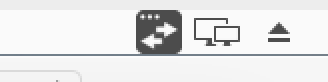
should be this size:
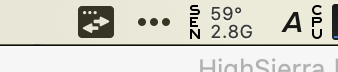
- checkboxes showing like this:
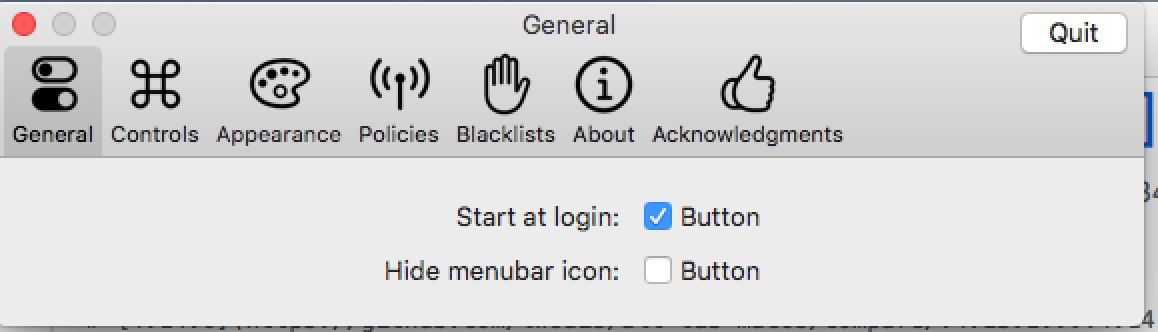
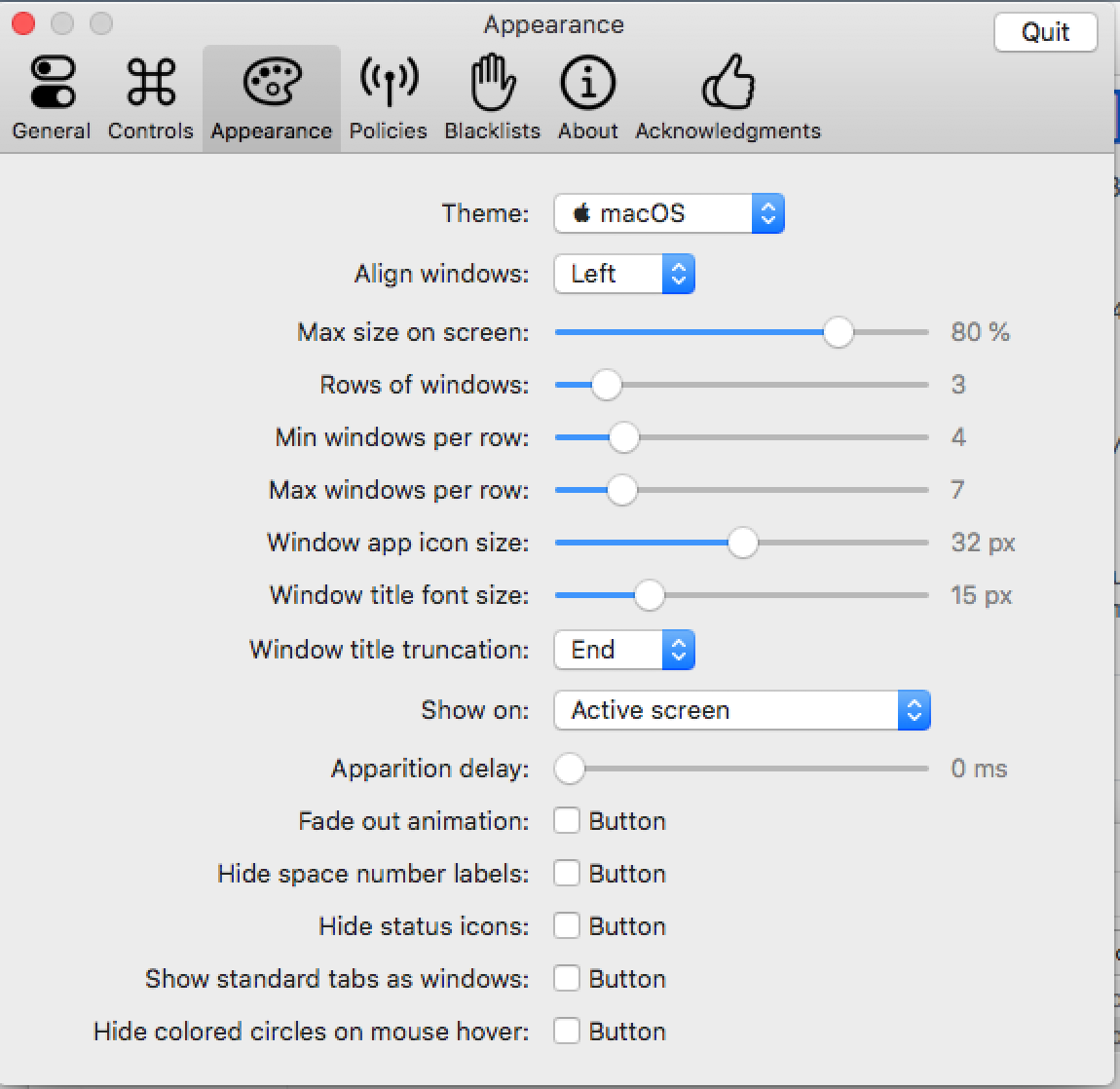
Checkboxes normally have text on their right. To have a more pleasant layout, we put text on the left sometimes, and we put "" as the checkboxes text. I guess on 10.13 is shows a default "Button" text instead of no text like on more recent macOS versions.
I'll try to fix all these issues.
Note that these issues don't happen on 10.14 and 10.15. I need to test on 10.12.
lwouis
on 11 Aug 2020
Good news, I got these issues fixed on 10.13! Release coming soon 👍
lwouis
on 11 Aug 2020
Related issues
 gingerr
·
6Comments
gingerr
·
6Comments
 DaVince
·
3Comments
DaVince
·
3Comments
 max-sixty
·
4Comments
max-sixty
·
4Comments
 anukul
·
3Comments
anukul
·
3Comments
 Stokestack
·
5Comments
Stokestack
·
5Comments