Alt-tab-macos: Incorrect switcher sizing with vertical monitor layout
I use two monitors side by side in a vertical layout. The switcher overlay extends past the borders of one of the windows, making some of the windows hard to identify (and looking ugly).

I'm using Mojave 10.14.6. I can't find a way to get a version for AltTab but I just downloaded it.
 cmf
cmf
All 12 comments
The overflow issue is a clear bug. I'll try to reproduce and have a look. Thanks a lot for the screenshot, it helps a lot understand the issue!
I'm using Mojave 10.14.6. I can't find a way to get a version for AltTab but I just downloaded it.
I'm not sure I understand what you mean. Releases are published here on github, together with their release notes. I would recommend getting the latest
 lwouis
on 16 Oct 2019
lwouis
on 16 Oct 2019
Sorry, yes, that is not my clearest piece of writing :-). What I meant was that I had downloaded the latest version from the link on the homepage, but then I couldn't work out which version that was to file the bug report. It's not in the archive name or available anywhere in the application once it's running, as far as I can tell. I filed #36 about this.
Looking at the release page, I think I have either 1.0.11 or 1.0.12.
cmf
on 16 Oct 2019
No change was done related to layout recently so I assume the bug exists on all versions. However your point about not being able to check which version you have is true! I will open a ticket to add a version text line in the menubar context menu.
lwouis
on 17 Oct 2019
I tried to reproduce: I physically set my Dell external monitor vertically, and used macOS to rotate the OS software-side. As you can see here I could not reproduce:
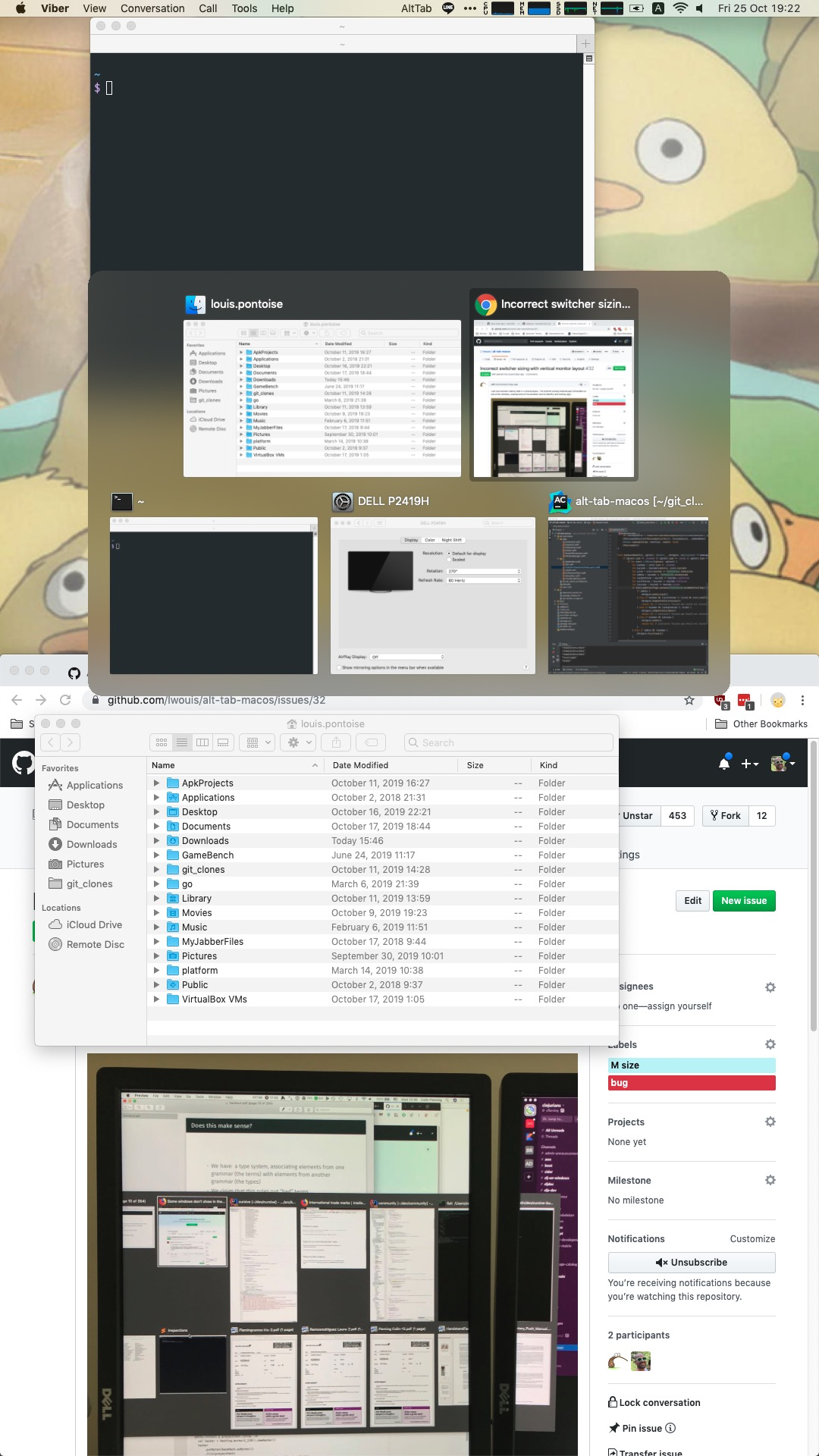
I also tried to open my laptop to have a secondary monitor. I thought vertical + dual-displays could be the root cause. I got the same result: no layout issue.
Could you please download the latest version and try again to see if the issue still persist? I improved a lot of things btw since you posted this issue 9 days ago, so you may want to try the new app anyway!
In the meanwhile I will close the issue as unreproducible. If you still experience the issue, could you please re-open this ticket? This time I will need your help to reproduce since it doesn't happen with my setup. Any info would be good like:
- Displays brand and models
- Does it happen if you turn off one display?
- Does it happen if you switch left and right displays?
- Does it happen when you have 1 display in horizontal mode, or your laptop display + 1 external display
Basically any info to try and pinpoint where the issue could be coming from :)
lwouis
on 25 Oct 2019
Sorry this took so long to test, things are busy. I actually can't re-open this issue, but I'm still experiencing the problem. I'm now running 1.14.3. This is what it currently looks like - the switcher now spans more than the width of the two displays:
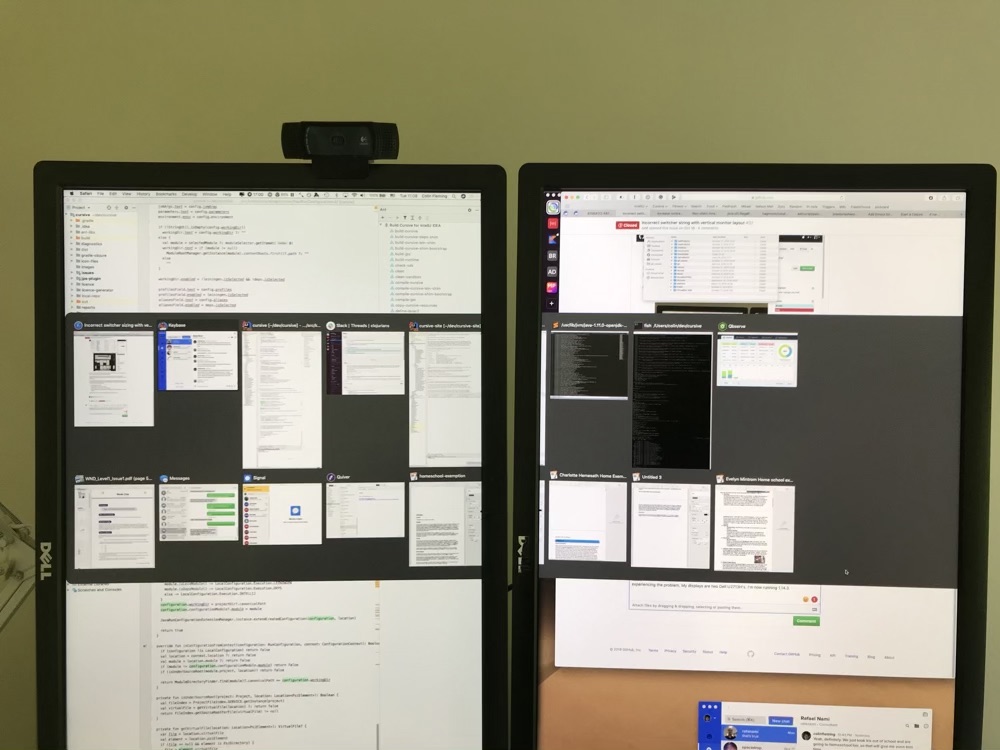
There are also two window which don't appear in the list - after toggling through all the visible ones I can toggle through (and switch to) two more which aren't visible.
Running through your list:
- My displays are two Dell U2713H's.
- Yes, in fact if I turn off one display the switcher stays the same size as in the photo above, even though half of it is no longer visible.
- Yes, it still happens if I switch left and right.
- Yes, it still happens if I have one external monitor and my laptop screen. In that case the single external monitor is my main display, and the laptop screen just shows about a quarter of the switcher. A lot of the switcher is invisible when using that configuration.
cmf
on 25 Nov 2019
Thank you for the added details! I'm afraid it's going to be tricky to fix that issue since I can't reproduce locally.
Could you possibly run the project in XCode (download this repo, open in XCode, then press run) and add a debugPrint(frame, screen.deviceDescription, screen) after this line?
The only explanation I have is that Cocoa reports the wrong screen dimensions with your Dell monitors for some reason. Not sure how to deal with that if the OS is giving us the wrong info about your screen being horizontal instead of vertical :/
lwouis
on 26 Nov 2019
Re-opening this issue as new ticket #165 shows that more people encounter a similar situation. I don't have access to monitor which exhibit this bug, so someone that has one needs to help us and follow the above instructions, so we can understand why the OS API is giving us the wrong dimensions 😅
lwouis
on 6 Mar 2020
I used to have the same issue, @lwouis you tried to reproduce with only 5 windows, but this issue only happened with more (maybe >10) windows.
Looks like this issued had been fixed as of version 3.2.1.
 yume-chan
on 1 Apr 2020
yume-chan
on 1 Apr 2020
Oh that sounds great! @cmf could you tell us if the latest release has fixed this issue for you as well? :)
lwouis
on 1 Apr 2020
Same for @jackbravo. Could you please tell us if the latest release fixed your issue? I would like to close this ticket if that's the case :)
lwouis
on 8 Apr 2020
@lwouis I can confirm the new release fixed the issue for me.
 jackbravo
on 22 Apr 2020
jackbravo
on 22 Apr 2020
@lwouis Yes, the latest version has fixed the bug for me. The app is looking very slick in general, great work! It's come a long way.
Edit: My apologies, I used the wrong GitHub account here, I'm cmf in disguise :)
 cursive-ide
on 23 Apr 2020
cursive-ide
on 23 Apr 2020
Related issues
 max-sixty
·
4Comments
max-sixty
·
4Comments
 mrc247-DE
·
3Comments
mrc247-DE
·
3Comments
 gingerr
·
6Comments
gingerr
·
6Comments
 Stokestack
·
5Comments
Stokestack
·
5Comments
 net
·
3Comments
net
·
3Comments