Alpine: Inspecting values for debugging
Is it possible to display the current values just like in VueDebugger? This would be really helpful. Thanks in advance.
 Wulfheart
All 10 comments
You mean, a DevTools for Alpine? :thinking:
 the94air
on 27 Jan 2020
the94air
on 27 Jan 2020
Exactly
Wulfheart
on 27 Jan 2020
Yeah, you can inspect it but data is a bit hidden.
In dev console (I use chrome) go to the Elements tab and click on the component you want to inspect (the tag with the x-data attribute). In the right column, where you see Styles by default, click on the Properties tab, open the first element and scroll down until you find the __x property: this is your alpine component.
If you then open it and click on $data > [[Target]] you can see the data context.
Some times, when you refresh, chrome doesn't show anything in the properties tab (I don't know why). When it happens, you need to close the dev console and open it again.
It would be good if somebody wrote an Alpine inspector to make it more user friendly.
 SimoTod
on 27 Jan 2020
SimoTod
on 27 Jan 2020
An Alpine Inspector would be really cool!
Wulfheart
on 28 Jan 2020
Agreed
 calebporzio
on 30 Jan 2020
calebporzio
on 30 Jan 2020
Is there a way through the console we can currently get components and see current values?
EDIT: there is
document.querySelector('[x-data]').__x
 MarcelRusu
on 9 Mar 2020
MarcelRusu
on 9 Mar 2020
@MarcelRusu Unfortunately I'm getting undefined when running it in the console.
Wulfheart
on 14 Mar 2020
@Wulfheart normally you will get something like that
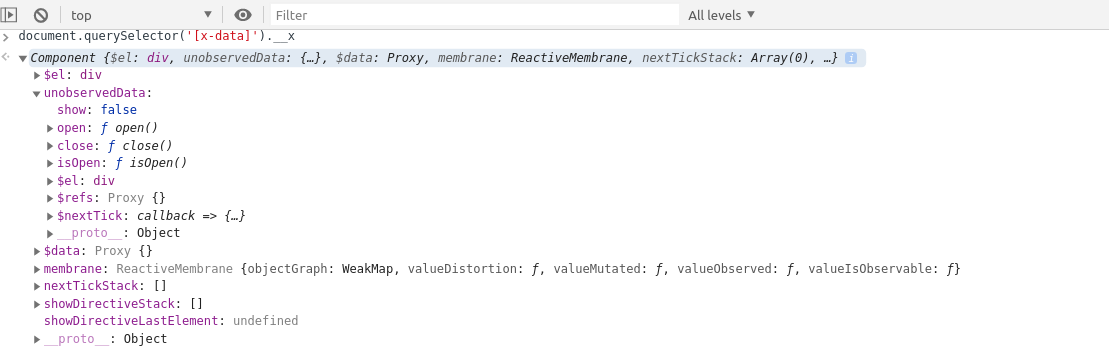
 abakermi
on 14 Mar 2020
abakermi
on 14 Mar 2020
A first version of the inspector is now available at https://github.com/Te7a-Houdini/alpinejs-devtools
SimoTod
on 14 Apr 2020
Thanks for sharing the link @SimoTod, came here to do the same thing. I'm going to close this issue now though since the new inspector / developer tools are available.
If you notice any issues or bugs with the dev tools please make an issue on the correct repository. Thanks! :)
 ryangjchandler
on 15 Apr 2020
ryangjchandler
on 15 Apr 2020
Related issues
 hkan
·
3Comments
hkan
·
3Comments
 mrmathewc
·
4Comments
mrmathewc
·
4Comments
 dstpierre
·
4Comments
dstpierre
·
4Comments
 Calinou
·
4Comments
Calinou
·
4Comments
 mikemartin
·
3Comments
mikemartin
·
3Comments
Most helpful comment
Agreed