Ale: ALE does not work with RLS (Stable/Unstable channel)
Information
VIM version
NVIM 0.2.2
Build type: RelWithDebInfo
Operating System: Debian 9.5 Stretch, using Nvim from repos
:ALEInfo
:ALEInfo
 Current Filetype: rust
Available Linters: ['cargo', 'rls', 'rustc']
  Enabled Linters: []
 Suggested Fixers:
  'remove_trailing_lines' - Remove all blank lines at the end of a file.
  'rustfmt' - Fix Rust files with Rustfmt.
  'trim_whitespace' - Remove all trailing whitespace characters at the end of every line.
 Linter Variables:
 Global Variables:

let g:ale_cache_executable_check_failures = v:null
let g:ale_change_sign_column_color = v:null
let g:ale_command_wrapper = v:null
let g:ale_completion_delay = 100
let g:ale_completion_enabled = 1
let g:ale_completion_max_suggestions = 50
let g:ale_echo_cursor = 1
let g:ale_echo_msg_error_str = 'Error'
let g:ale_echo_msg_format = v:null
let g:ale_echo_msg_info_str = 'Info'
let g:ale_echo_msg_warning_str = 'Warning'
let g:ale_enabled = 1
let g:ale_fix_on_save = 0
let g:ale_fixers = {}
let g:ale_history_enabled = 1
let g:ale_history_log_output = 1
let g:ale_keep_list_window_open = v:null
let g:ale_lint_delay = 200
let g:ale_lint_on_enter = 1
let g:ale_lint_on_filetype_changed = 1
let g:ale_lint_on_save = 1
let g:ale_lint_on_text_changed = 'always'
let g:ale_lint_on_insert_leave = 0
let g:ale_linter_aliases = {}
let g:ale_linters = {'rust': ['/home/omar/.cargo/bin/rls']}
let g:ale_linters_explicit = 0
let g:ale_list_window_size = v:null
let g:ale_list_vertical = v:null
let g:ale_loclist_msg_format = v:null
let g:ale_max_buffer_history_size = 20
let g:ale_max_signs = v:null
let g:ale_maximum_file_size = v:null
let g:ale_open_list = v:null
let g:ale_pattern_options = v:null
let g:ale_pattern_options_enabled = v:null
let g:ale_set_balloons = 0
let g:ale_set_highlights = 1
let g:ale_set_loclist = 1
let g:ale_enabled = 1
let g:ale_fix_on_save = 0
let g:ale_fixers = {}
let g:ale_history_enabled = 1
let g:ale_history_log_output = 1
let g:ale_keep_list_window_open = v:null
let g:ale_lint_delay = 200
let g:ale_lint_on_enter = 1
let g:ale_lint_on_filetype_changed = 1
let g:ale_lint_on_save = 1
let g:ale_lint_on_text_changed = 'always'
let g:ale_lint_on_insert_leave = 0
let g:ale_linter_aliases = {}
let g:ale_linters = {'rust': ['/home/omar/.cargo/bin/rls']}
let g:ale_linters_explicit = 0
let g:ale_list_window_size = v:null
let g:ale_list_vertical = v:null
let g:ale_loclist_msg_format = v:null
let g:ale_max_buffer_history_size = 20
let g:ale_max_signs = v:null
let g:ale_maximum_file_size = v:null
let g:ale_open_list = v:null
let g:ale_pattern_options = v:null
let g:ale_pattern_options_enabled = v:null
let g:ale_set_balloons = 0
let g:ale_set_highlights = 1
let g:ale_set_loclist = 1
let g:ale_set_quickfix = 0
let g:ale_set_signs = 1
let g:ale_sign_column_always = v:null
let g:ale_sign_error = '✗'
let g:ale_sign_info = v:null
let g:ale_sign_offset = v:null
let g:ale_sign_style_error = v:null
let g:ale_sign_style_warning = v:null
let g:ale_sign_warning = '⚠'
let g:ale_statusline_format = v:null
let g:ale_type_map = v:null
let g:ale_use_global_executables = v:null
let g:ale_warn_about_trailing_blank_lines = 1
let g:ale_warn_about_trailing_whitespace = 1
  Command History:
What went wrong
ALE doesn't use rls nor cargo to lint, I've tried with full paths & others to make it work but it just plain fails
Reproducing the bug
- Install ALE
- Add the following lines to init.vim file:
let g:ale_linters = { 'rust': ['rls']}//Doesn't work with 'rls' or 'cargo' alone or using full path to the rls/cargo binarieslet g:ale_rust_rls_executable = '/home/user/.cargo/bin/'// Doesn't work if i add the "rls" after the /bin directorylet g:ale_rust_rls_toolchain = 'stable'//haven't changed this, I don't use Rust beta or nightly
- Make Rust Project using cargo eg:
cargo new --bin test - Edit main.rs
- Make a mistake on purpose
- Watch nothing.
 VentGrey
All 19 comments
let g:ale_linters = {'rust': ['/home/omar/.cargo/bin/rls']} should be let g:ale_linters = {'rust': ['rls']}. g:ale_rust_rls_executable should point to the location of the executable, not the directory containing it.
 w0rp
on 3 Sep 2018
w0rp
on 3 Sep 2018
Should it be let g:ale_rust_rls_executable = '/home/user/.cargo/bin/rls' ? Being the last 'rls' the executable?
VentGrey
on 4 Sep 2018
Yes, the variable should point to the location of the executable file.
w0rp
on 4 Sep 2018
Strange, because it does point there, maybe It's conflicting with rust-vim or am I missing an option here? I was thinking about the g:ale_rust_cargo_use_check option but since that is on the cargo side of the documents I think it's not relevant.
I'll try to upload a picture later, still the full "A.L.E" settings I use are:
" Linters
Plug 'w0rp/ale'
"Vim A.L.E
"Enable A.L.E
let g:ale_completion_enabled = 1
let g:ale_sign_error = "✗"
let g:ale_sign_warning = "⚠"
"A.L.E Rust Settings
"Various settings for Rust
let g:ale_linters = {'rust': ['rls']}
let g:ale_rust_rls_executable = '/home/omar/.cargo/bin/rls'
let g:ale_rust_rls_toolchain = 'stable'
Mine only worked after adding let g:ale_rust_rls_options = '--cli' to vimrc. I didn't have to explicitly set the executable, it used rls from my PATH.
 gbrlsnchs
on 11 Sep 2018
gbrlsnchs
on 11 Sep 2018
Sounds like they changed the options in some version and broke compatibility with older versions.
w0rp
on 11 Sep 2018
No, --cli starts it in command-line mode, and otherwise it starts as a language server. See here. ALE doesn't do anything with a g:ale_rust_rls_options variable.
w0rp
on 11 Sep 2018
You're right, I apologize. It was just a coincidence. Both linting and autocompletion are working by simply setting these:
let g:ale_linters = {
            \ 'rust': [ 'rls' ],
            \ }
let g:ale_rust_rls_toolchain = 'stable' " this is needed, otherwise rls uses nightly toolchain
@gbrlsnchs Those 2 are on the settings I pasted there, funny enough, seeing other issues I find that only a very few editors manage to get rls working on stable channel, while others try nightly.
I have a theory, bit dumb if you ask me but rls uses racer to get the autocompletion, and racer now depends on rust nightly, could that be a problem source as well? :thinking:
VentGrey
on 11 Sep 2018
If you can run ALE from Vim instead, you can use ch_logfile() to log all of the messages to a file, and you might find something in there that lets you know why it isn't working, or not. Maybe someone familiar with Rust might suggest something.
w0rp
on 12 Sep 2018
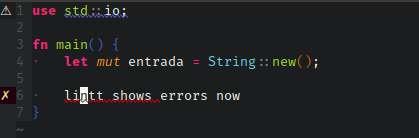
Well, issue is fixed now :laughing: not in a very...orthodox method but here's the steps on how to fix it:
Vim 8
- Add these repos to your .vimrc
Plug 'prabirshrestha/async.vim'
Plug 'prabirshrestha/vim-lsp'
Plug 'prabirshrestha/asyncomplete.vim'
Plug 'prabirshrestha/asyncomplete-lsp.vim'
- add this block on your vim rust settings block
if executable('rls')
    au User lsp_setup call lsp#register_server({
        \ 'name': 'rls',
        \ 'cmd': {server_info->['rustup', 'run', 'nightly', 'rls']},
        \ 'whitelist': ['rust'],
        \ })
endif
- (This is based on vim-plug) You have to install the missing packages:
$ vim +PlugInstall +qall
Neovim 0.2.2
- First of all upgrade your neovim-python integration
$ pip3 install --upgrade neovim
- Add these lines to your init.vim file
call plug#begin('~/.local/share/nvim/plugged')
Plug 'autozimu/LanguageClient-neovim', { 'do': ':UpdateRemotePlugins' }
call plug#end()

autocmd BufReadPost *.rs setlocal filetype=rust

" Required for operations modifying multiple buffers like rename.
set hidden

let g:LanguageClient_serverCommands = {
    \ 'rust': ['rustup', 'run', 'nightly', 'rls'],
    \ }

" Automatically start language servers.
let g:LanguageClient_autoStart = 1

" Maps K to hover, gd to goto definition, F2 to rename
nnoremap <silent> K :call LanguageClient_textDocument_hover()
nnoremap <silent> gd :call LanguageClient_textDocument_definition()
nnoremap <silent> <F2> :call LanguageClient_textDocument_rename()
- Install & update remote plugins
$ nvim +PlugInstall +UpdateRemotePlugins +qa
- voilà
VentGrey
on 13 Sep 2018
If rls is working with other LSP clients, it must work with ALE too. Like I said, I only had to set rls as the Rust linter and stable as the Rust toolchain:
let g:ale_linters = {
            \ 'rust': [ 'rls' ],
            \ }
let g:ale_rust_rls_toolchain = 'stable'
Everything worked out-of-the-box for me using ALE and rls.
I simply installed rls using the following command:
rustup component add rls-preview rust-analysis rust-src --toolchain stable
With ALE you don't need any other LSP clients like the ones you cited. ALE's advantage is that you can also integrate linters outside of LSP servers. For Rust it makes no difference, but for other languages having one tool to rule them all is the way to go.
gbrlsnchs
on 13 Sep 2018
Strangely enough I couldn't make it work out of the box, neither with the home installation using rustup nor from root installation, also most of the tools are included in my path variable, also the steps up there work with nightly, stable rls never worked for me.
VentGrey
on 13 Sep 2018
@VentGrey Your fix above doesn't have anything to do with ALE. You just installed another plugin that ALE doesn't interact with.
w0rp
on 14 Sep 2018
@w0rp Just noticed that :sweat_smile: apologies, I'll try to get even more verbose from nvim to see if there is a connection error or if the rls is not working at all. (Tried switching to nightly with no success).
VentGrey
on 14 Sep 2018
Update & Close:
Apparently neither the stable nor the nightly linting worked, I'm starting to think this might be a rls related problem or maybe the path variable is wrong somewhere in my init.vim file, in these days I tried:
- Removing & reinstalling rust completely (both stable & nightly toolchain).
- Downloading A.L.E again
- Re-arraging my .vim files
- Removing other lint & completion engines such as deoplete-rust & racer.
The only thing "out of place" that caught my eye was that if I was running the 'nightly' tooclhain the :ALEInfo commands shows Command History: empty, something that doesn't happen on the stable toolchain.
VentGrey
on 18 Sep 2018
Works here. rustup and racer were installed via Arch distro packages, rls is installed via the stable toolchain, and the nightly toolchain is installed for racer.
 polyzen
on 11 Feb 2019
polyzen
on 11 Feb 2019
I had a similar problem and then solved it by setting let g:ale_rust_rls_toolchain = ''. The problem is because my rust toolchain name is not simply nightly or stable, but a more specific version number (e.g. nightly-2019-03-05) because rls in not always available for the latest nightly build.
By reading the related source code of this plugin, I found that ale_linters#rust#rls#GetCommand just concatenates %e with +{toolchain} or ''. Using the default settings would run command rls +'nightly', which would result to the following error:
error: 'rls' is not installed for the toolchain 'nightly-x86_64-apple-darwin'
To install, run `rustup component add rls`
On the other hand, when toolchain is set to '', the command would be just %e (i.e. rls) and rls can find the correct toolchain version by itself. Running rls +nightly-2019-03-05 or just rls yields the correct results.
Therefore, by setting let g:ale_rust_rls_toolchain = '' or let g:ale_rust_rls_toolchain = 'nightly-2019-03-05' I can both get rls running successfully.
I think this behavior should have been reflected in the documentation since rls is not always available in the nightly channel (which is the default value of ale_rust_rls_toolchain), but it did not.
 superobertking
on 11 Apr 2019
superobertking
on 11 Apr 2019
Now ALE defaults to whatever toolchain just running rls without any other arguments will find.
w0rp
on 11 Apr 2019
Related issues
 glepnir
·
3Comments
glepnir
·
3Comments
 kronos29296
·
4Comments
kronos29296
·
4Comments
 plexigras
·
3Comments
plexigras
·
3Comments
 ilyakopy
·
4Comments
ilyakopy
·
4Comments
 lervag
·
3Comments
lervag
·
3Comments
Most helpful comment
You're right, I apologize. It was just a coincidence. Both linting and autocompletion are working by simply setting these: