Ale: How to get solargraph tcp lsp server to work for completion?
Information
VIM version
VIM - Vi IMproved 8.1 (2018 May 17, compiled May 25 2018 00:50:25)
Included patches: 1-22
Operating System: manjaro linux
:ALEInfo
 Current Filetype: ruby
Available Linters: ['brakeman', 'rails_best_practices', 'reek', 'rubocop', 'ruby', 'solargraph']
  Enabled Linters: ['solargraph']
 Suggested Fixers:
  'remove_trailing_lines' - Remove all blank lines at the end of a file.
  'rubocop' - Fix ruby files with rubocop --auto-correct.
  'rufo' - Fix ruby files with rufo
  'trim_whitespace' - Remove all trailing whitespace characters at the end of every line.
 Linter Variables:

let g:ale_ruby_solargraph_host = '127.0.0.1'
let g:ale_ruby_solargraph_port = '7658'
 Global Variables:

let g:ale_cache_executable_check_failures = v:null
let g:ale_change_sign_column_color = 0
let g:ale_command_wrapper = v:null
let g:ale_completion_delay = 100
let g:ale_completion_enabled = 1
let g:ale_completion_max_suggestions = 50
let g:ale_echo_cursor = 1
let g:ale_echo_msg_error_str = 'Error'
let g:ale_echo_msg_format = '%code: %%s'
let g:ale_echo_msg_info_str = 'Info'
let g:ale_echo_msg_warning_str = 'Warning'
let g:ale_enabled = 1
let g:ale_fix_on_save = 0
let g:ale_fixers = {}
let g:ale_history_enabled = 1
let g:ale_history_log_output = 1
let g:ale_keep_list_window_open = 0
let g:ale_lint_delay = 200
let g:ale_lint_on_enter = 1
let g:ale_lint_on_filetype_changed = 1
let g:ale_lint_on_save = 1
let g:ale_lint_on_text_changed = 'always'
let g:ale_lint_on_insert_leave = 0
let g:ale_linter_aliases = {}
let g:ale_linters = {'c': [], 'ruby': ['solargraph'], 'cpp': []}
let g:ale_linters_explicit = 0
let g:ale_list_window_size = 10
let g:ale_list_vertical = 0
let g:ale_loclist_msg_format = '%code: %%s'
let g:ale_max_buffer_history_size = 20
let g:ale_max_signs = -1
let g:ale_maximum_file_size = v:null
let g:ale_open_list = 0
let g:ale_pattern_options = v:null
let g:ale_pattern_options_enabled = v:null
let g:ale_set_balloons = 1
let g:ale_set_highlights = 1
let g:ale_set_loclist = 1
let g:ale_set_quickfix = 0
let g:ale_set_signs = 1
let g:ale_sign_column_always = 0
let g:ale_sign_error = '>>'
let g:ale_sign_info = '--'
let g:ale_sign_offset = 1000000
let g:ale_sign_style_error = '>>'
let g:ale_sign_style_warning = '--'
let g:ale_sign_warning = '--'
let g:ale_statusline_format = v:null
let g:ale_type_map = {}
let g:ale_use_global_executables = v:null
let g:ale_warn_about_trailing_blank_lines = 1
let g:ale_warn_about_trailing_whitespace = 1
  Command History:
What went wrong
Hi, I'm trying to get the solargraph lsp server to work.
I've been using ale for some time for ruby with e.g. rubocop, which seems to be workig as intended.
In order to get better completion in ruby I wanted to try solargraph.
But there doesn't seem to be coming any suggestions from it.
When I use rubocop, I can see the command history in ALEInfo the Command History section, but when only solargraph is enabled, I never see anything appearing in that section.
Reproducing the bug
I installed the solargraph gem:
solargraph --version
0.26.1
I enabled ale completion and disabled all other linters, as the ALEInfo confirms
I'm not sure, but looking at the commit that added solargraph (https://github.com/w0rp/ale/commit/09e43ab16bc8fe7d5ddc72e904b05682587fd335) there doesn't seem to be any information on how to start the server, so I presume I have to start it myself manually (Is this in the docs somewhere?):
solargraph socket
Solargraph is listening PORT=7658 PID=16167
Quick test with netcat to see if the port is actually used
nc -zv 127.0.0.1 7658
localhost [127.0.0.1] 7658 open
I create a new rubyfile a.rb, and can check its filetype in vim to be ruby.
I put some code similar to the example page on solargraph (http://solargraph.org/demo):
class A
    def func_a
        puts 'A::func_a'
    end
end

a = A.new
a.
On the last line, I expect omnicomplete to be able to suggest func_a when press <C-x><C-o>, but it doesn't.
I expect to see communication logs in ALEInfo, but I don't.
After a few characters of func_a, I get a suggestion, but I'm guessing that is the built in ruby omnicomplete (or I also have vim-ruby installed).
 Frydac
All 13 comments
ALE doesn't use the omnicompletion keybinds to trigger completion because the function for omnicompletion is synchronous. ALE instead makes a request for completion as you type, and sends the keys to open the omnicomplete menu after the results have come back.
@hsanson You added support for the linter. Does it support completion?
 w0rp
on 3 Sep 2018
w0rp
on 3 Sep 2018
@w0rp yes, solargraph supports auto-completion.
@Frydac the issue here is that for the solargraph linter to start you must have a valid ruby project root. Open the a.rb file in vim/nvim and then run the following command:
echo ale#ruby#FindProjectRoot(bufnr('%'))
If this returns an empty string it means ALE is unable to find the root path of the ruby project.
The way ALE finds the root folder are:
- Find closets directory that contains an app, config, and db folders. This is common for rack based projects (e.g rails, grape, sinatra, etc.).
- Find the closest directory that contains a Rakefile. This is common for gem libraries.
- Find the closest directory that contains a Gemfile. This is the last resource in hopes that most projects will include such file.
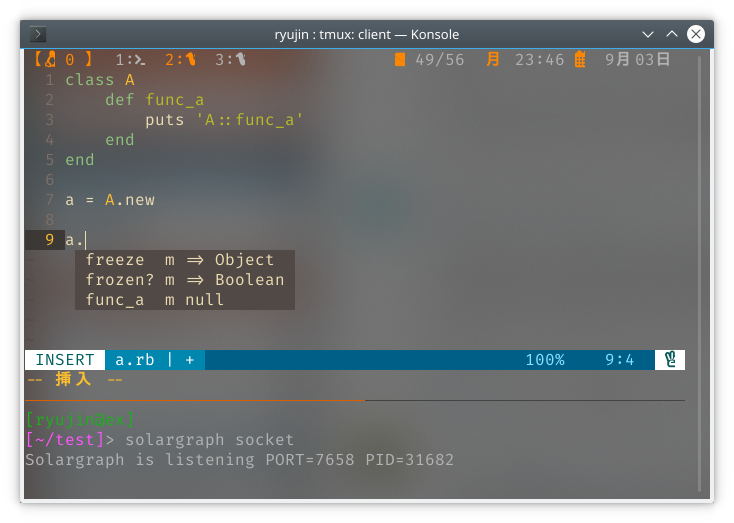
If you create an empty Rakefile or Gemfile in the same folder as the a.rb file then you should get autocompletion working (see screen below). Not that the first time it can take some time to get any auto-complete suggestions so be patient.
Also I am not 100% certain but I think you must start the solargraph server inside the same root folder.
 hsanson
on 3 Sep 2018
hsanson
on 3 Sep 2018
If it's the working directory that's the problem, we can fix that by prefixing the command with cd, like ALE does for a few other commands.
w0rp
on 3 Sep 2018
Thanks for the quick help!
Not having a root directory seemed to have been the problem, after adding an emtpy Gemfile it works.
Also, tried it out and the solargraph executable/server _can_ be started from a different directory.
Working with a Gemfile/Rakefile is be workable for me, though, just my 2 cents, in my case, ideal would be if it took the furthest git directory (directory with .git file or directory), we work with modules and submodules, with different loadpaths into the submodules where the ruby code is spread out over. Though I would have to put a .solargraph.yml file in that dir to tell solargraph where to find the loadpaths (edit: have tested this now, and it works great, finds all my required source files with 1 glob in the yaml file), adding a check for that yaml file might not be a bad idea.
Frydac
on 3 Sep 2018
Maybe we could make it look for .solargraph.yml too, and maybe look for the directory containing .git if everything else fails.
w0rp
on 4 Sep 2018
I created a PR that adds .solargraph.yml as search candidate for ruby root paths. Regarding the .git I believe that this functionality is generic and applies to all projects, thus should be considered sort of global fallback by Ale.
Maybe adding a FindRepoRoot() method that searches for common version control folders (e.g. .git, .svn, etc) similar to what the vim-projectroot plugin does. Then individual ale linters may use that method as last resource to find the project root paths.
hsanson
on 4 Sep 2018
It depends on the language and the program. Some programs don't work at all without a configuration file or additional settings, like ESLint or tsserver.
w0rp
on 4 Sep 2018
Now @hsanson has made it so it searches for .solargraph.yml too.
w0rp
on 6 Sep 2018
@Frydac if solargraph is working for you it would be good to close this issue.
hsanson
on 11 Sep 2018
Thx for all the help, I'm trying to make it work in tandem with youcompleteme (it has some extra features, e.g. fuzzy search into the list of suggestions, suggestions based on symbols in the open documents, ..), which on windows seems to work, but not on linux.. But I'll open a new issue once I understand things better and can ask a proper question about this.
Frydac
on 14 Sep 2018
Solargraph now runs in stdio mode, so you don't have to start the server yourself. #1934
w0rp
on 19 Sep 2018
Just wondering, I had a ruby project folder and completion wasn't working until I created an empty Gemfile as suggested by @w0rp. From what I understood of this issue, Ale should be able to set the root project falling back where a .git directory is found, but it seems that is not working (or I didn't understand :sweat_smile:)
 pablox-cl
on 17 Nov 2018
pablox-cl
on 17 Nov 2018
The way ALE finds the root folder are:
- Find closets directory that contains an app, config, and db folders. This is common for rack based projects (e.g rails, grape, sinatra, etc.).
- Find the closest directory that contains a Rakefile. This is common for gem libraries.
- Find the closest directory that contains a Gemfile. This is the last resource in hopes that most projects will include such file.
hsanson
on 18 Nov 2018
Related issues
 plexigras
·
3Comments
plexigras
·
3Comments
 arthuryangcs
·
4Comments
arthuryangcs
·
4Comments
 glepnir
·
3Comments
glepnir
·
3Comments
 sublee
·
3Comments
sublee
·
3Comments
 catbaron0
·
3Comments
catbaron0
·
3Comments
Most helpful comment