Ale: setline() calls for fixing files are slow when foldmethod=syntax
Information
VIM version
NVIM v0.3.1
Build type: Release
LuaJIT 2.0.5
Operating System: Mac os High Sierra 10.13.6
:ALEInfo
Current Filetype: javascript.jsx
Available Linters: ['eslint', 'flow', 'flow-language-server', 'jscs', 'jshint', 'standard', 'tsserver', 'xo']
Enabled Linters: ['eslint']
Suggested Fixers:
'eslint' - Apply eslint --fix to a file.
'importjs' - automatic imports for javascript
'prettier' - Apply prettier to a file.
'prettier_eslint', 'prettier-eslint' - Apply prettier-eslint to a file.
'prettier_standard', 'prettier-standard' - Apply prettier-standard to a file.
'remove_trailing_lines' - Remove all blank lines at the end of a file.
'standard' - Fix JavaScript files using standard --fix
'trim_whitespace' - Remove all trailing whitespace characters at the end of every line.
'xo' - Fix JavaScript files using xo --fix.
Linter Variables:
let g:ale_javascript_eslint_executable = 'eslint'
let g:ale_javascript_eslint_options = ''
let g:ale_javascript_eslint_suppress_eslintignore = 0
let g:ale_javascript_eslint_suppress_missing_config = 0
let g:ale_javascript_eslint_use_global = 0
Global Variables:
let g:ale_cache_executable_check_failures = 1
let g:ale_change_sign_column_color = 0
let g:ale_command_wrapper = ''
let g:ale_completion_delay = 100
let g:ale_completion_enabled = 1
let g:ale_completion_max_suggestions = 50
let g:ale_echo_cursor = 1
let g:ale_echo_msg_error_str = '‚úñ'
let g:ale_echo_msg_format = '%severity% %s% [%linter%% code%]'
let g:ale_echo_msg_info_str = 'Info'
let g:ale_echo_msg_warning_str = '‚ö†'
let g:ale_enabled = 1
let g:ale_fix_on_save = 1
let g:ale_fixers = {'yaml': ['prettier'], 'scss': ['prettier'], 'json': ['prettier'], 'javascript': ['prettier'], 'css': ['prettier'], 'markdown': ['prettier']}
let g:ale_history_enabled = 1
let g:ale_history_log_output = 1
let g:ale_keep_list_window_open = 0
let g:ale_lint_delay = 200
let g:ale_lint_on_enter = 1
let g:ale_lint_on_filetype_changed = 1
let g:ale_lint_on_save = 1
let g:ale_lint_on_text_changed = 0
let g:ale_lint_on_insert_leave = 0
let g:ale_linter_aliases = {}
let g:ale_linters = {'html': [], 'javascript': ['eslint']}
let g:ale_linters_explicit = 0
let g:ale_list_window_size = 10
let g:ale_list_vertical = 0
let g:ale_loclist_msg_format = '%severity% %s% [%linter%% code%]'
let g:ale_max_buffer_history_size = 20
let g:ale_max_signs = -1
let g:ale_maximum_file_size = v:null
let g:ale_open_list = 0
let g:ale_pattern_options = v:null
let g:ale_pattern_options_enabled = v:null
let g:ale_set_balloons = 0
let g:ale_set_highlights = 0
let g:ale_set_loclist = 1
let g:ale_set_quickfix = 0
let g:ale_set_signs = 1
let g:ale_sign_column_always = 1
let g:ale_sign_error = '‚úñ'
let g:ale_sign_info = '‚ö†'
let g:ale_sign_offset = 1000000
let g:ale_sign_style_error = '‚úñ'
let g:ale_sign_style_warning = '‚ö†'
let g:ale_sign_warning = '‚ö†'
let g:ale_statusline_format = v:null
let g:ale_type_map = {}
let g:ale_use_global_executables = v:null
let g:ale_warn_about_trailing_blank_lines = 1
let g:ale_warn_about_trailing_whitespace = 1
Command History:
(executable check - success) [path]/node_modules/eslint/bin/eslint.js
(finished - exit code 1) ['/bin/zsh', '-c', '''[path]/node_modules/eslint/bin/eslint.js'' -f unix --stdin --stdin-filename ''[filepath].js'' < ''/var/folders/jt/3b3q52r15lvd8xv066hkdrzh0000gn/T/nvimuvSnCd/2/[filename].js''']
What went wrong
It's taking too long to fix the file
Reproducing the bug
- I have recently updated to NeoVim. After updating, I install by regular plugins
- Vim is just working fine if I remove ale plugin from my rc but when enabled, it hangs the UI untill the prettier has done the fixing. I don't know what is happening but after looking at profile, it looks like
ale#ApplyQueuedFixes -> setlineis taking around 10s.
I'm also attaching the vim profiles for with ale and without ale.
 sudkumar
All 15 comments
How large is your file?
 w0rp
on 20 Aug 2018
w0rp
on 20 Aug 2018
561 lines.
sudkumar
on 20 Aug 2018
Here is my vimrc. Even if I just disable javascript fixers, it works just fine.
sudkumar
on 20 Aug 2018
Sounds like a bug in NeoVim. No setline() call should take that long.
w0rp
on 20 Aug 2018
Even if use
VIM - Vi IMproved 8.1 (2018 May 18, compiled Aug 20 2018 12:36:19)
macOS version
Included patches: 1-250
Compiled by Homebrew
I get the same results. I have tried removing all other plugins except ale, but the issue still presists.
sudkumar
on 20 Aug 2018
I don't think I can do anything about it. If setline() is too slow, that's a problem in Vim.
w0rp
on 20 Aug 2018
Alright.
Thank you for your quick response. I'll try to use my old vimrc where it was working just fine and will let you know the status.
sudkumar
on 20 Aug 2018
so this was the culprit ಠ_ಠ. diff
- set foldmethod=syntax
+ set foldmethod=indent
It is working now. Thank you. __ale__
sudkumar
on 20 Aug 2018
Thanks for figuring that out. I updated the title to explain what the issue is. I don't know if that's an issue I can fix. Off the top of my head, the only thing someone could try is working out which lines are different when foldmethod is set to syntax, with a complicated set of code, and making several setline() calls to update only those lines. I don't use folding myself, because it's often annoying.
w0rp
on 20 Aug 2018
Yeah. I wonder why folding with syntax is causing setline to be that much slower. I don't think it's caused by another plugin usage. But it can be. I'll try using ale with fold method and disabling everything else. And I'll see what happens to the setline/profile.
Have you tried setting fold method to syntax and checking the results? Just curious to know. :)
sudkumar
on 21 Aug 2018
Hey folks, so somehow I managed to arrive at this issue, but for other reasons.
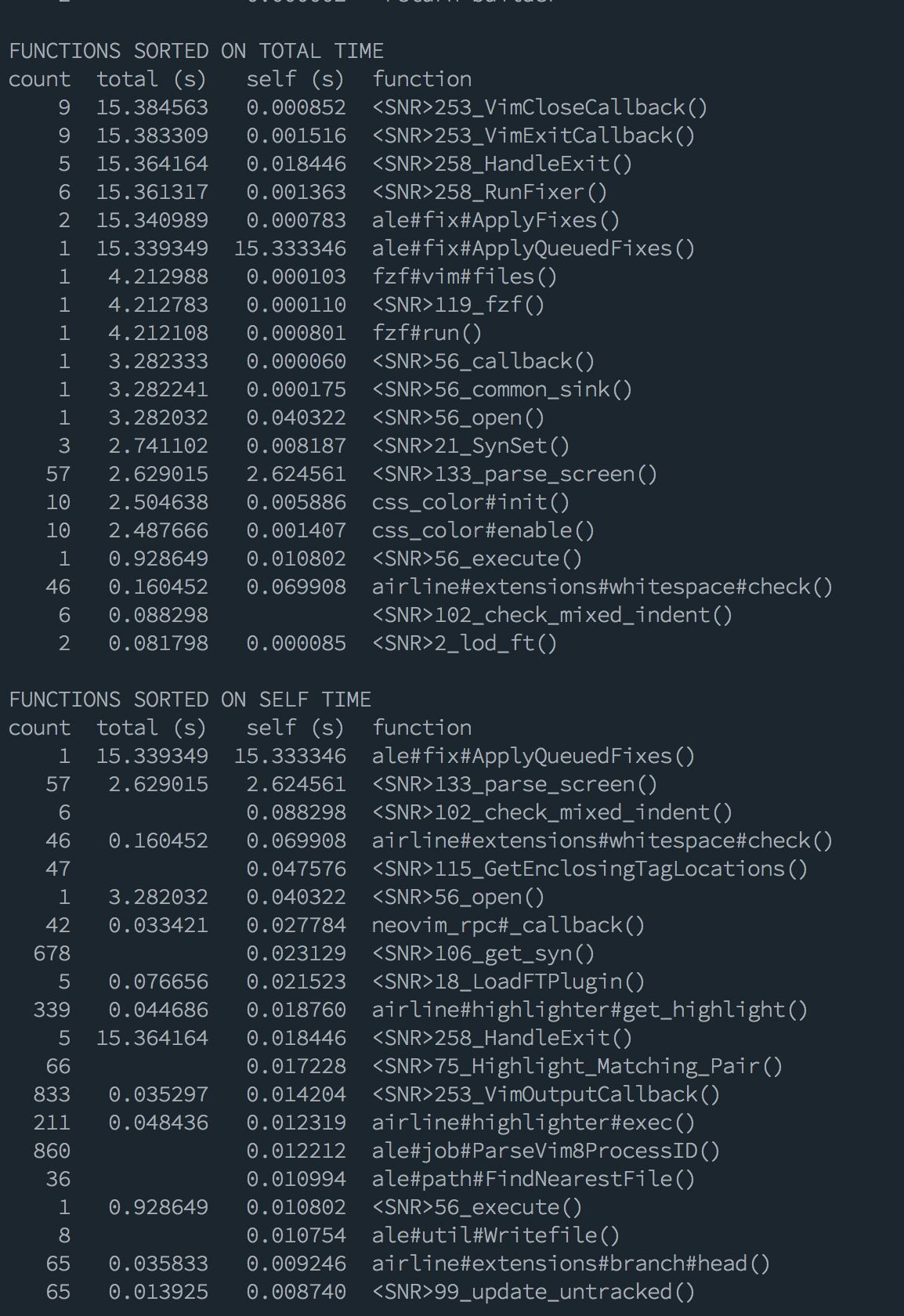
I noticed that on a specific file ale would take a long time applying the fixes in this case was just some random React stuff, and prettier was taking a really long time.
I'm posting images as I think is more readable in this specific case:
before set foldmethod=syntax
after set foldmethod=manual
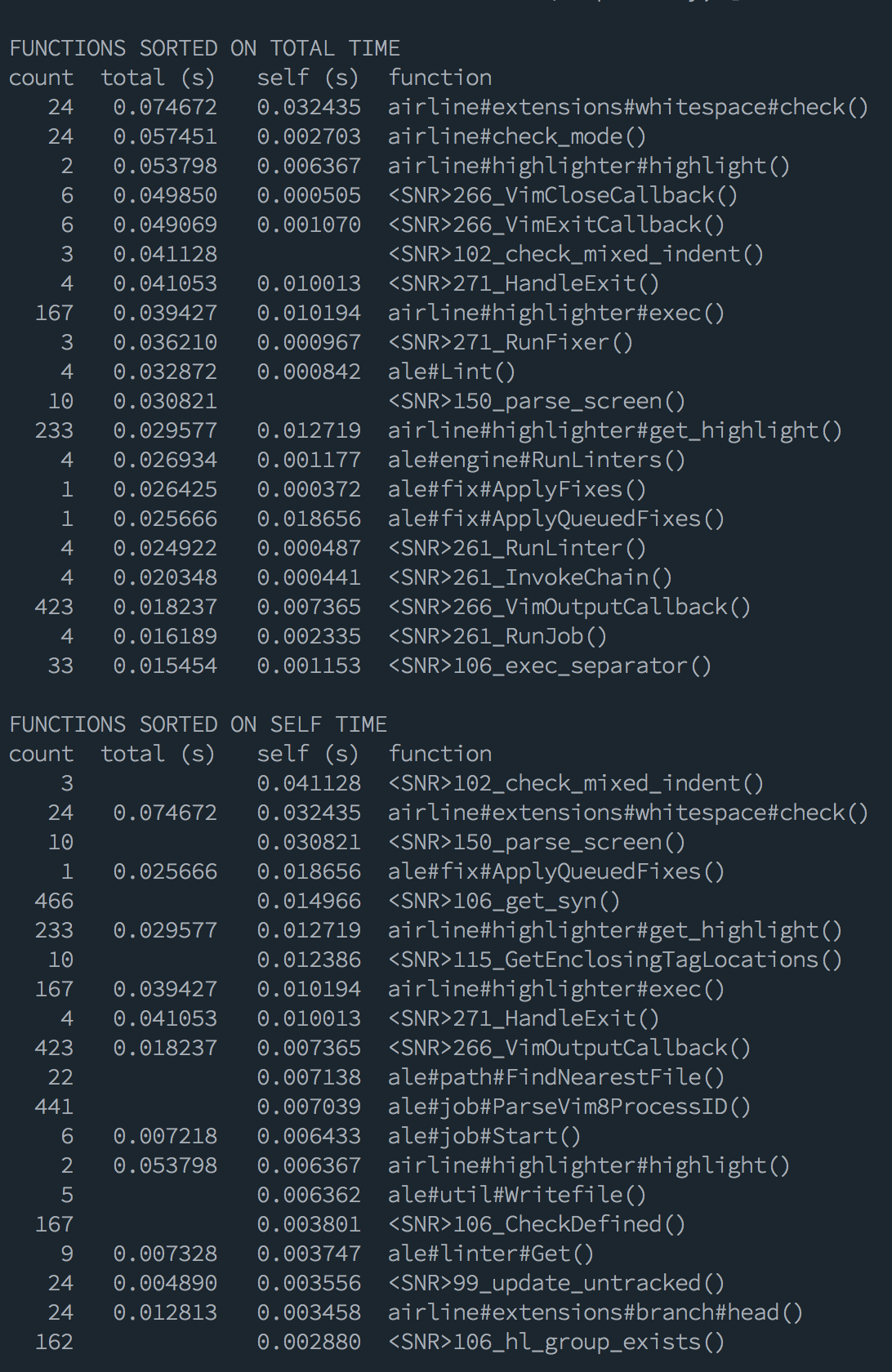
So has you can see actually there's a problem with folds, which is penalising ALE. But when profiling what you actually see is that the function that is taking the most time is ale#fix#ApplyQueuedFixes()
To be honest this was a simple choice for me as I don't really care much about folds, but it's really hard based on this profiling, discover the actual problem is the fold setting and not ALE.
Just wanted to add this note for future reference and visitors in case they found any performance issues.
 FabioAntunes
on 15 Sep 2018
FabioAntunes
on 15 Sep 2018
I had this same issue with Javascript and the prettier fixer. For anyone coming with the same problem, here is a couple of solutions:
1. Use a different foldmethod
Add setlocal foldmethod=manual if you don't use folds, or setlocal foldmethod=indent for an alternative useful but faster fold method, to ftplugin/javascript.vim.
This speeds up the fixing dramatically.
2. Install Konfekt/FastFold
Keep setlocal foldmethod=syntax but install that plugin. It dramatically speeds up everything too by not updating folds on every insert mode change, which makes it not affect the file fixing.
Keeps the usefulness of foldmethod=syntax, with less of a penalty, and will probably help with other languages where you are using foldmethod syntax too (like that rust bug linked right above).
 joakin
on 22 Mar 2019
joakin
on 22 Mar 2019
Thank you for sharing the information. :+1:
w0rp
on 25 Mar 2019
Oh my, that's such a lifesaver... I've been spending hours trying to manually fix files because it took hours on our (admittedly big) JS file. I thought it was ALE's fault (no offense, @w0rp =P).
Thank you very much @joakin!
 Augustin82
on 27 Mar 2019
Augustin82
on 27 Mar 2019
I'll close this issue, as it can't be fixed, but the advice above for improving the performance of folding is good.
w0rp
on 10 Jun 2019
Related issues
 lervag
·
3Comments
lervag
·
3Comments
 ilyakopy
·
4Comments
ilyakopy
·
4Comments
 trevordmiller
·
3Comments
trevordmiller
·
3Comments
trevordmiller
·
3Comments
trevordmiller
·
3Comments
 alexlafroscia
·
4Comments
alexlafroscia
·
4Comments
Most helpful comment
I had this same issue with Javascript and the prettier fixer. For anyone coming with the same problem, here is a couple of solutions:
1. Use a different
foldmethodAdd
setlocal foldmethod=manualif you don't use folds, orsetlocal foldmethod=indentfor an alternative useful but faster fold method, toftplugin/javascript.vim.This speeds up the fixing dramatically.
2. Install Konfekt/FastFold
Keep
setlocal foldmethod=syntaxbut install that plugin. It dramatically speeds up everything too by not updating folds on every insert mode change, which makes it not affect the file fixing.Keeps the usefulness of
foldmethod=syntax, with less of a penalty, and will probably help with other languages where you are using foldmethod syntax too (like that rust bug linked right above).