Ale: Autocomplete is too eager and inserts suggestions even when I haven't typed anything
Information
VIM version
VIM - Vi IMproved 8.1 (2018 May 17, compiled May 18 2018 13:18:41)
macOS version
Operating System: macOS
:ALEInfo
Current Filetype: python
Available Linters: ['flake8', 'mypy', 'prospector', 'pycodestyle', 'pyflakes', 'pylint', 'pyls']
Enabled Linters: ['pyls']
Suggested Fixers:
'add_blank_lines_for_python_control_statements' - Add blank lines before control statements.
'autopep8' - Fix PEP8 issues with autopep8.
'black' - Fix PEP8 issues with black.
'isort' - Sort Python imports with isort.
'remove_trailing_lines' - Remove all blank lines at the end of a file.
'trim_whitespace' - Remove all trailing whitespace characters at the end of every line.
'yapf' - Fix Python files with yapf.
Linter Variables:
let g:ale_python_pyls_executable = 'pyls'
let g:ale_python_pyls_use_global = 0
Global Variables:
let g:ale_cache_executable_check_failures = v:null
let g:ale_change_sign_column_color = 0
let g:ale_command_wrapper = ''
let g:ale_completion_delay = 100
let g:ale_completion_enabled = 1
let g:ale_completion_max_suggestions = 50
let g:ale_echo_cursor = 1
let g:ale_echo_msg_error_str = 'Error'
let g:ale_echo_msg_format = '%code: %%s'
let g:ale_echo_msg_info_str = 'Info'
let g:ale_echo_msg_warning_str = 'Warning'
let g:ale_enabled = 1
let g:ale_fix_on_save = 0
let g:ale_fixers = {}
let g:ale_history_enabled = 1
let g:ale_history_log_output = 1
let g:ale_keep_list_window_open = 0
let g:ale_lint_delay = 200
let g:ale_lint_on_enter = 1
let g:ale_lint_on_filetype_changed = 1
let g:ale_lint_on_save = 0
let g:ale_lint_on_text_changed = 1
let g:ale_lint_on_insert_leave = 0
let g:ale_linter_aliases = {}
let g:ale_linters = {'python': ['pyls']}
let g:ale_linters_explicit = 0
let g:ale_list_window_size = 10
let g:ale_list_vertical = 0
let g:ale_loclist_msg_format = '%code: %%s'
let g:ale_max_buffer_history_size = 20
let g:ale_max_signs = -1
let g:ale_maximum_file_size = v:null
let g:ale_open_list = 0
let g:ale_pattern_options = {}
let g:ale_pattern_options_enabled = 0
let g:ale_set_balloons = 1
let g:ale_set_highlights = 0
let g:ale_set_loclist = 1
let g:ale_set_quickfix = 0
let g:ale_set_signs = 1
let g:ale_sign_column_always = 1
let g:ale_sign_error = '•'
let g:ale_sign_info = '•'
let g:ale_sign_offset = 1000000
let g:ale_sign_style_error = '•'
let g:ale_sign_style_warning = '•'
let g:ale_sign_warning = '•'
let g:ale_statusline_format = ['%d error(s)', '%d warning(s)', 'OK']
let g:ale_type_map = {}
let g:ale_use_global_executables = v:null
let g:ale_warn_about_trailing_blank_lines = 1
let g:ale_warn_about_trailing_whitespace = 1
Command History:
(started) ['/bin/bash', '-c', '''/Users/joaqo/.virtualenvs/deleteme/bin/pyls''']
What went wrong
ALE is too eager to autocomplete. So for example, I write the name of a python module, and as soon as I type . to start writing the name of a method of said module, ALE inserts the first method name in the module, forcing me to delete said method name before I can start writing the method name I originally intended to write.
Reproducing the bug

 joaqo
joaqo
All 54 comments
That's a bug, it shouldn't be doing that. Could you share a project I can test this with? The completion results aren't inserted automatically like that for me.
 w0rp
on 5 Jul 2018
w0rp
on 5 Jul 2018
You might be able to work around this for now by adding set completeopt+=noinsert to vimrc, or by using setlocal in an ftplugin file.
w0rp
on 5 Jul 2018
Hey @w0rp thanks for the help.
The project is just a clean python3 virtualenv with ipdb ipython python-language-server installed, time is a standard library module in python.
Setting set completeopt+=noinsert didn't fix it. I suspect I may have something else seriously wrong in my config now.
joaqo
on 5 Jul 2018
Nevermind setting set completeopt+=noinsert did fix it!
joaqo
on 5 Jul 2018
Good to know. It should work without you having to do that, but at least you can do that for now. Hopefully I can somehow repeat the bug by tweaking a few things.
w0rp
on 5 Jul 2018
Hey @w0rp I think I haven't completely fixed autocomplete as I have just finished pinning down a very strange bug that has been haunting me since I originally posted this issue.
It seems that strange things happen when I am in insert mode, and ALE is looking for something to autocomplete and I press ESC very quickly to exit insert mode. This is a bit hard to explain so I'll just post a gif:
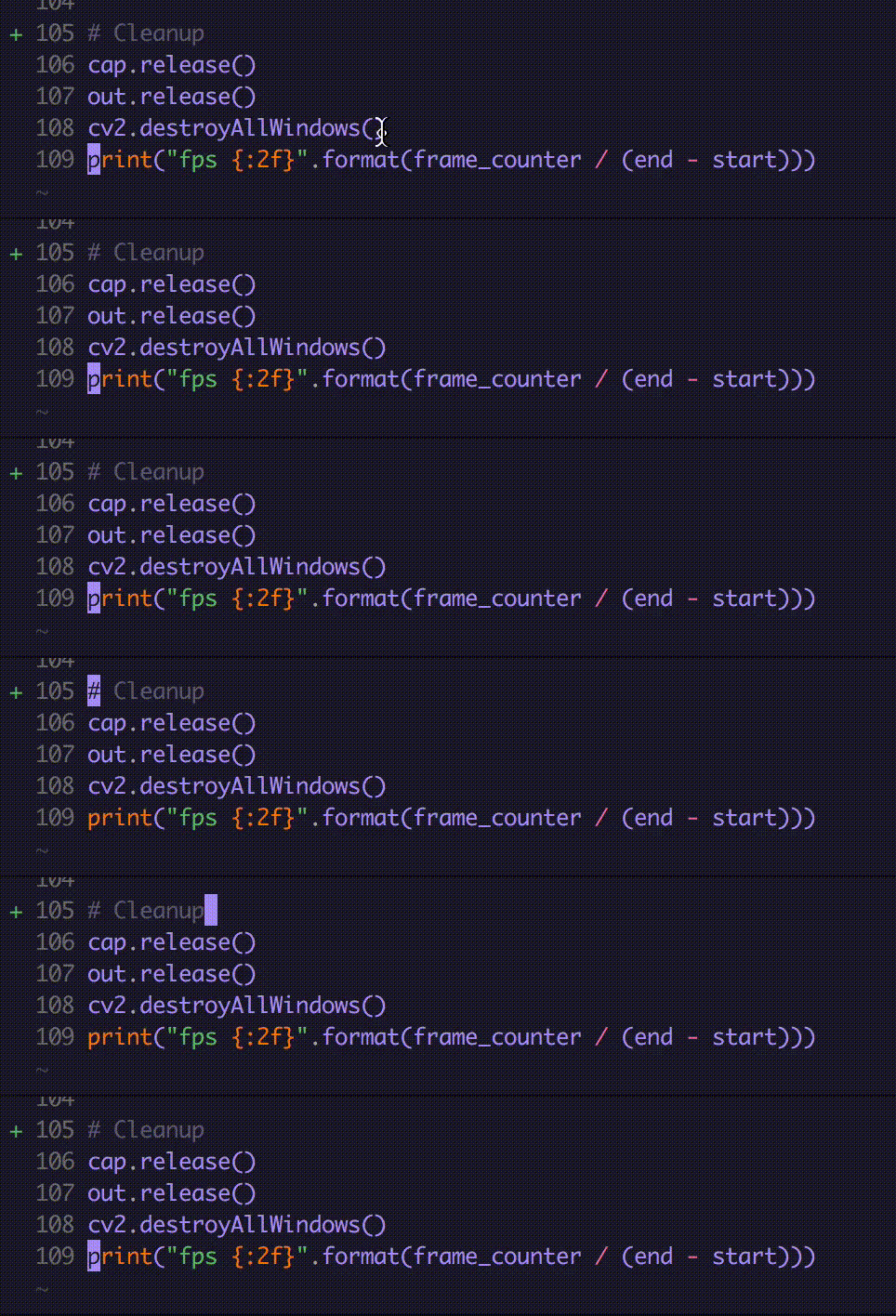
In this gif I am pressing p + esc in quick succession on the # Cleanup comment, and for some reason vim registers a Ctrl + o when I do so and sends my cursor to my last location (the original print line). This only happens if I do it quickly. If I take my time and press esc 1 second after p nothing happens.
joaqo
on 16 Jul 2018
@joaqo That can be fixed easily by checking mode(). What will be happening will be that the timer function is stopping after you've exited insert mode.
w0rp
on 16 Jul 2018
@w0rp Thanks for the answer. Can't find what mode() is, do you mind sharing a link describing what it is? Tried running :mode() and searching for mode in the ale docs but came up empty handed.
joaqo
on 16 Jul 2018
See :help mode(), but more importantly, see this commit for fixing that issue...
w0rp
on 16 Jul 2018
If you git pull again, that issue should be fixed.
w0rp
on 16 Jul 2018
@w0rp Thanks for the insanely fast commit to address the issue! Regrettably it didn't fix my issue :-( . Did the pull and verified the pulled files versus the commit you linked to, to make sure I had pulled them correctly and I had, but the issue persists.
joaqo
on 16 Jul 2018
You'll have to play around with the code yourself in that case. I made it so the code for sending Ctrl + x then Ctrl + o is only run from Insert mode.
w0rp
on 16 Jul 2018
When I typed in a . in a js file, it automatically completed with the first recommendation, even though I didn't type any words.
Then I set the options set completeopt+=noinsert, but the new problem appeared, it is no longer automatically completed, but after I manually complete, I can not delete the completed words, the words are constantly reset during the process of deleting.
then I set the options let g:ale_completion_enabled = 0 , problem resolved。
 Gyufei
on 17 Jul 2018
Gyufei
on 17 Jul 2018
I don't have the same issues myself. Try using a different version of Vim.
w0rp
on 17 Jul 2018
It would be good to know which exact version of Vim you are using. On my machine, I just have completeopt set to its default value, and everything works just fine. I use completion every day. I wouldn't be surprised if there's some issue in Vim which has already been fixed in some patch or other.
w0rp
on 17 Jul 2018
set completeopt=menu,menuone,preview,noselect,noinsert might work for you, but that's what should be set automatically, temporarily, anyway. The items in the completion menu must never be selected as you type, or it will interrupt typing.
w0rp
on 17 Jul 2018
I am a javascript engineer, so I don't know much about vimL, but I tried it. I found that when I changed the line of the project code https://github.com/w0rp/ale/blob/a01fab2ee6dd827d555792f69fc30443a64dac5f/autoload/ale/completion.vim#L92 and changed the point to another character, the problem disappeared. I don't know what the specific reason is, but I guess the problem should be here. I am very sorry that I can't help you more.
Gyufei
on 17 Jul 2018
That's for showing completions when you just type .. That's so a menu will appear when you type foo. and then it can offer bar for foo.bar, and so on. You should expect the menu to appear when you just type . on something. What you shouldn't expect is for some text to be entered without you making a selection, or for removing some characters to insert some text. If either of those happen for you, then that's a bug I can't repeat on any of my computers.
If you experience some issue where text is being inserted automatically, you'll have to debug the code yourself and see if you can fix it, as I can't repeat the bug.
w0rp
on 17 Jul 2018
Let me know what your Vim version is. I could try installing the same version of Vim, and see if I can repeat the bug that way. Share your vimrc and generally any other information you can share.
w0rp
on 17 Jul 2018
Just as a fyi I tried setting set completeopt=menu,menuone,preview,noselect,noinsert and using several different computers with different vim versions and the problem of ale confusing some_key + esc as ctrl + o persists. The only thing in common between these machines is my vimrc so thats probably the problem.
joaqo
on 17 Jul 2018
What's the output of :version for you? Do you have a Linux machine you can test on? I don't have a Mac myself.
w0rp
on 17 Jul 2018
@joaqo If you remove this line, does that particular problem go away? https://github.com/w0rp/ale/blob/a01fab2ee6dd827d555792f69fc30443a64dac5f/autoload/ale/completion.vim#L190
If so, can you add :echom 'completion mode: ' . mode(1) before that line and get the output by looking at :mess?
w0rp
on 17 Jul 2018
Hey @w0rp, I'll go step by step on what I did:
- I tried in 2 ubuntu machines and 1 mac, the versions vary but they are all > 8
- Commented out
call ale#util#FeedKeys("\<C-x>\<C-o>", 'n')and it fixed the problem!One thing to note is that I was previously usingAnother thing to note is that the line you linked to was in linectrl + nfor autocompleting, when I removed that linectrl + nstopped working, but usingctrl + xctrl + oworks just fine.182instead of190, not sure if thats relevant at all. - When I try adding
:echom 'completion mode: ' . mode(1)as you instructed I only getMessages maintainer: Bram Moolenaar <[email protected]>from running:mess.
Thanks a lot for the help!
joaqo
on 17 Jul 2018
Please ignore my comment about ctrl + n that only happened cause I was using a machine without set completeopt=menu,menuone,preview,noselect,noinsert in its vimrc.
joaqo
on 17 Jul 2018
If :echom isn't working for you, could you try this line instead? :call writefile([mode(1)], expand('~/mode.tmp'), 'a')
Then share the contents of ~/mode.tmp. I'm trying to figure out what mode Vim is in at the time that function is called for you.
w0rp
on 17 Jul 2018
Ok, i got:
i
i
I think the reason :echom wasnt working is because I wasn't triggering an autocomplete in the file, which I now did.
joaqo
on 17 Jul 2018
I'm confused then. It looks like that's sending Ctrl+x Ctrl+o, without using any remapping, to open the omnicomplete menu only in Insert mode, so how does that end up moving your cursor around in normal mode?
w0rp
on 17 Jul 2018
My best guess is that feedkeys() is queuing the keys for processing, and somehow executes after your key press to exit Insert mode. What I'll try to do instead is send a keypress for a custom Plug mapping which ends up sending <C-x><C-o>, and which will be <Nop> in normal mode.
w0rp
on 17 Jul 2018
@joaqo Okay, try that.
w0rp
on 17 Jul 2018
@w0rp Its fixed! Just pulled from master and everything looks good. Tried on a mac and an ubuntu machine, both fixed!
Thanks a lot for the great project and for the really fast help!
joaqo
on 17 Jul 2018
@Gyufei If you still have some issues, let me know.
w0rp
on 17 Jul 2018
just noting that i had the same issue with automatic inserting with the most recent ale, and adding set completeopt=menu,menuone,preview,noselect,noinsert to my neovim init.vim fixed it. seems like there may be a race condition in overriding the value?
 malectro
on 25 Jul 2018
malectro
on 25 Jul 2018
@malectro Give that a go. I moved the temporary compleopt setting changes from before feedkeys() is fired to right before the key for opening the omnicomplete menu is read.
w0rp
on 25 Jul 2018
same issue if i remove the line from my config file. if you watch the whole gif here, you'll see that it's intermittent, which is weird.

btw, ale is awesome.
malectro
on 25 Jul 2018
Could you share all of your Vim configuration files and your Vim version?
w0rp
on 25 Jul 2018
sure thing
here's my vim config
" Pathogen
" --------

" filetype off                    " Avoid a Vim/Pathogen bug
" call pathogen#helptags()
" call pathogen#infect()

" set nocompatible                " Don't maintain compatibility with vi
" syntax on                       " Highlight known syntaxes
" filetype plugin indent on


" Plug
" ----

call plug#begin('~/.vim/plugged')

" functionality
Plug 'mileszs/ack.vim'
Plug 'ctrlpvim/ctrlp.vim'
Plug 'scrooloose/nerdcommenter'
Plug 'scrooloose/nerdtree'
Plug 'tpope/vim-fugitive'
Plug 'tpope/vim-repeat'
Plug 'tpope/vim-surround'
Plug 'kana/vim-textobj-user'
Plug 'tpope/vim-unimpaired'
Plug 'sirver/ultisnips'
Plug 'embear/vim-localvimrc'

" lint
Plug 'w0rp/ale'
" Plug 'nvie/vim-flake8'

" syntax
Plug 'Glench/Vim-Jinja2-Syntax'
Plug 'pangloss/vim-javascript'
Plug 'maksimr/vim-jsbeautify'
Plug 'mxw/vim-jsx'
Plug 'plasticboy/vim-markdown'
Plug 'digitaltoad/vim-pug'
Plug 'elixir-editors/vim-elixir'
Plug 'tikhomirov/vim-glsl'
Plug 'stephenway/postcss.vim'

" themes
Plug 'morhetz/gruvbox'
Plug 'ayu-theme/ayu-vim'
Plug 'vim-scripts/molokai'
Plug 'mhartington/oceanic-next'
Plug 'joshdick/onedark.vim'
Plug 'dracula/vim'
Plug 'altercation/vim-colors-solarized'
Plug 'tpope/vim-vividchalk'

" Plug 'mtscout6/syntastic-local-eslint.vim'

call plug#end()


" Configuration
" -------------

colorscheme molokai
if has('termguicolors')
  set t_Co=256
  set termguicolors
  " colorscheme OceanicNext
  " colorscheme ayu
  " colorscheme onedark
  let g:onedark_terminal_italics = 1
  colorscheme gruvbox
  let g:gruvbox_contrast_dark = 'hard'
  " colorscheme dracula
endif

set background=dark
if exists('+guifont')
  " set guifont=Operator\ Mono:h16
  set guifont=Fira\ Code:h16
  " set guifont=Space\ Mono:h14
  " set guifont=Monaco:h14
endif
set guioptions-=T               " Remove GUI toolbar
set visualbell                  " Suppress audio/visual error bell
set notimeout                   " No command timeout
set showcmd                     " Show typed command prefixes while waiting for operator

set backspace=indent,eol,start
set expandtab                   " Use soft tabs
set tabstop=2                   " Tab settings
set autoindent
set smarttab                    " Use shiftwidth to tab at line beginning
set shiftwidth=2                " Width of autoindent
autocmd FileType py setlocal shiftwidth=4
set number                      " Line numbers
set nowrap                      " No wrapping
set ignorecase                  " Ignore case
set smartcase                   " ... unless uppercase characters are involved
autocmd FileType markdown setlocal spell
autocmd FileType markdown setlocal wrap

set list                        " Show whitespace
set listchars=tab:▸\ ,trail:¬   " UTF-8 characters for trailing whitespace
set virtualedit=onemore         " Cursor can display one character past line
set showmatch                   " Show matching brackets
set hidden                      " Allow hidden, unsaved buffers
set splitright                  " Add new windows towards the right
set splitbelow                  " ... and bottom
set wildmode=list:longest       " Bash-like tab completion
set scrolloff=3                 " Scroll when the cursor is 3 lines from edge
set cursorline                  " Highlight current line
set laststatus=2                " Always show statusline
set statusline=
set statusline+=\ %t\ \|\ len:\ \%L\ \|\ type:\ %Y\ \|\ ascii:\ \%03.3b\ \|\ hex:\ %2.2B\ \|\ line:\ \%2l

set incsearch                   " Incremental search
set history=1024                " History size

set autoread                    " No prompt for file changes outside Vim
set noswapfile                  " No swap file
set nobackup                    " No backup file
set nowritebackup

" set autowriteall                " Save when focus is lost
" autocmd FocusLost * silent! wall

" Keybindings
" -----------

let mapleader = ","
let maplocalleader = ";"

" kj - The intuitive way to get out of insert mode
imap kj         <Esc>

" Make Y consistent with D and C
map Y           y$

" Indent/unindent visual mode selection
vmap <tab>      >gv
vmap <S-tab>    <gv

" Search
nmap <leader>s  :%s/
vmap <leader>s  :s/

" Toggle highlight search
map <Leader>hh :set hlsearch!<CR>
imap <Leader>hh <ESC>:set hlsearch!<CR>a

" Toggle syntax highlight
map <Leader>ss :if exists("syntax_on") <Bar>
  \   syntax off <Bar>
  \ else <Bar>
  \   syntax enable <Bar>
  \ endif <CR>
imap <Leader>ss <ESC><Leader>ssi

" Split screen
map <leader>v   :vsp<CR>

" Shell commands
map <C-c> :!

" Move between screens
map <leader>w   ^Ww
map <leader>=   ^W=
map <leader>j   ^Wj
map <leader>k   ^Wk
nmap <C-j>      <C-w>j
nmap <C-k>      <C-w>k
nmap <C-h>      <C-w>h
nmap <C-l>      <C-w>l

" Open .vimrc file in new tab. Think Command + , [Preferences...] but with Shift.
map <D-<>       :tabedit ~/.vimrc<CR>

" Reload .vimrc
map <leader>rv  :source ~/.vimrc<CR>
" Remove highlighting post-search
nmap <leader>y  :nohls<CR>

" Undo/redo - Doesn't MacVim already have this?
map <D-z>       :earlier 1<CR>
map <D-Z>       :later 1<CR>

" Auto-indent whole file
nmap <leader>=  gg=G``
map <silent> <F7> gg=G`` :delmarks z<CR>:echo "Reformatted."<CR>

" Jump to a new line in insert mode
imap <D-CR>     <Esc>o

" Fast scrolling
nnoremap <C-e>  3<C-e>
nnoremap <C-y>  3<C-y>

" File tree browser
map \           :NERDTreeToggle<CR>

" File tree browser showing current file - pipe (shift-backslash)
map \|          :NERDTreeFind<CR>

" Previous/next quickfix file listings (e.g. search results)
map <M-D-Down>  :cn<CR>
map <M-D-Up>    :cp<CR>

" Previous/next buffers
map <M-D-Left>  :bp<CR>
map <M-D-Right> :bn<CR>

" FuzzyFinder and switchback commands
" map <leader>e   :e#<CR>
" map <leader>b   :FufBuffer<CR>
" map <leader>f   <Plug>PeepOpen
" map <leader><C-N> :FufFile **/<CR>

" Command-T
" map <D-e>       :CommandTBuffer<CR>
" map <D-N>       :CommandTFlush<CR>:CommandT<CR>
" imap <D-N>      <Esc>:CommandTFlush<CR>:CommandT<CR>
" nmap <leader>t  :CommandT<CR>

" CtrlP
map <leader>p :CtrlP<CR>
map <leader>b :CtrlPBuffer<CR>
" let g:ctrlp_custom_ignore = '\v[\/](node_modules)|(\.(git|hg|svn))$'

" AG
if executable('ag')
  let g:ctrlp_user_command = 'ag %s -l --nocolor --hidden -g ""'
  let g:ctrlp_use_caching = 0
endif

" Git blame
map <leader>g   :Gblame<CR>

" Comment/uncomment lines
map <leader>/   <plug>NERDCommenterToggle
map <D-/>       <plug>NERDCommenterToggle
imap <D-/>      <Esc><plug>NERDCommenterToggle i

" Copy current file path to system pasteboard
map <silent> <D-C> :let @* = expand("%")<CR>:echo "Copied: ".expand("%")<CR>

" Disable middle mouse button, F1
map <MiddleMouse>   <Nop>
imap <MiddleMouse>  <Nop>
map <F1>            <Nop>
imap <F1>           <Nop>

" Easy access to the shell
map <Leader><Leader> :!

" Pad comment delimeters with spaces
let NERDSpaceDelims = 1

" Small default width for NERDTree pane
let g:NERDTreeWinSize = 20

" Small default height for CommandT
let g:CommandTMaxHeight=20

" Change working directory if you change root directories
let g:NERDTreeChDirMode=2

" Use paste mode when replacing. (Work in progress.)
" vmap <silent> <C-K> :<C-U>call InPasteMode("<Plug>ReplaceVisual")<CR>
" function! InPasteMode(command)
  " let oldpaste = &l:paste
  " try
    " set paste
    " execute "normal" "gv".a:command
  " finally
    " let &l:paste = oldpaste
  " endtry
" endfunction

" Find current word in command mode
function! AckGrep()
  let command = "ack ".expand("<cword>")
  cexpr system(command)
  cw
endfunction

function! AckVisual()
  normal gv"xy
  let command = "ack ".@x
  cexpr system(command)
  cw
endfunction

if executable('ag')
  let g:ackprg = 'ag --vimgrep'
endif

" AckGrep current word
" map <leader>a :call AckGrep()<CR>
" AckVisual current selection
" vmap <leader>a :call AckVisual()<CR>

" ack.vim
map <leader>a :Ack


" UltiSnips
" Trigger configuration. Do not use <tab> if you use https://github.com/Valloric/YouCompleteMe.
let g:UltiSnipsExpandTrigger="<tab>"
let g:UltiSnipsJumpForwardTrigger="<c-b>"
let g:UltiSnipsJumpBackwardTrigger="<c-z>"

" If you want :UltiSnipsEdit to split your window.
" let g:UltiSnipsEditSplit="vertical"


" Whitespace & highlighting & language-specific config
" ----------------------------------------------------

" Strip trailing whitespace for code files on save
" C family
autocmd BufWritePre *.m,*.h,*.c,*.mm,*.cpp,*.hpp :%s/\s\+$//e

" Ruby, Rails
autocmd BufWritePre *.rb,*.yml,*.js,*.json,*.css,*.less,*.sass,*.html,*.xml,*.erb,*.haml,*.feature :%s/\s\+$//e
au BufRead,BufNewFile *.thor set filetype=ruby
au BufRead,BufNewFile *.god set filetype=ruby
au BufRead,BufNewFile Gemfile* set filetype=ruby
au BufRead,BufNewFile Guardfile* set filetype=ruby
au BufRead,BufNewFile Vagrantfile set filetype=ruby
au BufRead,BufNewFile soloistrc set filetype=ruby

" Jinja
au BufRead,BufNewFile *.html.jinja set filetype=jinja

" Java, PHP
autocmd BufWritePre *.java,*.php :%s/\s\+$//e

" Highlight JSON files as javascript
" autocmd BufRead,BufNewFile *.json set filetype=javascript

" Highlight Jasmine fixture files as HTML
autocmd BufRead,BufNewFile *.jasmine_fixture set filetype=html

" Consider question/exclamation marks to be part of a Vim word.
autocmd FileType ruby set iskeyword=@,48-57,_,?,!,192-255
autocmd FileType scss set iskeyword=@,48-57,_,-,?,!,192-255

" Insert ' => '
autocmd FileType ruby imap  <Space>=><Space>


" syntax vars
" -----------

" markdown
let g:vim_markdown_folding_disabled = 1

" this doesn't work yet
let g:javascript_plugin_flow = 0


" Syntastic
" ---------

" set statusline+=\ \|\ %#warningmsg#
" set statusline+=%{SyntasticStatuslineFlag()}
" set statusline+=%*

" let g:syntastic_always_populate_loc_list = 1
" let g:syntastic_auto_loc_list = 1
" let g:syntastic_check_on_open = 1
" let g:syntastic_check_on_wq = 0

" let g:syntastic_javascript_checkers = ['eslint']
" let g:syntastic_jsx_checkers = ['eslint']
" let g:syntastic_python_checkers = ['flake8']
" let g:syntastic_python_flake8_args='--max-line-length=120 --ignore=E402,E731,E711'


" ale
" ---
let g:ale_javascript_prettier_use_local_config = 1
let g:ale_fix_on_save = 1
let g:ale_fixers = {
\  'javascript': ['prettier', 'eslint'],
\  'css': ['prettier'],
\  'scss': ['prettier'],
\  'markdown': ['prettier'],
\  'python': [],
\}

highlight clear ALEErrorSign " otherwise uses error bg color (typically red)
highlight clear ALEWarningSign " otherwise uses error bg color (typically red)

" let g:ale_sign_error = 'X' " could use emoji
" let g:ale_sign_warning = '?' " could use emoji
" let g:ale_statusline_format = ['X %d', '? %d', '']

" %linter% is the name of the linter that provided the message
" %s is the error or warning message
let g:ale_echo_msg_format = '%linter% says %s'

" Map keys to navigate between lines with errors and warnings.
nnoremap <leader>an :ALENextWrap<cr>
nnoremap <leader>ap :ALEPreviousWrap<cr>

" Go to definition
nnoremap <leader>d :ALEGoToDefinition<cr>

map <leader>f :ALEFix<CR>


" .vimrc.local Options
" --------------------
"
" No GUI tab bar
" set guioptions-=e

" No scrollbars
" set guioptions-=rL

" 256 colors
" set t_Co=256

" Change background color in insert mode
" let g:insert_mode_background_color = "#18434E"

" Machine-local vim settings - keep this at the end
silent! source ~/.vimrc.local
and here's my nvim config
set runtimepath^=~/.vim runtimepath+=~/.vim/after
let &packpath = &runtimepath
source ~/.vimrc

map <leader>rv  :source ~/.config/nvim/init.vim<CR>

let g:ale_completion_enabled = 1
let g:ale_completion_delay = 100

set completeopt=menu,menuone,preview,noselect,noinsert
i'm using vimR 0.24.0 (282)
malectro
on 26 Jul 2018
Okay, I pushed another commit. Try that. If that doesn't work, I don't know what will.
w0rp
on 27 Jul 2018
I updated my version of ale, and removed
set completeopt=menu,menuone,preview,noselect,noinsert
from my vimrc to try out the fix, and the autocomplete problem persists.
This is just to give you some feedback, as it doesn't really affect me as adding the aforementioned line to my vimrc completely fixes my problems.
Cheers!
joaqo
on 31 Jul 2018
yeah, verified that it's still happening. sorry, this sounds really frustrating.
malectro
on 31 Jul 2018
Okay, I'll just update the documentation telling people to set that option if they have this problem. I think this is a bug in Vim. Logically if you first set the option and second open the menu, you should expect Vim to respect the option you just set.
w0rp
on 31 Jul 2018
I just saw this today with pyls. The noinsert option fixed it for me! Thanks!
 DevonMorris
on 10 Apr 2019
DevonMorris
on 10 Apr 2019
I'm having this problem horribly writing JavaScript code. Been working on back end node js. And react client side. I've disabled everything trying to find the issue. Don't know what's going on but hope it gets fixed soon! Great plug in. Probably a vim change giving it issues. But it does make it almost unusable. I'll try the above fixes tomorrow and report back! Good luck everyone. May the odds be ever in our favor! 🤣
 bangarangler
on 14 Apr 2019
bangarangler
on 14 Apr 2019
Ok update. After putting set completeopt+=noinsert in vim rc the annoyance has ended. Thank you all for this thread. Have we yet figured out the actual culprit? Curiosity and what not.
bangarangler
on 14 Apr 2019
My guess is that there's a bug in Vim where settings applied from an asynchronous callback aren't applied until the callback exits, or something like that.
w0rp
on 15 Apr 2019
@w0rp I managed to replicate this issue consistently but in a different way. If you try to use ale with http://github.com/ajh17/VimCompletesMe and let g:ale_completion_enabled = 1 then the issue shows up consistently when you work with javascript code
 Risto-Stevcev
on 8 May 2019
Risto-Stevcev
on 8 May 2019
Which version of Vim are you using? I think it's a bug in Vim, but I've never been able to create an isolated test case for it.
w0rp
on 9 May 2019
Could be, I'm using Neovim:
NVIM v0.3.5
Build type: Release
Operating System: Arch Linux
Risto-Stevcev
on 9 May 2019
This just randomly started happening to me, (OSX, NVIM 0.3.5).
Out of interest, what does the workaround, set completeopt=menu,menuone,preview,noselect,noinsert, do versus the default, and are there any changes/caveats in functionality to know about from it? I'm guessing it omits something?
🍻
 Billy-
on 11 Jun 2019
Billy-
on 11 Jun 2019
The default value for completeopt is menu,preview, meaning insert,select are present, and menuone isn't so menus aren't opened when there is a single result. ALE sets menu,menuone,noselect,noinsert and also preview if preview is already present in your options before starting omnicompletion with <C-x><C-o>. Sometimes it seems like Vim doesn't recognise the modified settings. I think it's a bug in Vim, as I can't see anything logically wrong with the code, but I've never been able to create a simple script that repeats the bug. You can set the same settings to always be set that way, and that seems to fix the problem.
w0rp
on 17 Jun 2019
Awesome, thanks for explaining 😄
Billy-
on 19 Jun 2019
Since it's kind of an elusive bug and there's already a workaround for it, I think it's worth it to add a section about it in the README describing that if you get it then just add set completeopt+=noinsert
Risto-Stevcev
on 20 Jun 2019
It's mentioned in the help text. See :h ale-completion-completeopt-bug
w0rp
on 20 Jun 2019
Ah ok
Risto-Stevcev
on 21 Jun 2019
@matsuhav made a great suggestion in #3205, which I have now implemented. This should make completion in ALE work a little bit better by default.
w0rp
on 29 Aug 2020
Related issues
 aressler38
·
3Comments
aressler38
·
3Comments
 plexigras
·
3Comments
plexigras
·
3Comments
 ianchanning
·
3Comments
ianchanning
·
3Comments
 garand
·
4Comments
garand
·
4Comments
 lervag
·
3Comments
lervag
·
3Comments
Most helpful comment
You might be able to work around this for now by adding
set completeopt+=noinsertto vimrc, or by usingsetlocalin an ftplugin file.