Ale: Rust RLS linter not showing errors on Windows
Here is my _vimrc:
set encoding=utf-8

call plug#begin()

Plug 'rust-lang/rust.vim'
Plug 'valloric/youcompleteme'
Plug 'w0rp/ale'
"Plug 'vim-syntastic/syntastic'

call plug#end()

let g:ale_linters = {'rust': ['rls']}
ALEInfo:
 Current Filetype: rust
Available Linters: ['cargo', 'rls', 'rustc']
  Enabled Linters: ['rls']
 Linter Variables:

let g:ale_rust_rls_executable = 'rls'
 Global Variables:

let g:ale_echo_cursor = 1
let g:ale_echo_msg_error_str = 'Error'
let g:ale_echo_msg_format = '%code: %%s'
let g:ale_echo_msg_warning_str = 'Warning'
let g:ale_enabled = 1
let g:ale_fix_on_save = 0
let g:ale_fixers = {}
let g:ale_keep_list_window_open = 0
let g:ale_lint_delay = 200
let g:ale_lint_on_enter = 1
let g:ale_lint_on_save = 1
let g:ale_lint_on_text_changed = 'always'
let g:ale_linter_aliases = {}
let g:ale_linters = {'rust': ['rls']}
let g:ale_open_list = 0
let g:ale_set_highlights = 1
let g:ale_set_loclist = 1
let g:ale_set_quickfix = 0
let g:ale_set_signs = 1
let g:ale_sign_column_always = 0
let g:ale_sign_error = '>>'
let g:ale_sign_offset = 1000000
let g:ale_sign_warning = '--'
let g:ale_statusline_format = ['%d error(s)', '%d warning(s)', 'OK']
let g:ale_warn_about_trailing_whitespace = 1
  Command History:

(started) 'cmd /c rls +nightly'
The same configuration works well on Linux, not on Windows.
My vim version is 8.0.1305.
No errors are shown to the left:
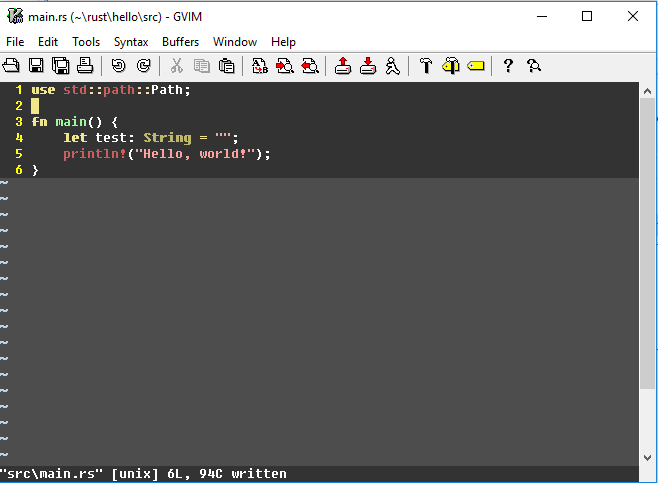
Here, the 1st line should have a warning and the 4th line should have an error.
RLS is working fine with Visual Studio Code.
 Luxed
Luxed
All 4 comments
Would you be willing to capture the full output of everything that is being sent and received between the client and the server? You can use :call ch_logfile('some_filename') to log all of the messages, open the first Rust file after that and hit the same issue again, and then close Vim. It might be possible to figure out what's going on from that.
 w0rp
on 20 Nov 2017
w0rp
on 20 Nov 2017
Here you go:
ale.log
Luxed
on 20 Nov 2017
Okay, it looks like the messages are being sent back and forth okay. My hunch then was that something was wrong with how ALE was figuring out which buffer the diagnostics were for, and I found a problem with how Windows path URIs are handled and added a test for that. Pull the latest code and try again.
w0rp
on 20 Nov 2017
That did it!
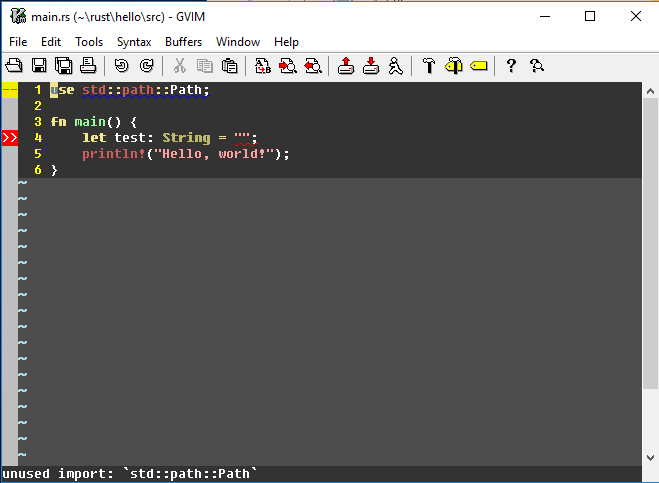
Thank you very much.
Luxed
on 20 Nov 2017
Related issues
 FredrikAugust
·
45Comments
FredrikAugust
·
45Comments
 docwhat
·
30Comments
docwhat
·
30Comments
 ghost
·
24Comments
ghost
·
24Comments
 prashcr
·
38Comments
prashcr
·
38Comments
 junkblocker
·
87Comments
junkblocker
·
87Comments