Ale: render problem after fixing syntax error
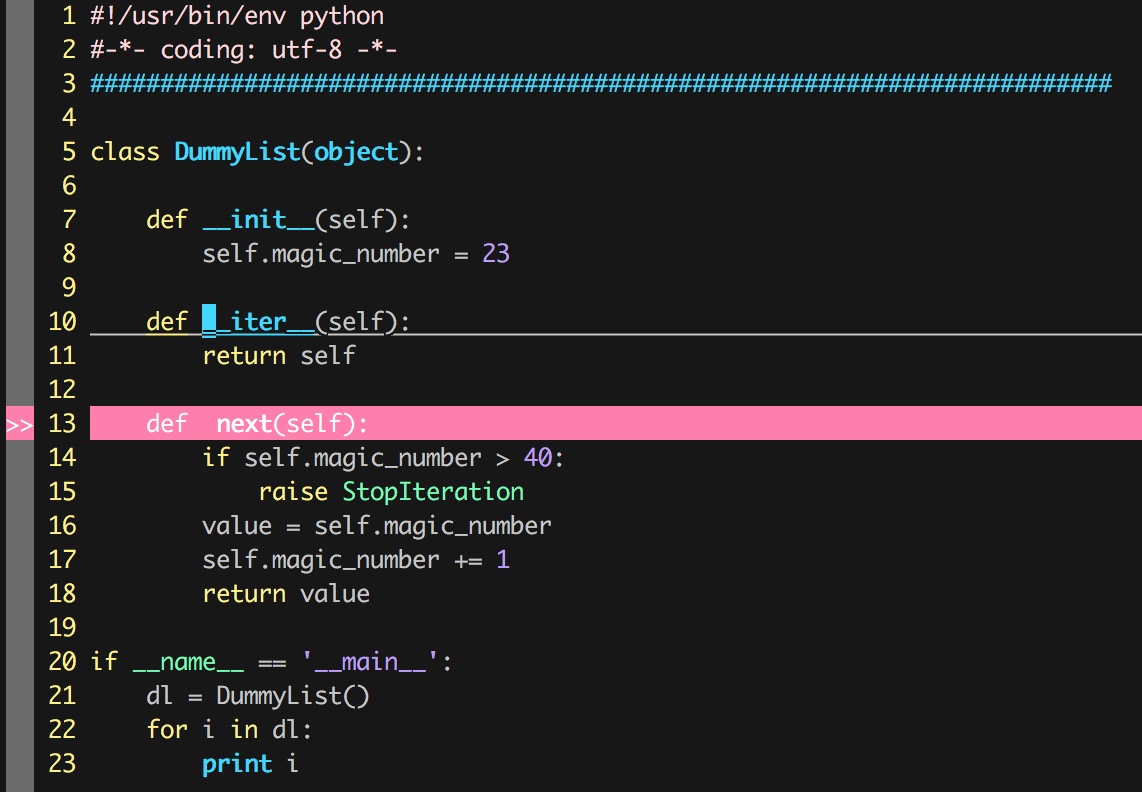
when ale detects a error, it can render properly:
however, when I fix the error, it cannot render properly...
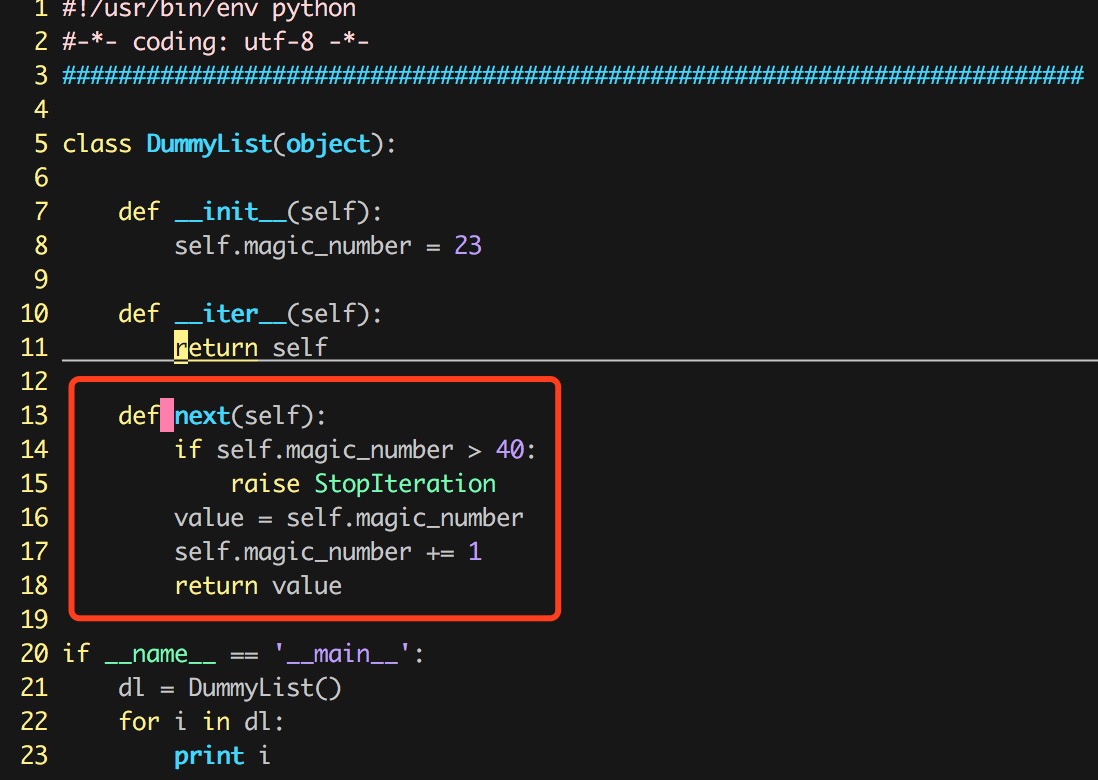
notice the red block left there, the yellow block is fine, 'cause it's where the cursor stands
 cs50Mu
All 9 comments
Can you include the output of :ALEInfo and produce a series of steps for repeating the bug? If you could upload a file which repeats the bug, that would also be helpful.
 w0rp
on 5 Nov 2017
w0rp
on 5 Nov 2017
output of :ALEInfo:
Current Filetype: python
Available Linters: ['flake8', 'mypy', 'pylint']
Enabled Linters: ['flake8']
Linter Variables:
let g:ale_python_flake8_executable = 'flake8'
let g:ale_python_flake8_options = ''
let g:ale_python_flake8_use_global = 0
Global Variables:
let g:ale_echo_cursor = 1
let g:ale_echo_msg_error_str = 'Error'
let g:ale_echo_msg_format = '%s'
let g:ale_echo_msg_warning_str = 'Warning'
let g:ale_enabled = 1
let g:ale_keep_list_window_open = 0
let g:ale_lint_delay = 200
let g:ale_lint_on_enter = 1
let g:ale_lint_on_save = 1
let g:ale_lint_on_text_changed = 'always'
let g:ale_linter_aliases = {}
let g:ale_linters = {'python': ['flake8']}
let g:ale_open_list = 0
let g:ale_set_highlights = 1
let g:ale_set_loclist = 1
let g:ale_set_quickfix = 0
let g:ale_set_signs = 1
let g:ale_sign_column_always = 0
let g:ale_sign_error = '>>'
let g:ale_sign_offset = 1000000
let g:ale_sign_warning = '--'
let g:ale_statusline_format = ['%d error(s)', '%d warning(s)', 'OK']
let g:ale_warn_about_trailing_whitespace = 1
Command History:
(finished - exit code 0) ['/bin/zsh', '-c', '''flake8'' --version']
(finished - exit code 0) ['/bin/zsh', '-c', '''flake8'' --stdin-display-name ''/Users/linuxfish/playground/demo/iterator_proto.py'' - < ''/var/folders/7h/987y943n1y356_cz41k60h400000gn/T/voIJUNF/0/iter
ator_proto.py''']
(finished - exit code 1) ['/bin/zsh', '-c', '''flake8'' --stdin-display-name ''/Users/linuxfish/playground/demo/iterator_proto.py'' - < ''/var/folders/7h/987y943n1y356_cz41k60h400000gn/T/voIJUNF/1/iter
ator_proto.py''']
(finished - exit code 0) ['/bin/zsh', '-c', '''flake8'' --stdin-display-name ''/Users/linuxfish/playground/demo/iterator_proto.py'' - < ''/var/folders/7h/987y943n1y356_cz41k60h400000gn/T/voIJUNF/2/iter
ator_proto.py''']
cs50Mu
on 5 Nov 2017
I'm using ale on Mac OS X Sierra 1.12.5, iTerm2 and the default Terminal has the same problem.
Steps to reproduce the bug actually is just as I said before:
- writing some code
- ale detects some error in the code I'm writing, which corresponds to the first screenshot i posted before.
- I fixed the error, leaving a red block on the screen, which corresponds to the second screenshot.
I've uploaded the py file I've used, but actually this occurred to every file I edited...(I've renamed it to txt file, you may need to change it to py file when you test it on your env)
if you need any other background info, please let me know, thanks!
iterator_proto.txt
cs50Mu
on 5 Nov 2017
@cs50Mu are you using NeoVim or Vim 8? Also, is lazyredraw enabled?
 aurieh
on 7 Nov 2017
aurieh
on 7 Nov 2017
That's a good question. lazyredraw could mess some things up.
w0rp
on 7 Nov 2017
@aurieh @w0rp I'm using Vim 8, how can i check if lazyredraw is enabled?
cs50Mu
on 8 Nov 2017
After googling a little bit and a few experiments, I can confirm that either set lazyredraw or set nolazyredraw could work...
cs50Mu
on 8 Nov 2017
fixed by setting let g:ale_set_highlights = 0 in vimrc
cs50Mu
on 28 Dec 2017
Closed due to inactivity.
w0rp
on 2 Jun 2018
Related issues
 vikramsg
·
27Comments
vikramsg
·
27Comments
 junkblocker
·
87Comments
junkblocker
·
87Comments
 jamm1985
·
28Comments
jamm1985
·
28Comments
 jwkvam
·
24Comments
jwkvam
·
24Comments
 Utagai
·
21Comments
Utagai
·
21Comments