Ale: Having `autocmd User ALELint` makes ALE close all folds all the time
Declare the autocommand: autocmd User ALELint echom 'lint!'.
Open a file that has some folds, e.g. use the minimal neovim config that I posted below.
Try to edit something, as soon as you insert any character, all folds are being closed.
It doesn't matter what command is being executed on ALELint, the folds will always be closing.
Remove the autocmd declaration.
Inserting begins to work, folds are not being closed anymore.
It is possible that @olimorris has the same issue as described in https://github.com/w0rp/ale/issues/371#issuecomment-338900592 , although adding let b:ale_enabled = 0 does not help me.
:ALEInfoToClipboard

 Current Filetype: vim
Available Linters: ['vint']
  Enabled Linters: ['vint']
 Linter Variables:
let g:ale_vim_vint_show_style_issues = 1
 Global Variables:
let g:ale_echo_cursor = 1
let g:ale_echo_msg_error_str = 'Error'
let g:ale_echo_msg_format = '%s'
let g:ale_echo_msg_warning_str = 'Warning'
let g:ale_enabled = 1
let g:ale_fix_on_save = 0
let g:ale_fixers = {}
let g:ale_keep_list_window_open = 0
let g:ale_lint_delay = 200
let g:ale_lint_on_enter = 1
let g:ale_lint_on_save = 1
let g:ale_lint_on_text_changed = 'always'
let g:ale_linter_aliases = {}
let g:ale_linters = {}
let g:ale_open_list = 0
let g:ale_set_highlights = 1
let g:ale_set_loclist = 1
let g:ale_set_quickfix = 0
let g:ale_set_signs = 1
let g:ale_sign_column_always = 0
let g:ale_sign_error = '>>'
let g:ale_sign_offset = 1000000
let g:ale_sign_warning = '--'
let g:ale_statusline_format = ['%d error(s)', '%d warning(s)', 'OK']
let g:ale_warn_about_trailing_whitespace = 1
  Command History:
(executable check - failure) vint
(executable check - failure) vint
(executable check - failure) vint
````
minimal nvim config:
""" Plugins
"""" Dein-begin
execute 'set runtimepath^=' . expand('~/.cache/dein/repos/github.com/Shougo/dein.vim')
call dein#begin(expand('~/.cache/dein'))
"""" Plugin manager
call dein#add('Shougo/dein.vim')
"""" Lint code
call dein#add('w0rp/ale')
"""" Dein-end
call dein#end()
""" Environment
filetype plugin indent on
syntax on
""" Plugins configuration
"""" ALE
autocmd User ALELint echom 'lint'
"" vim:ft=vim:foldmethod=expr:foldlevel=0
"" vim:foldexpr=getline(v\:lnum)=~'^""'?'>'.(matchend(getline(v\:lnum),'""*')-2)\:'='
 maximbaz
All 14 comments
That's strange. I'll have a look when I get the time.
 w0rp
on 30 Oct 2017
w0rp
on 30 Oct 2017
@maximbaz, you're right I had the exact same issue. My fix posted in a previous issue actually stopped working. As a work around I use the following:
let g:ale_linters = {
    \ 'vim': []
    \ }
 olimorris
on 31 Oct 2017
olimorris
on 31 Oct 2017
I tried to repeat the bug myself, but I can't. The folds stay open for me in NeoVim. If anyone has any steps for repeating this bug, let me know.
w0rp
on 5 Nov 2017
Did you take exactly that neovim config that I posted above?
maximbaz
on 5 Nov 2017
Nope, I didn't install dein.vim. I tried various fold methods.
w0rp
on 5 Nov 2017
I assume the most important part is the bottom one, where a custom fold is defined, maybe try this?
""" <Your plugin manager>
""" <Enable ALE>

""" Environment
filetype plugin indent on
syntax on

""" Plugins configuration
"""" ALE
autocmd User ALELint echom 'lint'


"" vim:ft=vim:foldmethod=expr:foldlevel=0
"" vim:foldexpr=getline(v\:lnum)=~'^""'?'>'.(matchend(getline(v\:lnum),'""*')-2)\:'='
What kind of file should I look at with at that config? Can you provide an example of something that should be folded?
w0rp
on 5 Nov 2017
At that same file, those """ indicated a fold 🙂
But actually here's a simpler example for you, save it in test.txt and open:
"" vim:ft=vim:foldmethod=marker:foldlevel=0
A fold is below

" This is a fold {{{
This is some folded text
More folded text
And another line
" }}}
It uses foldmethod=marker with foldlevel=0 as stated in the first line.
Here's the video where I'm slowly typing "123456" to a line inside the fold.
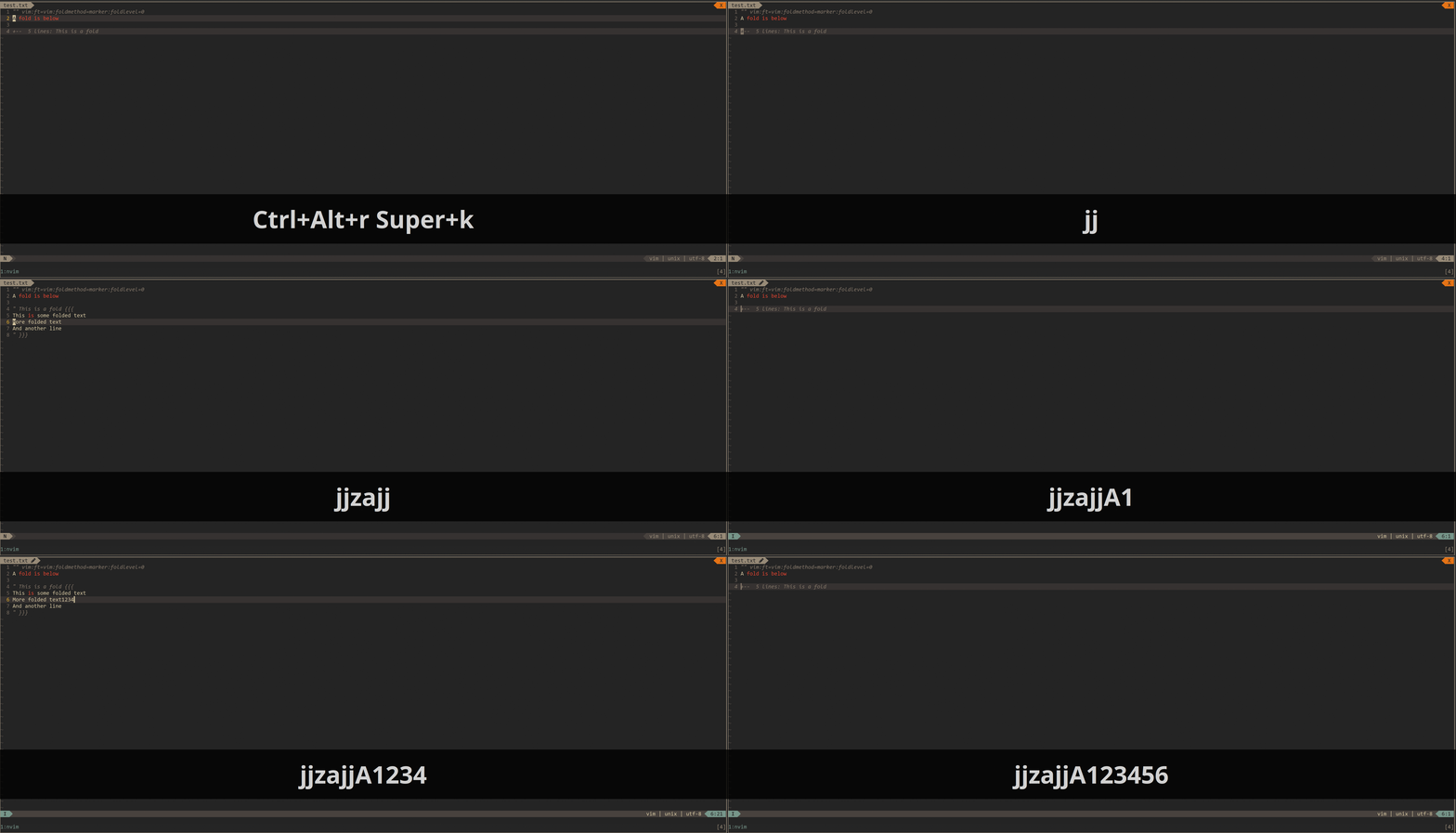
The problem is not only with vim filetype, e.g. if you replace above ft=vim with ft=go the issue will still reproduce (if you have go linters installed, I guess).
maximbaz
on 5 Nov 2017
Okay, I can repeat the bug in both Vim and NeoVim with the following files.
" setup.vim
set nocompatible
filetype plugin indent on
syntax on

autocmd User Anything let x=3
autocmd TextChanged * doautocmd User Anything
" test.txt
"" vim:ft=vim:foldmethod=marker:foldlevel=0

" Open the fold below, then delete this line with dd

" This is a fold {{{
This is some folded text
More folded text
And another line
" }}}
You can use nvim -u setup.vim test.xt or vim -u setup.vim test.txt, and the fold will be closed when you delete the line above. Looks like this is a bug in Vim.
w0rp
on 5 Nov 2017
I have opened an issue for Vim here: https://github.com/vim/vim/issues/2287
w0rp
on 5 Nov 2017
Thanks! Shall we close this issue then, since there is nothing else we can do?
maximbaz
on 5 Nov 2017
Leave it open for now. I'll see what Vim contributors say.
w0rp
on 5 Nov 2017
Okay, apparently it's not really a bug. Apparently if you don't use <nomodeline> for doautocmd, then it will close folds and what not, for some reason. I added that, and that seems to fix the problem.
w0rp
on 5 Nov 2017
I confirm that it is fixed, thanks a lot! 🙂
maximbaz
on 5 Nov 2017
Related issues
 sodiumjoe
·
4Comments
sodiumjoe
·
4Comments
 trevordmiller
·
3Comments
trevordmiller
·
3Comments
 EdmundsEcho
·
3Comments
EdmundsEcho
·
3Comments
 alexlafroscia
·
4Comments
alexlafroscia
·
4Comments
 ianchanning
·
3Comments
ianchanning
·
3Comments