Ale: Error highlights aren't removed some of the time
Not sure if someone already reported this, but i wasn't able to find it.
Often i have a situation where after fixing linting errors, i still get some random stuff marked as they are bad, but they are ok. After closing the file and re-opening it, everything looks ok. redraw command is not doing anything.
Here's example screenshot:

I'm on Xubuntu 17.04. It happened also on Xubuntu 16.10 before upgrade.
Using latest NeoVim.
My colleague also has this issue on Hackintosh with Vim 8.
Here's log from clipboard. I left only two lines of the command history, since all other are same as those.
Current Filetype: javascript
Available Linters: ['eslint', 'flow', 'jscs', 'jshint', 'standard', 'xo']
Enabled Linters: ['eslint']
Linter Variables:

let g:ale_javascript_eslint_executable = 'eslint'
let g:ale_javascript_eslint_options = ''
let g:ale_javascript_eslint_use_global = 0
 Global Variables:

let g:ale_echo_cursor = 1
let g:ale_echo_msg_error_str = 'Error'
let g:ale_echo_msg_format = '%s'
let g:ale_echo_msg_warning_str = 'Warning'
let g:ale_enabled = 1
let g:ale_keep_list_window_open = 0
let g:ale_lint_delay = 200
let g:ale_lint_on_enter = 1
let g:ale_lint_on_save = 1
let g:ale_lint_on_text_changed = 'always'
let g:ale_linter_aliases = {}
let g:ale_linters = {'javascript': ['eslint']}
let g:ale_open_list = 0
let g:ale_set_highlights = 1
let g:ale_set_loclist = 1
let g:ale_set_quickfix = 0
let g:ale_set_signs = 1
let g:ale_sign_column_always = 0
let g:ale_sign_error = '✖'
let g:ale_sign_offset = 1000000
let g:ale_sign_warning = '⚠'
let g:ale_statusline_format = ['%d error(s)', '%d warning(s)', 'OK']
let g:ale_warn_about_trailing_whitespace = 1
Command History:
(started) ['/bin/zsh', '-c', '''/home/kristijan/code/myproject/api/node_modules/eslint/bin/eslint.js'' -f unix --stdin --stdin-filename ''/home/kristijan/code/myproject/api/lib/domain/customer/available_funds_manager.js'' < ''/tmp/nvimBHKQqb/188/available_funds_manager.js''']
(finished - exit code 0) ['/bin/zsh', '-c', '''/home/kristijan/code/myproject/api/node_modules/eslint/bin/eslint.js'' -f unix --stdin --stdin-filename ''/home/kristijan/code/myproject/api/lib/domain/customer/available_funds_manager.js'' < ''/tmp/nvimBHKQqb/195/available_funds_manager.js''']
 kristijanhusak
All 41 comments
What does getmatches() return when this happens?
 w0rp
on 27 Jun 2017
w0rp
on 27 Jun 2017
How do i run that?
kristijanhusak
on 27 Jun 2017
:echo getmatches().
w0rp
on 27 Jun 2017
[{'group': 'MatchParen', 'id': 3, 'priority': 10, 'pos1': [50, 24, 1], 'pos2': [52, 5, 1]}, {'group': 'ALEError', 'id': 469, 'priority': 10, 'pos1': [47, 11, 1]}, {'group': 'ALEError', 'id': 470, 'priority': 10, 'pos1': [48, 56, 5]}, {'g
roup': 'ALEError', 'id': 471, 'priority': 10, 'pos1': [48, 63, 4]}, {'group': 'ALEError', 'id': 472, 'priority': 10, 'pos1': [48, 72, 6]}, {'group': 'ALEError', 'id': 473, 'priority': 10, 'pos1': [48, 83, 2]}, {'group': 'ALEError', 'id':
 474, 'priority': 10, 'pos1': [50, 12, 10]}]
The first error is on line 47, and another one is at line 50.
kristijanhusak
on 27 Jun 2017
Is this after using :ALEFix?
w0rp
on 27 Jun 2017
No, i haven't use that at all.
kristijanhusak
on 27 Jun 2017
When do the highlights first appear?
w0rp
on 27 Jun 2017
Could you record this behaviour and upload a GIF of it? Use this: https://asciinema.org/
w0rp
on 27 Jun 2017
Well, not a GIF, but upload to there.
w0rp
on 27 Jun 2017
Ok, i'll try. It doesn't happen all the time. It's completely random.
kristijanhusak
on 27 Jun 2017
I'm seeing this too. It's not so straightforward to reproduce, so recording an assicast might be difficult.
 jottr
on 1 Jul 2017
jottr
on 1 Jul 2017
Could this somehow be related to https://github.com/w0rp/ale/issues/714 ?
jottr
on 1 Jul 2017
Probably not.
w0rp
on 1 Jul 2017
I am also seeing this on python.
 zhou13
on 6 Jul 2017
zhou13
on 6 Jul 2017
Does anyone have any steps for repeating this bug?
w0rp
on 6 Jul 2017
@w0rp it's completely random.
Do you use it every day? On what system?
I'm not familiar with the codebase, and i'm not really good with vimscript, but do you have some function that clears out all errors before checking again? Maybe there's an issue with that.
kristijanhusak
on 6 Jul 2017
Yeah, I use ALE just about every day for working on Python, JavaScript, and TypeScript code. I use various versions of Ubuntu Linux and Linux Mint with GVim 8 myself.
w0rp
on 7 Jul 2017
Okay, pull again, and see if you experience the same issues.
It was keeping some highlights and only adding new highlights, but now it just removes all highlights with a group name starting with 'ALE' every single time highlights are set and sets them all over again. That should ensure that the highlights are removed when there's nothing to show.
w0rp
on 8 Jul 2017
Also, not directly related, if you change a buffer's filetype to something which doesn't have any linters, or disable one of the linters, then ALE will now be better about removing problems from before.
w0rp
on 8 Jul 2017
@w0rp ok, i'll give it a try on Monday. Thanks!
Does this impact performance? Just curious.
kristijanhusak
on 8 Jul 2017
Nah, it shouldn't make a difference.
w0rp
on 8 Jul 2017
@w0rp unfortunately it still happens to me. I'm testing on the freshly installed Linux Mint Cinnamon 18.2 and NeoVim. I figured out that it happens after fixing an error. So if i had for example 2 errors marked (Function must return a value, variable not used), and i just return that value from the function, error marks stay there, even tho errors are fixed (error list is empty). Of course, this happens once in 10 or 15 times.
Is there a way to debug it when it happens?
kristijanhusak
on 10 Jul 2017
Try pulling again. I just fixed a bug where it didn't lint again when files were fixed.
w0rp
on 10 Jul 2017
@w0rp ok, i did. Will let you know what happens.
kristijanhusak
on 10 Jul 2017
This bug still happens to me.
zhou13
on 10 Jul 2017
Could you create a recording of the bug with https://asciinema.org/?
Then I might be able to reproduce it.
w0rp
on 10 Jul 2017
I found these bugs are hard to reproduce on toy examples. It just happened sometimes when I was editing some big python projects with several different files open. I will try to record it.
zhou13
on 11 Jul 2017
@w0rp still happens, but it looks like it doesn't happen so often. Not really sure.
Is there a way to debug it when it happens?
kristijanhusak
on 12 Jul 2017
Not really. If you can provide a recording or any other information, I might be able to repeat the bug myself and fix it. I don't experience the bug myself.
w0rp
on 12 Jul 2017
Now the bug just happens maybe one or two times a day on my computer. I guess we can upload the log after this happens?
zhou13
on 13 Jul 2017
@w0rp in few comments above you wrote that you are using Gvim. Did you try using Vim, or NeoVim for a day, to see if it happens there?
kristijanhusak
on 13 Jul 2017
Please share your configuration, steps to repeat the bug, and an ascii cinema recording of the bug happening. Then I might be able to repeat the bug and fix it.
w0rp
on 13 Jul 2017
Ok, I encountered the issue again today.
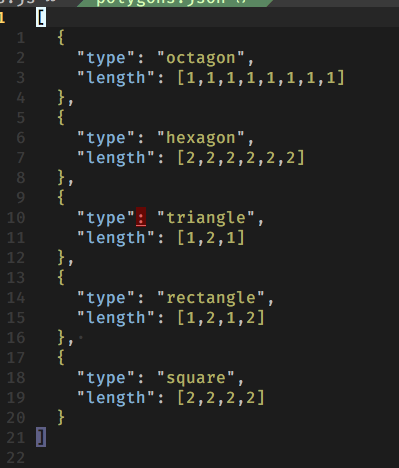
The file in question is valid JSON:
[
  {
    "type": "octagon",
    "length": [1,1,1,1,1,1,1,1]
  },
  {
    "type": "hexagon",
    "length": [2,2,2,2,2,2]
  },
  {
    "type": "triangle",
    "length": [1,2,1]
  },
  {
    "type": "rectangle",
    "length": [1,2,1,2]
  },
  {
    "type": "square",
    "length": [2,2,2,2]
  }
]
The error highlight that wasn't removed was due to an unmatched paren, I believe something like this:
  {
    "type: "triangle",
    "length": [1,2,1]
  },
 {
  ...
 }
I've tried to replicate the error in a new file while recording an asciicast to no avail.
Output from within the buffer with the erroneous highlight:
:echo getmatches()
[{'group': 'ALEError', 'id': 17, 'priority': 10, 'pos1': [11, 11, 1]}, {'group': 'ALEError', 'id': 18, 'priority': 10, 'pos1': [11, 11, 1]}]
You can find my vimconfig in my dotfiles.
$ vim --version
NVIM v0.2.1-134-gd76a9582
Build type: RelWithDebInfo
Compilation: /usr/local/Homebrew/Library/Homebrew/shims/super/clang -Wconversion -U_FORTIFY_SOURCE -D_FORTIFY_SOURCE=1 -DNVIM_MSGPACK_HAS_FLOAT32 -O2 -g -DDISABLE_LOG -Wall -Wextra -pedantic -Wno-unused-parameter -Wstrict-prototypes -std=gnu99 -Wvla -fstack-protector-strong -fdiagnostics-color=auto -DINCLUDE_GENERATED_DECLARATIONS -I/tmp/neovim-20170509-45126-18url74/build/config -I/tmp/neovim-20170509-45126-18url74/src -I/usr/local/include -I/usr/local/include -I/usr/local/include -I/usr/local/include -I/usr/local/include -I/usr/local/include -I/usr/local/opt/gettext/include -I/usr/include -I/usr/include -I/tmp/neovim-20170509-45126-18url74/build/src/nvim/auto -I/tmp/neovim-20170509-45126-18url74/build/include
Compiled by jottr@titan

Optional features included (+) or not (-): +acl   +iconv    +jemalloc +tui
For differences from Vim, see :help vim-differences

   system vimrc file: "$VIM/sysinit.vim"
  fall-back for $VIM: "/usr/local/Cellar/neovim/HEAD-d76a958/share/nvim"
Note that I run nvim inside tmux on iTerm.
I know its not much, but maybe someone sees a pattern?
Output from :ALEInfo
 Current Filetype: json
Available Linters: ['jsonlint']
  Enabled Linters: ['jsonlint']
 Linter Variables:

 Global Variables:

let g:ale_echo_cursor = 1
let g:ale_echo_msg_error_str = 'Error'
let g:ale_echo_msg_format = '%s'
let g:ale_echo_msg_warning_str = 'Warning'
let g:ale_enabled = 1
let g:ale_keep_list_window_open = 0
let g:ale_lint_delay = 200
let g:ale_lint_on_enter = 1
let g:ale_lint_on_save = 1
let g:ale_lint_on_text_changed = 'always'
let g:ale_linter_aliases = {}
let g:ale_linters = {}
let g:ale_open_list = 0
let g:ale_set_highlights = 1
let g:ale_set_loclist = 1
let g:ale_set_quickfix = 0
let g:ale_set_signs = 1
let g:ale_sign_column_always = 0
let g:ale_sign_error = '‚úó'
let g:ale_sign_offset = 1000000
let g:ale_sign_warning = '‚ù±'
let g:ale_statusline_format = ['‚úó %d', '‚ù± %d', '‚úî ok']
let g:ale_warn_about_trailing_whitespace = 1
  Command History:

(finished - exit code 1) ['/bin/zsh', '-c', 'jsonlint --compact - < ''/var/folders/mv/dy0670cn3255t3fjlv5dwk1m0000gn/T/nvimn7mofd/609/polygons.json''']
(started) ['/bin/zsh', '-c', 'jsonlint --compact - < ''/var/folders/mv/dy0670cn3255t3fjlv5dwk1m0000gn/T/nvimn7mofd/610/polygons.json''']
(finished - exit code 1) ['/bin/zsh', '-c', 'jsonlint --compact - < ''/var/folders/mv/dy0670cn3255t3fjlv5dwk1m0000gn/T/nvimn7mofd/611/polygons.json''']
(finished - exit code 0) ['/bin/zsh', '-c', 'jsonlint --compact - < ''/var/folders/mv/dy0670cn3255t3fjlv5dwk1m0000gn/T/nvimn7mofd/612/polygons.json''']
(finished - exit code 0) ['/bin/zsh', '-c', 'jsonlint --compact - < ''/var/folders/mv/dy0670cn3255t3fjlv5dwk1m0000gn/T/nvimn7mofd/613/polygons.json''']
(finished - exit code 0) ['/bin/zsh', '-c', 'jsonlint --compact - < ''/var/folders/mv/dy0670cn3255t3fjlv5dwk1m0000gn/T/nvimn7mofd/614/polygons.json''']
(finished - exit code 0) ['/bin/zsh', '-c', 'jsonlint --compact - < ''/var/folders/mv/dy0670cn3255t3fjlv5dwk1m0000gn/T/nvimn7mofd/615/polygons.json''']
(finished - exit code 1) ['/bin/zsh', '-c', 'jsonlint --compact - < ''/var/folders/mv/dy0670cn3255t3fjlv5dwk1m0000gn/T/nvimn7mofd/616/polygons.json''']
(finished - exit code 0) ['/bin/zsh', '-c', 'jsonlint --compact - < ''/var/folders/mv/dy0670cn3255t3fjlv5dwk1m0000gn/T/nvimn7mofd/617/polygons.json''']
(finished - exit code 1) ['/bin/zsh', '-c', 'jsonlint --compact - < ''/var/folders/mv/dy0670cn3255t3fjlv5dwk1m0000gn/T/nvimn7mofd/618/polygons.json''']
(finished - exit code 0) ['/bin/zsh', '-c', 'jsonlint --compact - < ''/var/folders/mv/dy0670cn3255t3fjlv5dwk1m0000gn/T/nvimn7mofd/619/polygons.json''']
(finished - exit code 0) ['/bin/zsh', '-c', 'jsonlint --compact - < ''/var/folders/mv/dy0670cn3255t3fjlv5dwk1m0000gn/T/nvimn7mofd/620/polygons.json''']
(finished - exit code 0) ['/bin/zsh', '-c', 'jsonlint --compact - < ''/var/folders/mv/dy0670cn3255t3fjlv5dwk1m0000gn/T/nvimn7mofd/621/polygons.json''']
(finished - exit code 0) ['/bin/zsh', '-c', 'jsonlint --compact - < ''/var/folders/mv/dy0670cn3255t3fjlv5dwk1m0000gn/T/nvimn7mofd/622/polygons.json''']
(finished - exit code 0) ['/bin/zsh', '-c', 'jsonlint --compact - < ''/var/folders/mv/dy0670cn3255t3fjlv5dwk1m0000gn/T/nvimn7mofd/623/polygons.json''']
(finished - exit code 0) ['/bin/zsh', '-c', 'jsonlint --compact - < ''/var/folders/mv/dy0670cn3255t3fjlv5dwk1m0000gn/T/nvimn7mofd/624/polygons.json''']
(finished - exit code 0) ['/bin/zsh', '-c', 'jsonlint --compact - < ''/var/folders/mv/dy0670cn3255t3fjlv5dwk1m0000gn/T/nvimn7mofd/625/polygons.json''']
(finished - exit code 0) ['/bin/zsh', '-c', 'jsonlint --compact - < ''/var/folders/mv/dy0670cn3255t3fjlv5dwk1m0000gn/T/nvimn7mofd/626/polygons.json''']
(finished - exit code 0) ['/bin/zsh', '-c', 'jsonlint --compact - < ''/var/folders/mv/dy0670cn3255t3fjlv5dwk1m0000gn/T/nvimn7mofd/627/polygons.json''']
(finished - exit code 0) ['/bin/zsh', '-c', 'jsonlint --compact - < ''/var/folders/mv/dy0670cn3255t3fjlv5dwk1m0000gn/T/nvimn7mofd/628/polygons.json''']
With an exact series of steps for repeating the bug, all I can do is speculate as to why it might be happening. I'll try and rewrite certain parts in the hope that it might somehow stop this happening.
w0rp
on 13 Jul 2017
Okay, I simplified the code a bit, and now highlights should be removed and added again every time a buffer is entered or linting completes.
w0rp
on 14 Jul 2017
I haven't upgrade my ale yet. But for the old version, it seems that the bugs only occurs when there is no error in current file. If I deliberately add some error to my code, then the wrong highlights will go away and replaced by the new error. If I delete these deliberately added error, the wrong highlights go back.
zhou13
on 14 Jul 2017
Okay, try it again with what's on master.
w0rp
on 14 Jul 2017
I didn't had this issue whole day, so i think the last thing fixed it. What was the issue?
kristijanhusak
on 14 Jul 2017
I think there was just too much state being managed. It's simpler now and removes highlights every single time linting is done or buffers are opened, and adds highlights for whatever list was set in a buffer variable.
w0rp
on 14 Jul 2017
Ok, great. Thanks for explaining. I'll test it out more, and we'll wait for others to confirm that its fixed. Thanks for fixing it up.
kristijanhusak
on 14 Jul 2017
This should be fixed now, so I'll close this. If anyone has any issues, let me know.
w0rp
on 18 Jul 2017
Related issues
 Wexcode
·
35Comments
Wexcode
·
35Comments
 rlerm
·
30Comments
rlerm
·
30Comments
 Utagai
·
21Comments
w0rp
·
49Comments
Utagai
·
21Comments
w0rp
·
49Comments
 kaicataldo
·
31Comments
kaicataldo
·
31Comments