Alamofire: Code Sign Error occurred while running alamofire on my iphone
I am using Alamofire and AlamofireImage for my app and while using simulator, it works really well.
But Today, I am trying to run it on my iphone, code sign error occurred.
this is the error message.
CodeSign /Users/admin/Library/Developer/Xcode/DerivedData/TicketingApp-btjnzulfdhjwkaatpcsjsmkxxnja/Build/Products/Debug-iphoneos/TicketingApp.app/Frameworks/AlamofireImage.framework
cd /Users/admin/Documents/Ticketing_app/TicketingApp
export CODESIGN_ALLOCATE="/Applications/Xcode 9.2.app/Contents/Developer/Toolchains/XcodeDefault.xctoolchain/usr/bin/codesign_allocate"
export PATH="/Applications/Xcode 9.2.app/Contents/Developer/Platforms/iPhoneOS.platform/Developer/usr/bin:/Applications/Xcode 9.2.app/Contents/Developer/usr/bin:/usr/local/bin:/usr/bin:/bin:/usr/sbin:/sbin"Signing Identity: "iPhone Developer: [email protected] (8DVUKPBSDP)"
/usr/bin/codesign --force --sign D76A8EE1054C83A06B5F2361F4D02E0501F39126 --preserve-metadata=identifier,entitlements,flags --timestamp=none /Users/admin/Library/Developer/Xcode/DerivedData/TicketingApp-btjnzulfdhjwkaatpcsjsmkxxnja/Build/Products/Debug-iphoneos/TicketingApp.app/Frameworks/AlamofireImage.framework/Users/admin/Library/Developer/Xcode/DerivedData/TicketingApp-btjnzulfdhjwkaatpcsjsmkxxnja/Build/Products/Debug-iphoneos/TicketingApp.app/Frameworks/AlamofireImage.framework: unknown error -1=ffffffffffffffff
Command /usr/bin/codesign failed with exit code 1
Alamofire Environment
Alamofire version: 4.6
Xcode version: 9.2 beta
Swift version: 4.0
 ry815
ry815
All 6 comments
Sorry, we use our GitHub project for bug reports and feature requests. In the future, you should open questions like this on Stack Overflow and tag alamofire.
Cheers. 🍻
From our Contribution Guidelines
Asking Questions
We don't use GitHub as a support forum. For any usage questions that are not specific to the project itself, please ask on Stack Overflow instead. By doing so, you'll be more likely to quickly solve your problem, and you'll allow anyone else with the same question to find the answer. This also allows maintainers to focus on improving the project for others.
 jshier
on 22 Jan 2018
jshier
on 22 Jan 2018
I have exactly the same issue... and no (usual) solution seems to work...
 syc-pad
on 23 Jan 2018
syc-pad
on 23 Jan 2018
I'm too facing this issue. any update on this issue ?
 nadendlaprasad
on 25 Jan 2018
nadendlaprasad
on 25 Jan 2018
Same issue. :(
 yoali11
on 25 Jan 2018
yoali11
on 25 Jan 2018
I've solved this problem after trying so many things.
so, I am not sure what I did is correct way~ and it is almost 1 month ago :)
But try this:
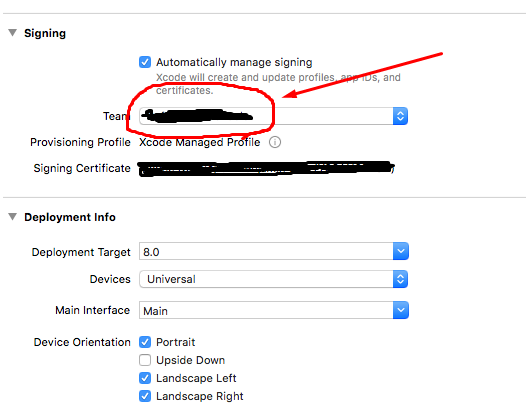
As you can see on this image, you can choose correct option.
!!! Choose "agent" role user !!!
I hope this can solve your problems.
ry815
on 25 Jan 2018
I solved this issue finally. In my case this is happening due to keychain. Keychain was denying the permission to code sign
nadendlaprasad
on 29 Jan 2018
Related issues
 unusuallyreticent
·
23Comments
unusuallyreticent
·
23Comments
 n2b8
·
39Comments
n2b8
·
39Comments
 blixt
·
44Comments
blixt
·
44Comments
 michalkos
·
30Comments
michalkos
·
30Comments
 kcharwood
·
85Comments
kcharwood
·
85Comments