Alacritty: Allow changing window title bar color in macOS
Recent iTerm2 versions allow selecting a color for the title bar on macOS to make it blend in with the terminal background. It doesn't hide the title bar, but makes it look a lot better.
Is there any chance of getting this for alacritty? Or, can someone point me in the right direction towards implementing this myself?

This can be achieved by using the following flags on NSWindow, assuming the window background color is set accordingly (example in Swift).
window.titlebarAppearsTransparent = true
window.titleVisibility = .hidden
window.styleMask.insert(NSWindowStyleMask.fullSizeContentView)
 dominiklohmann
All 29 comments
this actually looks really nice
 ghost
on 22 Jul 2017
ghost
on 22 Jul 2017
yes please
 asilvadesigns
on 22 Jul 2017
asilvadesigns
on 22 Jul 2017
This would be best implemented in glutin.
 tbodt
on 22 Jul 2017
tbodt
on 22 Jul 2017
It would look great! It would be great to allow theme authors to specify a title_bar_color under primary namespace, and fallback to primary.background otherwise.
 metalelf0
on 27 Jul 2017
metalelf0
on 27 Jul 2017
The positive feedback definitely shows that aesthetics are highly valued.
However, looking through glutin I have no idea where to start, so unless someone else has a good idea on where to apply the necessary changes this is probably put on hold.
dominiklohmann
on 27 Jul 2017
Yay aesthetics!
At first glance, it looks like glutin uses a winit library (same author), which is used for cross-platform window initialization, but winit doesn't seem to have a lot of support for providing custom NSWindow flags in macOS.
You can remove all window decorations by adding a
.with_decorations(false)
into https://github.com/jwilm/alacritty/blob/master/src/window.rs#L188, but I don't immediately see a way outside of submitting a PR to winit to do what is needed, except possibly by directly accessing the cocoa NSWindow object directory through os::macos::WindowExt.
 mcginty
on 27 Jul 2017
mcginty
on 27 Jul 2017
Decided to play with it a bit.
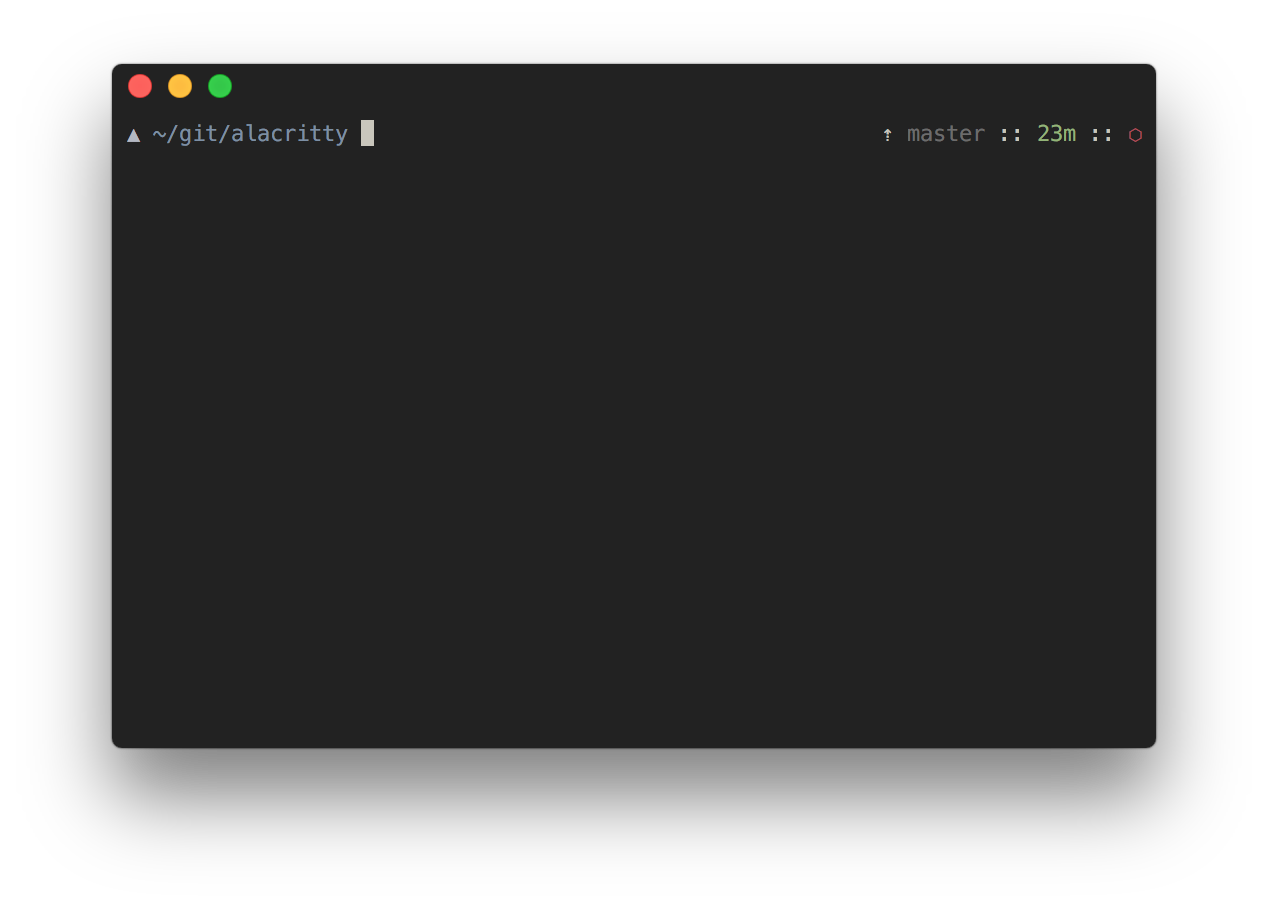
I got it partially working by modifying winit in a horribly hackish way, but even with that work would still need to be done to add automatic padding to the top, and re-enable the title by finding a way to change the font color or render our own.
EDIT: if anybody wants to play with this more and make it, like, not shit, diffs here:
https://github.com/mcginty/alacritty/commit/145aa0f82f0d9851ce9e461ac5c09831f4f8fb43
https://github.com/mcginty/winit/commit/42980aa8980c655072da3737de751eba9961bebb
I couldn't get the hackier version working (which wouldn't require changes to winit), it just crashes, but someone who knows more about FFI interaction may be able to fix that quickly for all I know.
mcginty
on 27 Jul 2017
FYI, I made an issue on winit.
 sodiumjoe
on 16 Oct 2017
sodiumjoe
on 16 Oct 2017
FYI, looks like https://github.com/tomaka/winit/pull/389 will make this possible. Some more discussion here: https://github.com/jwilm/alacritty/pull/947#issuecomment-360457297
sodiumjoe
on 4 Feb 2018
FYI, I opened a PR on winit to allow resizability on with_decorations(false) windows, but there was an objection as to whether that should be the default behavior of with_decorations(false), so I limited the scope to just adding a subclass that makes it possible: https://github.com/tomaka/winit/pull/408
Once that's merged, there will be an option to pull in cocoa and manipulate the window masks directly by calling ns::get_window(). That will allow creation of resizable windows that look like this:
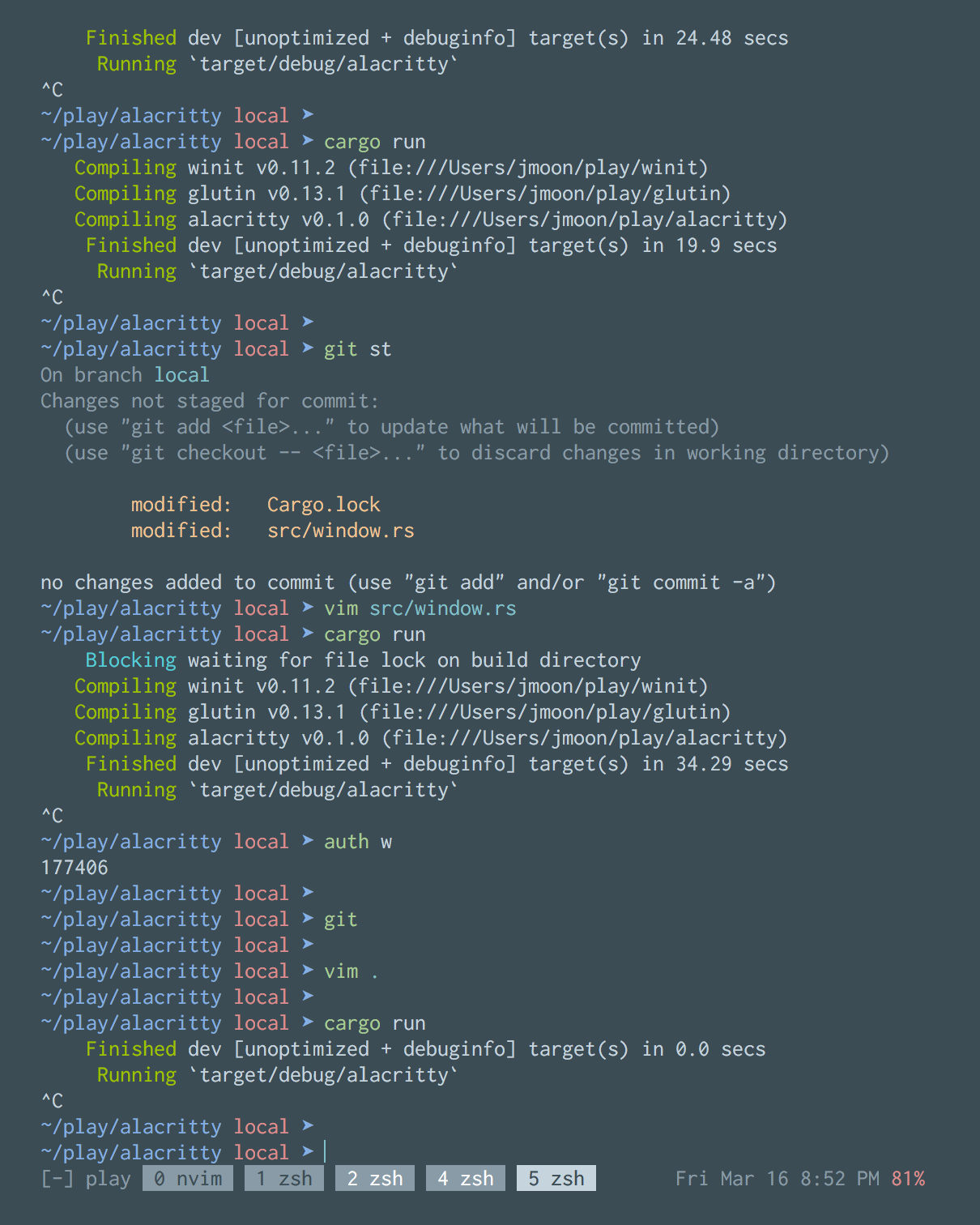
Notice there are no borders, no titlebar, square corners, and no drop shadow.
There's also this open PR https://github.com/tomaka/winit/pull/389 which will allow windows that look like this:
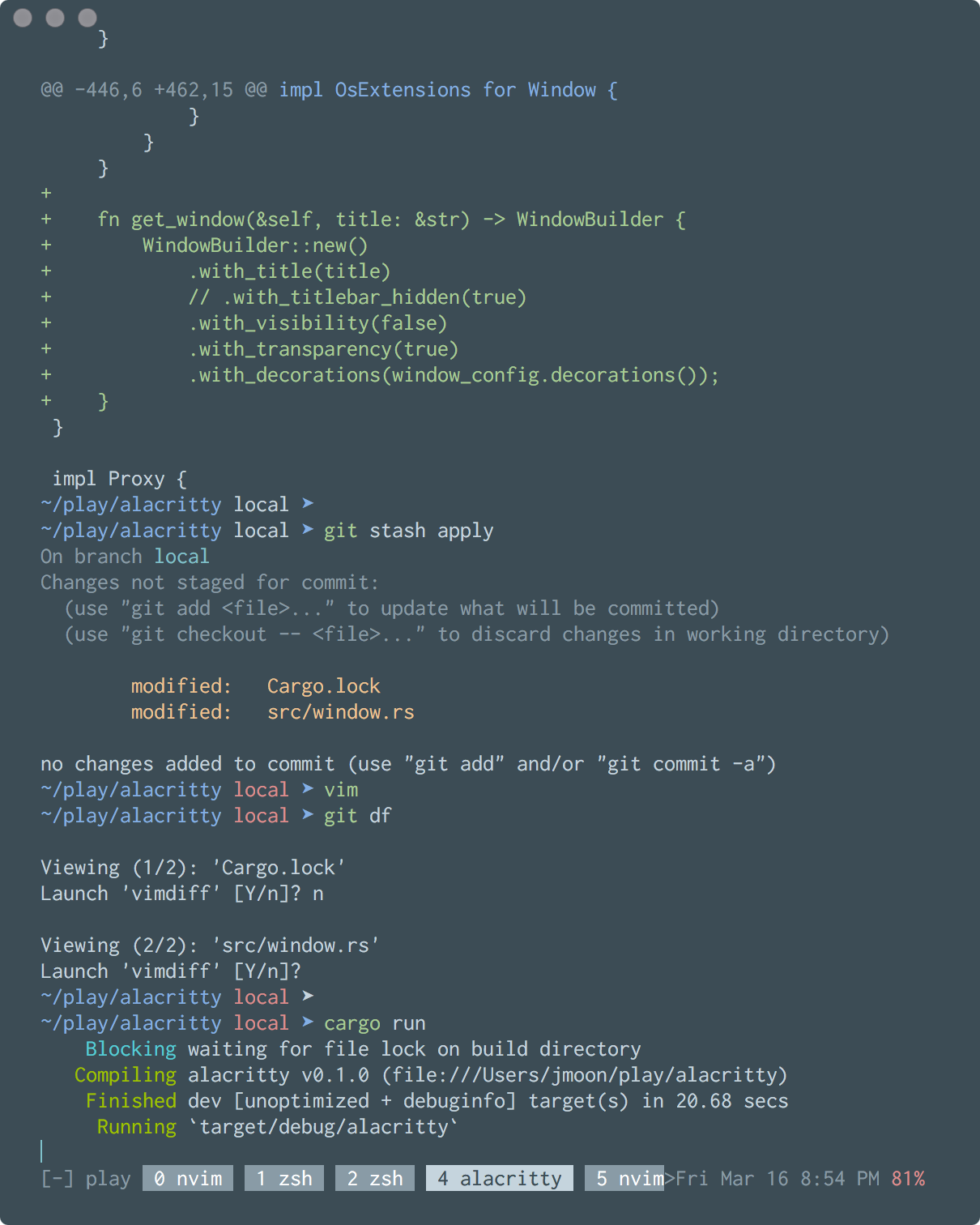
This has a transparent titlebar with a "full size content window" meaning the titlebar will have the same color background as the content, and retains the titlebar buttons, rounded corners, and drop shadow.
There does appear to be an issue with this for non-hidpi monitors that I've noted here: https://github.com/jwilm/alacritty/pull/947#issuecomment-360908642 I'm still trying to figure out what's going on there.
I also have a PR into the above PR https://github.com/robertgzr/winit/pull/1 to allow the same as above, but also hide the titlebar buttons, to allow a window that looks like this:

This basically looks like a window with no titlebar, but retains rounded corners and drop shadow.
I'm trying to get those PRs moving. I'm not sure how we would expose those options from alacritty, though. Should we expose all of these options? Or alias decorations: false to one of these? (Current decorations: false doesn't allow any resizability, so imo is not very useful.)
sodiumjoe
on 17 Mar 2018
Providing a middle ground between configurability and ease of use - if we use the term decorations to cover borders, titlebar, corner, and shadow, I'd propose from first screenshot to last:
decorations: none
decorations: transparent
decorations: buttonless
'none' covers the fullscreen or quake-like terminal use case.
'transparent' covers floating
'buttonless' covers minimal floating
There are two use cases that I think we do not have to cover (until someone pipes up)
- buttonless without transparency
- no decorations + not resizeable (what we have now with decorations: false)
also decorations: default would just be regular old window like we have now
 jedahan
on 17 Mar 2018
jedahan
on 17 Mar 2018
quick update, I opened a new PR so the relevant PRs that this depends on are:
https://github.com/tomaka/winit/pull/408
https://github.com/tomaka/winit/pull/423
sodiumjoe
on 18 Mar 2018
@jedahan I think that's a really good summary. I agree with the options you've presented, but I'm not sure how this would work for other platforms. I'm also not sure if decorations correctly describes what this does anymore. I wonder if it would make more sense to present a new field in the config that's macos specific. Something for @jwilm and @chrisduerr to weight in on, probably.
sodiumjoe
on 18 Mar 2018
https://github.com/tomaka/winit/pull/423 is merged and https://github.com/tomaka/winit/pull/408 is approved, hopefully merged very soon. I'd like to start work on a PR into alacritty to integrate those changes. @jwilm does jedehan's suggestion sound good to you for macos-specific config options?
sodiumjoe
on 23 Mar 2018
If a macos-specific setting is added it should probably be similar to thin_strokes where it is present in both configs but only does something in one.
This should help us with the long-term plan to merge the two default configurations together once the font configuration RFC is implemented.
 chrisduerr
on 23 Mar 2018
chrisduerr
on 23 Mar 2018
while waiting for https://github.com/tomaka/winit/pull/408 to merge, I started an implementation of the above: https://github.com/sodiumjoe/alacritty/commit/1d20fae37f2adc9102452fc08b467ed242da0471
Any feedback would be welcome!
sodiumjoe
on 29 Mar 2018
https://github.com/tomaka/winit/pull/408 has merged, we're now just waiting for a release
sodiumjoe
on 3 Apr 2018
Just a heads up, looks like winit released these changes in 0.12 a few days ago: https://github.com/tomaka/winit/blob/master/CHANGELOG.md. And BTW, thanks for working on this @sodiumjoe !
 wavded
on 9 Apr 2018
wavded
on 9 Apr 2018
oh nice, ok, i'll get a PR up to integrate that change into alacritty
sodiumjoe
on 9 Apr 2018
We might have to wait for glutin because we're not using winit directly, but if that's updated too it should be all good to go!
Thanks for putting in all that nice work on macos @sodiumjoe :)
chrisduerr
on 9 Apr 2018
Yeah, it looks like glutin is still on [email protected]. There's a PR up for updating it to @0.12 tho: https://github.com/tomaka/glutin/pull/1010
sodiumjoe
on 9 Apr 2018
Ok, glutin updated and published, I've made a PR for this: #1241
sodiumjoe
on 11 Apr 2018
Thank you @sodiumjoe
 ChadTaljaardt
on 11 Apr 2018
ChadTaljaardt
on 11 Apr 2018
Thanks sodiumjoe!
as a follow up it would be nice if it was possible to not only make the titlebar transparent but also make the text start below the titelbar ❤️ as of now the history goes all the way up into the titelbar and below the buttons
ghost
on 11 Apr 2018
@monouser7dig I think that should be achieved by granular padding config for top,right,bottom,left instead of just x,y. Either way it should probably be a separate issue.
sodiumjoe
on 12 Apr 2018
Indeed top-only padding would be very welcome when #686 is merged and running with decorations: transparent. Currently I need padding.y: 50 to make sure the terminal contents don't run under the window buttons, but this has the side effect of not using the bottom 50 pixels off the screen either.
 pascalw
on 21 Apr 2018
pascalw
on 21 Apr 2018
will this feature be supported in linux
 yech1990
on 14 Nov 2018
yech1990
on 14 Nov 2018
@yech1990 that would be cool, wanna open another github issue to request it, and pointers to example applications that behave like you'd want?
jedahan
on 14 Nov 2018
VSCode's "custom" title bars on both macOS, Windows & Linux should be good inspiration: https://code.visualstudio.com/updates/v1_28#_custom-title-and-menu-bar-on-windows-by-default
 elithrar
on 17 Nov 2018
elithrar
on 17 Nov 2018
Related issues
 paupalou
·
3Comments
paupalou
·
3Comments
 sersorrel
·
3Comments
sersorrel
·
3Comments
 zethra
·
3Comments
zethra
·
3Comments
 zacstewart
·
3Comments
zacstewart
·
3Comments
 kekePower
·
3Comments
kekePower
·
3Comments
Most helpful comment
Decided to play with it a bit.
I got it partially working by modifying
winitin a horribly hackish way, but even with that work would still need to be done to add automatic padding to the top, and re-enable the title by finding a way to change the font color or render our own.EDIT: if anybody wants to play with this more and make it, like, not shit, diffs here:
https://github.com/mcginty/alacritty/commit/145aa0f82f0d9851ce9e461ac5c09831f4f8fb43
https://github.com/mcginty/winit/commit/42980aa8980c655072da3737de751eba9961bebb
I couldn't get the hackier version working (which wouldn't require changes to
winit), it just crashes, but someone who knows more about FFI interaction may be able to fix that quickly for all I know.