Al: Array of JsonObject doesn't work as expected - wrong values
Describe the bug
Array of JsonObject doesn't work as expected. The entire array shows the same value which corresponds with the last value being assigned to one of the indexes (slots).
To Reproduce
Steps and to reproduce the behavior:
- Using the direct assignment
MyArray[1].ReadFrom('{"Index1":"Index 1"}');makes the last value visible in all indexes (slots) directly.
    local procedure ArrayOfJsonObjectTest01()
    var
        MyArray: Array[3] of JsonObject;
    begin
        MyArray[1].ReadFrom('{"Index1":"Index 1"}');
        MyArray[2].ReadFrom('{"Index2":"Index 2"}');
        MyArray[3].ReadFrom('{"Index3":"Index 3"}');
    end;
- Using the approach of the variable assignment
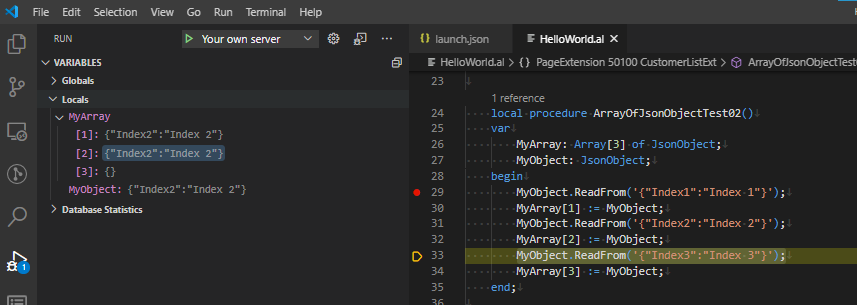
MyObject.ReadFrom('{"Index1":"Index 1"}'); MyArray[1] := MyObject;works more or less in the same way but there is some difference too. The debugger shows the last value only in the indexes being already assigned. So if you set the breakpoint toMyObject.ReadFrom('{"Index3":"Index 3"}');you will notice that onlyMyArray[1]andMyArray[2]have the values (and this is always the same, the last one =>{"Index2":"Index 2"}).
    local procedure ArrayOfJsonObjectTest02()
    var
        MyArray: Array[3] of JsonObject;
        MyObject: JsonObject;
    begin
        MyObject.ReadFrom('{"Index1":"Index 1"}');
        MyArray[1] := MyObject;
        MyObject.ReadFrom('{"Index2":"Index 2"}');
        MyArray[2] := MyObject;
        MyObject.ReadFrom('{"Index3":"Index 3"}');
        MyArray[3] := MyObject;
    end;
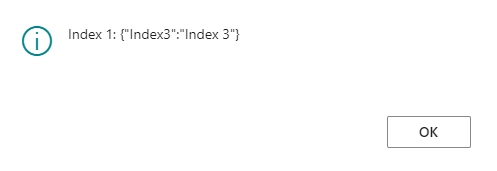
- In a similar way works also List of [JsonObject]. The only difference is that the debugger can't be used to see the values but you can detect wrong values in the client.
    local procedure ListOfJsonObjectTest01()
    var
        MyArray: List of [JsonObject];
        MyObject: JsonObject;
    begin
        MyObject.ReadFrom('{"Index1":"Index 1"}');
        MyArray.Add(MyObject);
        MyObject.ReadFrom('{"Index2":"Index 2"}');
        MyArray.Add(MyObject);
        MyObject.ReadFrom('{"Index3":"Index 3"}');
        MyArray.Add(MyObject);

        Message(format(MyArray.Count));

        MyArray.Get(1, MyObject);
        Message('Index 1: %1', MyObject);
        MyArray.Get(2, MyObject);
        Message('Index 2: %1', MyObject);
        MyArray.Get(3, MyObject);
        Message('Index 3: %1', MyObject);
    end;
Expected behavior
I believe, this is an error and should be either fixed or the compiler should produce an error if this is considered as an unsupported scenario. I am aware of this limitation for the List approach but in this case (List of [Blob]), the compiler gives the error. I don't see any details or relevant limitations for Array of.
Using of JsonArray works correctly, of course. But I still believe the problem described above should be solved somehow or maybe we are missing some details which would be very nice to know :)
Screenshots
Ad 1)

Ad 2)
Ad 3)
5. Versions:
- AL Language: v6.1.362735
- Business Central: 17.0.16993.0/w1
 Koubek
All 4 comments
This is by design. See the note in the documentation related to JSON types being reference types not value types https://docs.microsoft.com/en-us/dynamics365/business-central/dev-itpro/developer/methods-auto/jsonobject/jsonobject-data-type
 atoader
on 6 Nov 2020
atoader
on 6 Nov 2020
Sorry, I beg you to reconsider this. There is one big difference between a reference type and an array of references.
local procedure Test()
var
  TestObject: array[5] of JsonObject;
  TestText: Text;
begin
  TestObject[1].ReadFrom('{"foo":"bar"}');
  TestObject[2].ReadFrom('{"hello":"world"}');

  TestObject[1].WriteTo(TestText);
  Message('%1', TestText);
end;
Those five elements in this array are different references. They cannot all be one.
 vjekob
on 6 Nov 2020
vjekob
on 6 Nov 2020
I might have gone over the issue too quickly. We'll take another look.
atoader
on 10 Nov 2020
Thanks for reconsidering ;)
Koubek
on 10 Nov 2020
Related issues
 lvanvugt
·
3Comments
lvanvugt
·
3Comments
 ghost
·
3Comments
ghost
·
3Comments
 FSharpCSharp
·
3Comments
FSharpCSharp
·
3Comments
 bvbeek
·
3Comments
bvbeek
·
3Comments
 JavierFuentes
·
3Comments
JavierFuentes
·
3Comments
Most helpful comment
I might have gone over the issue too quickly. We'll take another look.