Al: "editor.formatOnSave" is damaging files
Describe the bug
If "editor.formatOnSave" is active, files are being damaged.
To Reproduce
- Verify "editor.formatOnSave" is enabled.
- Create a new project, using:
app.json
{
  "id": "b33ae0f2-491f-4ae1-b650-73c46c978ec9",
  "name": "FormatOnSave",
  "publisher": "Default publisher",
  "version": "1.0.0.0",
  "brief": "",
  "description": "",
  "privacyStatement": "",
  "EULA": "",
  "help": "",
  "url": "",
  "logo": "",
  "screenshots": [],
  "platform": "16.0.0.0",
  "application": "16.0.0.0",
  "idRanges": [
    {
      "from": 50100,
      "to": 50149
    }
  ],
  "contextSensitiveHelpUrl": "https://FormatOnSave.com/help/",
  "showMyCode": true,
  "runtime": "5.0",

  "dependencies": [
    {
      "id": "63ca2fa4-4f03-4f2b-a480-172fef340d3f",
      "publisher": "Microsoft",
      "name": "System Application",
      "version": "1.0.0.0"
    },
    {
      "id": "437dbf0e-84ff-417a-965d-ed2bb9650972",
      "publisher": "Microsoft",
      "name": "Base Application",
      "version": "1.0.0.0"
    },
    {
      "id": "5d86850b-0d76-4eca-bd7b-951ad998e997",
      "publisher": "Microsoft",
      "name": "Tests-TestLibraries",
      "version": "1.0.0.0"
    },
    {
      "id": "e7320ebb-08b3-4406-b1ec-b4927d3e280b",
      "publisher": "Microsoft",
      "name": "Any",
      "version": "1.0.0.0"
    },
    {
      "id": "23de40a6-dfe8-4f80-80db-d70f83ce8caf",
      "publisher": "Microsoft",
      "name": "Test Runner",
      "version": "1.0.0.0"
    }
  ]
}
New codeunit
codeunit 50100 Test
{
    Subtype = Test;

    var
        Assert: Codeunit Assert;
        LibraryTestInitialize: Codeunit "Library - Test Initialize";
        LibraryVariableStorage: Codeunit "Library - Variable Storage";
        LibrarySetupStorage: Codeunit "Library - Setup Storage";
        isInitialized: Boolean;

    [Test]
    procedure Test01()
    var
        Item: Record Item;
    begin
        Initialize();
        // [GIVEN] Given Some State
        SomeFunction1();
        SomeFunction2();
        // [WHEN] When Some Action
        Item.Delete(true);
        // [THEN] Then Expected Output
        Assert.AreEqual('ABC', Item."No.", '');
    end;

    [Test]
    procedure Test02()
    var
        Item: Record Item;
    begin
        Initialize();
        // [GIVEN] Given Some State
        SomeFunction1();
        SomeFunction2();
        // [WHEN] When Some Action
        Item.Delete(true);
        // [THEN] Then Expected Output
        Assert.AreEqual('ABC', Item."No.", '');
    end;

    local procedure Initialize()
    begin
    end;

    local procedure SomeFunction1()
    begin
        Error('Procedure SomeFunction1 not implemented.');
    end;

    local procedure SomeFunction2()
    begin
        Error('Procedure SomeFunction2 not implemented.');
    end;
}
- Go to the last line of
procedure Test01(important: not Test02). - Enter a new line as a copy of the previous line:
Assert.AreEqual('ABC', Item."No.", '');
Very important: Do not copy & paste; just type everything manually. - Save your changes and control
procedure Test02:
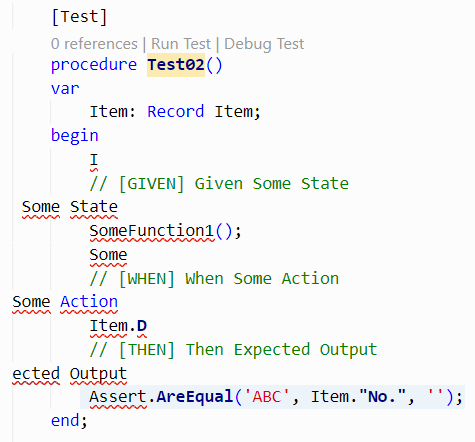
- if you repeat the test with "editor.formatOnSave" = false, the error does not occur.
Expected behavior
The existing function Test02 should not break.
. Versions:
- AL Language: 6.0.324421
- Business Central: 16.0
 NKarolak
All 15 comments
Thanks for raising this. We're already working on a fix for this. I'll double check that the fix also works for your sample input and check what the ETA for the fix being released is.
 thloke
on 29 Sep 2020
thloke
on 29 Sep 2020
@thloke Great news, thank you. Just out of curiosity: what actually triggers the bug? The comment lines in my example?
I'm asking, because I've encountered this issue so far only in test codeunits, and in AL Language 6.x (as far as I remember).
NKarolak
on 29 Sep 2020
It's a weird combination of comments and using LF line endings. I'm not 100% sure on the exact cause, but that's what we have recorded on our internal bug. I'll check with the engineer that's working on the fix.
Actually, could you check if you're using LF or CRLF line endings? That will also give us a clue to help confirm if it's the same issue.
thloke
on 29 Sep 2020
@EmilDamsbo - can you provide more information on the bug and confirm if this is the same as the issue you are working on?
thloke
on 29 Sep 2020
Confirmed! I can reproduce the broken code only, if LF is set as per VS Code:

However, something strange is now happening.
Compare my broken code with LF ...
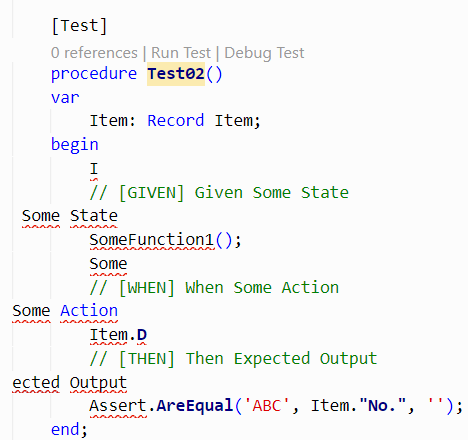
... with the code (or rather: error markings) with CRLF (after manual input + save):
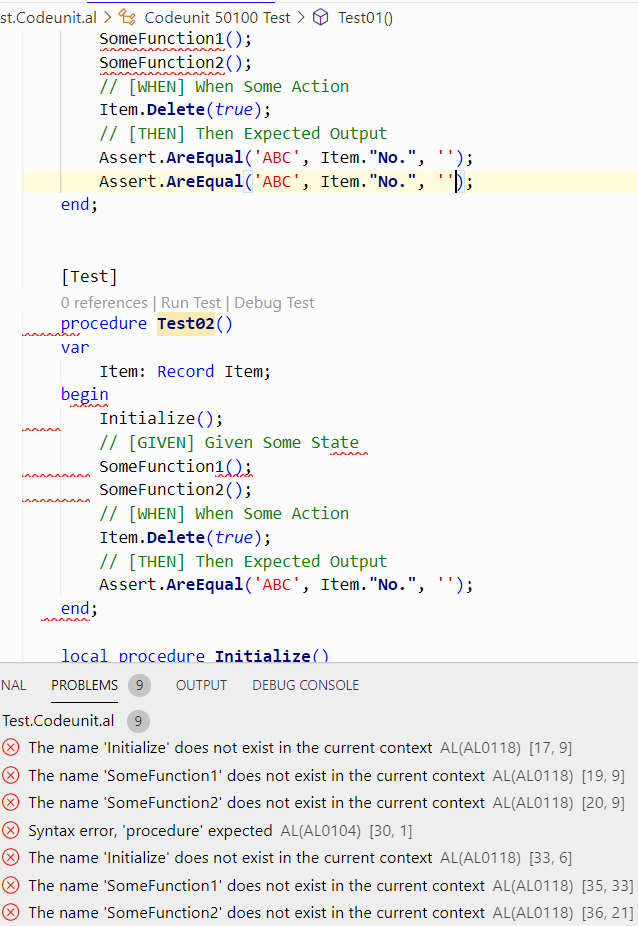
I have to "Reload Window" to get rid of the errors that are actually none. I didn't see that earlier.
I wonder whether you can reproduce that as well? For my test, I have disabled all AL related extensions except the AL Language extension, of course.
NKarolak
on 29 Sep 2020
Hm, I don't recall seeing the additional errors, that is really interesting. It looks like the parsing is being completely messed up, so we can't build a symbol tree. I'll defer to @EmilDamsbo for a more accurate explanation on what is going on.
thloke
on 29 Sep 2020
And just FYI, I've just found out why my test codeunit was set up with LF although my default setting is actually CRLF: the codeunit was created with another extension (a wizard).
I love when mysteries get solved :)
NKarolak
on 29 Sep 2020
I'm glad we could shed some light on the mysteries. :) ...hopefully we'll deliver the final solution to the mystery in a bugfix soon!
thloke
on 29 Sep 2020
Using AL Language 6.1.352568, I can still reproduce both issues :
- broken code lines when using LF instead of CRLF,
- Reload Window necessary after "good" change with CRLF due to unexpected compiler problems.
What is your current state on it? Do you need a separate GitHub Issue for issue No. 2?
NKarolak
on 21 Oct 2020
We're still actively working on this is the short answer. I'm hoping to have a fix out by the end of this week. I'll update this issue once we have a VSIX in the marketplace that addresses this.
thloke
on 21 Oct 2020
FYI, I've just had a case in my current project where the file (a test codeunit with many comments) was damaged again after save, although CRLF was used.
I have currently no time to investigate/reproduce any further, so I've disabled formatOnSave again for my test app.
Observed with AL Language 6.1.352568 on runtime 5.0.
NKarolak
on 22 Oct 2020
We have a very similar bug #6210 - the symptom is very similar in that there is code loss on save, but the underlying cause is different. This one happens when the parser mis-categorises an attribute as an identifier. You might have run into that one, which I'm fixing in tandem with this one.
thloke
on 22 Oct 2020
Good to know, thanks.
NKarolak
on 22 Oct 2020
@thloke thanks for keeping us updated!
 bjarkihall
on 24 Oct 2020
bjarkihall
on 24 Oct 2020
This has been fixed in the latest version of the VSIX. Thanks for waiting. (:
thloke
on 27 Oct 2020
Related issues
 ThomasBrodkorb
·
3Comments
ThomasBrodkorb
·
3Comments
 JavierFuentes
·
3Comments
JavierFuentes
·
3Comments
 kine
·
3Comments
kine
·
3Comments
 malue19
·
3Comments
malue19
·
3Comments
 worldofthenavcraft
·
3Comments
worldofthenavcraft
·
3Comments
Most helpful comment
This has been fixed in the latest version of the VSIX. Thanks for waiting. (: