Al: Issue Object Table: Conversion of OemText to Text fails
Describe the bug
My app.json contains:
{
"target": "Internal"
}
I'm encountering this error "The definition of the Name field has changed; old type: Text, new type: OemText. Start your activity again."
AL Code to reproduce the issue
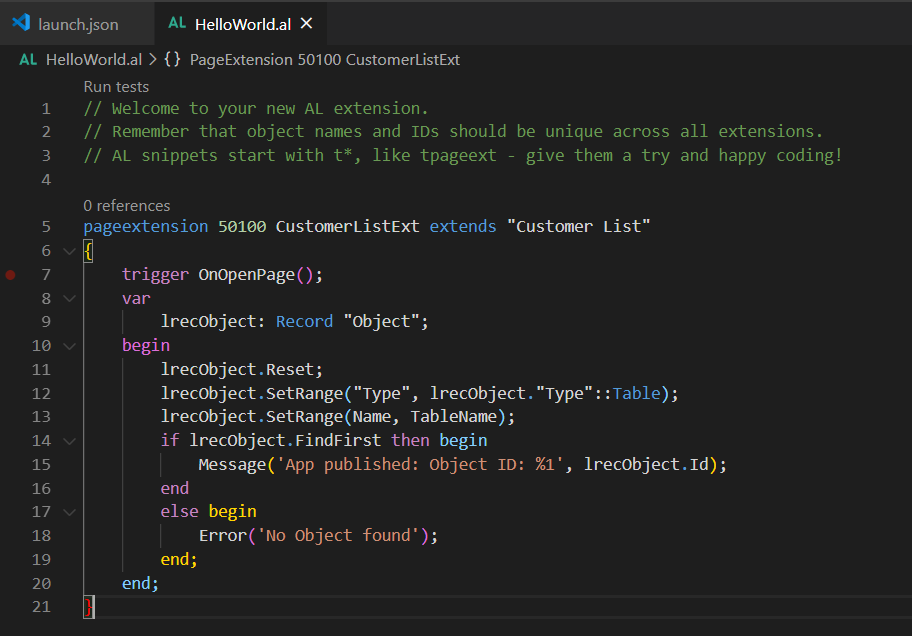
The error comes on this line of code. When I try to set filter on "Name" field of "Object Table" to get "Object ID".

5. Versions:
- AL Language: v5.0.288712
- Business Central: 16.0.11240.12076
Is there any way to convert the OemText into a valid string?
 MathurRahul
All 6 comments
Can you provide a fully contained project that reproduces the issue?
 atoader
on 29 Jul 2020
atoader
on 29 Jul 2020
Hello,
I created a new AL project and edited the default "HelloWorld.AL" file to simulate the issue.
CustomerListExt
Error Message:

The project files are attached:
ObjectTableIssue.zip
Business Central Version: 16.0.11240.12076
AL Language: v5.0.288712
Launch.json

Please let me know if you need any other information.
MathurRahul
on 29 Jul 2020
Hello, is there any update on this issue? Do you need any more input from my side?
MathurRahul
on 3 Aug 2020
@MathurRahul , Did you try to work with the "AllObj" virtual table?
 waldo1001
on 5 Aug 2020
waldo1001
on 5 Aug 2020
Hello @waldo1001 , Thank you for the input. It works.

MathurRahul
on 6 Aug 2020
Hi! We've discussed this a bit internally. We will deprecate the "Object" and "Object Metadata" tables in 17.0 and later. These tables should not be used as they refer to objects and metadata generated by C/SIDE. The AllObj, AllObjWithCaptions, "Nav App Object Metadata" tables should be used instead.
atoader
on 20 Aug 2020
Related issues
 worldofthenavcraft
·
3Comments
worldofthenavcraft
·
3Comments
 bvbeek
·
3Comments
bvbeek
·
3Comments
 lvanvugt
·
3Comments
lvanvugt
·
3Comments
 TinaMenezes
·
3Comments
TinaMenezes
·
3Comments
 ghost
·
3Comments
ghost
·
3Comments
Most helpful comment
Hi! We've discussed this a bit internally. We will deprecate the "Object" and "Object Metadata" tables in 17.0 and later. These tables should not be used as they refer to objects and metadata generated by C/SIDE. The AllObj, AllObjWithCaptions, "Nav App Object Metadata" tables should be used instead.