Al: IncludeCaption has no effect on WORD layouts
Describe the bug
When creating a report dataset, in AL, and using IncldeCaption on fields, no captions (labels) are created in the WORD layout. Is that normal?
When using a Label it gets created, when using IncludeCaption it does not.
To Reproduce
Steps and to reproduce the behavior:
Create the following Report:
report 50106 CustomerListReport
{
    UsageCategory = ReportsAndAnalysis;
    ApplicationArea = All;
    AdditionalSearchTerms = 'Customer List Report';
    RDLCLayout = 'CustomerListReport.rdl';
    WordLayout = 'CustomerListReport.docx';
    DefaultLayout = RDLC;

    dataset
    {
        dataitem(Customer; Customer)
        {
            column(CustomerNo; "No.")
            {
                IncludeCaption = true;
            }
            column(CustomerName; Name)
            {
                IncludeCaption = true;
            }
            column(City; City)
            {
                IncludeCaption = true;
            }
            column(BalanceLCY; "Balance (LCY)")
            {
                IncludeCaption = true;
            }
        }
    }
    labels
    {
        LabelName = 'Label Text', Comment = 'Foo', MaxLength = 999, Locked = true;
    }
}
Generate the layout using Ctrl+Shft+B
Expected behavior
Labels should becreated in the layouts.
Screenshots
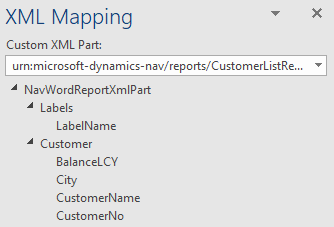
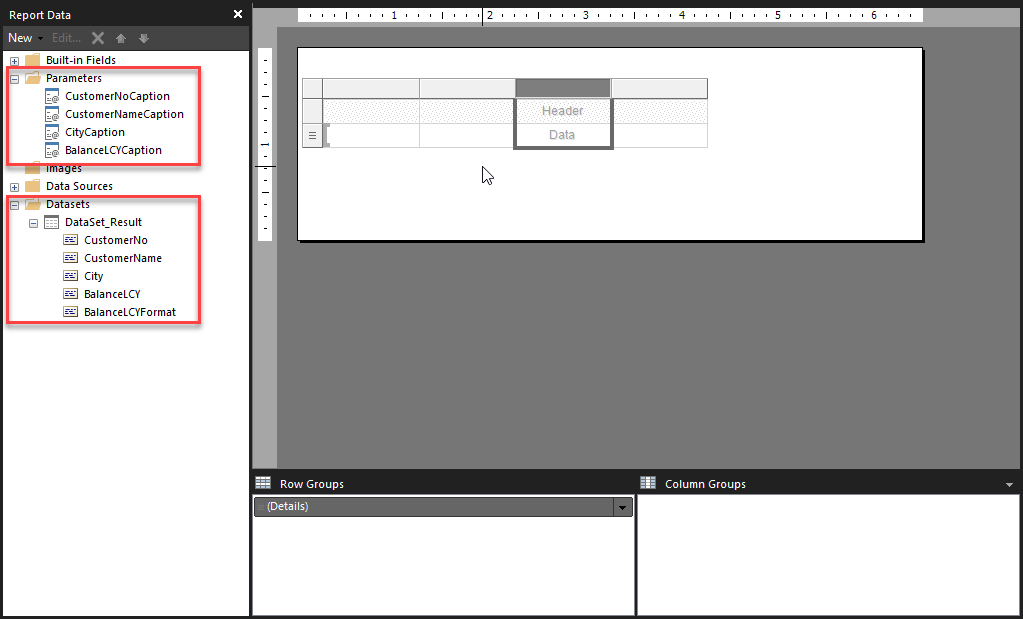
5. Versions:
- AL Language:
Name: AL Language
Id: ms-dynamics-smb.al
Description: AL development tools for Dynamics 365 Business Central
Version: 4.0.229715
Publisher: Microsoft
VS Marketplace Link: https://marketplace.visualstudio.com/items?itemName=ms-dynamics-smb.al
- Business Central:
Version: US Business Central 15.2 (Platform 15.0.39461.40778 + Application 15.2.39060.0)
 srenders
All 14 comments
Any update on this?
It seems like a bug and I don't know of any other way to make a report multi-language, unless you want people to start using FIELDCAPTION() and adding a lot of fields in the dataset, which imho is not so good for performance...
(IncludeCaption is used to generate captions in the language of the user running the report and FIELDCAPTION() should only be used to generate reports in the language of the recipient, for example for document reports.)
srenders
on 9 Mar 2020
Any update or ETA of a fix?
srenders
on 29 Apr 2020
Any update or ETA of a fix?
srenders
on 26 May 2020
Any update?
 rsgilbert
on 6 Oct 2020
rsgilbert
on 6 Oct 2020
According to this page https://docs.microsoft.com/en-us/dynamics365/business-central/dev-itpro/developer/properties/devenv-includecaption-property, it seems like that's the intended behavior
rsgilbert
on 6 Oct 2020
Yeah, but it shouldn't be... BC has no problem putting things from the labels section of the report code into the Word layout, so why can't it also put things with IncludeCaption=true there too, just like it does for RDLC layouts? I doubt there's a technical barrier, just a bug or a lack of implementing the feature.
 dtkb
on 6 Oct 2020
dtkb
on 6 Oct 2020
I am guessing its not the recommended approach, perhaps most people use rdlc to design reports. WordLayouts look better but they seem to have less capabilities. Just today I could not creating a nested repeating group in my WordLayout. Either it cant be done or the people who know how to do it dont blog or document how its done.
rsgilbert
on 7 Oct 2020
Today I picked up working with WORD layout again after a log time. Now on BC17 for first time and running into the same issue. And I am flabbergasted that it is still not fixed.
If you cannot get captions added to the Labels in dataset xml (definition) WORD layout is totally useless.
BTW: the funny thing (and tedious workaround) is that if I export the WORD layout through the Report Layout Selection (Custom Reports Layouts) the captions do reside in the xml dataset structure and I can get things working.
 lvanvugt
on 11 Nov 2020
lvanvugt
on 11 Nov 2020
This request has been sent now through the the CSS channel and escalated to development team.
When the item will be processed, I will update this thread with the outcome.
FYI this feature limitation is there since ages (tested from 14.x onwards).
 dtacconi
on 13 Nov 2020
dtacconi
on 13 Nov 2020
The problem has been identified and a fix is on its way to the repository. The issue was caused by the code that generated the empty template from the report design, it inserted the normal labels, but did not generate new labels for the columns with include caption.
 nhsejth
on 18 Nov 2020
nhsejth
on 18 Nov 2020
Hooray. Great. But I am somewhat disappointed that a support escalation was needed to get things moving (again?).
lvanvugt
on 18 Nov 2020
We try our best to fix issues reported through GitHub, but we will not be able to address all of them. If anything is very important, please raise it through support.
 atoader
on 18 Nov 2020
atoader
on 18 Nov 2020
We try our best to fix issues reported through GitHub, but we will not be able to address all of them. If anything is very important, please raise it through support.
I know. I was a MSFTE, and yes, true for raising anything very important through support, but that shouldn't have been the case here, as this is clearly a major issue by the shear fact that we get the advice to use WORD over RDLC from MS.
Read the Important notice here https://docs.microsoft.com/en-us/dynamics365/business-central/dev-itpro/developer/devenv-howto-rdl-report-layout
lvanvugt
on 18 Nov 2020
I will close this issue as the fix has been checked in and will be available in a future CU for Business Central.
atoader
on 22 Nov 2020
Related issues
 JavierFuentes
·
3Comments
JavierFuentes
·
3Comments
 kine
·
3Comments
kine
·
3Comments
 malue19
·
3Comments
malue19
·
3Comments
 daansaveyn
·
3Comments
daansaveyn
·
3Comments
 FSharpCSharp
·
3Comments
FSharpCSharp
·
3Comments
Most helpful comment
The problem has been identified and a fix is on its way to the repository. The issue was caused by the code that generated the empty template from the report design, it inserted the normal labels, but did not generate new labels for the columns with include caption.