Al: Debugger 'Out of Scope' value when hovering a variable with a value
I'm debugging a function that is part of a table definition. Looking into the 'Variables' window of the VSCode debugger, the 'Rec' variable is listed with all fields, and the value of the fields is ok.
However, hovering the same field in code in debug mode more often shows 'Out of scope' than the actual value.
 (Image is animated, click to replay)
Can you please ensure the 'hover' option (not using With statements) is actually aware of the context and shows same values as the variables window?
PS: It even depends on what part of the field name you hover (Transport or Type) that get you another (also wrong) value.
 fvet
fvet
All 7 comments
Unfortunately this is not fixable for now.
It is a VSCode issue in the protocol we are using. The position of the hovered variable is not returned by the debug adapter only the 'text' what you hovered at.
From that it is impossible to figure out the context.
I have logged a bug on them, but it is completely ignored.
https://github.com/microsoft/vscode-debugadapter-node/issues/137
 kalberes
on 4 Feb 2020
kalberes
on 4 Feb 2020
Is there anything that we can do to help you get attention from the VS Code team? Everyone in our company constantly complains about this bug every time they use the AL debugger.
 salgiza
on 10 Feb 2020
salgiza
on 10 Feb 2020
The support has been implemented by the VsCode team. We will try to adjust.
kalberes
on 18 Feb 2020
It will even happen on simple variables at times:
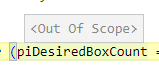
I can understand it with the spaced rec values, i.e. "qty to ship", but a regular int?
 mjmatthiesen
on 26 Feb 2020
mjmatthiesen
on 26 Feb 2020
You have a open parenthesis around the variable name: Am I seeing it correctly? What if you add a space after the open parenthesis. And are you hovering on the variable name or the open parenthesis?
It looks to me that it is the open parenthesis.
kalberes
on 1 Mar 2020
Hi,
Mouse was over the variable. Parenthesis is because of an if statement. The weird highlight comes from me having to click around to get the stupid debugger line highlighting to not select all the text on the line, so now it's highlighting which brackets belong together.
Spaces do nothing and are also formatted away by the AL formatter anyway.
mjmatthiesen
on 2 Mar 2020
This issue has been fixed and backported. The fix should then be available in our latest developer previews and in one of the next CU.
 qutreson
on 30 Jun 2020
qutreson
on 30 Jun 2020
Related issues
 TinaMenezes
·
3Comments
TinaMenezes
·
3Comments
 gregoral
·
3Comments
gregoral
·
3Comments
 bvbeek
·
3Comments
bvbeek
·
3Comments
 RonKoppelaar
·
3Comments
RonKoppelaar
·
3Comments
 AndersMad
·
3Comments
AndersMad
·
3Comments