Al: Error: It is not possible to add a breakpoint at the location requested.
Describe the bug
I'm not able to set breakpoints in my al code
To Reproduce
Im running the latest version on docker, and on some places i can set breakpoint, on some i cannot and i got the error from title
Expected behavior
I should be able to set breakpoints everywhere
Screenshots

Version:
- AL Language: 4.0.206840
 NemanjaKutlesic
All 14 comments
same problem. Restarting VSCode fixes it for me :)
 LFlamme
on 10 Jan 2020
LFlamme
on 10 Jan 2020
It is not temporary solution, some of them work after restart, but some still remains dead
NemanjaKutlesic
on 10 Jan 2020
Same problem. Came with a recent update. Same as begin/end autocomplete being entirely broken now.
 mjmatthiesen
on 10 Jan 2020
mjmatthiesen
on 10 Jan 2020
Have you published the code with F5?
Can you provide a repro.? Is it that you just click around and add breakpoints and some succeed, some not?
Have you renamed, or deleted any file that had a breakpoint?
What happens if you open the breakpoints window in the debug tab and delete all breakpoints, and start re adding them?
 kalberes
on 10 Jan 2020
kalberes
on 10 Jan 2020
This issue also occurs quite frequently on my dev environment. I could not figure out the exact situation until a couple of minutes ago.
In my case the following scenario creates the issue:
- Change a piece of code
- Do a RAD
- Select "Debug without publishing" from VSCode and wait untill the session is started.
- Try to add a breakpoint withing the code you've just changed.
VSCode now throws the error "Error: It is not possible to add a breakpoint at the location requested.".
This leads me to believe it has something to do with Rapid Application Publishing.
 daansaveyn
on 13 Jan 2020
daansaveyn
on 13 Jan 2020
@daansaveyn
- What does it mean "Do a RAD"? Do an Alt Ctrl F5? RAd publishing without debugging?
- Have you tried Alt F5 publishing with debugging. Does that work?
I have no repro on this on the latest build(for you insider docker) I have assumed "Do a RAD" being an Alt Ctrl F5. But there were no changes in RAD compared to the released version 15.x
Breakpoint resolution happens on the server. If the code the (BC, NAV, your term) server knows as AL source code for an application object does not match a line number of a given statement you set a breakpoint at, that is when the error you have seen happens. This means that one of the publishing scenarios have failed for you, since you have a mismatch between the source code versions
kalberes
on 16 Jan 2020
Here's an easy example:
        case precrRecRef.Number() of
            Database::"Warehouse Shipment Header":
                begin
                    precrRecRef.SetTable(lrecWhseShipHeader);
                end;
            Database::"Transfer Header":
                begin
                    precrRecRef.SetTable(lrecTransferHeader);
                end;
            Database::"Sales Header":
                begin
                    precrRecRef.SetTable(lrecSalesHeader);
                end;
        end;
You cannot set a breakpoint on case. It will be valid, until the code runs and deploys, then the breakpoint is disabled. This is annoying when I want to examine the case statement specifically, because I need a break statement in each case instead.
mjmatthiesen
on 17 Jan 2020
I can confirm mjmatthiesen: we can not debug case structures.
 bleisibach
on 12 Feb 2020
bleisibach
on 12 Feb 2020
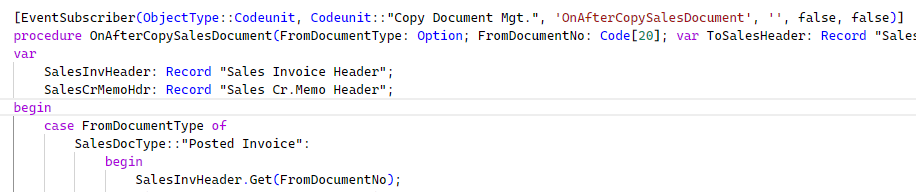
I cannot debug this case statement on version 16 RTM , using Docker container:
 rznd
on 6 May 2020
rznd
on 6 May 2020
Neither do I. I cannot debug case structures
Versión: ES Business Central 16.0 (Plataforma 16.0.11233.13086 + Aplicación 16.0.11240.11946)
 achecac
on 19 May 2020
achecac
on 19 May 2020
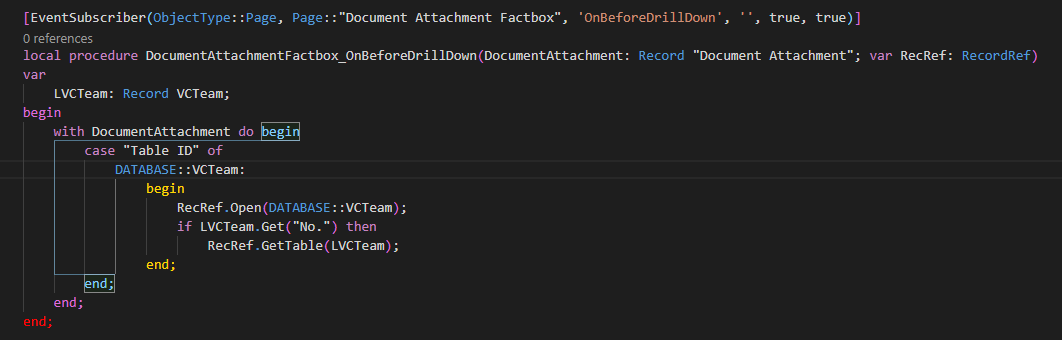
I have the same problem:
 guilliano
on 4 Jun 2020
guilliano
on 4 Jun 2020
I accept it as a bug for now.
kalberes
on 4 Jun 2020
The issue has been fixed and checked into the master branch. It will be available in the next major release of Business Central or through the preview program. Please try it out and let us know if you still encounter the issue. As requested through the support channel, the fix will also be backported to the 16 branch and will be available in the next CU (16.6)
 atoader
on 2 Sep 2020
atoader
on 2 Sep 2020
hello,
i have a similar issue. I can set breakpoint in some of the methods of sales line.dal but on some of them cannot.
I thought problems with symblos and cache so i redownloaded them but the issue still exist.
Is this fix related to this kind of issue?
 albgen
on 26 Oct 2020
albgen
on 26 Oct 2020
Related issues
 AddEleven
·
3Comments
AddEleven
·
3Comments
 SteveKrisjanovsD365
·
3Comments
SteveKrisjanovsD365
·
3Comments
 gregoral
·
3Comments
gregoral
·
3Comments
 kine
·
3Comments
kine
·
3Comments
 ThomasBrodkorb
·
3Comments
ThomasBrodkorb
·
3Comments
Most helpful comment
Here's an easy example:
You cannot set a breakpoint on case. It will be valid, until the code runs and deploys, then the breakpoint is disabled. This is annoying when I want to examine the case statement specifically, because I need a break statement in each case instead.