Al: AppSourceCop active in workspace folder despite settings
Describe the bug
In a repo with two folders (apps) A and B and a workspace containing these, AppSourceCop rules are used on the B folder app.json although activated only for folder A.
To Reproduce
Create a repo with subfolders app and test. Add a workspace and include both folders (and use that workspace of course ;-)).
Activate the AppSourceCop in the app folder only.
_Click somewhere into the test folder and wait._
These are my current settings:
workspace.code-workspace
{
    "folders": [
        {
            "path": "app"
        },
        {
            "path": "test"
        }
    ],
    "settings": {
        "al.backgroundCodeAnalysis": false,
        "al.enableCodeAnalysis": false
    }
}
app\.vscode\settings.json
[...]
    "al.enableCodeAnalysis": true,
    "al.backgroundCodeAnalysis": true,
    "al.codeAnalyzers": ["${CodeCop}","${AppSourceCop}","${UICop}"],
    "al.ruleSetPath": ".\\.vscode\\AppSourceCop.ruleset.json"
}
test\.vscode\settings.json
[...]
    "al.enableCodeAnalysis": false,
    "al.backgroundCodeAnalysis": false
}
Expected behavior
The AppSourceCop should not be run for the test folder.
Instead, the AppSourceCop throws errors for the test > app.json
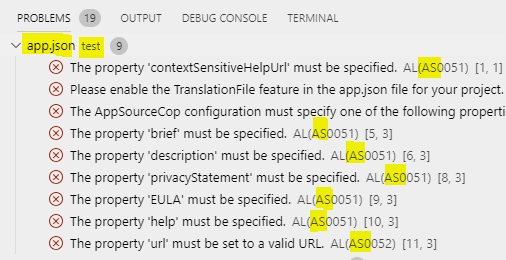
It might take some time until the errors show up.
Versions:
- AL Language: 4.0.199169
- DE Business Central 15.2 (Platform 15.0.37954.0 + Application 15.2.38034.0)
 NKarolak
All 5 comments
A work around could be to consider having them in 2 different workspaces.
Go ahead and post this to our Ideas forum at https://aka.ms/BusinessCentralideas, or vote up the idea if its already there. We're constantly monitoring top Ideas and will consider them for a future release.
 PooyaKharamesh
on 26 Nov 2019
PooyaKharamesh
on 26 Nov 2019
Hi @PooyaKharamesh
I see this as a bug - because if I am setting the CodeCops per folder, they should be working per folder. Having Test app and Main app in separate workspaces is complicating everything and is against what was done to support multiple roots in workspaces (automatic dependency publishing etc.). It is really just possible workaround, shortterm (and if it is workaround, there is bug...).
Please, reconsider this again, because it is really a bug, not feature...
 kine
on 6 Dec 2019
kine
on 6 Dec 2019
Agree with @kine and @NKarolak
This is most certainly a bug and now how workspaces are to function. There's vs code settings, workspace settings, and project settings. I may have subproject that wouldn't be on app source and thus need that cop disabled.
 mjmatthiesen
on 10 Dec 2019
mjmatthiesen
on 10 Dec 2019
Upvote the idea: https://experience.dynamics.com/ideas/idea/?ideaid=5a5f8d29-4d10-ea11-b265-0003ff68d51d
NKarolak
on 3 Mar 2020
See #5585
 kalberes
on 29 Apr 2020
kalberes
on 29 Apr 2020
Related issues
 JavierFuentes
·
3Comments
JavierFuentes
·
3Comments
 lvanvugt
·
3Comments
lvanvugt
·
3Comments
 ThomasBrodkorb
·
3Comments
ThomasBrodkorb
·
3Comments
 FSharpCSharp
·
3Comments
FSharpCSharp
·
3Comments
 bvbeek
·
3Comments
bvbeek
·
3Comments
Most helpful comment
Hi @PooyaKharamesh
I see this as a bug - because if I am setting the CodeCops per folder, they should be working per folder. Having Test app and Main app in separate workspaces is complicating everything and is against what was done to support multiple roots in workspaces (automatic dependency publishing etc.). It is really just possible workaround, shortterm (and if it is workaround, there is bug...).
Please, reconsider this again, because it is really a bug, not feature...