Following #4841 (@atoader )
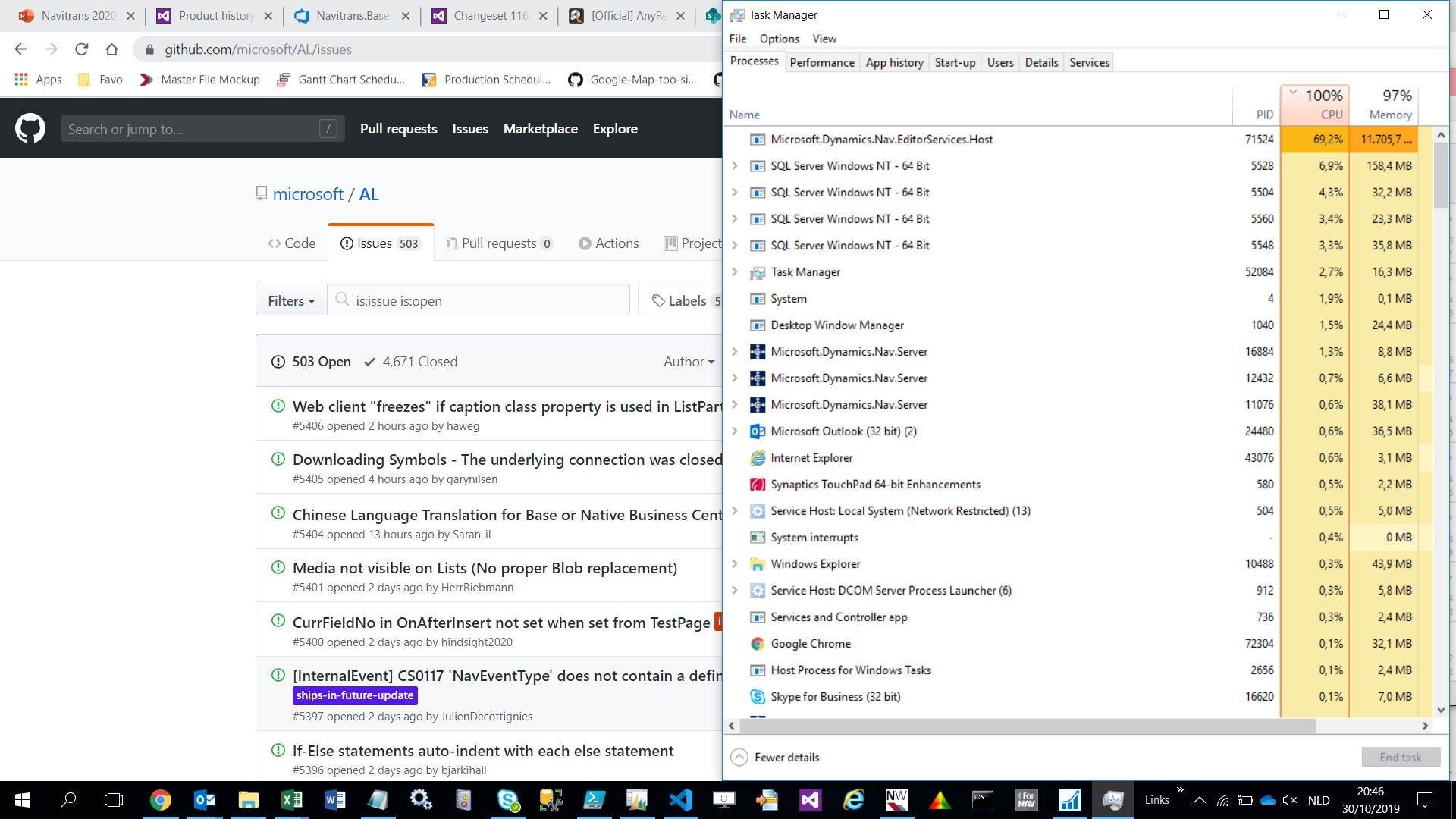
We've currently converted our solution to AL and started fixing errors (150+). (Not building / publishing yet). Some figures:
- Memory usage on average : 10 - 12 Gb
- CPU usage : varies from 40% to 100%
- Size of the project : 172 Mb
- Number of AL files : 5200+ (_We are currently not able to split the extension in smaller extensions._)
- CodeLens : Off
- al.enableCodeAnalysis: false
Working in VS Code is really slow, changing code / typing has a delay. It's not workable as daily tool currently...
AL version

Any hints / hidden feature flags / upcoming fixes to expect to reduce memory usage, speed up the VS Code experience?
 fvet
fvet
All 9 comments
Try "al.incrementalBuild": true as well to reuse the background compilation when using Ctrl + Shift +B. The memory usage is higher than expected for a project of this size. Is this project built on top of the Base Application or is it customizing it?
 atoader
on 30 Oct 2019
atoader
on 30 Oct 2019
Thanks, will try the incrementalBuild (although I was not building yet at this stage) and will keep this thread updated. The project is a separate ISV add-on, no base app customizing (we should be able to avoid once all requested events have been made available)
fvet
on 30 Oct 2019
We recommend using the following settings for larger solutions:
{
    "al.enableCodeAnalysis":  false,
    "editor.codeLens":  false,
    "al.incrementalBuild":  true,
    "al.enableCodeActions":  false
}
In addition to those settings, you can consider excluding the source folder and the Microsoft.Dynamics.Nav.EditorServices.Host.exe from Windows Defender analysis.
atoader
on 6 Nov 2019
I will close this issue for now as there is no action we can take. We will keep investing in performance improvements for the compiler, but our main recommendation is to consider splitting your large applications into smaller projects.
atoader
on 6 Nov 2019
@fvet we are exploring adding some configuration settings that will allow you to trade responsiveness for lower CPU usage.
I think it will help us a lot if you post this as an idea on https://aka.ms/BusinessCentralideas or vote up the idea if its already there. If the idea gets sufficient votes, we will be able to allocate a larger amount of time to exploring additional performance improvements.
atoader
on 11 Nov 2019
For those also in the need for a better development experience, please upvote the idea below.
https://experience.dynamics.com/ideas/idea/?ideaid=a37cf0d0-2105-ea11-b862-0003ff68edfa
fvet
on 12 Nov 2019
@atoader
Working with VS Code on large workspaces for the last week has honestly been a real pain. Every change of keystroke, deletion/modifcation of code, a property, ... seems to immediately result in the background compiler to run a full workspace check.
Wouldn't it be an idea that we could instruct the background compiler to only run at certain triggers (using a separate setting)?
- When modifying the current object, syntax errors on the current objects might be shown
- Only when 'saving' the current object, the compiler could then check the impact on other objects in the workspace.
I think we can certainly live with the compiler not being 'real-time' responsive upon writing code before actually saving it.
PS: What's the difference between below settings? Currently only the first has been disabled on our workspaces. If the latter also required?
al.enableCodeAnalysis
al.backgroundCodeAnalysis
@atoader, fvet's got a great point about being able to have greater control over when the compiler makes checks on the whole solution.
I'm also curious if the RAD functionality can be made more expendable, so we could e.g. only publish a single folder or select couple of .al files in the VSCode file explorer and only compile/publish them, just like objects could be selected in C/SIDE for compiling just a subset of all the objects.
There could also be great performance benefits made if settings could exclude/ignore folders from the compiler, since the compiler might be traversing through a lots of unnecessary files. I've seen multiple issues in this repo that would be fixed by this functionality that I can group together if you're interested.
One would at least think the solution isn't only for partners to break down monoliths into smaller pieces, the compiler/development environment could also solve part of the issue (and make the process of modularizing apps more efficient/enjoyable).
 bjarkihall
on 5 Feb 2020
bjarkihall
on 5 Feb 2020
A big part of this seems to be that the background task forks off lots distinct threads, as such the Windows scheduler effectively gives it priority of the CPU.
Finding "Microsoft.Dynamics.Nav.EditorServices.Host.exe" and setting it's priority "Below normal" appears to help without significantly slowing the process.
 rdebath
on 27 Feb 2020
rdebath
on 27 Feb 2020
Related issues
 kine
·
3Comments
kine
·
3Comments
kine
·
3Comments
kine
·
3Comments
 JavierFuentes
·
3Comments
JavierFuentes
·
3Comments
 worldofthenavcraft
·
3Comments
worldofthenavcraft
·
3Comments
 RonKoppelaar
·
3Comments
RonKoppelaar
·
3Comments