Al: WebEndpoint (PublicWebBaseUrl) is not returned when publishing and building app
Describe the bug
When publishing an app from VSCode, the final step to launch the startup page is failing with this message:
Could not open the specified startup page. Please check that the server configuration key PublicWebBaseUrl has been properly set.
To Reproduce
Steps and to reproduce the behavior:
- Go to CustomSettings.config
- Element PublicWebBaseUrl is empty
2.1. Element PublicWebBaseUrl is defined (second test) - Create new AL. project in visual studio code
- Press F5 to publish and launch the app
- launch.json
json
{
"version": "0.2.0",
"configurations": [
    {
        "type": "al",
        "request": "launch",
        "name": "My Dev Server",
        "server": "http://xxx.xxx.xxx.xxx",
        "serverInstance": "serverinstance",
        "port": 9044,
        "authentication": "Windows",
        "startupObjectType": "Page",
        "startupObjectId": 31,
        "schemaUpdateMode": "Synchronize"
    }
]
}
Debug Console
Powershell
[2019-04-29 15:20:38.24] Publishing AL application using launch configuration '<ServerName> <ServerInstance>'.
[2019-04-29 15:20:38.31] Targeting server '<ServerName>' and server instance '<ServerInstance>'.
[2019-04-29 15:20:38.31] Using Windows authentication.
[2019-04-29 15:20:38.33] Sending request to http://<ServerInstance>:<ServerPort>/<ServerInstance>/dev/apps?SchemaUpdateMode=synchronize
[2019-04-29 15:20:39.99] Success: The package 'xxxxx_1.0.0.0.app' has been published to the server.
[2019-04-29 15:20:40.25] Error: Could not open the specified startup page. Please check that the server configuration key PublicWebBaseUrl has been properly set.
Expected behavior
In the Success response After publishing the app, BC should return something like
Powershell
{
    "WebEndpoint": "http://<ServerInstance>/<ServerInstance>/WebClient"
}
When I trace the traffic with Fiddler, I see no such a response.
Then of course VSCode outputs an error like this:
Powershell
[2019-04-29 15:20:40.25] Error: Could not open the specified startup page. Please check that the server configuration key PublicWebBaseUrl has been properly set.
Screenshots



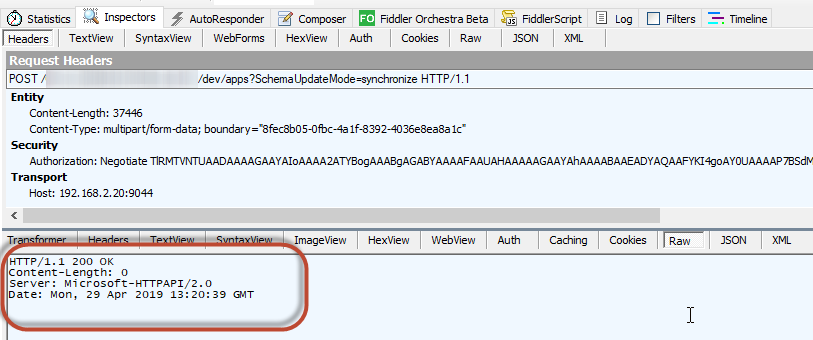
Versions:
- AL Language: Microsoft_Application_14.0.29537.0.app
- Business Central: Microsoft_System_14.0.29530.0
 louagej
All 2 comments
Strange, but it seems to working fine today.
So I couldn't find the cause to prevent this from happening again.
louagej
on 30 Apr 2019
After changing the PublicWebBaseURL key it is necessary to restart both the Server Instance and Visual Studio Code; then Publishing the app should work. without "Error: could not open the specified Startup page…" (we had the same Problem today with BC / Dynamics NAV 130)
 RudolfEisele
on 5 Nov 2019
RudolfEisele
on 5 Nov 2019
Related issues
 worldofthenavcraft
·
3Comments
worldofthenavcraft
·
3Comments
 ThomasBrodkorb
·
3Comments
ThomasBrodkorb
·
3Comments
 SteveKrisjanovsD365
·
3Comments
SteveKrisjanovsD365
·
3Comments
 RedFoxUA
·
3Comments
RedFoxUA
·
3Comments
 lvanvugt
·
3Comments
lvanvugt
·
3Comments
Most helpful comment
After changing the PublicWebBaseURL key it is necessary to restart both the Server Instance and Visual Studio Code; then Publishing the app should work. without "Error: could not open the specified Startup page…" (we had the same Problem today with BC / Dynamics NAV 130)