Al: Filterpagebuilder.Runmodal always returns false and does not run the filter page
Hi,
every time a filterpagebuilder calls the method RunModal the return value is false an the filterpage is never displayed.
To reproduce this you can open the "Interaction Log Entries" for some contact. In the actions (Screenshot 1) you can find an action "Filter" which calls a filterpagebuilder from code (Screenshot 2).


Versions:
AL Language --> 2.0.58805
System Information --> DE Dynamics NAV 14.0 (26322)
 SPinkow
All 11 comments
In BC CU3, I am facing similar issue in using standard Workflow, to set condition, the dynamic request page did not show because the FilterPageBuilder.RunModal immediately returns false:

So, I wrote a simple test with the following code:
FilterPageBuilder.AddTable('Purchase Header', 38);
FilterPageBuilder.AddFieldNo('PurchaseHeader', 2);
FilterPageBuilder.RunModal;
Running the code, there is an error: The metadata object page 9598 was not found.
I ran the same test code in NAV 2018 without problem and in there I can set the condition of Workflow as normal.
 ChewKimPoh
on 25 Jan 2019
ChewKimPoh
on 25 Jan 2019
In BC CU3, I am facing similar issue in using standard Workflow, to set condition, the dynamic request page did not show because the FilterPageBuilder.RunModal immediately returns false:
So, I wrote a simple test with the following code:
FilterPageBuilder.AddTable('Purchase Header', 38);
FilterPageBuilder.AddFieldNo('PurchaseHeader', 2);
FilterPageBuilder.RunModal;Running the code, there is an error: The metadata object page 9598 was not found.
I ran the same test code in NAV 2018 without problem and in there I can set the condition of Workflow as normal.
Same here.
btw... it did work in 13.0.24623.0!
... any information from Microsoft (maybe it will be solved in CU4)
 Slindebaum
on 27 Feb 2019
Slindebaum
on 27 Feb 2019
Hi, I am using Business Central on Prem (Dynamics.365.BC.27233) and facing same issue with FilterPagebuilder.RUN. please let me know if any one is able to a workaround for the same.
 rishiaurrishabh
on 1 Mar 2019
rishiaurrishabh
on 1 Mar 2019
I have the same problem using standard Workflows.
BC on premise CU 3 is not working
Latest Docker images sandbox:base and sandbox:nl is working.
I've created Workflow from template for Purchase Invoice and tried to click Condition - AssistEdit
I've debugged the code, and until T1520 Function RunDynamicRequestPage and code
IF NOT FilterPageBuilder.RUNMODAL THEN
everything is the same and all variables have the same value.
I guess it's the same problem you guys have.
 tinfister
on 20 Mar 2019
tinfister
on 20 Mar 2019
I have the same issue with BC on premise Cu3.
Do you know if it is solved in Cu4?
Thank you
 JJMadrigal
on 20 Mar 2019
JJMadrigal
on 20 Mar 2019
Seems to be fixed in CU4. Another two hours of life wasted chasing bugs...
 markbrummel
on 25 Mar 2019
markbrummel
on 25 Mar 2019
I don't think it's entirely fixed. It's certainly less broke in the latest BC release but it does not appear to be fully functional either. I've checked the latest release plus several customers and while a FilterPageBuilder will come up, it has limited functionality. If not filters were previously defined, it comes up blank. If a filter was previously defined, you can edit that filter but you cannot delete it or add new ones.
 eric-silverw-com
on 9 Apr 2019
eric-silverw-com
on 9 Apr 2019
Quickfix : You can add an empty 9598 page and then the problem is gone in the version that has the bug. I have tryed this in a BC365Cu3
 LarsMadsen
on 23 May 2019
LarsMadsen
on 23 May 2019
I have the same problem. We are running BC on docker, image "mcr.microsoft.com/businesscentral/onprem:13.6.29777.0-is"
and I still can't select filter on filter page
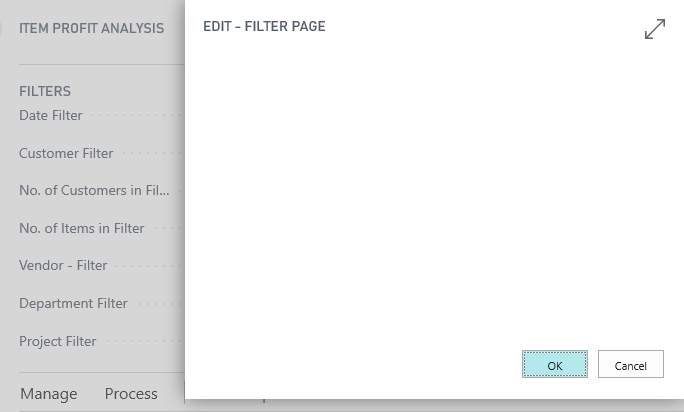
did I missed something?
 tomasevicstefan
on 3 Jun 2019
tomasevicstefan
on 3 Jun 2019
Hi! In the last months, we've been working hard on adding new features that increase your productivity and on improving the quality of the tools. Unfortunately, this meant that we were not able to follow up on as many GitHub issues as we have liked.
Is this issue still a problem for you? Can you provide a sample project to reproduce the issue? Does it reproduce on the Wave 2 2019 release?
 atoader
on 9 Nov 2019
atoader
on 9 Nov 2019
This issue has been closed because it needs more information and has not had recent activity. Please open a new issue if you believe this has not been resolved and reference the current issue.
atoader
on 18 Nov 2019
Related issues
 ghost
·
3Comments
ghost
·
3Comments
 FSharpCSharp
·
3Comments
FSharpCSharp
·
3Comments
 lvanvugt
·
3Comments
lvanvugt
·
3Comments
 kine
·
3Comments
kine
·
3Comments
 TinaMenezes
·
3Comments
TinaMenezes
·
3Comments
Most helpful comment
In BC CU3, I am facing similar issue in using standard Workflow, to set condition, the dynamic request page did not show because the FilterPageBuilder.RunModal immediately returns false:
So, I wrote a simple test with the following code:
FilterPageBuilder.AddTable('Purchase Header', 38);
FilterPageBuilder.AddFieldNo('PurchaseHeader', 2);
FilterPageBuilder.RunModal;
Running the code, there is an error: The metadata object page 9598 was not found.
I ran the same test code in NAV 2018 without problem and in there I can set the condition of Workflow as normal.