Al: Debugger: How to set a watch on a field
In NAV 2018 it seems not possible to set a watch on a field of a record variable. Or am doing something wrong?
What ever I do, the watch always says _Not available_.
SO this is on NAV 2018. Due to technical issues I cannot check it this very moment on D365BC. Curious whether it does work there. The various preview update announcement do not mention anything on this topic anyway.
 lvanvugt
All 9 comments
Today I experienced it somewhat different. It does work, but apparently not for the Rec variable. Is that right?
lvanvugt
on 22 Sep 2018
It works for me. Just add rec, or a rec.[field name] to the watch.
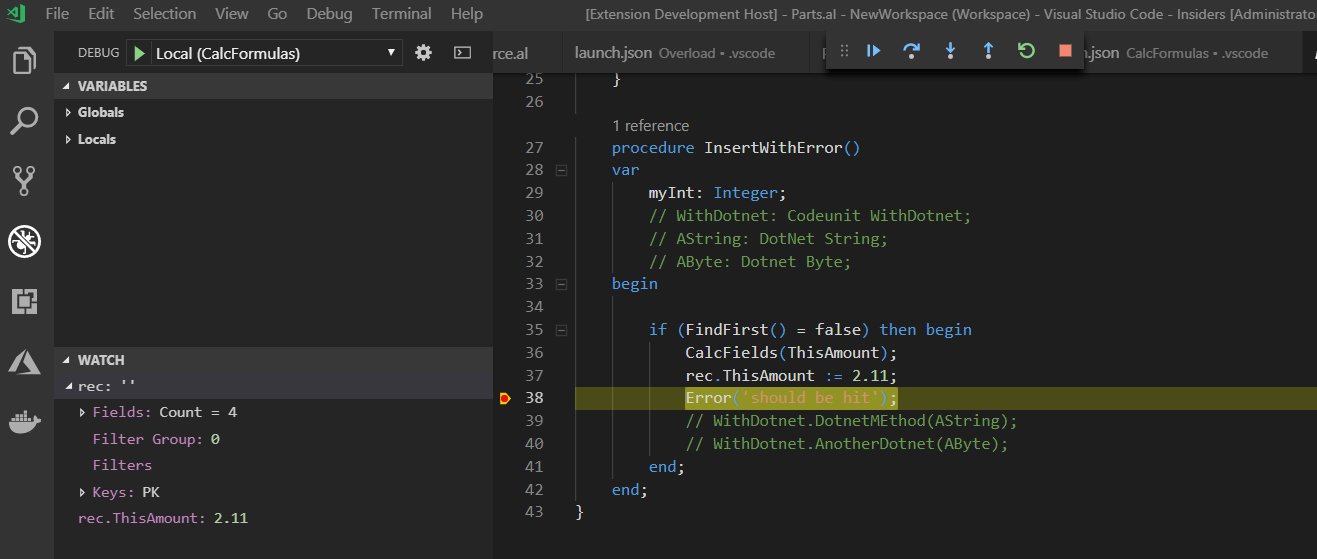
 kalberes
on 22 Sep 2018
kalberes
on 22 Sep 2018
@kalberes , I guess this is on D365BC?
lvanvugt
on 23 Sep 2018
As far as I know it should work on NAv 2018 too.
kalberes
on 24 Sep 2018
table."field name" works for me v2.0.42188.
However you need to type it in the watch list like some sort of caveman...
I hope they plan to bring back r-click -> add to watch for record variables.
 BartPermentier
on 26 Sep 2018
BartPermentier
on 26 Sep 2018
Long term plan is to have intellisense in the watch window. We'll see what options we have for adding variables with VScode's gestures to the watch window
kalberes
on 26 Sep 2018
While in a debug session you can mark an expression -> right click -> Add to watch

 tfenster
on 26 Sep 2018
tfenster
on 26 Sep 2018
While in a debug session you can mark an expression -> right click -> Add to watch
Yep, used that one too. But still have issues with (implicit references to) Rec variable.
lvanvugt
on 26 Sep 2018
Ok, that probably will need to happen in the AL extension as we can't expect VS Code to understand how that works :)
tfenster
on 26 Sep 2018
Related issues
 bvbeek
·
3Comments
bvbeek
·
3Comments
 kine
·
3Comments
bvbeek
·
3Comments
kine
·
3Comments
bvbeek
·
3Comments
 FSharpCSharp
·
3Comments
FSharpCSharp
·
3Comments
 ThomasBrodkorb
·
3Comments
ThomasBrodkorb
·
3Comments