Hi guys, I have developed an extension for NAV2017 on my local PC and now I want to test it against the standard application of NAV2017. Therefore I want to download the symbols in Visual Studio Code, which is unfortunately not possible. Do I have to consider something specific?
This is my launch.json:

Is it possible to download the symbols, also when you want to test your extension on-prem and not on server?
 malue19
All 7 comments
@malue19 Extensions in AL are not possible with NAV2017 as far as I know. You need NAV2018 or Business Central version to be able to develope Extensions in AL/VSCode
 joshua-lehmann
on 13 Sep 2018
joshua-lehmann
on 13 Sep 2018
@joshua-lehmann In the meantime, I also found out, that it is not possible with NAV2017, but with NAV2018, that is why I am upgrading my database from 2017 to 2018...
malue19
on 13 Sep 2018
Hey guys, I have upgraded my NAV from 2017 to 2018. It is working fine and now I would like to download the symbols in Visual Studio Code to test my extensions...
This is how my launch.json looks like:
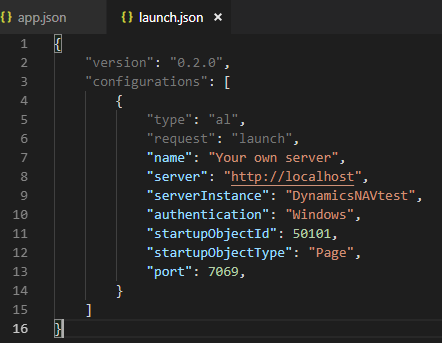
And this is my app.json, where I say, which version my NAV is:
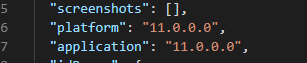
When I try to download the symbols I get the following output:
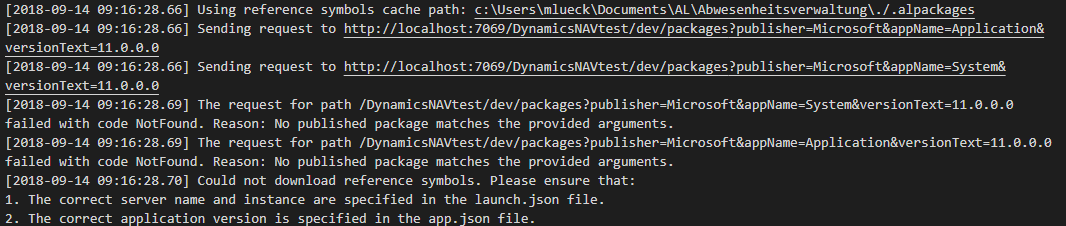
Any ideas what my mistakes are?
malue19
on 14 Sep 2018
Hi, in an upgraded DB I think there are no symbols you need to manually import them to NAV2018.
Maybe those Links helps you:
https://blogs.msdn.microsoft.com/nav/2018/02/02/import-symbols-in-new-or-upgrade-databases-with-microsoft-dynamics-nav-2018/
https://blogs.msdn.microsoft.com/nav/2018/01/16/generate-symbols-in-a-modern-development-environment-with-microsoft-dynamics-nav-2018/
joshua-lehmann
on 14 Sep 2018
@joshua-lehmann Thank you for your help, but I do not know how to handle the different steps in your documentations...
malue19
on 14 Sep 2018
@malue19 Hmm the instructions are pretty clear in the documentation, I am sorry I cannot help you more there.
You should ask help from Microsoft so a support engineer can directly assist you. For NAV2018 you need to use the support portal (github is only for D365 BC): https://support.microsoft.com/en-gb/assistedsupportproducts#gsproductselector
Just search for Dynamics NAV2018 and use your Partner Account/Partner Support Incident Contract to create a case.
joshua-lehmann
on 14 Sep 2018
@joshua-lehmann You were right, the instructions are pretty clear^^ now I have the symbols :)
malue19
on 14 Sep 2018
Related issues
 SteveKrisjanovsD365
·
3Comments
SteveKrisjanovsD365
·
3Comments
 gregoral
·
3Comments
malue19
·
3Comments
gregoral
·
3Comments
malue19
·
3Comments
 FSharpCSharp
·
3Comments
FSharpCSharp
·
3Comments
 lvanvugt
·
3Comments
lvanvugt
·
3Comments