Hey guys, has the property DataItemTable changed in VSC? Maybe changed to DataItemLink? I am trying to use it within my dataitem...
question
 malue19
All 7 comments
Custom Sales Quote:
        dataitem("Sales header";"Sales Header")
        {
            DataItemTableView = SORTING("Document Type","No.")
                                WHERE("Document Type"=CONST(Quote));
            RequestFilterFields = "No.","Sell-to Customer No.","No. Printed";
            RequestFilterHeading = 'Sales Quote';
            column(DocType_SalesHeader;"Document Type")
...
                    dataitem("Sales Line";"Sales Line")
                    {
                        DataItemLink = "Document Type"=FIELD("Document Type"),
                                       "Document No."=FIELD("No.");
                        DataItemLinkReference = "Sales Header";
                        DataItemTableView = SORTING("Document Type","Document No.","Line No.");
Hope it helps :)
 SirBETE
on 23 Aug 2018
SirBETE
on 23 Aug 2018
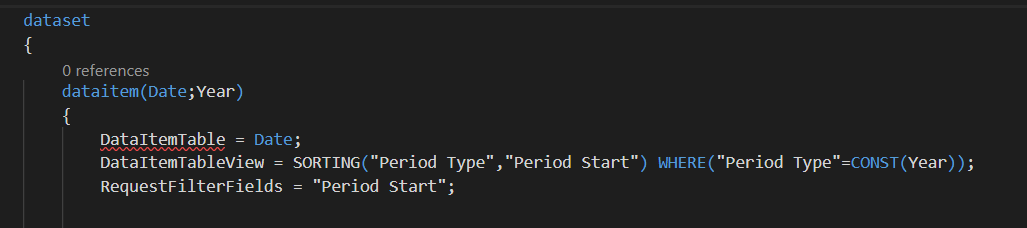
This is the error I get.
malue19
on 23 Aug 2018
With the message?
Doubt it's needed ...
SirBETE
on 23 Aug 2018
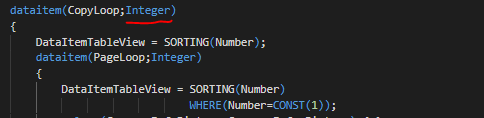
it's not a property anymore. The first parameter in Dataitem is the Name, the second is the DataItemTable
 mr-sala
on 23 Aug 2018
mr-sala
on 23 Aug 2018
👍1
Ah yes, @mr-sala is correct, it's
dataitem(NAME; TABLE)
SirBETE
on 23 Aug 2018
👍1
Ok, so wrong order and then I do not need the Property DataItemTable any longer?
malue19
on 23 Aug 2018
That's right!
You can use the Txt2AL converter (usually in C:\Program Files (x86)\Microsoft Dynamics NAV\110\RoleTailored Client) to convert standard reports (or some of your own) and see some sintaxis examples.
Hope it helps!
mr-sala
on 23 Aug 2018
👍2
Was this page helpful?
0 / 5 - 0 ratings
Related issues
 FSharpCSharp
·
3Comments
FSharpCSharp
·
3Comments
 RonKoppelaar
·
3Comments
RonKoppelaar
·
3Comments
 kine
·
3Comments
kine
·
3Comments
 TinaMenezes
·
3Comments
TinaMenezes
·
3Comments
 ThomasBrodkorb
·
3Comments
ThomasBrodkorb
·
3Comments
Most helpful comment
That's right!
You can use the Txt2AL converter (usually in C:\Program Files (x86)\Microsoft Dynamics NAV\110\RoleTailored Client) to convert standard reports (or some of your own) and see some sintaxis examples.
Hope it helps!