Al: Option to disable browser when debugging.
Hi, I usually develop using the RTC client, since it's faster. But, each time i publish the extension from VS Code by hitting F5 (or ctrl+F5) the browser always opens. Like I get it if you're developing for BC365, but we are still primarily targeting NAV2018 while future proofing for BC365.
So, could we please have a launch option like: "openInBrowser": true|false
Thank you.
 graknol
All 8 comments
Maybe you can use "CRS AL Language Extension".
This will add a new Command: "CRS: Run Object (Windows Client)"
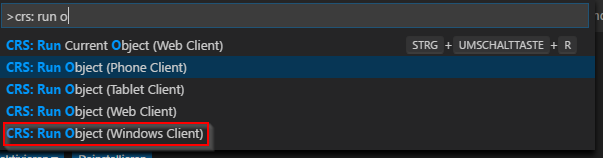
You can find more Infos about this Extension in the blog of @waldo1001 http://www.waldo.be/2018/04/18/crs-al-language-extension/
 ChrisBlankDe
on 23 Jul 2018
ChrisBlankDe
on 23 Jul 2018
@ChrisBlankDe Thank you for sharing this extension, yes it allows me to run an object that I specify, but it doesn't support building/publishing the extension without opening the browser 😢
graknol
on 23 Jul 2018
We received this request from multiple sources and it is something we would like to implement in the near future.
 StanislawStempin
on 24 Jul 2018
StanislawStempin
on 24 Jul 2018
Just blank the Web Client Base URL in your Navision Service (Under Client Services) and publish using F6; that's what I'm doing :)
PS: You might want to rebind F7 since that button pulls the code from your Navision. I did it the first time I accidentally pressed it and lost a lot of code.
 BartPermentier
on 24 Jul 2018
BartPermentier
on 24 Jul 2018
Awesome, it works thank you!
But does F7 overwrite your AL files too??
Den tir. 24. jul. 2018, 16:55 skrev Bart Permentier <
[email protected]>:
Just blank the Web Client Base URL in your Navision Service (Under Client
Services) and publish using F6; that's what I'm doing :)PS: You might want to rebind F7 since that button pulls the code from your
Navision. I did it the first time I accidentally pressed it and lost a lot
of code.—
You are receiving this because you authored the thread.
Reply to this email directly, view it on GitHub
https://github.com/Microsoft/AL/issues/2986#issuecomment-407436533, or mute
the thread
https://github.com/notifications/unsubscribe-auth/ABTQPYdMgRGKHXBdmtX-YjVujsZV5aaJks5uJzVGgaJpZM4Vasio
.
graknol
on 24 Jul 2018
F7 Overwrites your AL files with the version deployed on the server so you should rebind that function to Shift-F7 or something :)
BartPermentier
on 24 Jul 2018
Oh, thank you, lifesaver :-)
Den tir. 24. jul. 2018, 18:14 skrev Bart Permentier <
[email protected]>:
F7 Overwrites your AL files with the version deployed on the server so you
should rebind that function to Shift-F7 or something :)—
You are receiving this because you authored the thread.
Reply to this email directly, view it on GitHub
https://github.com/Microsoft/AL/issues/2986#issuecomment-407464311, or mute
the thread
https://github.com/notifications/unsubscribe-auth/ABTQPRacwRfK6VpGo_kHz0c-RifjNrUdks5uJ0f5gaJpZM4Vasio
.
graknol
on 24 Jul 2018
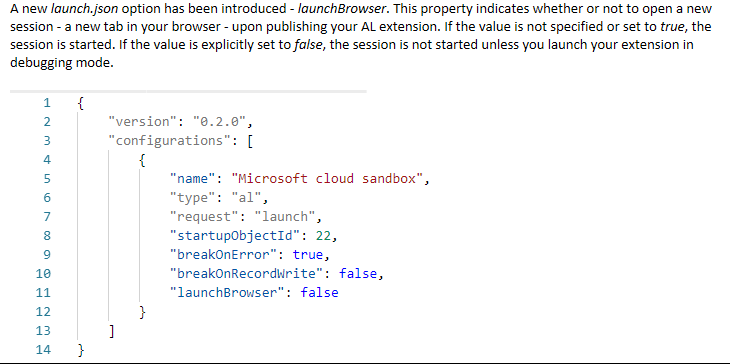
This has been implemented in the latest insider images and in the upcoming November preview release.
StanislawStempin
on 5 Nov 2018
Related issues
 worldofthenavcraft
·
3Comments
worldofthenavcraft
·
3Comments
 bvbeek
·
3Comments
bvbeek
·
3Comments
 AndersMad
·
3Comments
AndersMad
·
3Comments
 RedFoxUA
·
3Comments
RedFoxUA
·
3Comments
 daansaveyn
·
3Comments
daansaveyn
·
3Comments
Most helpful comment
We received this request from multiple sources and it is something we would like to implement in the near future.