I dont know how I can convert this line into AL code
Window.INPUT(2,faplicac);
My AL Extension Version it's 0.16 and the error that I receive it's;
'Dialog' does not contain a definition for 'INPUT'
How do you resolve this error?
 sssolammm
All 9 comments
Since there's no INPUT dialog in BC you will need to do something else. For example, create a mini page with a textbox and use that instead.
Here's a simple example: https://github.com/srenders/AL-Demos/tree/master/InputPopup
 srenders
on 23 Jul 2018
srenders
on 23 Jul 2018
Thanks @srenders I will check it. I just check it but when I am running you example in BC license cronus its supouse that the pop up have to appear before client page loads?
sssolammm
on 23 Jul 2018
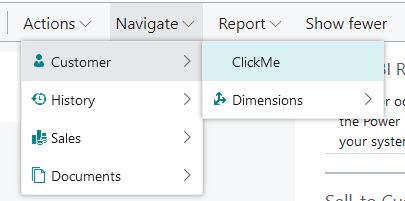
No, the popup will appear when you click the action ClickMe on the Customer List
 dNsl9r
on 24 Jul 2018
dNsl9r
on 24 Jul 2018
I dont know why I am not finding the modal, I click in costumer list but nothing appear, I try to click multiple actions in the menu but theres nothing called ClickMe and I trying to click in the first section called "General" but theres no way. Can you give me another tip?
Thanks,
sssolammm
on 24 Jul 2018
When you deploy the extension, to your server (change the launch.json) then in the customer list you should see the action ClickMe:
srenders
on 24 Jul 2018
Sorry but Im not getting the sames options. Im running:
Image: microsoft/bcsandbox:es
vsix: 0.16.19969
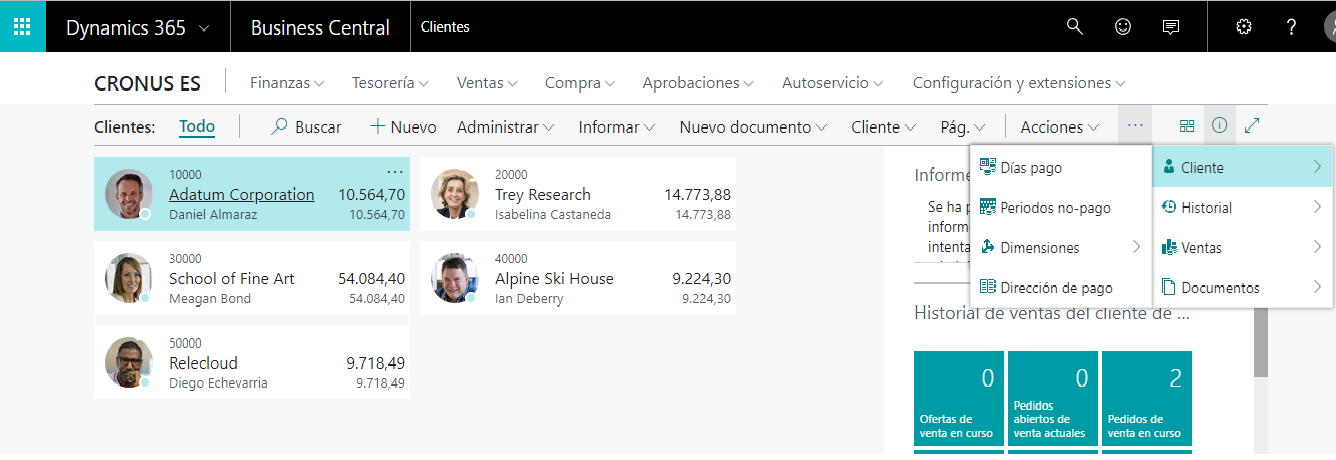
It's a version of the sandbox issue?
sssolammm
on 24 Jul 2018
Maybe? To be sure, you can try to add the action somewhere else on that page or on another page?
srenders
on 25 Jul 2018
We haven't seen any problem with actions not showing up. Can you make sure that the extension got successfully deployed to your server? The action might be somewhere else on the ES version of the product or it might have been moved by a profile.
As @srenders suggested, please try adding the action somewhere else on that page.
 StanislawStempin
on 8 Aug 2018
StanislawStempin
on 8 Aug 2018
Thanks for your time @StanislawStempin and @srenders I solved the problem
sssolammm
on 4 Oct 2018
Related issues
 RonKoppelaar
·
3Comments
RonKoppelaar
·
3Comments
 bvbeek
·
3Comments
bvbeek
·
3Comments
 ThomasBrodkorb
·
3Comments
ThomasBrodkorb
·
3Comments
 JavierFuentes
·
3Comments
JavierFuentes
·
3Comments
 ghost
·
3Comments
ghost
·
3Comments