Al: Powershell window stuck on "Creating container bc-test from image microsoft/bcsandbox:12.0.21405.22470-us".
Hi,
I am preparing a sandbox environment for BC and following instructions from here https://docs.microsoft.com/en-us/dynamics365/business-central/dev-itpro/developer/devenv-get-started-container-sandbox..
But when I run the downloaded powershell command on Windows PowerShell ISE run as admin, it stuck on the statement Creating container bc-test from image microsoft/bcsandbox:12.0.21405.22470-us .
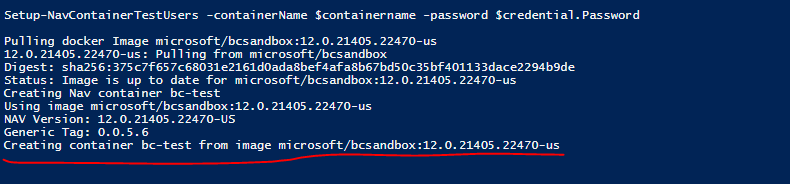
I have downloaded a proper Docker version also for windows.
What should be the issue?
Kind regards
Sudarshan
 SUD-D365
All 15 comments
Are you running Docker on Windows 10? If so, did you specify the max. memory allocated to the container using the '-memoryLimit' switch? (Example: -memoryLimit 4g)
 MikeGlue
on 8 Jun 2018
MikeGlue
on 8 Jun 2018
Yes I m running. What I did. I just installed Docker from docker official store site for windows 10, and install it. I am not familiar with docker and container.
And then just go to my BC and download the Powershell command and run. I didn't do any thing with docker even didn't login with DOcker (As I do not have any account, I don't know its require or not) :-).
Where should I define this property '-memoryLimit' ?
Please give me some more detail on it.
Kind regards
Sudarshan
SUD-D365
on 8 Jun 2018
I am having the same experience. Even with the MemoryLimit specified.
I am afraid that Docker is the issue here.
On Thu, Jun 7, 2018 at 9:58 PM, SUD-D365 notifications@github.com wrote:
Yes I m running. What I did. I just installed Docker from docker
official store site for windows 10, and install it. I am not familiar with
docker and container.
And then just go to my BC and download the Powershell command and run. I
didn't do any thing with docker even didn't login with DOcker (As I do not
have any account, I don't know its require or not) :-).
Where should I define this property '-memoryLimit' ?
Please give me some more detail on it.Kind regards
Sudarshan—
You are receiving this because you are subscribed to this thread.
Reply to this email directly, view it on GitHub
https://github.com/Microsoft/AL/issues/2503#issuecomment-395647257, or mute
the thread
https://github.com/notifications/unsubscribe-auth/AXIqcMPfRmTekDheKd3sbKvZxj8iZQ8Pks5t6gSMgaJpZM4UePFn
.
--
Regards,
Henrik Helgesen | President | Helgesen Consulting, Inc. | Phone: (818)
319-2721
 TheDoubleH
on 8 Jun 2018
TheDoubleH
on 8 Jun 2018
Correct, this is a problem with the Docker installation, the Docker network, Firewalls or the likes.
MemoryLimit gets set automatically to 4G by New-NavContainer.
With Docker on some computers, this has been seen to fail, so you could try to set the memorylimit to 3G and see if this works.
 freddydk
on 8 Jun 2018
freddydk
on 8 Jun 2018
I had the same issue. Check if your PC has the virtualization activated. You can find it in the BIOS settings.
 ptorres11
on 8 Jun 2018
ptorres11
on 8 Jun 2018
So now what to do ? I have repeated whole the installation process for Docker, Hyper-V ,Container again.
But no luck.
I am fed up with it.
Anyone please get me out of this problem.
Kind Regards
Sudarshan
SUD-D365
on 8 Jun 2018
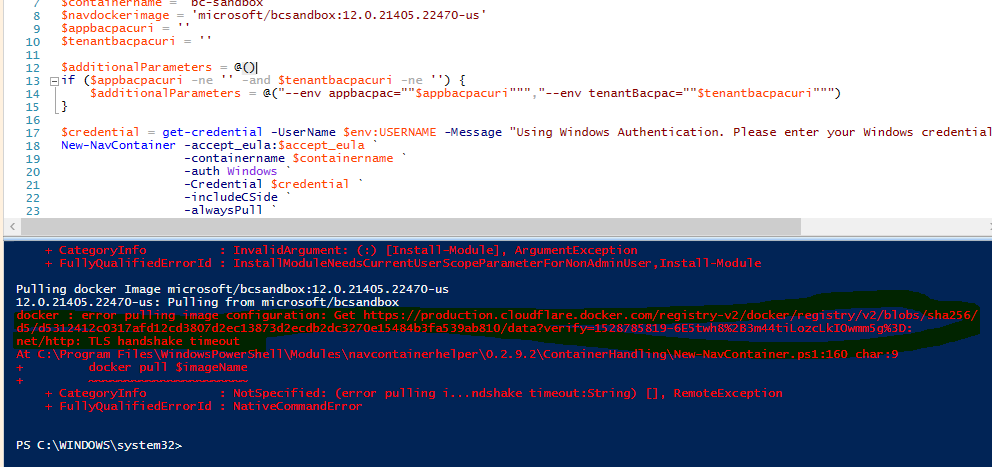
Now I m getting another error when I m pulling a image of Microsoft/bcsandbox.
Can any one give me any solution for this>?
SUD-D365
on 12 Jun 2018
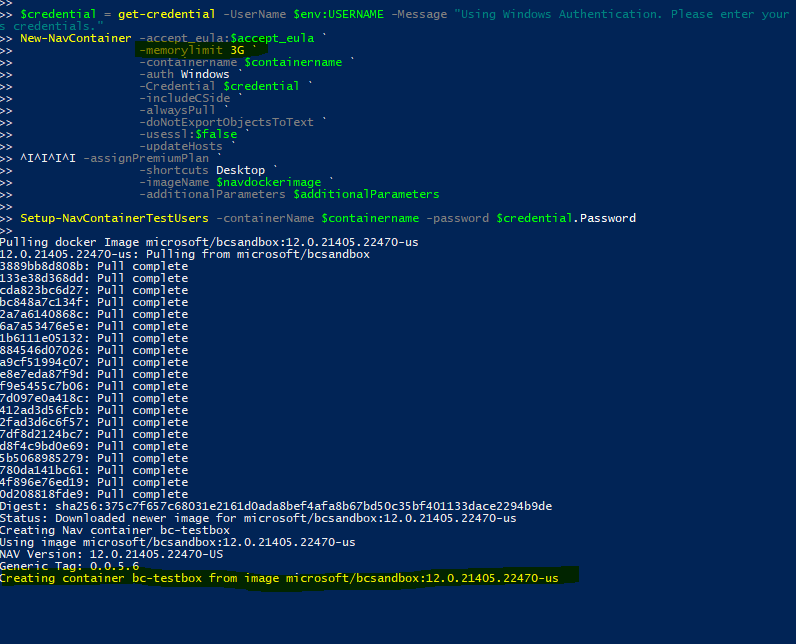
@freddydk u helped me with the TLS Timeout issue thanks vm for that ;-) . Now please help me with this issue.
Its been almost 1 an hour , its still stuck on this statement even after defining the MemoryLimit 3G as u suggested.
SUD-D365
on 12 Jun 2018
Sigh,,,,, Finally I have resolved the issue. Thanks @ptorres11 and @freddydk for your valuable suggestion.
SUD-D365
on 13 Jun 2018
Dear SUD-D365,
Could you please tell me how you resolved this issue.. I am getting the same even though i tried different computers.
"Creating container ANASBC365 from image microsoft/bcsandbox:us"
 AnasNavTech
on 11 Jul 2018
AnasNavTech
on 11 Jul 2018
@SUD-D365
Keep getting same message.."Creating container ANASBC365 from image microsoft/bcsandbox:us"
AnasNavTech
on 11 Jul 2018
How this issue has been resolved. please help us also
 AshishDynamics
on 13 Jul 2018
AshishDynamics
on 13 Jul 2018
@anasbeg , @AshishDynamics guyz..Just go to your bios setup (it was by pressing F2 on my lenevo) and enable the Virtualization feature on your windows 10 pro system.
It will work.
SUD-D365
on 14 Jul 2018
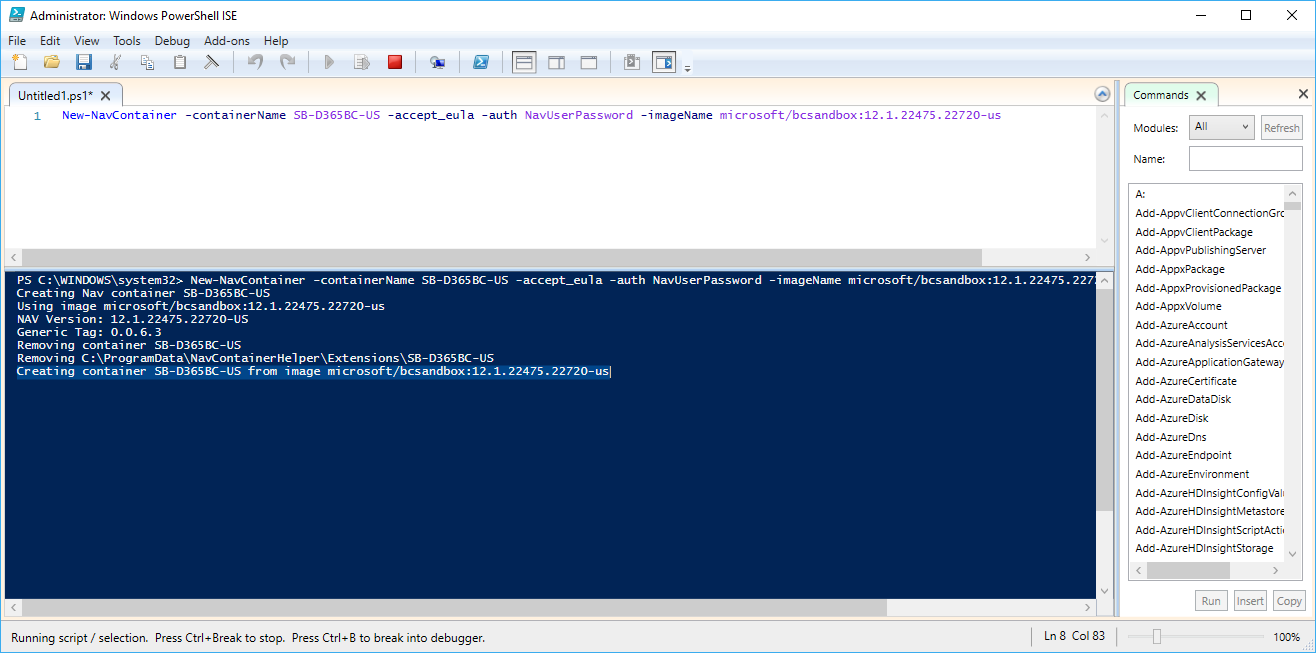
It did not work for me. Any other solution? I did try in two different environments and I am getting the same result. HELP
 SergioKelly
on 7 Aug 2018
SergioKelly
on 7 Aug 2018
Issues related to navcontainerhelper or docker should be filed on https://github.com/microsoft/navcontainerhelper or https://github.com/microsoft/nav-docker.
Please test your installation using this: https://blogs.msdn.microsoft.com/freddyk/2017/10/29/troubleshooting-nav-on-docker/ or using this script http://aka.ms/debug-containerhost.ps1
and if that doesn't resolve your issue, create a new issue in the right repo.
 StanislawStempin
on 8 Aug 2018
StanislawStempin
on 8 Aug 2018
Related issues
 AddEleven
·
3Comments
AddEleven
·
3Comments
 ghost
·
3Comments
ghost
·
3Comments
 kine
·
3Comments
kine
·
3Comments
 ThomasBrodkorb
·
3Comments
ThomasBrodkorb
·
3Comments
 malue19
·
3Comments
malue19
·
3Comments