Al: Error in Sales Documents with word layout
Moved from #1351
Also I've posted a question regarding the issue in #1452
In two latest builds (navdocker.azurecr.io/dynamics-nav:11.0.20258.0-finus and navdocker.azurecr.io/dynamics-nav:11.0.20186.0-finus) we haven't been able to run our sales document reports. They compile but running the report results in error:
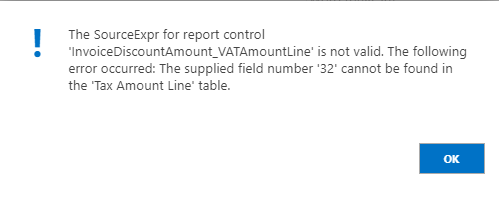
to reproduce.
make a copy of Report 1306 in finsql and export it using ExportToNewSyntax
convert the txt to AL using txt2al.exe.
remove property RDLCLayout = './Sales - Invoice.rdlc';
resolve compiling issues in VS code and deploy.
in the web client - open the Report layout selection page, find the report and run it.
This is a serious blocker for our extension and we need it fixed asap.
NewSalesInvoiceFrom1306.zip
 gudrunleos
All 6 comments
Thank you for the clear repro. I'm looking into what is the issue
 Kungitoo
on 23 Jan 2018
Kungitoo
on 23 Jan 2018
A fix is on the way
Kungitoo
on 25 Jan 2018
I'm wondering if this is Docker related?
None of the WordLayout reports (i.e. 1306) are compiling when running the image on Docker. But when running it in a local install, then it works fine.
 epernst
on 23 Mar 2018
epernst
on 23 Mar 2018
So you are using the same version of the platform for both or? Could be that there is an older version or something
Kungitoo
on 23 Mar 2018
Yes. I've just tried on Azure using the DevPreview docker deployment. Here I'm able to compile without issues (20723). If I try with the same image, but on a local container, then compiling any word reports fail with:
_The Word layout document is malformed. Unable to read the document._
Or if I open the report and compile from there, then it shows:
_Unable to rename or update data bindings in the Word layout document._
If I'm downloading and installing the old fashioned way, then it also works.
epernst
on 23 Mar 2018
Just wanted to say that the Word layout issue was caused by a missing Open XML SDK missing on the VM.
Ref: https://dynamicsuser.net/nav/b/vanvugt/posts/the-word-layout-document-is-malformed
epernst
on 19 Apr 2018
Related issues
 malue19
·
3Comments
malue19
·
3Comments
 lvanvugt
·
3Comments
lvanvugt
·
3Comments
 bvbeek
·
3Comments
bvbeek
·
3Comments
 FSharpCSharp
·
3Comments
FSharpCSharp
·
3Comments
 gregoral
·
3Comments
gregoral
·
3Comments
Most helpful comment
A fix is on the way