Al: How do I create RDLC reports from the Visual Studio Code Editor
I have found the Microsoft.RdlcDesigner.vsix file from
But is that it?
There is no useable explaination on how to install it.
Anybody found a link about the subject?
/Peik
 peikba
All 7 comments
Hi Peik,
How I understand it, these are the steps you can follow:
http://thinkaboutit.be/2017/08/how-do-i-create-a-report-and-layout-in-vscode/
/Steven
 srenders
on 13 Dec 2017
srenders
on 13 Dec 2017
Perfect
Not pretty but it will do 😀
Sendt fra min iPad
Den 13. dec. 2017 kl. 23.00 skrev Steven Renders notifications@github.com:
Hi Peik,
How I understand it, these are the steps you can follow:
http://thinkaboutit.be/2017/08/how-do-i-create-a-report-and-layout-in-vscode//Steven
—
You are receiving this because you authored the thread.
Reply to this email directly, view it on GitHub, or mute the thread.
peikba
on 14 Dec 2017
Hi Steven
Have you found the right syntax for this:
DataItemTableView = SORTING("No.")
                            ORDER(Ascending)

                            WHERE("Subscription Customer"=CONST(Yes));
I tried converting it from cal to al and this was the suggestion.
But it does not work.
Med venlig hilsen / Best Regards
Peik Bech-Andersen
Senior Consultant, Lead MCT
Mobile: +45 28 92 91 11
From: Peik Bech-Andersen [mailto:[email protected]]
Sent: 14. december 2017 18:14
To: Microsoft/AL reply@reply.github.com
Subject: Re: [Microsoft/AL] How do I create RDLC reports from the Visual Studio Code Editor (#1187)
Perfect
Not pretty but it will do 😀
Sendt fra min iPad
Den 13. dec. 2017 kl. 23.00 skrev Steven Renders <[email protected] notifications@github.com >:
Hi Peik,
How I understand it, these are the steps you can follow:
http://thinkaboutit.be/2017/08/how-do-i-create-a-report-and-layout-in-vscode/
/Steven
—
You are receiving this because you authored the thread.
Reply to this email directly, view it on GitHub https://github.com/Microsoft/AL/issues/1187#issuecomment-351538961 , or mute the thread https://github.com/notifications/unsubscribe-auth/AgMF8Z4LKA5dwuPOJ2V0oWRJvhwE_02zks5tAEkDgaJpZM4RAJ8T . https://github.com/notifications/beacon/AgMF8SZ53_5oYHzRFdUHmnKsH8tEmkM7ks5tAEkDgaJpZM4RAJ8T.gif
peikba
on 16 Dec 2017
Hi @peikba,
The syntax for DataItemTableView is correct, but we have changed the values of booleans from yes/no to true/false so if "Subscription Customer" is a boolean field then you need to change it to CONST(True).
The converter should have done that transformation as well, but it requires you to first compile the objects in C/SIDE before exporting them with the following argument: command=exporttonewsyntax
 thpeder
on 18 Dec 2017
thpeder
on 18 Dec 2017
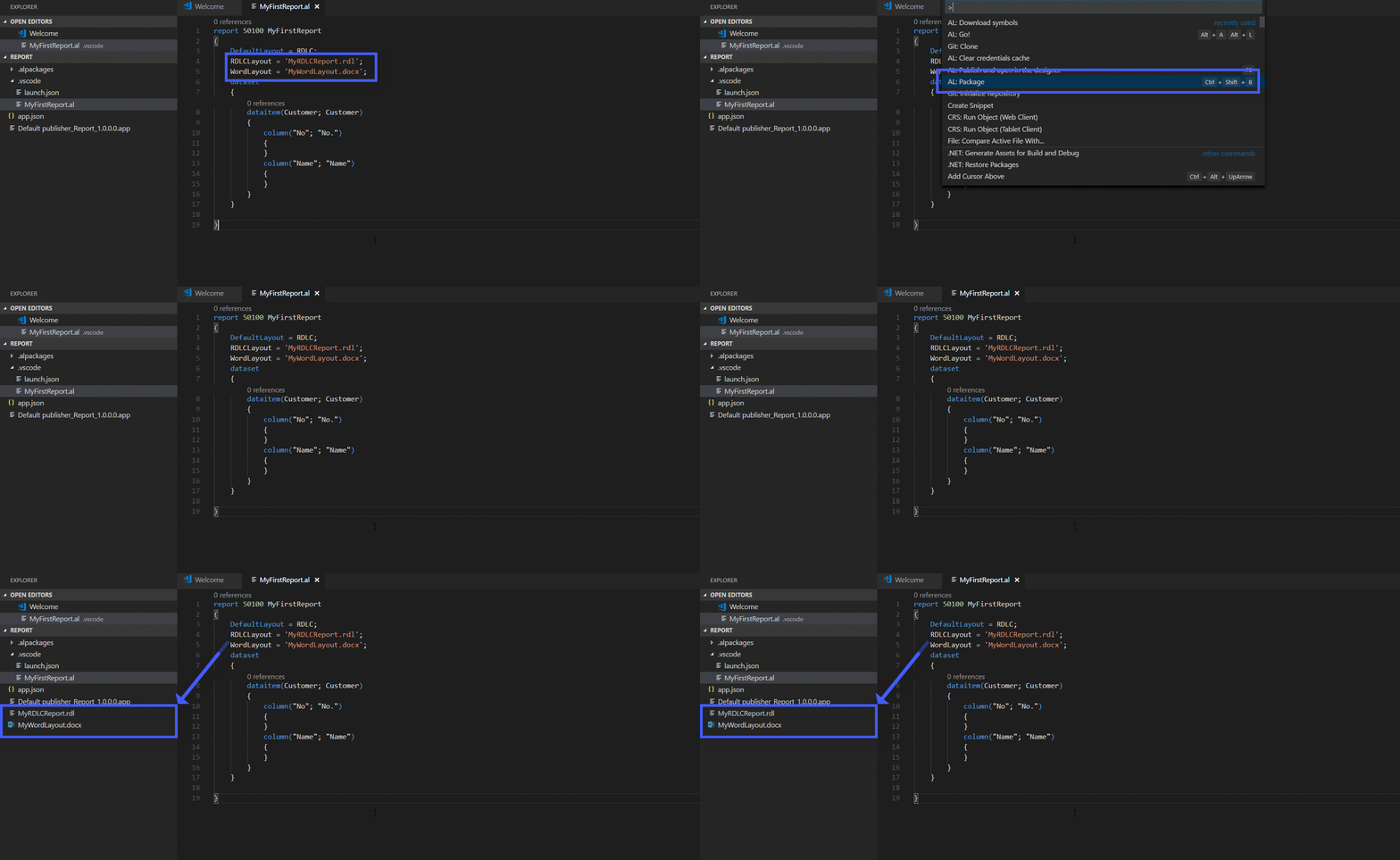
Hi @peikba . As @srenders says, for now we support the tedious process of doing rdlc and word development where you need to export from the app.
Here's a teaser: we have an improved scenario for this coming up in January update which will only require vscode and word/rdl designer
 Kungitoo
on 4 Jan 2018
Kungitoo
on 4 Jan 2018
I have seen this improved scenario, and I find it amazing!
srenders
on 2 Feb 2018
Hi @srenders , can you tell me which build you used?
 aidasberesinevicius
on 7 Feb 2018
aidasberesinevicius
on 7 Feb 2018
Related issues
 gregoral
·
3Comments
gregoral
·
3Comments
 worldofthenavcraft
·
3Comments
worldofthenavcraft
·
3Comments
 bvbeek
·
3Comments
bvbeek
·
3Comments
 dkatson
·
3Comments
dkatson
·
3Comments
 SteveKrisjanovsD365
·
3Comments
SteveKrisjanovsD365
·
3Comments
Most helpful comment
I have seen this improved scenario, and I find it amazing!
