Al: Can't load symbols - No published package matches the provided arguments (local installation NAV 2018 CTP16)
Hi, i have locally installed NAV 2018 CTP16 and i'm trying to retrieve the symbols from my service.
My service instance is called "NAV2018TEST" and is running without any problems, even the web client works fine. I found some topic here, that are dealing with different locales (W1, DE, US), but this didn't help in my case. My Development Port is 7049 and the "Enable Developer Service Endpoint" and "Enable loading application ..." are selected.
[2017-10-30 16:44:44.54] Sending request to http://localhost:7049/NAV2018TEST/dev/packages?publisher=Microsoft&appName=W1&versionText=11.0.0.0&tenant=default
[2017-10-30 16:44:44.56] The request for path /NAV2018TEST/dev/packages?publisher=Microsoft&appName=W1&versionText=11.0.0.0&tenant=default failed with code NotFound. Reason: No published package matches the provided arguments.
[2017-10-30 16:44:44.56] Could not download reference symbols. Please ensure that:
- The correct server name and instance are specified in the launch.json file.
- The correct application locale and version are specified in the app.json file.
Is there anything else i need to take care of, with a local installation? (no Azure)
AL Version seems to be 0.9.13932 (how to update? i have seen some with 0.11*)
 Walwode
All 12 comments
app.json
{
"id": "e2dc80fc-0178-4bc3-bf2b-a9b4068ed7b1",
"name": "Hello World Extension",
"publisher": "Hello World",
"brief": "Hello World",
"description": "Hello World",
"version": "0.0.0.1",
"compatibilityId": "0.0.0.0",
"privacyStatement": "",
"EULA": "",
"help": "",
"url": "",
"logo": "",
"capabilities": [],
"dependencies": [],
"screenshots": [],
"platform": "11.0.0.0",
"application": {
"version": "11.0.0.0",
"locale": "W1"
},
"idRange": {
"from": 5000000,
"to": 6000000
}
}
launch.json
{
"version": "0.2.0",
"configurations": [
{
"type": "al",
"request": "launch",
"name": "Local server",
"server": "http://localhost",
"serverInstance": "NAV2018TEST",
"tenant": "default",
"authentication": "Windows",
"startupObjectId": 22
}
]
}
Walwode
on 30 Oct 2017
CTP builds distributed as DVD are not a supported environment for Modern Development. You would need to use the CTP Docker image distributed through MS Collaborate as that's the only one that contains the AL Language extension (*.vsix file).
Or you can use the Developer Preview release VM provisioned through aka.ms/navdeveloperpreview
 StanislawStempin
on 31 Oct 2017
StanislawStempin
on 31 Oct 2017
ok, thanks. Consider closed.
Walwode
on 1 Nov 2017
hi, i have moved to the docker version of the CTP. After a day of testing i got my docker container running.
again the message:
The request for path /NAV/dev/packages?publisher=Microsoft&appName=DE&versionText=11.0.0.0&tenant=default failed with code NotFound. Reason: No published package matches the provided arguments.
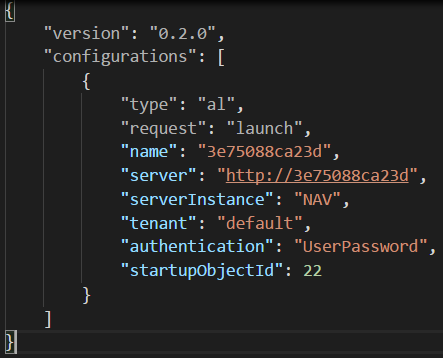
i have tried again local DE and W1, i have tried with https and http
docker run -m 3g --env accept_eula=Y navdocker.azurecr.io/dynamics-nav:11.0.18843.0-de
docker run -m 3g --env accept_eula=Y --env UseSSL=N navdocker.azurecr.io/dynamics-nav:11.0.18843.0-de
any new tipps?
I have also tried the NavContainerHelper, but the commands seems changed since EMEA.
Walwode
on 1 Nov 2017
Have you updated to using AL Language version 0.11.14380 that matches this server?
StanislawStempin
on 1 Nov 2017
Wrong VSIX - like my fault?
https://github.com/Microsoft/AL/issues/802
 megel
on 1 Nov 2017
megel
on 1 Nov 2017
yes, last sentence of my first post was the AL version question. I have used the VSIX file that is shown at the end of the docker instancing. Last issue (i hope) is a untrusted certificate. Für den geschützten SSL/TLS-Kanal konnte keine Vertrauensstellung hergestellt werden..
Walwode
on 1 Nov 2017
ok, now the final resolution, for all rookies like me:
- Update Visual Code to the most current AL Compiler. The AL Language extension store in Visual Code is out of date. I have used the vsix file from the docker.
- Add parameter --env UseSSL=N into your docker run command, to avoid SSL issues and have a http://
address.
PS: After having vsix file, i can now use my local installation of NAV to retrieve the symbols, too.
Walwode
on 1 Nov 2017
Hi everyone,
Having this error now "No published package matches the provided arguments" with the final released version.
Installed NAV 2018 locally and also have Azure Dev. Sandbox.
Installed VScode and AL extension (Latest version).
All posts about this error are "old" and refer to beta versions.
Anyone experiencing this error with the official release version?
Thanks for any assistance you can provide.
 hdvalerod
on 4 Dec 2017
hdvalerod
on 4 Dec 2017
@hdvalerod I think a new issue with reference to this would have been better.
What does your launch. json look like?
Which ServerInstance have you entered?
I had to find out that while the server uses the serverinstanc NAV110 as its name, the API uses the name dynamicsnav110,
 Gallimathias
on 4 Dec 2017
Gallimathias
on 4 Dec 2017
I also installed 2018 locally. And had quite some "fun" getting it going.
- Vsix File. On the installation Medium you will find the vsix file that you porperply have to use with the shipped Version of NAV. it will also be located in "C:\Program Files (x86)\Microsoft Dynamics NAV\110\Modern Development Environment" make sure you disable any other version of in in visual studio code. In Visual Studio go in extensions, press the ... and install from vsix and select it. Should end up with AL Language Version 0.12.15355.
That helped me to setup the VSC. after that I just made a AL: Go! if you installed just straight from the DVD you should have something like this:
{
    "version": "0.2.0",
    "configurations": [
        {
            "type": "al",
            "request": "launch",
            "name": "Your own server",
            "server": "http://localhost",
            "serverInstance": "DynamicsNAV110",
            "authentication": "Windows",
            "startupObjectId": 22
        }
    ]
}
Next problem I had because i tried to do this "SidebySide" thing that you have to run finsql.exe Command=generatesymbolreference, Database=”Demo Database NAV (11-0)”, ServerName=.\NAVDEMO` and also start dev. env. up with "finsql.exe generatesymbolreference=yes". but to do so you first have to make sure your Servicetier Setup is correct. There you have to enable: "Enable loading application symbol references at server startup" (while doing the config also make sure you can debug (#1038), remember to set the Web Client url http://localhost:8080/dynamicsnav110/webclient) - don't forget to restart afterwards the ST.
after all that it kind of started working for me :)
 KristofKlein
on 5 Dec 2017
KristofKlein
on 5 Dec 2017
Kristo,
Thank you very much for the reply. Its was the VSIX file install. As soon as I installed this extension from the DVD media, BAM! all working.
Again, thanks for the help. Time to program now :)
hdvalerod
on 5 Dec 2017
Related issues
 dkatson
·
3Comments
dkatson
·
3Comments
 FSharpCSharp
·
3Comments
FSharpCSharp
·
3Comments
 worldofthenavcraft
·
3Comments
worldofthenavcraft
·
3Comments
 kine
·
3Comments
kine
·
3Comments
 AddEleven
·
3Comments
AddEleven
·
3Comments