Al: Beter support for creating subscribers
Please point us to a different/better way if there is one... Else please consider better IntelliSense:
At the moment when we want to subscribe to an event we need to do everything manually:
- First You need to know the names of all publishers a given object may have. There should at least be IntelliSense here to support the developer
- Then when You have selected a publisher You will have to know which parameters the publisher provides. Again help is mandatory. Right now we have to wirite a subscriber in the old Dev to then retype the stuff to the new Dev.
 RafaelKoch
All 12 comments
You should be able to see a full list of publishers for a given object using Intellisense. Try typing:
[EventSubscriber(ObjectType::Codeunit, <Id>, <Press Ctrl+Space here>
For the second issue we are planning to add a 'code action' to provide a default subscriber signature with all valid parameters.
 StanislawStempin
on 19 Apr 2017
StanislawStempin
on 19 Apr 2017
Ctrl+Space seams not working in the October Update.
 DanielGoehler
on 15 Oct 2017
DanielGoehler
on 15 Oct 2017
Creating an EventSubscriber seems pretty rough right now. It would be nice to have some IntelliSence on the Object Id, or even better the option to use the Object Name, which would be more consistence with the rest of the AL-Syntax.
DanielGoehler
on 15 Oct 2017
I have used the following syntax with success instead of using the objects IDs, but I do wish that there was intellisense on the event names.
database::"Sales Header"
page::"Customer Card"
 MikeGlue
on 15 Oct 2017
MikeGlue
on 15 Oct 2017
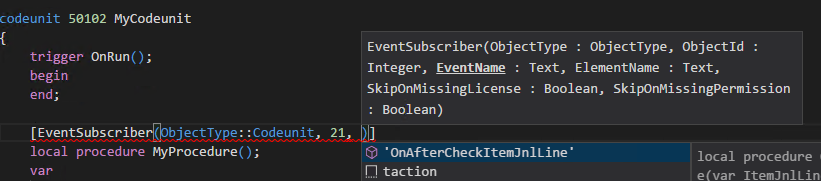
Could you please log a new issue for the specific Intellisense bug? Can you provide a detailed repro? Checking on the latest build we do get event name suggestions:
StanislawStempin
on 17 Oct 2017
For now, Do we need to manually enter procedure parameters for a event subscriber? I cannot find any documentation for this
 jaspreet997
on 2 Nov 2017
jaspreet997
on 2 Nov 2017
@StanislawStempin: I started with the teventsub Template, which currently has no procedure, because as @jaspreet997 pointed out, I'm also don't know the procedure parameters from that event. In that case the IntelliSense seems not to work.
It would be nice and more intuitive to have a more guided process here. E.g. the way in the old development environment is pretty good.
New case for that?
DanielGoehler
on 2 Nov 2017
Thanks. No need for a new case, better support for creating subscribers is tracked by this one and we are aware that this is an important scenario. We will provide updates on this issue once we are closer to implementing the solution.
StanislawStempin
on 2 Nov 2017
Intellisense works correctly when Object ID is being entered explicitly:
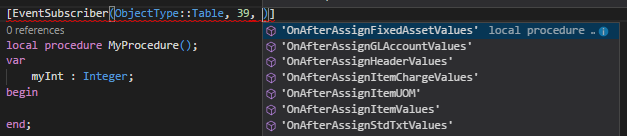
Intellisense does not work when Object ID is being transformed, eg: Database::"Table Name:

The first approach is wrong, it goes against all NAV best practices. The second one does not provide Instellisense.
 Koubek
on 5 Nov 2017
Koubek
on 5 Nov 2017
Hi @StanislawStempin,
in Februar Update if you using the teventsub-Template, you still have to remove the Apostrophes (') of EventName to get the IntelliSense List of published Events. Furthermore it would be nice to be able to see the Publisher Event Definition or even better to be able to add the parameters to the procedure below.
DanielGoehler
on 17 Feb 2018
For now, we will see what we can do to improve the snippet.
The overall usability improvement of subscribing to events is still on our backlog.
StanislawStempin
on 20 Feb 2018
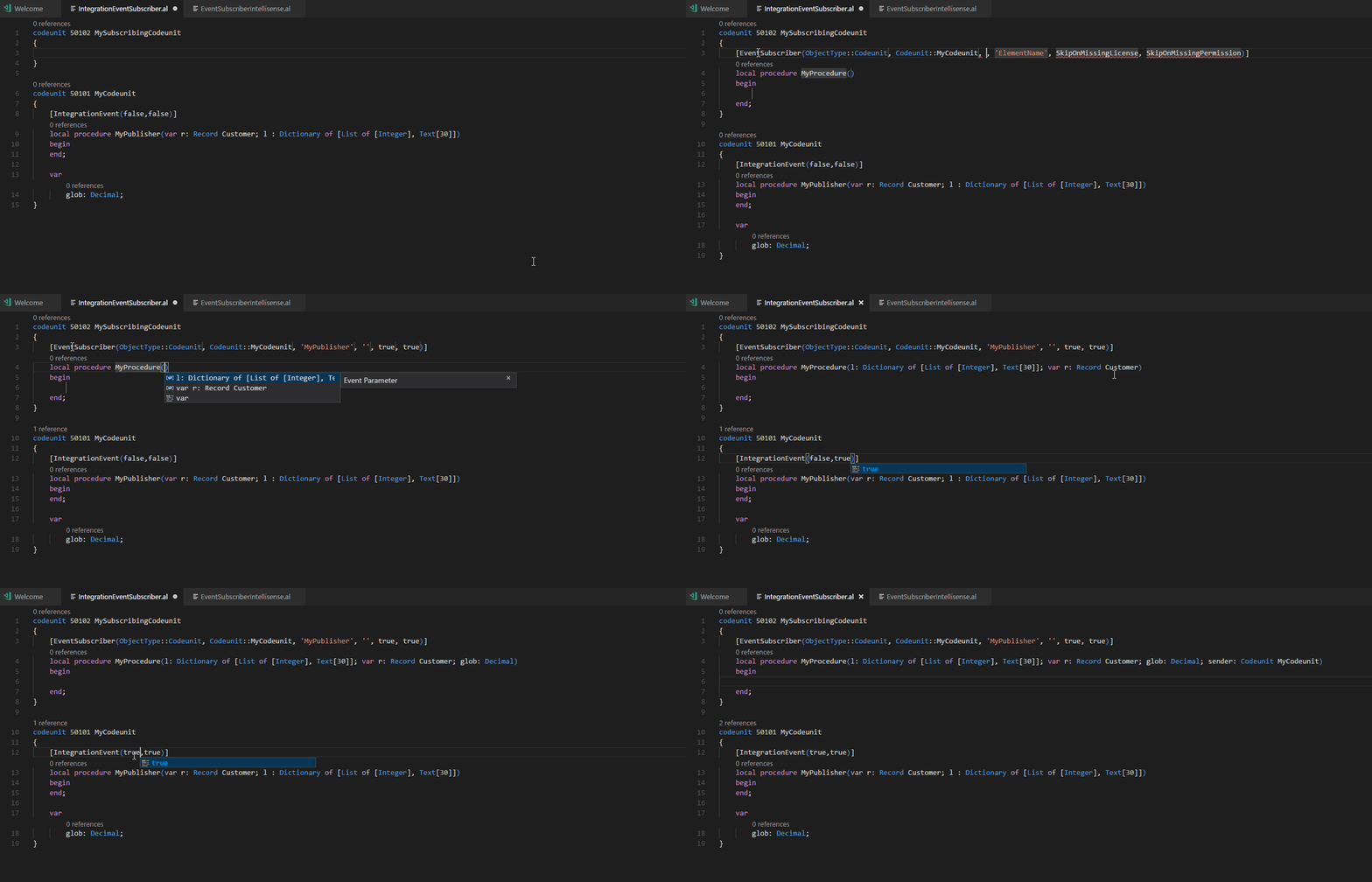
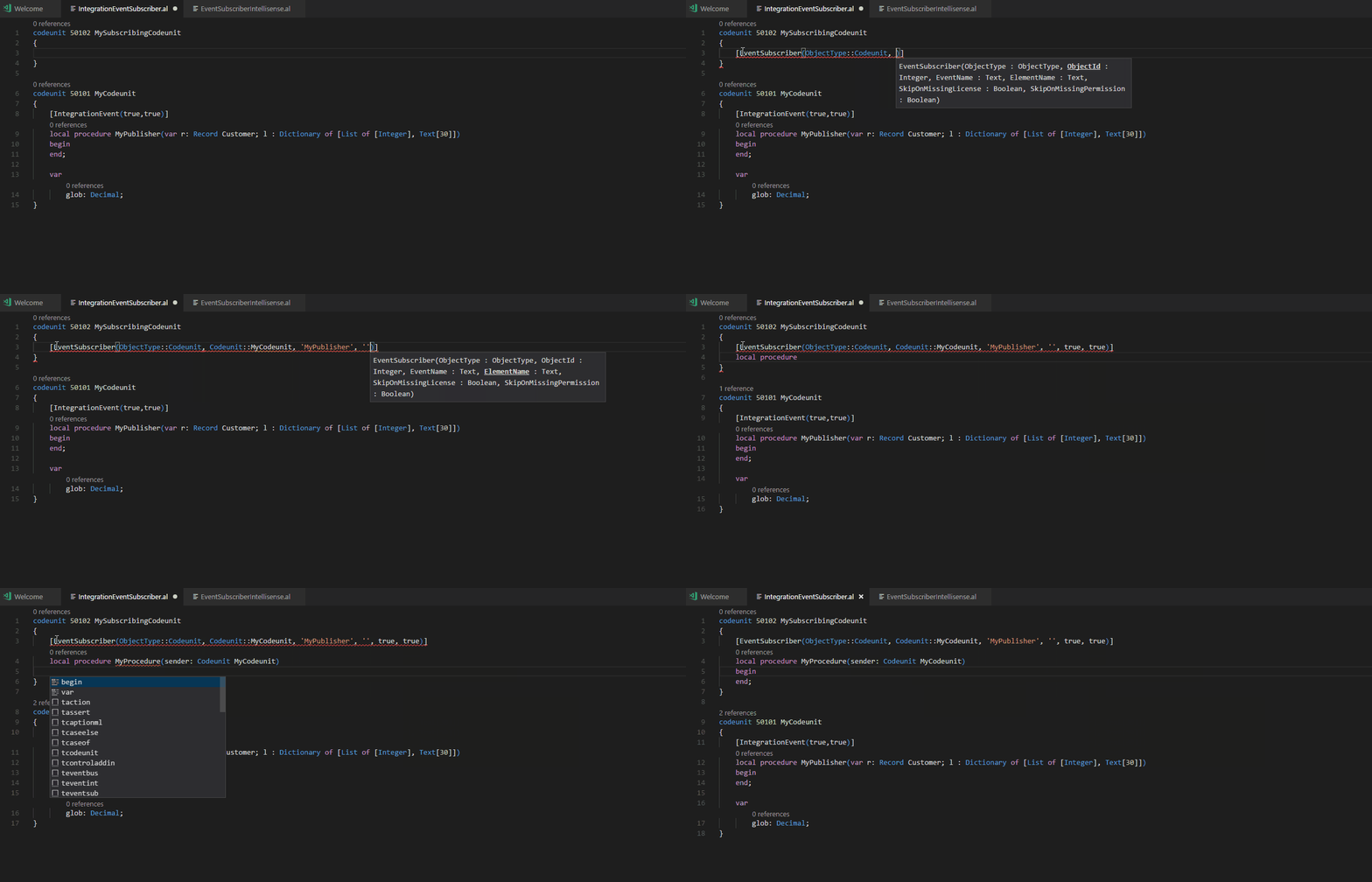
We did some work on improving the snippets and Intellisense around event subscribers (for both the attribute arguments and the method parameters - see examples below). It is now working for trigger events, integration and business events. In case of business and integration events, the suggestion of the method parameters is made based on the attributes of the event publisher in order to know if the global variables and/or the sender should also be suggested.
Here is what it looks like to subscribe to an integration event when using the snippets:
Here is what it looks when writing the event subscriber from scratch:
Also, after our changes, the problem of the quotes does not seem to reproduce anymore.
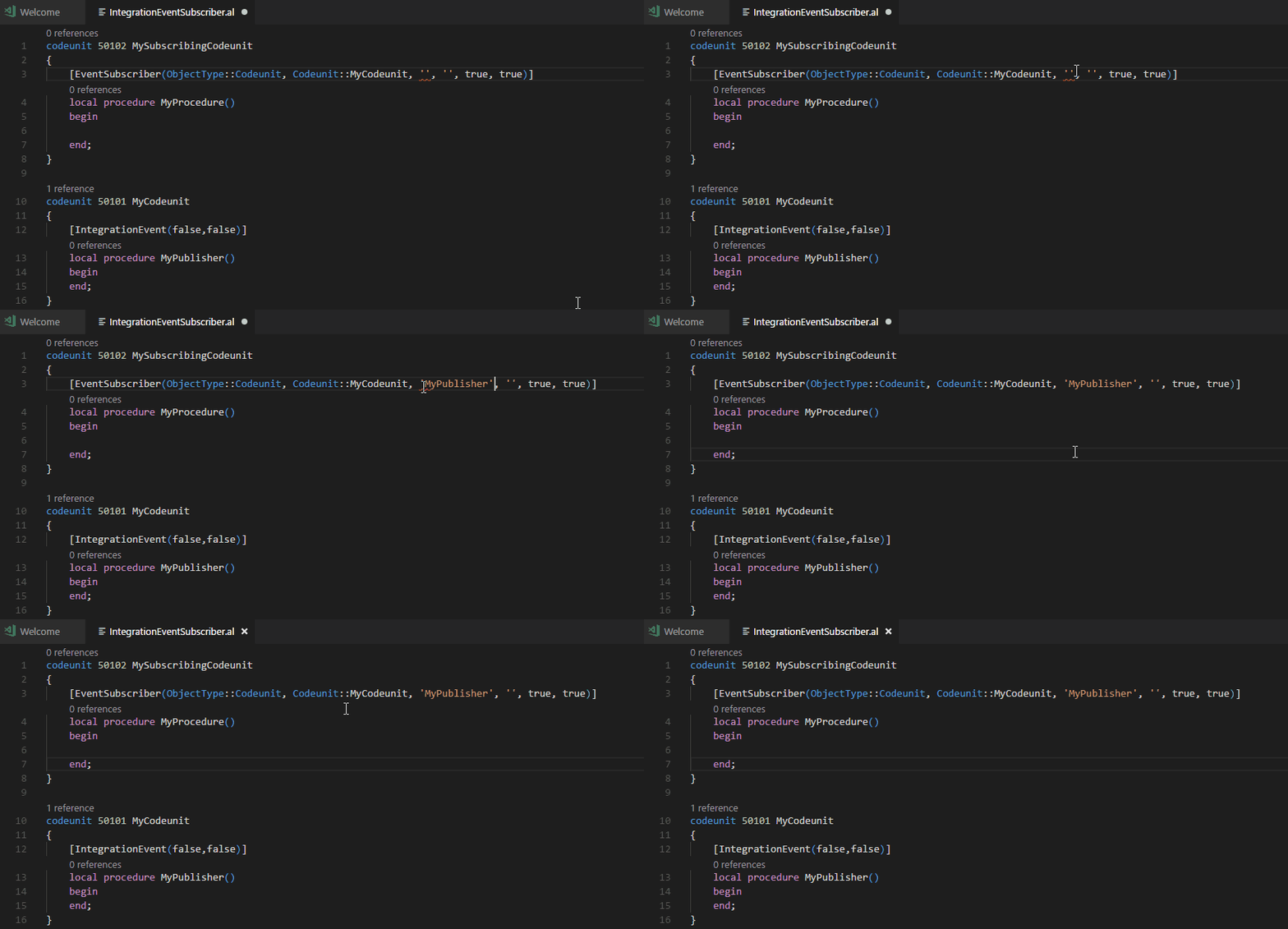
I hope this helps!
 qutreson
on 2 Mar 2018
qutreson
on 2 Mar 2018
Related issues
 daansaveyn
·
3Comments
daansaveyn
·
3Comments
 worldofthenavcraft
·
3Comments
worldofthenavcraft
·
3Comments
 AndersMad
·
3Comments
AndersMad
·
3Comments
 kine
·
3Comments
kine
·
3Comments
 ghost
·
3Comments
ghost
·
3Comments
Most helpful comment
We did some work on improving the snippets and Intellisense around event subscribers (for both the attribute arguments and the method parameters - see examples below). It is now working for trigger events, integration and business events. In case of business and integration events, the suggestion of the method parameters is made based on the attributes of the event publisher in order to know if the global variables and/or the sender should also be suggested.
Here is what it looks like to subscribe to an integration event when using the snippets:

Here is what it looks when writing the event subscriber from scratch:

Also, after our changes, the problem of the quotes does not seem to reproduce anymore.

I hope this helps!