Aks-engine: AKS Engine - VMSS not using Premium disks
Describe the bug
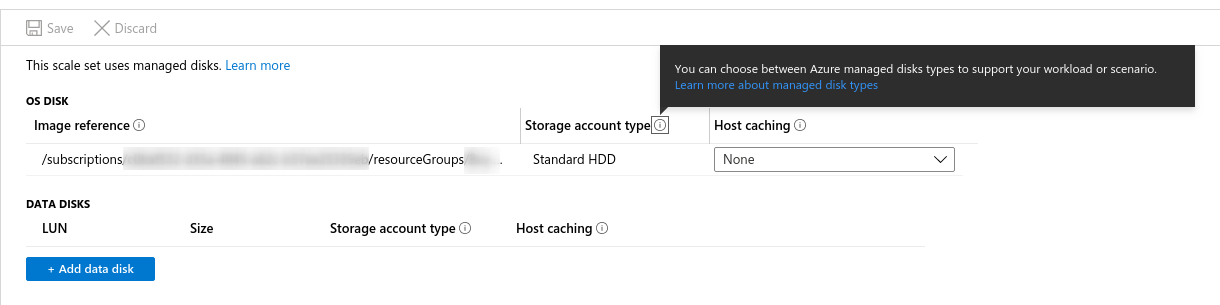
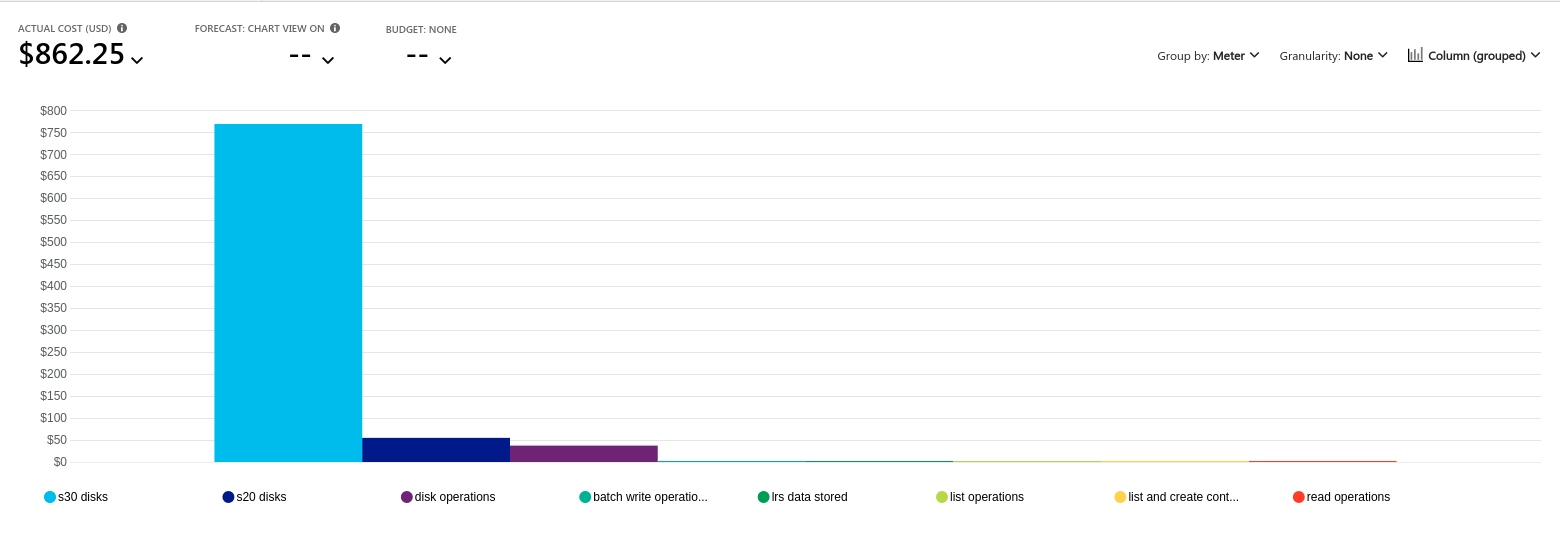
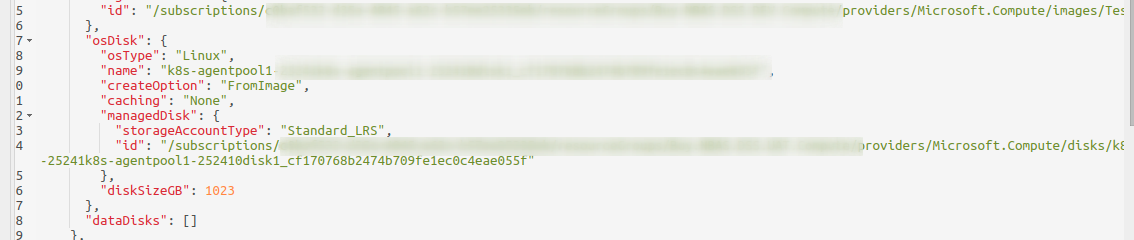
After creating a VMSS backed K8s cluster using AKS Engine I am discovering that Standard disks appear to be used. This is shown in various places including the Azure portal UI, billing, and the Azure resource explorer.
Steps To Reproduce
We use the following configuration to deploy this agent pool.
(Note the 1xxxxxxx1 sections are deliberate as they're replaced with sed)
 "agentPoolProfiles": [
      {
        "name": "agentpool1",
        "count": 1worker_vm_count1,
        "distro": "ubuntu",
        "ipAddressCount": 1ipAddrCount1,
        "imageReference": {
          "name": "1worker_image_name1",
          "resourceGroup": "1worker_image_rg1"
        },
        "vmSize": "1worker_node_vm_type1",
        "vnetSubnetId": "1subnet_id1",
        "storageProfile" : "ManagedDisks",
        "availabilityProfile": "VirtualMachineScaleSets",
        "customNodeLabels": {
          "role_worker": "all",
          "role_notebook": "all"
        },
        "OSDiskSizeGB": 1os_disk_gb1
      }
    ],
Expected behavior
The expected behavior is that we would be given premium disks. If this is not the expected behavior, I would expect that there would be a way to specify this in the template and there doesn't appear to be.
AKS Engine version
AKS_ENGINE_VERSION=0.41.4
Kubernetes version
KUBERNETES_VERSION=1.13.11
Additional context
Discussed with AKS engine team Thursday October 24th.
This is possibly related to:
https://github.com/Azure/aks-engine/issues/532
 brettplarson
All 14 comments
👋 Thanks for opening your first issue here! If you're reporting a 🐞 bug, please make sure you include steps to reproduce it.
![welcome[bot] picture](https://avatars.githubusercontent.com/in/4141?v=4&s=40) welcome[bot]
on 24 Oct 2019
welcome[bot]
on 24 Oct 2019
Whick VM SKU are you using? We found out that if you use a SKU without "s" (i.e. Standard_D4_v3), aks-engine uses standard HDD. If you use a SKU with "s" (i.e. Standard_D4s_v3), it uses Premium SSD.
 ericsuhong
on 24 Oct 2019
ericsuhong
on 24 Oct 2019
Whick VM SKU are you using? We found out that if you use a SKU without "s" (i.e. Standard_D4_v3), aks-engine uses standard HDD. If you use a SKU with "s" (i.e. Standard_D4s_v3), it uses Premium SSD.
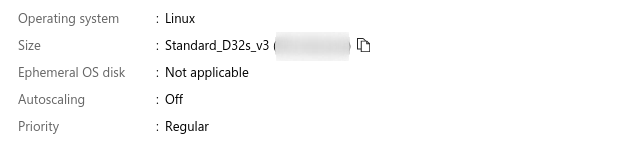
We are using Standard_D32s_v3 so I don't think this is the case.
brettplarson
on 24 Oct 2019
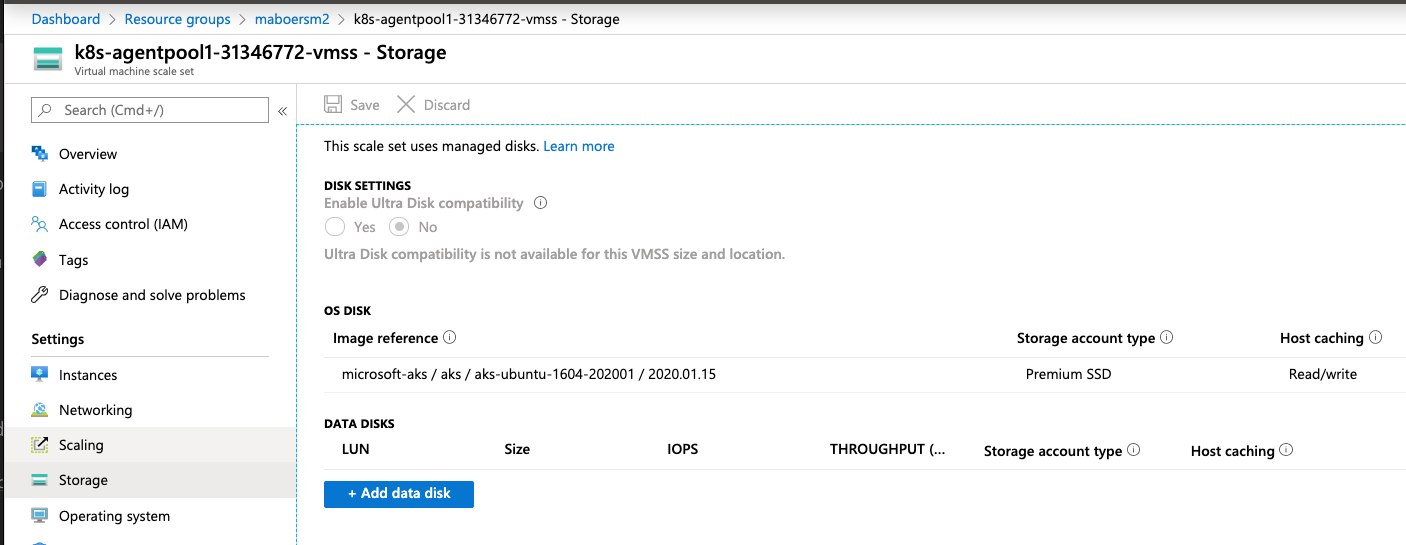
I provisioned two clusters using current AKS Engine, one with Standard_D4s_v3 and one with Standard_D32s_v3 for the agent pool. Both of them show "Premium SSD" in the OS Disk section:
Is this still an issue for you with AKS Engine v0.46.0? Any other ideas about how to reproduce it?
 mboersma
on 24 Jan 2020
mboersma
on 24 Jan 2020
@mboersma we are going to try this weekend and follow up.
Thanks!
 goatmale
on 24 Jan 2020
goatmale
on 24 Jan 2020
Hi @mboersma, when you did that test did you use a custom image?
We are still seeing "Standard HDD" when we use the following:
"agentPoolProfiles": [
      {
        "name": "services",
        "count": 1,
        "ipAddressCount": 34,
        "imageReference": {
          "name": "dev0.46.0NodeImagerelease-1.3.55",
          "resourceGroup": "**********"
        },
        "vmSize": "Standard_D32s_v3",
        "vnetSubnetId": "/subscriptions/**********/resourceGroups/**********/providers/Microsoft.Network/virtualNetworks/**********/subnets/**********",
        "storageProfile" : "ManagedDisks",
        "availabilityProfile": "VirtualMachineScaleSets",
        "customNodeLabels": {
          "role_service": "all"
        },
        "OSDiskSizeGB": 1023
      }
 PacoGuy
on 28 Jan 2020
PacoGuy
on 28 Jan 2020
Oh, and that was with aks-engine version v0.46.0 and a new image built using the same.
From Packer creating the image:
    "os_type": "Linux",
    "os_disk_size_gb": "150",
    "image_publisher": "microsoft-aks",
    "image_offer": "aks",
    "image_sku": "aks-ubuntu-1604-202001",
    "image_version": "2020.01.15",

    "azure_tags": {
        "dept": "Intelligence Studio",
        "task": "aks node image",
        "sprint": "Y20S01"
    },

    "vm_size": "Standard_D2s_v3"
when you did that test did you use a custom image?
I did not. That's probably the difference–let me do more testing.
mboersma
on 28 Jan 2020
Is it possible Packer is defaulting to Standard_LRS in the managed_image_storage_account_type?
cc: @marosset
mboersma
on 29 Jan 2020
If the images are created with packer can you check the 'Account type' of the images?
In the azure portal you can see that in the overview page of the image.
That value is set when the image is created and I believe is inherited when VMs are created from the image.
 marosset
on 29 Jan 2020
marosset
on 29 Jan 2020
Hmm you both might be on to something with that @marosset @mboersma
I'm looking into testing with that param defined and the latest version of Packer, but I did find this bug referring to a possible problem with the Azure api for the creation of these disks: https://github.com/hashicorp/packer/issues/7304
PacoGuy
on 29 Jan 2020
@goatmale @brettplarson can this be closed now?
 craiglpeters
on 4 Mar 2020
craiglpeters
on 4 Mar 2020
Yeah, this one seems to no longer be an issue for us after we added the following to our packer definition: "managed_image_storage_account_type": "Premium_LRS",
PacoGuy
on 5 Mar 2020
Thanks All!
PacoGuy
on 5 Mar 2020
Related issues
 brusMX
·
5Comments
brusMX
·
5Comments
 jackfrancis
·
5Comments
jackfrancis
·
5Comments
 serbrech
·
5Comments
jackfrancis
·
5Comments
serbrech
·
5Comments
jackfrancis
·
5Comments
 adelina-t
·
5Comments
adelina-t
·
5Comments