Aks-engine: Standard LB-enabled cluster fails to scale up. - Episode 2
Describe the bug
With the newest version of aks-engine (v0.41.3) we solved the issue described here https://github.com/Azure/aks-engine/issues/1970 but we have another issue.
Steps To Reproduce
I created a cluster with this cluster definition:
{
    "apiVersion": "vlabs",
    "properties": {
        "orchestratorProfile": {
            "orchestratorType": "Kubernetes",
            "orchestratorVersion": "1.15.4",
            "kubernetesConfig": {
                "networkPlugin": "azure",
                "networkPolicy": "azure",
                "loadBalancerSku": "standard",
                "enablePodSecurityPolicy": true,
                "enableRbac": true,
                "addons": [
                    {
                        "name": "tiller",
                        "enabled": false
                    },
                    {
                        "name": "kubernetes-dashboard",
                        "enabled": false
                    },
                    {
                        "name": "heapster",
                        "enabled": false
                    },
                    {
                        "name": "keyvault-flexvolume",
                        "enabled": false
                    },
                    {
                        "name": "metrics-server",
                        "enabled": false
                    },
                    {
                        "name": "blobfuse-flexvolume",
                        "enabled": false
                    }
                ],
                "kubeletConfig": {
                    "--max-pods": "110"
                },
                "apiServerConfig": {
                    "--oidc-issuer-url": "xxxx",
                    "--oidc-client-id": "xxxx",
                    "--oidc-username-claim": "email",
                    "--oidc-groups-claim": "xxxx"
                },
                "controllerManagerConfig": {},
                "schedulerConfig": {}
            }
        },
        "masterProfile": {
            "count": 3,
            "dnsPrefix": "xxxx",
            "vmSize": "Standard_D2s_v3",
            "vnetSubnetId": "xxxx",
            "availabilityProfile": "AvailabilitySet",
            "firstConsecutiveStaticIP": "xxxx"
        },
        "agentPoolProfiles": [
            {
                "name": "minionb2s",
                "count": 2,
                "dnsPrefix": "",
                "vnetSubnetId": "xxxx",
                "vmSize": "Standard_B2s",
                "availabilityProfile": "VirtualMachineScaleSets"
            },
            {
                "name": "minionb4ms",
                "count": 1,
                "dnsPrefix": "",
                "vnetSubnetId": "xxxx",
                "vmSize": "Standard_B4ms",
                "availabilityProfile": "VirtualMachineScaleSets"
            }
        ],
        "linuxProfile": {
            "adminUsername": "xxxx",
            "ssh": {
                "publicKeys": [
                    {
                        "keyData": "ssh-rsa xxxx"
                    }
                ]
            }
        },
        "servicePrincipalProfile": {
            "clientId": "xxxx",
            "secret": "xxxx"
        }
    }
}
Installed helm/tiller v2.14.3
---
apiVersion: rbac.authorization.k8s.io/v1
kind: ClusterRoleBinding
metadata:
  name: tiller
roleRef:
  apiGroup: rbac.authorization.k8s.io
  kind: ClusterRole
  name: cluster-admin
subjects:
  - kind: ServiceAccount
    name: tiller
    namespace: kube-system
---
apiVersion: v1
kind: ServiceAccount
metadata:
  name: tiller
  namespace: kube-system
and
helm init --service-account tiller --upgrade
Installed nginx-ingress with helm (chart 0.25.1) with this value.yaml https://pastebin.com/NAk2Sp4P
Then I used this command to scale up
aks-engine scale --location westeurope --subscription-id "xxxx" --resource-group "xxx" --api-model ./apimodel.json --node-pool minionb4ms --new-node-count 4 --auth-method client_secret --client-id "xxxx" --client-secret "xxxx"
The virtual machine scale set scaled up but the minion k8s-minionb4ms-xxxx-vmss_0 failed to upgrade. See linked images.

I forced the upgrade with Azure Console and the update is running since 40 minutes.

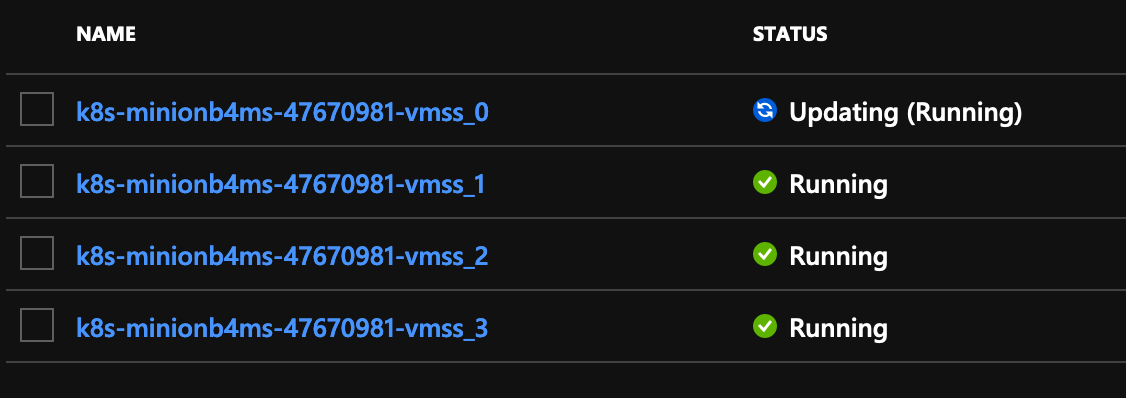
I tried also with a previous version (0.41.0 if I remember well) and I had the same problem. See attached images:

After a while (long time) the upgrade fails.
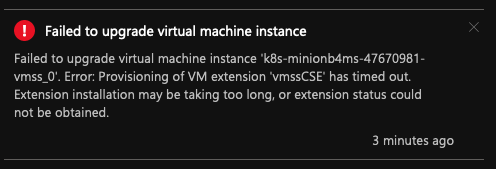
Expected behavior
The cluster scale-up
AKS Engine version
0.41.3 (b55e6f951)
Kubernetes version
1.15.4
Additional context
 pierluigilenoci
All 28 comments
@mboersma the saga continues...
pierluigilenoci
on 26 Sep 2019
I tag you all because I need support, even just moral. 😭
@jackfrancis @ritazh @alexeldeib
pierluigilenoci
on 26 Sep 2019
I can confirm, happens also with 0.41.0 Ref: https://github.com/Azure/aks-engine/issues/1970#issuecomment-534065002
pierluigilenoci
on 26 Sep 2019
@pierluigilenoci could you please ssh into the instance and pull the logs as described here?
 CecileRobertMichon
on 26 Sep 2019
CecileRobertMichon
on 26 Sep 2019
@CecileRobertMichon
CSE error: exit code 6
logs.zip
pierluigilenoci
on 27 Sep 2019
I will try to recreate the cluster with v0.41.4
@mboersma could you please approve? https://github.com/Azure/homebrew-aks-engine/pull/39
pierluigilenoci
on 27 Sep 2019
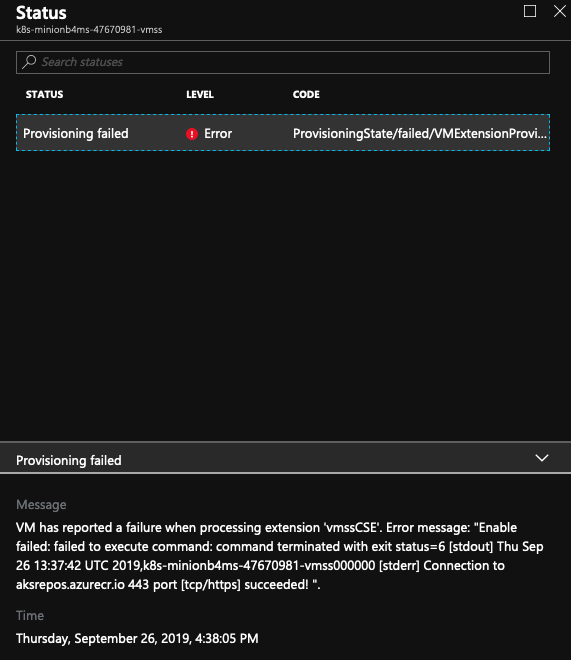
pierluigilenoci
on 27 Sep 2019
@pierluigilenoci which version of aks-engine did you use to originally create the cluster? I think what's happening is that "upgrading" the instance is using the new implementation of CustomScriptExtension, but is not referencing the new VHD, and so the CSE script isn't recognizing prerequisite files the way it expects (since we introduced a #EOF suffix to the end of each file).
I'll try to repro by building a cluster on an older version (before the #EOF change), scaling up, and then manually upgrading the original instance.
 jackfrancis
on 27 Sep 2019
jackfrancis
on 27 Sep 2019
O.K., I wasn't able to repro using my hypothesis (which is good, because prior to this investigation I would have thought that the new VHD would be included w/ an VMSS instance model upgrade).
jackfrancis
on 27 Sep 2019
Also worth mentioning: doing a manual VMSS instance "upgrade" via the portal or CLI will be disruptive. An aks-engine upgrade operation might be preferable as it includes cordon/drain against each node (it upgrades one node at a time).
(If you've never used aks-engine upgrade before I recommend staging a new cluster and then running upgrade against that cluster first a few times so you are comfortable with the process.)
jackfrancis
on 27 Sep 2019
Hi @jackfrancis,
this was a fresh new created cluster with v0.41.3. I created the cluster, installed tiller and helm, installed nginx-ingress and scaled up one of the pool from 1 to 4. I never upgraded the cluster.
pierluigilenoci
on 30 Sep 2019
I also tried with v0.41.4 with the same result. https://github.com/Azure/aks-engine/issues/2033#issuecomment-535839122
pierluigilenoci
on 30 Sep 2019
I make another test. Created the cluster, scale up from 1 to 5 (with the usual error), I scaled down from 5 to 1 (no error) and finally, I tried to scale up again (deployment failed). You can find all the deployments details attached.
Deployment-development-1971821936.zip
Deployment-development-582717663.zip
Deployment-k8s-dev-cluster-deployment.zip
Deployment-development-1132904343.zip
Deployment-development-1323292509.zip
pierluigilenoci
on 30 Sep 2019
@feiskyer It seems that it's the same issue fixed here
but now with Standard LoadBalancer and only after scaling.
Would be great if you can have a look
Thanks
 mo-saeed
on 1 Oct 2019
mo-saeed
on 1 Oct 2019
Today I made another test to verify if the problem is the "scale" command of aks-engine. I created a cluster with the usual cluster definition and I tried to scale up the scale-sets with the portal interface instead of aks-engine.
I started with the minionb4ms from 1 to 4. I get this error:
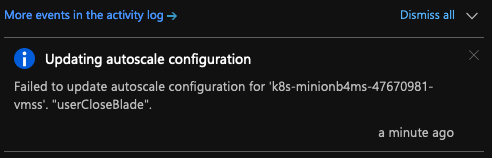
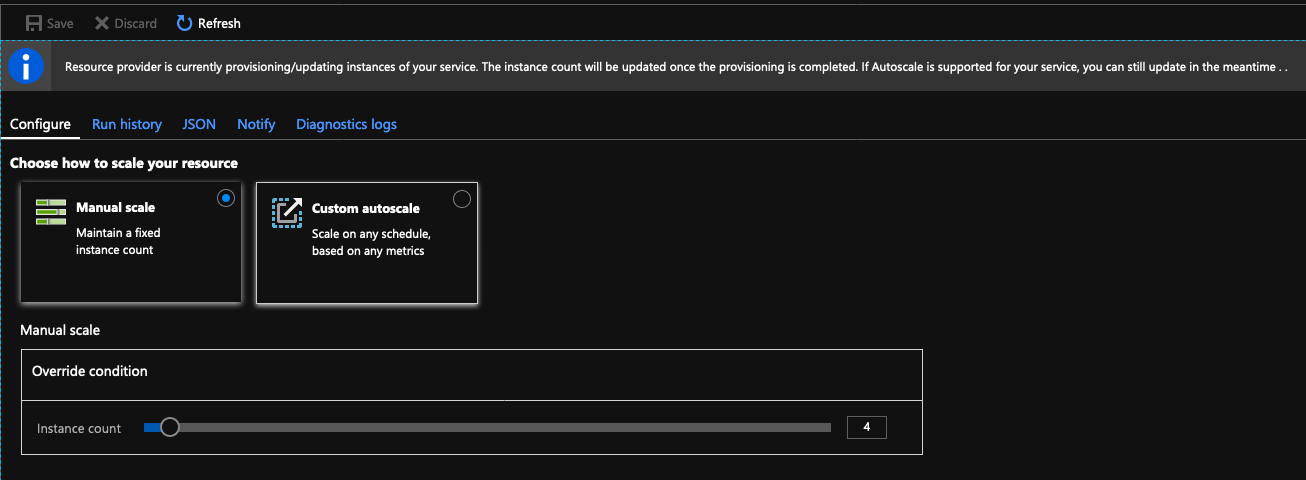
I tried to scale the other (minionb2s) from 2 to 5 and worked like a charm.
I checked back to the first one (minionb4ms) and the 4 minions were there.
So basically the scale-up worked for both poll except the fact that one returned an error on Portal. All minions are up&running.
pierluigilenoci
on 4 Oct 2019
So basically the scale-up worked for both poll except the fact that one returned an error on Portal. All minions are up&running.
I tried again doing exactly the same steps and I didn't get the same error. Probably was an Azure Portal glitch. So... now I'm pretty sure that the problem is inside the "scale" command of aks-engine.
pierluigilenoci
on 4 Oct 2019
@pierluigilenoci just so we understand what the issue is here... As originally described, the issue was that when a node pool was scaled from 1 to 5, only the 4 new nodes had the "updated" instance model. This is by design.
Now it seems that you are unable to scale at all using the aks-engine CLI after creating the cluster?
jackfrancis
on 7 Oct 2019
Let me summarize.
I always make this test on a fresh new cluster. No old stuff, no applications runnings on cluster, no upgrade needed/done.
Scaling was not completely possible with the 0.39.1 version of aks-engine. Ref: https://github.com/Azure/aks-engine/issues/1970
With version 41.4 I can scale the cluster with the CLI but the existing VMs are not upgraded, only the new VMs. Ref: https://github.com/Azure/aks-engine/issues/2033#issue-498917055
If I try to upgrade the VMs using the portal I get an error. Ref:
https://user-images.githubusercontent.com/36044817/65696179-15a04380-e079-11e9-84f3-b570fc63c332.png
You say that the "missing upgrade" of the existing VMs is a feature. The thing that amazes me is the fact that a newly created cluster (in theory already with upgraded VMs) really isn't. Probably I misunderstood the "upgraded" concept in aks.
If the problem is to use always aks-engine CLI to scale the cluster why with Azure Portal works fine and with aks-engine CLI one machine remains not upgraded? I really don't understand.
Obviously, it makes sense to say "use only aks-engine CLI" but I want to understand why.
The fact remains that if I manually upgrade the VM from Azure Portal I get an error.
I will try to create a fresh new cluster, scale up a pool and then upgrade using the CLI. I will report my result on this ticket.
Thank you for everything. As always, aks-engine team are always available and helpful! ❤️
pierluigilenoci
on 8 Oct 2019
I'll do some repro'ing too and report back. Specifically I will verify that a brand new cluster create followed by an aks-engine CLI scale up results in the portal reporting that the original nodes have an old model.
No matter what, there is a clear documentation gap here as we don't want users to be totally confused when doing basic cluster maintenance. :(
jackfrancis
on 8 Oct 2019
I confirmed that even when scaling using the portal (i.e., not the aks-engine CLI) the "original" instances are marked as "old":
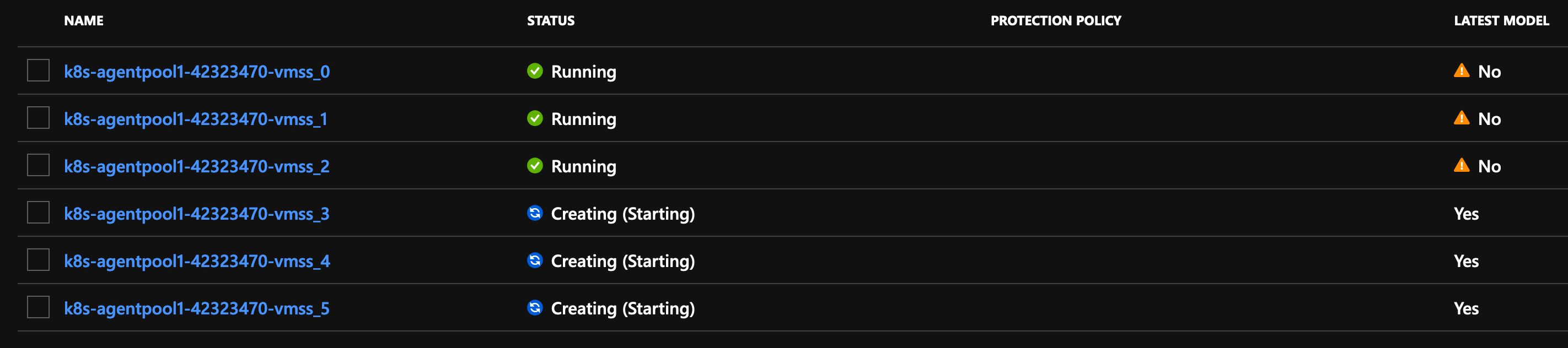
And those new nodes came online fine:
$ k get nodes -o wide
NAME                                 STATUS   ROLES    AGE   VERSION   INTERNAL-IP    EXTERNAL-IP   OS-IMAGE             KERNEL-VERSION      CONTAINER-RUNTIME
k8s-agentpool1-42323470-vmss000000   Ready    agent    51m   v1.15.4   10.240.0.34    <none>        Ubuntu 16.04.6 LTS   4.15.0-1060-azure   docker://3.0.4
k8s-agentpool1-42323470-vmss000001   Ready    agent    51m   v1.15.4   10.240.0.65    <none>        Ubuntu 16.04.6 LTS   4.15.0-1060-azure   docker://3.0.4
k8s-agentpool1-42323470-vmss000002   Ready    agent    51m   v1.15.4   10.240.0.96    <none>        Ubuntu 16.04.6 LTS   4.15.0-1060-azure   docker://3.0.4
k8s-agentpool1-42323470-vmss000003   Ready    agent    25s   v1.15.4   10.240.0.127   <none>        Ubuntu 16.04.6 LTS   4.15.0-1060-azure   docker://3.0.4
k8s-agentpool1-42323470-vmss000004   Ready    agent    39s   v1.15.4   10.240.0.158   <none>        Ubuntu 16.04.6 LTS   4.15.0-1060-azure   docker://3.0.4
k8s-agentpool1-42323470-vmss000005   Ready    agent    15s   v1.15.4   10.240.0.189   <none>        Ubuntu 16.04.6 LTS   4.15.0-1060-azure   docker://3.0.4
k8s-master-42323470-0                Ready    master   51m   v1.15.4   10.255.255.5   <none>        Ubuntu 16.04.6 LTS   4.15.0-1060-azure   docker://3.0.4
So I think we can consider one conclusion at this point: the "latest model" instance boolean property isn't really meaningful in the context of aks-engine + VMSS. Perhaps aks-engine is using VMSS + ARM templates in an anti-pattern-y way? That would need more investigation.
Also, I think we can say the following: there is definitely no guidance like "you must always use the aks-engine CLI to scale". If you prefer to use the az CLI or the Azure portal UI to scale the VMSS directly, that should work. Where things get interesting is when you want to use an existing VMSS to apply a "newer" implementation of an aks-engine node. For example, let's say you want to upgrade moby on an existing node pool. You could do that via aks-engine scale by using a newer version of aks-engine that defaults to the newer, desired version, and then run aks-engine scale to produce an outcome like this:
$ k get nodes -o wide
NAME                                 STATUS   ROLES    AGE    VERSION   INTERNAL-IP    EXTERNAL-IP   OS-IMAGE             KERNEL-VERSION      CONTAINER-RUNTIME
k8s-agentpool1-42323470-vmss000000   Ready    agent    102m   v1.15.4   10.240.0.34    <none>        Ubuntu 16.04.6 LTS   4.15.0-1060-azure   docker://3.0.4
k8s-agentpool1-42323470-vmss000001   Ready    agent    102m   v1.15.4   10.240.0.65    <none>        Ubuntu 16.04.6 LTS   4.15.0-1060-azure   docker://3.0.4
k8s-agentpool1-42323470-vmss000002   Ready    agent    102m   v1.15.4   10.240.0.96    <none>        Ubuntu 16.04.6 LTS   4.15.0-1060-azure   docker://3.0.4
k8s-agentpool1-42323470-vmss000003   Ready    agent    51m    v1.15.4   10.240.0.127   <none>        Ubuntu 16.04.6 LTS   4.15.0-1060-azure   docker://3.0.4
k8s-agentpool1-42323470-vmss000004   Ready    agent    51m    v1.15.4   10.240.0.158   <none>        Ubuntu 16.04.6 LTS   4.15.0-1060-azure   docker://3.0.4
k8s-agentpool1-42323470-vmss000005   Ready    agent    51m    v1.15.4   10.240.0.189   <none>        Ubuntu 16.04.6 LTS   4.15.0-1060-azure   docker://3.0.4
k8s-agentpool1-42323470-vmss000006   Ready    agent    106s   v1.15.4   10.240.0.220   <none>        Ubuntu 16.04.6 LTS   4.15.0-1060-azure   docker://3.0.7
k8s-master-42323470-0                Ready    master   102m   v1.15.4   10.255.255.5   <none>        Ubuntu 16.04.6 LTS   4.15.0-1060-azure   docker://3.0.4
You might do that to A/B moby 3.0.4 vs moby 3.0.7, after which point you could scale up even higher, and then manually delete (via az CLI or Azure portal) the instances running the version of moby you no longer want.
And the same strategy could be applied for rolling out a fix, in the event the VMSS node implementation totally breaks (e.g., expired apt certificate) and you need a newer version of aks-engine to actually scale up at all.
Does the above make sense? What outstanding questions do we still have? We should turn the outcome of this thread into a definitive documentation so we help others.
Thanks again for your stamina!
jackfrancis
on 8 Oct 2019
Thank you for everything. At this point, I will wait until you have some news on this topic.
pierluigilenoci
on 9 Oct 2019
Looking inside the open issues I found some issues probably related.
https://github.com/Azure/aks-engine/issues/401
pierluigilenoci
on 4 Nov 2019
@jackfrancis do you think this is also solved with https://github.com/Azure/aks-engine/pull/2138 ?
pierluigilenoci
on 11 Nov 2019
2138 solves #401 (or, something else in the interim solved that, as it wasn't tested for several months until #2138 was ready).
I don't see how #2138 addresses your workflows. Though feel free to test, of course.
jackfrancis
on 11 Nov 2019
This issue has been automatically marked as stale because it has not had recent activity. It will be closed if no further activity occurs. Thank you for your contributions.
![stale[bot] picture](https://avatars.githubusercontent.com/in/1724?v=4&s=40) stale[bot]
on 10 Jan 2020
stale[bot]
on 10 Jan 2020
Mr Stale Bot please leave my ticket alone :P
pierluigilenoci
on 13 Jan 2020
@jackfrancis I didn't experience again this error because I also stopped to spawn a new cluster with aks-engine. I will give you an update the next time that I will do.
pierluigilenoci
on 1 Apr 2020
Thanks for the response, and please do bug us if you experience this again using >= v0.48.0 of aks-engine.
jackfrancis
on 1 Apr 2020
Related issues
 serbrech
·
5Comments
serbrech
·
5Comments
 adelina-t
·
5Comments
adelina-t
·
5Comments
 lukasmrtvy
·
6Comments
lukasmrtvy
·
6Comments
 ericsuhong
·
3Comments
ericsuhong
·
3Comments
 dbrennand
·
4Comments
dbrennand
·
4Comments
Most helpful comment
I confirmed that even when scaling using the portal (i.e., not the
aks-engineCLI) the "original" instances are marked as "old":And those new nodes came online fine:
So I think we can consider one conclusion at this point: the "latest model" instance boolean property isn't really meaningful in the context of
aks-engine+ VMSS. Perhapsaks-engineis using VMSS + ARM templates in an anti-pattern-y way? That would need more investigation.Also, I think we can say the following: there is definitely no guidance like "you must always use the
aks-engineCLI to scale". If you prefer to use theazCLI or the Azure portal UI to scale the VMSS directly, that should work. Where things get interesting is when you want to use an existing VMSS to apply a "newer" implementation of anaks-enginenode. For example, let's say you want to upgrade moby on an existing node pool. You could do that viaaks-engine scaleby using a newer version ofaks-enginethat defaults to the newer, desired version, and then runaks-engine scaleto produce an outcome like this:You might do that to A/B moby 3.0.4 vs moby 3.0.7, after which point you could scale up even higher, and then manually delete (via az CLI or Azure portal) the instances running the version of moby you no longer want.
And the same strategy could be applied for rolling out a fix, in the event the VMSS node implementation totally breaks (e.g., expired apt certificate) and you need a newer version of aks-engine to actually scale up at all.
Does the above make sense? What outstanding questions do we still have? We should turn the outcome of this thread into a definitive documentation so we help others.
Thanks again for your stamina!