Aks-engine: VMExtensionProvisioning error CSE exit code 30
Request for help:
Conflict create in the masters during cluster creation
aks-engine version:
0.29.1
Kubernetes version:
12.1
What happened:
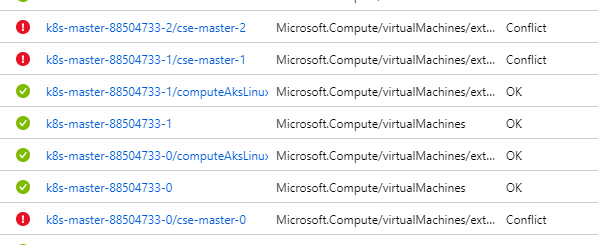
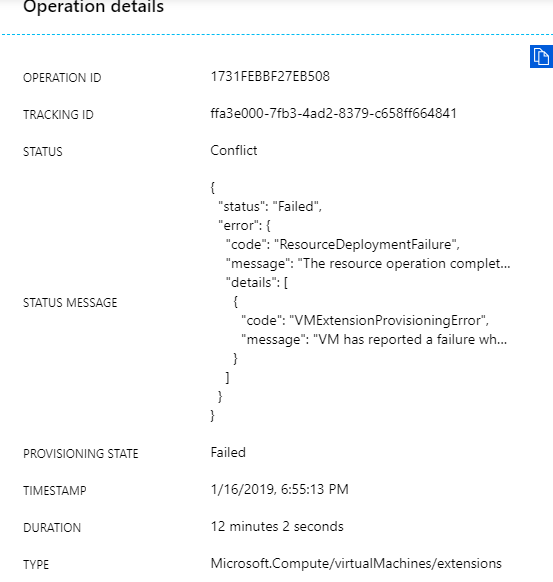
Error message:
{
"status": "Failed",
"error": {
"code": "ResourceDeploymentFailure",
"message": "The resource operation completed with terminal provisioning state 'Failed'.",
"details": [
{
"code": "VMExtensionProvisioningError",
"message": "VM has reported a failure when processing extension 'cse-master-2'. Error message: \"Enable failed: failed to execute command: command terminated with exit status=30\n[stdout]\n\n[stderr]\nConnection to k8s.gcr.io 443 port [tcp/https] succeeded!\nConnection to gcr.io 443 port [tcp/https] succeeded!\nConnection to docker.io 443 port [tcp/https] succeeded!\n\"."
}
]
}
The cluster deployment fails because of a conflict in the masters.
What you expected to happen:
No conflicts.
How to reproduce it (as minimally and precisely as possible):
The input parameters:
{
"apiVersion": "vlabs",
"properties": {
"orchestratorProfile": {
"orchestratorType": "Kubernetes",
"orchestratorVersion": "1.12.1",
"kubernetesConfig": {
"apiServerConfig": {
"--enable-admission-plugins": "NamespaceLifecycle,LimitRanger,ServiceAccount,DefaultStorageClass,DefaultTolerationSeconds,MutatingAdmissionWebhook,ValidatingAdmissionWebhook,ResourceQuota,ExtendedResourceToleration"
},
"useManagedIdentity": true,
"addons": [
{
"name": "cluster-autoscaler",
"enabled": true,
"config": {
"minNodes": "4",
"maxNodes": "50"
}
}
]
}
},
"masterProfile": {
"count": 3,
"dnsPrefix": "@__Master_dnsPrefix__@",
"vmSize": "Standard_D2_v2",
"vnetSubnetId": "@__resourceGroupName__@/providers/Microsoft.Network/virtualNetworks/@__clusterVnetName__@/subnets/@__Master_vnetSubnetName__@",
"firstConsecutiveStaticIP": "10.10.0.230",
"vnetCidr": "10.10.0.0/16",
"subjectAltNames": [
"@__Master_dnsPrefix__@.@__Master_DomainSuffix__@"
]
},
"agentPoolProfiles": [
{
"name": "agentstgeus",
"count": 2,
"vmSize": "Standard_D4_v2",
"vnetSubnetId": "@__resourceGroupName__@/providers/Microsoft.Network/virtualNetworks/@__clusterVnetName__@/subnets/@__agent_vnetSubnetName__@",
"availabilityProfile": "VirtualMachineScaleSets",
"storageProfile": "ManagedDisks",
"osDiskSizeGB": 400,
"acceleratedNetworkingEnabled": true
}
],
"linuxProfile": {
"adminUsername": "wdatpuser",
"ssh": {
"publicKeys": [
{
"keyData": "@__ClusterSshPublicKey__@"
}
]
}
}
}
}
Anything else we need to know:
 oronboni
All 15 comments
👋 Thanks for opening your first issue here! If you're reporting a 🐞 bug, please make sure you include steps to reproduce it.
![welcome[bot] picture](https://avatars.githubusercontent.com/in/4141?v=4&s=40) welcome[bot]
on 16 Jan 2019
welcome[bot]
on 16 Jan 2019
@oroboni "Conflict" is just how ARM chooses to present this error on the VMs. The core problem is a "CSE 30" issue.
Can you take a look at our VMExtensionProvisioning error troubleshooting doc and see if it helps you?
 mboersma
on 16 Jan 2019
mboersma
on 16 Jan 2019
The exit code is 30:
Enable failed: failed to execute command: command terminated with exit status=30
oronboni
on 16 Jan 2019
Is this reproducible--does it happen every time you try to deploy this apimodel? If so, it likely points to something in the model creating a problem. There are many configuration options available to aks-engine and not every possible permutation is workable.
mboersma
on 16 Jan 2019
In aks-engine-0.29.1 it happens every time.
I tried the same api-model with the same deployment process with acs-engine 0.24 and there was no issue.
oronboni
on 16 Jan 2019
The fact that this is happening on every master VM means that this is not transient. Let's figure out what might have changed between the two versions that could cause this error.
Exit 30 means that kubelet was unable to start.
Could you please check kubelet logs on one of the master VMs? sudo journalctl -u kubelet.
Also, I see that you didn't specify a --non-masquerade-cidr. Please check that value to make sure it is compatible with your Vnet definition.
 CecileRobertMichon
on 16 Jan 2019
CecileRobertMichon
on 16 Jan 2019
- Logs begin at Wed 2019-01-16 16:44:42 UTC, end at Wed 2019-01-16 19:02:58 UTC. --
Jan 16 16:44:41 k8s-master-88504733-0 systemd[1]: Stopped Kubelet.
Jan 16 16:44:41 k8s-master-88504733-0 systemd[1]: Starting Kubelet...
Jan 16 16:44:42 k8s-master-88504733-0 sysctl[5047]: net.ipv4.tcp_retries2 = 8
Jan 16 16:44:42 k8s-master-88504733-0 ebtables[5052]: Bridge table: nat
Jan 16 16:44:42 k8s-master-88504733-0 ebtables[5052]: Bridge chain: PREROUTING, entries: 0, policy: ACCEPT
Jan 16 16:44:42 k8s-master-88504733-0 ebtables[5052]: Bridge chain: OUTPUT, entries: 0, policy: ACCEPT
Jan 16 16:44:42 k8s-master-88504733-0 ebtables[5052]: Bridge chain: POSTROUTING, entries: 0, policy: ACCEPT
Jan 16 16:44:42 k8s-master-88504733-0 iptables[5054]: Chain PREROUTING (policy ACCEPT)
Jan 16 16:44:42 k8s-master-88504733-0 iptables[5054]: target prot opt source destination
Jan 16 16:44:42 k8s-master-88504733-0 iptables[5054]: DOCKER all -- anywhere anywhere ADDRTYPE match dst-type LOCAL
Jan 16 16:44:42 k8s-master-88504733-0 iptables[5054]: REDIRECT tcp -- anywhere anywhere tcp dpt:4443 redir ports 443
Jan 16 16:44:42 k8s-master-88504733-0 iptables[5054]: Chain INPUT (policy ACCEPT)
Jan 16 16:44:42 k8s-master-88504733-0 iptables[5054]: target prot opt source destination
Jan 16 16:44:42 k8s-master-88504733-0 iptables[5054]: Chain OUTPUT (policy ACCEPT)
Jan 16 16:44:42 k8s-master-88504733-0 iptables[5054]: target prot opt source destination
Jan 16 16:44:42 k8s-master-88504733-0 iptables[5054]: DOCKER all -- anywhere !127.0.0.0/8 ADDRTYPE match dst-type LOCAL
Jan 16 16:44:42 k8s-master-88504733-0 iptables[5054]: Chain POSTROUTING (policy ACCEPT)
Jan 16 16:44:42 k8s-master-88504733-0 iptables[5054]: target prot opt source destination
Jan 16 16:44:42 k8s-master-88504733-0 iptables[5054]: MASQUERADE all -- 172.17.0.0/16 anywhere
Jan 16 16:44:42 k8s-master-88504733-0 iptables[5054]: Chain DOCKER (2 references)
Jan 16 16:44:42 k8s-master-88504733-0 iptables[5054]: target prot opt source destination
Jan 16 16:44:42 k8s-master-88504733-0 iptables[5054]: RETURN all -- anywhere anywhere
Jan 16 16:44:42 k8s-master-88504733-0 systemd[1]: Started Kubelet.
Jan 16 16:44:57 k8s-master-88504733-0 kubelet[5060]: Flag --address has been deprecated, This parameter should be set via the config file specified by the Kubelet's --config flag. See https://kubernetes.io/docs/tasks/administer-cluster/k
Jan 16 16:44:57 k8s-master-88504733-0 kubelet[5060]: Flag --allow-privileged has been deprecated, will be removed in a future version
Jan 16 16:44:57 k8s-master-88504733-0 kubelet[5060]: Flag --anonymous-auth has been deprecated, This parameter should be set via the config file specified by the Kubelet's --config flag. See https://kubernetes.io/docs/tasks/administer-cl
Jan 16 16:44:57 k8s-master-88504733-0 kubelet[5060]: Flag --authorization-mode has been deprecated, This parameter should be set via the config file specified by the Kubelet's --config flag. See https://kubernetes.io/docs/tasks/administe
Jan 16 16:44:57 k8s-master-88504733-0 kubelet[5060]: Flag --cadvisor-port has been deprecated, The default will change to 0 (disabled) in 1.12, and the cadvisor port will be removed entirely in 1.13
Jan 16 16:44:57 k8s-master-88504733-0 kubelet[5060]: Flag --cgroups-per-qos has been deprecated, This parameter should be set via the config file specified by the Kubelet's --config flag. See https://kubernetes.io/docs/tasks/administer-c
Jan 16 16:44:57 k8s-master-88504733-0 kubelet[5060]: Flag --client-ca-file has been deprecated, This parameter should be set via the config file specified by the Kubelet's --config flag. See https://kubernetes.io/docs/tasks/administer-cl
Jan 16 16:44:57 k8s-master-88504733-0 kubelet[5060]: Flag --cluster-dns has been deprecated, This parameter should be set via the config file specified by the Kubelet's --config flag. See https://kubernetes.io/docs/tasks/administer-clust
Jan 16 16:44:57 k8s-master-88504733-0 kubelet[5060]: Flag --cluster-domain has been deprecated, This parameter should be set via the config file specified by the Kubelet's --config flag. See https://kubernetes.io/docs/tasks/administer-cl
Jan 16 16:44:57 k8s-master-88504733-0 kubelet[5060]: Flag --enforce-node-allocatable has been deprecated, This parameter should be set via the config file specified by the Kubelet's --config flag. See https://kubernetes.io/docs/tasks/adm
Jan 16 16:44:57 k8s-master-88504733-0 kubelet[5060]: Flag --event-qps has been deprecated, This parameter should be set via the config file specified by the Kubelet's --config flag. See https://kubernetes.io/docs/tasks/administer-cluster
Jan 16 16:44:57 k8s-master-88504733-0 kubelet[5060]: Flag --eviction-hard has been deprecated, This parameter should be set via the config file specified by the Kubelet's --config flag. See https://kubernetes.io/docs/tasks/administer-clu
Jan 16 16:44:57 k8s-master-88504733-0 kubelet[5060]: Flag --feature-gates has been deprecated, This parameter should be set via the config file specified by the Kubelet's --config flag. See https://kubernetes.io/docs/tasks/administer-clu
Jan 16 16:44:57 k8s-master-88504733-0 kubelet[5060]: Flag --image-gc-high-threshold has been deprecated, This parameter should be set via the config file specified by the Kubelet's --config flag. See https://kubernetes.io/docs/tasks/admi
Jan 16 16:44:57 k8s-master-88504733-0 kubelet[5060]: Flag --image-gc-low-threshold has been deprecated, This parameter should be set via the config file specified by the Kubelet's --config flag. See https://kubernetes.io/docs/tasks/admin
Jan 16 16:44:57 k8s-master-88504733-0 kubelet[5060]: Flag --keep-terminated-pod-volumes has been deprecated, will be removed in a future version
Jan 16 16:44:57 k8s-master-88504733-0 kubelet[5060]: Flag --max-pods has been deprecated, This parameter should be set via the config file specified by the Kubelet's --config flag. See https://kubernetes.io/docs/tasks/administer-cluster/
Jan 16 16:44:57 k8s-master-88504733-0 kubelet[5060]: Flag --node-status-update-frequency has been deprecated, This parameter should be set via the config file specified by the Kubelet's --config flag. See https://kubernetes.io/docs/tasks
Jan 16 16:44:57 k8s-master-88504733-0 kubelet[5060]: Flag --non-masquerade-cidr has been deprecated, will be removed in a future version
Jan 16 16:44:57 k8s-master-88504733-0 kubelet[5060]: Flag --pod-manifest-path has been deprecated, This parameter should be set via the config file specified by the Kubelet's --config flag. See https://kubernetes.io/docs/tasks/administer
Jan 16 16:44:57 k8s-master-88504733-0 kubelet[5060]: Flag --pod-max-pids has been deprecated, This parameter should be set via the config file specified by the Kubelet's --config flag. See https://kubernetes.io/docs/tasks/administer-clus
Jan 16 16:44:57 k8s-master-88504733-0 kubelet[5060]: I0116 16:44:57.779666 5060 flags.go:27] FLAG: --address="0.0.0.0"
Jan 16 16:44:57 k8s-master-88504733-0 kubelet[5060]: I0116 16:44:57.779718 5060 flags.go:27] FLAG: --allow-privileged="true"
Jan 16 16:44:57 k8s-master-88504733-0 kubelet[5060]: I0116 16:44:57.779727 5060 flags.go:27] FLAG: --alsologtostderr="false"
Jan 16 16:44:57 k8s-master-88504733-0 kubelet[5060]: I0116 16:44:57.779734 5060 flags.go:27] FLAG: --anonymous-auth="false"
Jan 16 16:44:57 k8s-master-88504733-0 kubelet[5060]: I0116 16:44:57.779738 5060 flags.go:27] FLAG: --application-metrics-count-limit="100"
Jan 16 16:44:57 k8s-master-88504733-0 kubelet[5060]: I0116 16:44:57.779743 5060 flags.go:27] FLAG: --authentication-token-webhook="false"
Jan 16 16:44:57 k8s-master-88504733-0 kubelet[5060]: I0116 16:44:57.779747 5060 flags.go:27] FLAG: --authentication-token-webhook-cache-ttl="2m0s"
Jan 16 16:44:57 k8s-master-88504733-0 kubelet[5060]: I0116 16:44:57.779754 5060 flags.go:27] FLAG: --authorization-mode="Webhook"
Jan 16 16:44:57 k8s-master-88504733-0 kubelet[5060]: I0116 16:44:57.779761 5060 flags.go:27] FLAG: --authorization-webhook-cache-authorized-ttl="5m0s"
Jan 16 16:44:57 k8s-master-88504733-0 kubelet[5060]: I0116 16:44:57.779765 5060 flags.go:27] FLAG: --authorization-webhook-cache-unauthorized-ttl="30s"
Jan 16 16:44:57 k8s-master-88504733-0 kubelet[5060]: I0116 16:44:57.779785 5060 flags.go:27] FLAG: --azure-container-registry-config="/etc/kubernetes/azure.json"
Jan 16 16:44:57 k8s-master-88504733-0 kubelet[5060]: I0116 16:44:57.779790 5060 flags.go:27] FLAG: --boot-id-file="/proc/sys/kernel/random/boot_id"
Jan 16 16:44:57 k8s-master-88504733-0 kubelet[5060]: I0116 16:44:57.779811 5060 flags.go:27] FLAG: --bootstrap-checkpoint-path=""
Jan 16 16:44:57 k8s-master-88504733-0 kubelet[5060]: I0116 16:44:57.779814 5060 flags.go:27] FLAG: --bootstrap-kubeconfig=""
Jan 16 16:44:57 k8s-master-88504733-0 kubelet[5060]: I0116 16:44:57.779818 5060 flags.go:27] FLAG: --cadvisor-port="0"
Jan 16 16:44:57 k8s-master-88504733-0 kubelet[5060]: I0116 16:44:57.779826 5060 flags.go:27] FLAG: --cert-dir="/var/lib/kubelet/pki"
Jan 16 16:44:57 k8s-master-88504733-0 kubelet[5060]: I0116 16:44:57.779830 5060 flags.go:27] FLAG: --cgroup-driver="cgroupfs"
oronboni
on 16 Jan 2019
Seems like these logs aren't complete, can you try sudo journalctl -u kubelet | tail?
CecileRobertMichon
on 16 Jan 2019
Jan 16 16:45:07 k8s-master-88504733-0 kubelet[8036]: F0116 16:45:07.257391 8036 server.go:233] failed to run Kubelet: could not init cloud provider "azure": Getting the managed service identity endpoint: open /var/lib/waagent/ManagedIdentity-Settings: no such file or directory
Jan 16 16:45:07 k8s-master-88504733-0 systemd[1]: kubelet.service: Main process exited, code=exited, status=255/n/a
Jan 16 16:45:07 k8s-master-88504733-0 systemd[1]: kubelet.service: Unit entered failed state.
Jan 16 16:45:07 k8s-master-88504733-0 systemd[1]: kubelet.service: Failed with result 'exit-code'.
Jan 16 16:45:07 k8s-master-88504733-0 systemd[1]: kubelet.service: Service hold-off time over, scheduling restart.
Jan 16 16:45:07 k8s-master-88504733-0 systemd[1]: Stopped Kubelet.
Jan 16 16:45:07 k8s-master-88504733-0 systemd[1]: kubelet.service: Start request repeated too quickly.
Jan 16 16:45:07 k8s-master-88504733-0 systemd[1]: Failed to start Kubelet.
Jan 16 16:45:07 k8s-master-88504733-0 systemd[1]: kubelet.service: Unit entered failed state.
Jan 16 16:45:07 k8s-master-88504733-0 systemd[1]: kubelet.service: Failed with result 'start-limit-hit'.
oronboni
on 16 Jan 2019
So Getting the managed service identity endpoint: open /var/lib/waagent/ManagedIdentity-Settings: no such file or directory seems to be the issue here. Let me investigate to see if anything in that surface area changed recently.
CecileRobertMichon
on 16 Jan 2019
Seems like it could be related to https://github.com/Azure/aks-engine/pull/185.
@ritazh do you know what could be happening here?
CecileRobertMichon
on 16 Jan 2019
It seems when "orchestratorVersion": "1.12.1" is used in the api model, you get "orchestratorNameVersionTag": "Kubernetes:1.10.12", which is < v1.11, the supported k8s version for IMDS per this commit: https://github.com/kubernetes/kubernetes/commit/b1b930a39b5a602611023b47fea1063acfd5bc53#diff-681659ab9abb4b4883e78e8aaa980dba
To use a supported v1.12, you can use "orchestratorRelease": "1.12", in your api model.
 ritazh
on 16 Jan 2019
ritazh
on 16 Jan 2019
k8s version 1.12.1 isn't supported in the latest release (1.12.4 is). There is a bug in the deploy command where the version defaults to 1.10.12 instead of returning an error when the version isn't supported. It is currently being fixed. You can track it at https://github.com/Azure/aks-engine/issues/191.
CecileRobertMichon
on 16 Jan 2019
To clarify, Rita's recommendation
To use a supported v1.12, you can use "orchestratorRelease": "1.12", in your api model.
you'll also need to remove "orchestratorVersion": "1.12.1",, so your config will become:
"orchestratorProfile": {
"orchestratorType": "Kubernetes",
"orchestratorRelease": "1.12",
...
}
(or you can use a specific supported orchestratorVersion such as 1.12.4 but that is harder to maintain as you will have to change the version every time a patch is deprecated.)
CecileRobertMichon
on 16 Jan 2019
Thank you
oronboni
on 17 Jan 2019
Related issues
 adelina-t
·
5Comments
adelina-t
·
5Comments
 Flask
·
3Comments
Flask
·
3Comments
 jackfrancis
·
5Comments
jackfrancis
·
5Comments
 javierprovecho
·
5Comments
javierprovecho
·
5Comments
 UncleTawnos
·
3Comments
UncleTawnos
·
3Comments
Most helpful comment
To clarify, Rita's recommendation
you'll also need to remove
"orchestratorVersion": "1.12.1",, so your config will become:(or you can use a specific supported
orchestratorVersionsuch as 1.12.4 but that is harder to maintain as you will have to change the version every time a patch is deprecated.)