Akka.net: Unable to join seednode with localhost when hostname configured as 0.0.0.0
- Which Akka.Net version you are using
1.4.10
- On which platform you are using Akka.Net
Windows Server 2019
- A list of steps to reproduce the issue. Or an gist or github repo which can be easily used to reproduce your case.
Start an actorsystem (variable name: system_local) with the following code in a box with IP 10.128.10.10
remote {
            dot-netty.tcp {
              hostname = "0.0.0.0"
              port = 9000
            }
          }
And use the following code to add it self as the seednode
let cluster = Cluster.Get system_local
let il = ImmutableList.Create<Address>(seq[
    Address.Parse @"akka.tcp://[email protected]:9000"
    ]|>Seq.toArray)
cluster.JoinSeedNodes il
And use the following code trying to join 10.128.10.10 as the seednode in another box
let cluster = Cluster.Get system_another_box
let il = ImmutableList.Create<Address>(seq[
    Address.Parse @"akka.tcp://[email protected]:9000"
    ]|>Seq.toArray)
cluster.JoinSeedNodes il
And in the 10.128.10.10 box, it says:
[ERROR][9/24/2020 10:23:39 AM][Thread 0013][akka.tcp://[email protected]:9000/system/endpointManager/reliableEndpointWriter-akka.tcp%3A%2F%2Fcluster-system%400.0.0.0%3A9010-9/endpointWriter] Dropping message [Akka.Actor.ActorSelectionMessage] for non-local recipient [[akka.tcp://[email protected]:9000/]] arriving at [akka.tcp://[email protected]:9000] inbound addresses [akka.tcp://[email protected]:9000]
Even in the same box, it doesn't allow localhost as the seednode path:
let cluster = Cluster.Get system_same_box
let il = ImmutableList.Create<Address>(seq[
    Address.Parse @"akka.tcp://cluster-system@localhost:9000"
    ]|>Seq.toArray)
cluster.JoinSeedNodes il
the similar message:
[ERROR][9/24/2020 10:35:43 AM][Thread 0013][akka.tcp://[email protected]:9000/system/endpointManager/endpointWriter-akka.tcp%3A%2F%2Fcluster-system%400.0.0.0%3A9010-10] Dropping message [Akka.Actor.ActorSelectionMessage] for non-local recipient [[akka.tcp://cluster-system@localhost:9000/]] arriving at [akka.tcp://cluster-system@localhost:9000] inbound addresses [akka.tcp://[email protected]:9000]
Is this by designed or ... an unexpected behavior?
When taking a look at the code, in src\core\Akka.Remote\Endpoint.cs
if (_provider.Transport.Addresses.Contains(recipientAddress))
                {
                    //if it was originally addressed to us but is in fact remote from our point of view (i.e. remote-deployed)
                    recipient.Tell(payload, sender);
                }
Should there be a logic to add localhost address object to the hashset behind _provider.Transport.Addresses (if the hostname is 0.0.0.0) ? (vice versa)
 ingted
All 12 comments
even when public-hostname is localhost, joinseednode with 127.0.0.1 doesn't work as well
ingted
on 24 Sep 2020
@ingted
Using 0.0.0.0 as a hostname is definitely supported. It's commonly used across all of the Akka.NET documentation. [1]
Hard to tell where the problem is since you didn't post the complete source, but I suspect it might be in the environment.
Try this example and see if it helps: https://github.com/BigDaddy1337/dotnet-core-akka-cluster-example
[1] https://getakka.net/articles/remoting/transports.html#separating-physical-ip-address-from-logical-address
 nagytech
on 25 Sep 2020
nagytech
on 25 Sep 2020
@ingted @nagytech AFAIK, you need to set public-hostname = 10.128.10.10 in your seed node, and use akka.tcp://[email protected]:9000 as contact point on every node. I don't think you can remotely connect to 0.0.0.0, or a NAT'ed IP for that matter.
 ismaelhamed
on 25 Sep 2020
ismaelhamed
on 25 Sep 2020
Hi all, thanks for the replies...
In the same box, I start a node with hostname 0.0.0.0.
It's ok at first to join seednode with 0.0.0.0, but unable to join it with the 192.168.43.122...
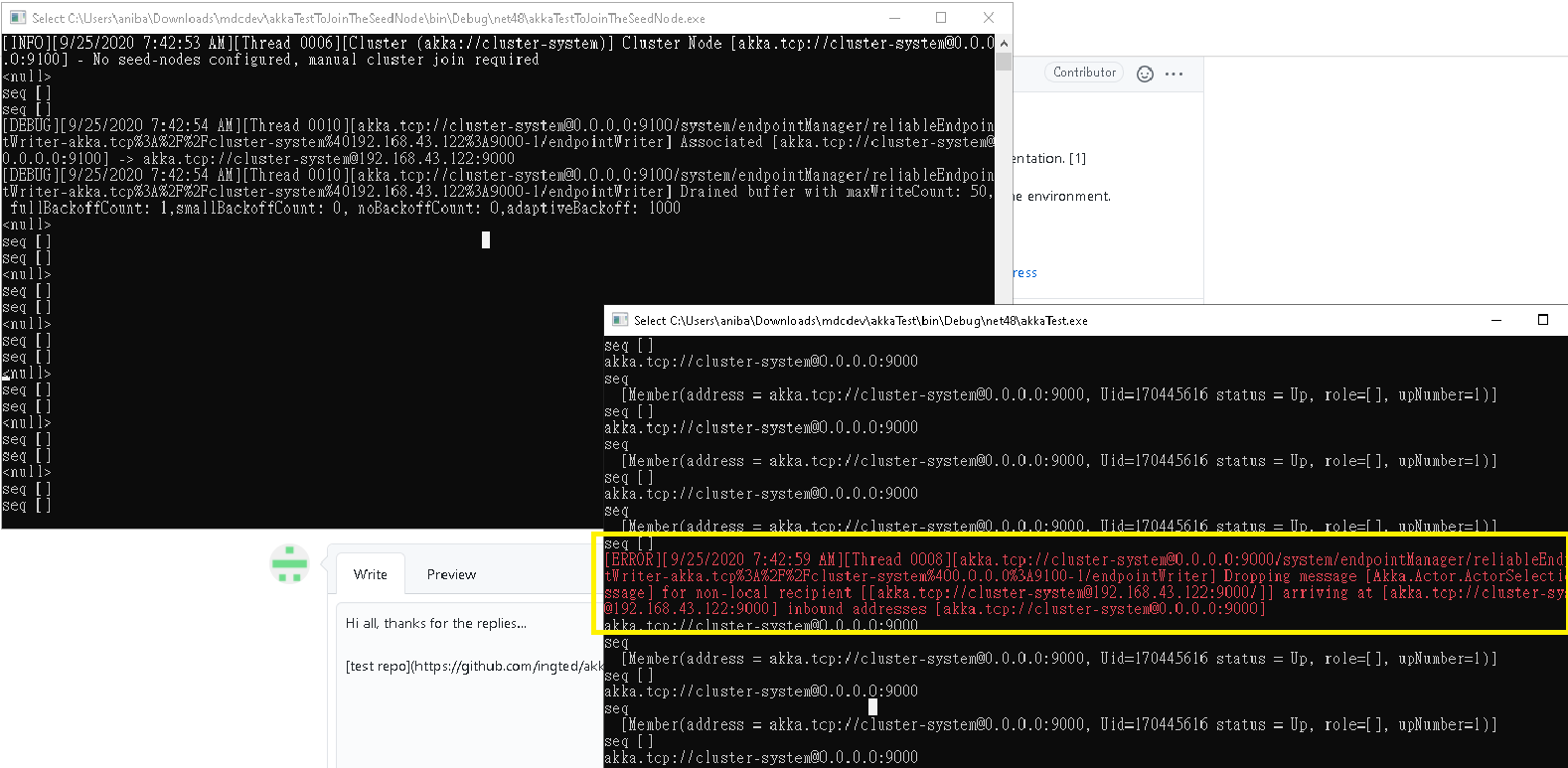
After add the public-hostname, 192.168.43.122 is ok, however 0.0.0.0 isn't anymore...
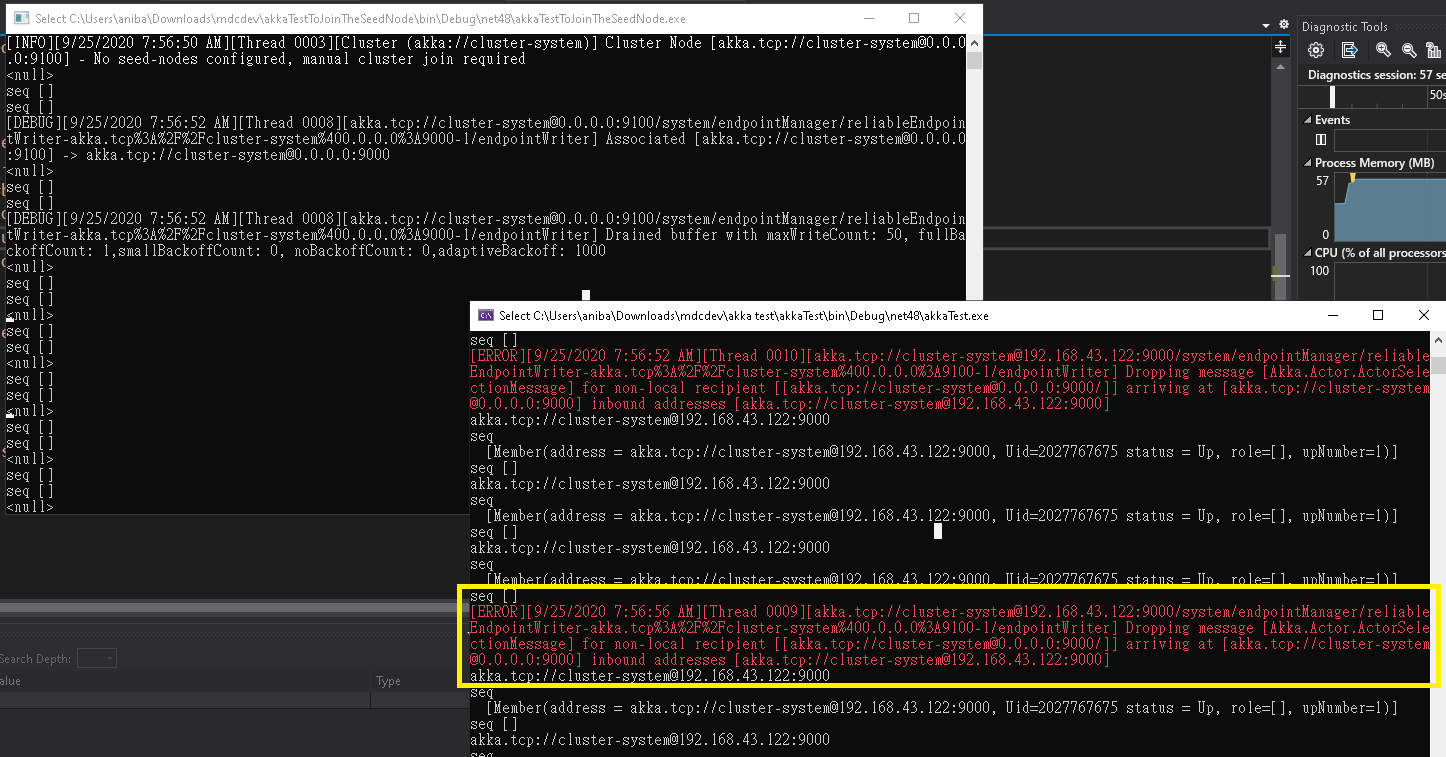
ingted
on 25 Sep 2020
Why public-hostname hides the original 0.0.0.0?!
ingted
on 25 Sep 2020
0.0.0.0 is an unrouteable address: you can use it as a source address to bind locally, but it cannot be resolved remotely. Hence why you need to publicly advertise where each node is listening to with public-hostname
ismaelhamed
on 28 Sep 2020
I know remote actorsystems must use public-hostname to communicate, however when in same machine, two actorsystem are unable to communicate with each other with 0.0.0.0 when public-hostname is configured... Is this by designed?
ingted
on 29 Sep 2020
@ingted
Looking at your example code can see that you haven't set the public-hostname in your configuration. The screenshots you sent also indicate that the configuration was not set, otherwise your logs would look something like this:
[INFO][29/09/2020 7:21:15 AM][Thread 0001][remoting (akka://cluster-system)] Remoting started; listening on addresses : [akka.tcp://[email protected]:9100]
[INFO][29/09/2020 7:21:15 AM][Thread 0001][remoting (akka://cluster-system)] Remoting now listens on addresses: [akka.tcp://[email protected]:9100]
[INFO][29/09/2020 7:21:15 AM][Thread 0001][Cluster (akka://cluster-system)] Cluster Node [akka.tcp://[email protected]:9100] - Starting up...
[INFO][29/09/2020 7:21:15 AM][Thread 0001][Cluster (akka://cluster-system)] Cluster Node [akka.tcp://[email protected]:9100] - Started up successfully
[INFO][29/09/2020 7:21:15 AM][Thread 0008][Cluster (akka://cluster-system)] Cluster Node [akka.tcp://[email protected]:9100] - No seed-nodes configured, manual cluster join required
<null>
seq []
seq []
_notice how the local actor system is identifying as akka.tcp://[email protected]:9100 and not akka.tcp://[email protected]:9100_
Check the remote HOCON segment below and make sure you configure your public-hostname value to a resolvable address.
remote {
    dot-netty.tcp {
        #byte-order = "little-endian"
        hostname = 0.0.0.0
        port = 9100
        public-hostname = 192.168.43.122
    }
}
Actually maybe I missed the commit with correct code. But if you see the screenshot, it was with public-hostname...
ingted
on 29 Sep 2020
One the same machine,
If a actorsystem starts with this configuration,
remote {
    dot-netty.tcp {
        #byte-order = "little-endian"
        hostname = 0.0.0.0
        port = 9100
        public-hostname = 192.168.43.122
    }
}
I will be unable to joinseedsnode by actorsystem on the same machine with 0.0.0.0.
I need to joinseedsnode with 192.168.43.122 on the same machine...
This is very strange?!
ingted
on 29 Sep 2020
@ingted you cannot join to IP address 0.0.0.0. It's not about akka, it's how operating system's sockets work. (You can try it yourself and create TCP or even HTTP client/server using standard .NET API, you'll see that client cannot connect to an unspecified address).
 Horusiath
on 30 Sep 2020
Horusiath
on 30 Sep 2020
@Horusiath I think what I want to express was localhost, not 0.0.0.0
https://github.com/pmbanka/akka-clustering-ndc/blob/master/sharding.fsx
when I changed the localhost to 0.0.0.0 and with two different port in the same box without public-hostname,
they can join successfully, however after public-hostname added, localhost/0.0.0.0 are unable to join...
ingted
on 4 Oct 2020
Related issues
 carol-braileanu
·
4Comments
carol-braileanu
·
4Comments
 netogallo
·
7Comments
Horusiath
·
3Comments
netogallo
·
7Comments
Horusiath
·
3Comments
 Aaronontheweb
·
6Comments
Aaronontheweb
·
6Comments
 AndrewBoklashko
·
3Comments
AndrewBoklashko
·
3Comments
Most helpful comment
@ingted
Using 0.0.0.0 as a hostname is definitely supported. It's commonly used across all of the Akka.NET documentation. [1]
Hard to tell where the problem is since you didn't post the complete source, but I suspect it might be in the environment.
Try this example and see if it helps: https://github.com/BigDaddy1337/dotnet-core-akka-cluster-example
[1] https://getakka.net/articles/remoting/transports.html#separating-physical-ip-address-from-logical-address