Akka.net: MultiNodeSpecs: turn off debug logging for all of them
Version: 1.4.0-beta4
We generate MASSIVE amounts of logs each time we run the MNTR. Most of the tests in the suite are pretty stable, especially since the most recent changes we introduced since Akka.NET v1.4.0-beta4 was released. Let's cut down on the noise by setting all of the logging levels back to INFO or lower.
cc @IgorFedchenko
 Aaronontheweb
All 20 comments
@Aaronontheweb from what I gather from here, the logs this issue refers are the ones generated from build.cmd MultiNodeTestsNetCore or build.cmd MultiNodeTestsNet. Correct?
If yes how long does a run usually take? It's been running for 30min+ on my quite powerfull machine (Razer Blade 2018 / i7 6core / 32GB / fast ssd). Or am I doing something wrong?
LE : just as i typed the message it finished
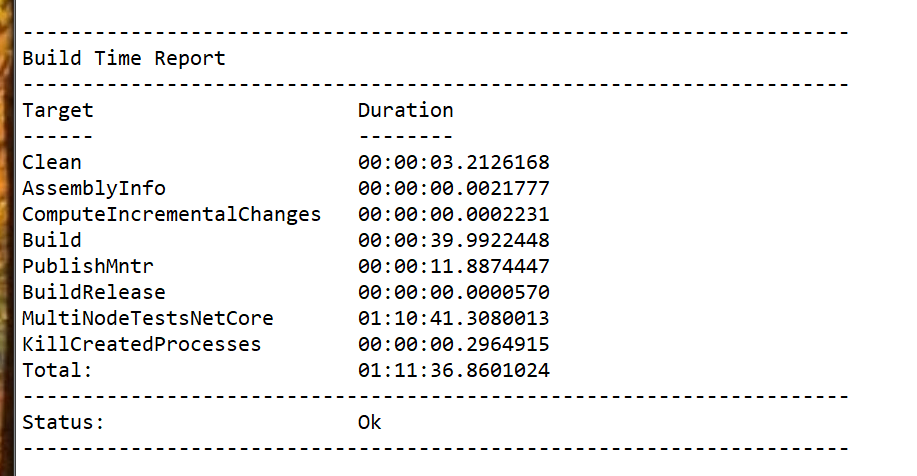
with and 18MB log dump - i take it that this is the stuff that needs to go
output.log
 razvangoga
on 25 Nov 2020
razvangoga
on 25 Nov 2020
@razvangoga I think each run on our build server usually takes 1 hour and 15 minutes. The tests are extremely long-running in some cases.
Aaronontheweb
on 26 Nov 2020
Ok, so 1h11 locally is in line.
Can you confirm that the logs i mentioned above are the ones the issue is
about?
On Thu, 26 Nov 2020, 00:04 Aaron Stannard notifications@github.com wrote:
@razvangoga https://github.com/razvangoga I think each run on our build
server usually takes 1 hour and 15 minutes. The tests are extremely
long-running in some cases.—
You are receiving this because you were mentioned.
Reply to this email directly, view it on GitHub
https://github.com/akkadotnet/akka.net/issues/4215#issuecomment-733983646,
or unsubscribe
https://github.com/notifications/unsubscribe-auth/AAIETZRRVPRSIENYAHEZA7DSRWEPZANCNFSM4KUV3SFQ
.
razvangoga
on 26 Nov 2020
@Aaronontheweb looking into the 18MB log dump i got from last night's run, i've got the following (ball-park) breakdown:
total lines : 59.5k
- build output : 1.3k
- compile warnings : 0.8k
- tests output : 58.0k
- DEBUG : 20.0k
- INFO : 13.0k
- WARNING : 10.0k
- ERROR : 0.5k
- others : 14.0k (stacktrace lines from errors / warnings, empty lines, logs without level)
Basically if the logging would be configured with the minimum level
- WARNING, you would shave 50% of it : -33k lines
- ERROR, you would be maybe around 75% : -43k + some of the stacktrace lines (as DotNetty connection errors like this one are logged as WARNING) - so maybe 50k?

razvangoga
on 26 Nov 2020
@razvangoga Ideally, making this configurable - with a command line switch would be ideal, but with some hardcoded value somewhere should be fine too. So that, if contributors will find that WARNING level is not informative enough when tracking issues with tests, it was easy to change to something other (like INFO level).
Anyway, I would say that setting it to a Warning level should be fine, since most of the time when you get issues with MNTR tests they are described with some error/warning messages. Looking for something on info level is quite rare.
So I think you can go ahead and trim this output by 50%.
 IgorFedchenko
on 26 Nov 2020
IgorFedchenko
on 26 Nov 2020
sounds like a good idea to me
Aaronontheweb
on 26 Nov 2020
ok, i'll proceed like this
what's the guidance regarding branches / PRs? fork and work in the dev branch or create a feature branch ?
LE : found it : https://getakka.net/community/building-akka-net.html#routine-updates-and-pull-requests
razvangoga
on 26 Nov 2020
A quick update - i've gone through (i think) all the MultiNodeSpecs and switched the log level to WARNING and found these edge-cases:
- Test failing if logging moved to WARNING
- ClusterClientSpec - this looks like something to do with the speed of the tests and/or timeouts configured (it fails in the faster less verbose WARNING setup, but always passes when left to the original DEBUG level
[Node #1(client)][Node1:client][FAIL] Akka.Cluster.Tools.Tests.MultiNode.Client.ClusterClientSpec.ClusterClientSpecs
[Node #1(client)][Node1:client][FAIL-EXCEPTION] Type: Xunit.Sdk.TrueException
[Node #1(client)]--> [Node1:client][FAIL-EXCEPTION] Message: Timeout (00:00:10) while waiting for messages. Only received 0/1 messages that matched filter [Info when Message starts with "Lost contact" and Source == "akka.trttl.gremlin.tcp://ClusterClientSpec@localhost:60953/user/client4"]
[Node #1(client)]Expected: True
[Node #1(client)]Actual:   False
[Node #1(client)]--> [Node1:client][FAIL-EXCEPTION] StackTrace:    at Xunit.Assert.True(Nullable`1 condition, String userMessage) in C:\Dev\xunit\xunit\src\xunit.assert\Asserts\BooleanAsserts.cs:line 96
[Node #1(client)]   at Xunit.Assert.True(Boolean condition, String userMessage) in C:\Dev\xunit\xunit\src\xunit.assert\Asserts\BooleanAsserts.cs:line 84
[Node #1(client)]   at Akka.TestKit.Xunit2.XunitAssertions.Fail(String format, Object[] args) in D:\_work\oss\akka\akka.net\src\contrib\testkits\Akka.TestKit.Xunit2\XunitAssertions.cs:line 27
[Node #1(client)]   at Akka.TestKit.Internal.InternalEventFilterApplier.Intercept[T](Func`1 func, ActorSystem system, Nullable`1 timeout, Nullable`1 expectedOccurrences, MatchedEventHandler matchedEventHandler) in D:\_work\oss\akka\akka.net\src\core\Akka.TestKit\EventFilter\Internal\EventFilterApplier.cs:line 314
[Node #1(client)]   at Akka.TestKit.Internal.InternalEventFilterApplier.InternalExpect(Action action, ActorSystem actorSystem, Int32 expectedCount, Nullable`1 timeout) in D:\_work\oss\akka\akka.net\src\core\Akka.TestKit\EventFilter\Internal\EventFilterApplier.cs:line 434
[Node #1(client)]   at Akka.TestKit.Internal.InternalEventFilterApplier.ExpectOne(Action action) in D:\_work\oss\akka\akka.net\src\core\Akka.TestKit\EventFilter\Internal\EventFilterApplier.cs:line 47
[Node #1(client)]   at Akka.Cluster.Tools.Tests.MultiNode.Client.ClusterClientSpec.<>c__DisplayClass21_0.<ClusterClient_must_reestablish_connection_to_receptionist_after_server_restart>b__4() in D:\_work\oss\akka\akka.net\src\contrib\cluster\Akka.Cluster.Tools.Tests.MultiNode\ClusterClient\ClusterClientSpec.cs:line 668
[Node #1(client)]   at Akka.TestKit.Internal.InternalEventFilterApplier.<>c__DisplayClass35_0.<InternalExpect>b__0() in D:\_work\oss\akka\akka.net\src\core\Akka.TestKit\EventFilter\Internal\EventFilterApplier.cs:line 433
[Node #1(client)]   at Akka.TestKit.Internal.InternalEventFilterApplier.Intercept[T](Func`1 func, ActorSystem system, Nullable`1 timeout, Nullable`1 expectedOccurrences, MatchedEventHandler matchedEventHandler) in D:\_work\oss\akka\akka.net\src\core\Akka.TestKit\EventFilter\Internal\EventFilterApplier.cs:line 289
[Node #1(client)]   at Akka.TestKit.Internal.InternalEventFilterApplier.InternalExpect(Action action, ActorSystem actorSystem, Int32 expectedCount, Nullable`1 timeout) in D:\_work\oss\akka\akka.net\src\core\Akka.TestKit\EventFilter\Internal\EventFilterApplier.cs:line 434
[Node #1(client)]   at Akka.TestKit.Internal.InternalEventFilterApplier.ExpectOne(Action action) in D:\_work\oss\akka\akka.net\src\core\Akka.TestKit\EventFilter\Internal\EventFilterApplier.cs:line 47
[Node #1(client)]   at Akka.Cluster.Tools.Tests.MultiNode.Client.ClusterClientSpec.<ClusterClient_must_reestablish_connection_to_receptionist_after_server_restart>b__21_1() in D:\_work\oss\akka\akka.net\src\contrib\cluster\Akka.Cluster.Tools.Tests.MultiNode\ClusterClient\ClusterClientSpec.cs:line 670
[Node #1(client)]   at Akka.Remote.TestKit.MultiNodeSpec.RunOn(Action thunk, RoleName[] nodes) in D:\_work\oss\akka\akka.net\src\core\Akka.Remote.TestKit\MultiNodeSpec.cs:line 513
[Node #1(client)]   at Akka.Cluster.Tools.Tests.MultiNode.Client.ClusterClientSpec.<ClusterClient_must_reestablish_connection_to_receptionist_after_server_restart>b__21_0() in D:\_work\oss\akka\akka.net\src\contrib\cluster\Akka.Cluster.Tools.Tests.MultiNode\ClusterClient\ClusterClientSpec.cs:line 674
[Node #1(client)]   at Akka.TestKit.TestKitBase.<>c__DisplayClass157_0.<Within>b__0() in D:\_work\oss\akka\akka.net\src\core\Akka.TestKit\TestKitBase_Within.cs:line 57
[Node #1(client)]   at Akka.TestKit.TestKitBase.Within[T](TimeSpan min, TimeSpan max, Func`1 function, String hint, Nullable`1 epsilonValue) in D:\_work\oss\akka\akka.net\src\core\Akka.TestKit\TestKitBase_Within.cs:line 134
[Node #1(client)]   at Akka.TestKit.TestKitBase.Within(TimeSpan min, TimeSpan max, Action action, String hint, Nullable`1 epsilonValue) in D:\_work\oss\akka\akka.net\src\core\Akka.TestKit\TestKitBase_Within.cs:line 58
[Node #1(client)]   at Akka.TestKit.TestKitBase.Within(TimeSpan max, Action action, Nullable`1 epsilonValue) in D:\_work\oss\akka\akka.net\src\core\Akka.TestKit\TestKitBase_Within.cs:line 33
[Node #1(client)]   at Akka.Cluster.Tools.Tests.MultiNode.Client.ClusterClientSpec.ClusterClient_must_reestablish_connection_to_receptionist_after_server_restart() in D:\_work\oss\akka\akka.net\src\contrib\cluster\Akka.Cluster.Tools.Tests.MultiNode\ClusterClient\ClusterClientSpec.cs:line 688
[Node #1(client)]   at Akka.Cluster.Tools.Tests.MultiNode.Client.ClusterClientSpec.ClusterClientSpecs() in D:\_work\oss\akka\akka.net\src\contrib\cluster\Akka.Cluster.Tools.Tests.MultiNode\ClusterClient\ClusterClientSpec.cs:line 294
- Debug explicitly requested for (and these tests log a lot in DEBUG)
- LeaderLeavingSpec
- ClusterBroadcastGroupSpec
- RestartNodeSpec
- RestartNode2Spec
- JoinSeedNodeSpec
- JoinInProgressSpec
- ConvergenceWithAccrualFailureDetectorMultiNode
- ConvergenceWithFailureDetectorPuppetMultiNode
- ClusterDeathWatchSpec
- RemoteRoundRobinSpec
- TestConductorSpec
- TransportFailSpec
- RemoteDeliverySpec
- PiercingShouldKeepQuarantineSpec
- AttemptSysMsgRedeliverySpec
for example:
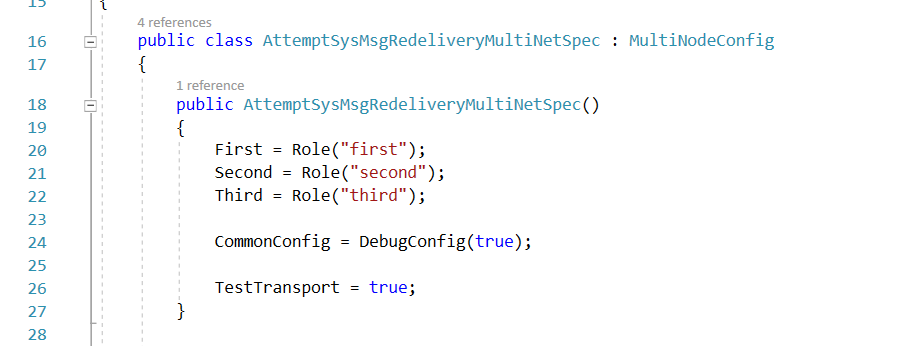
where the DebugConfig HOCON is
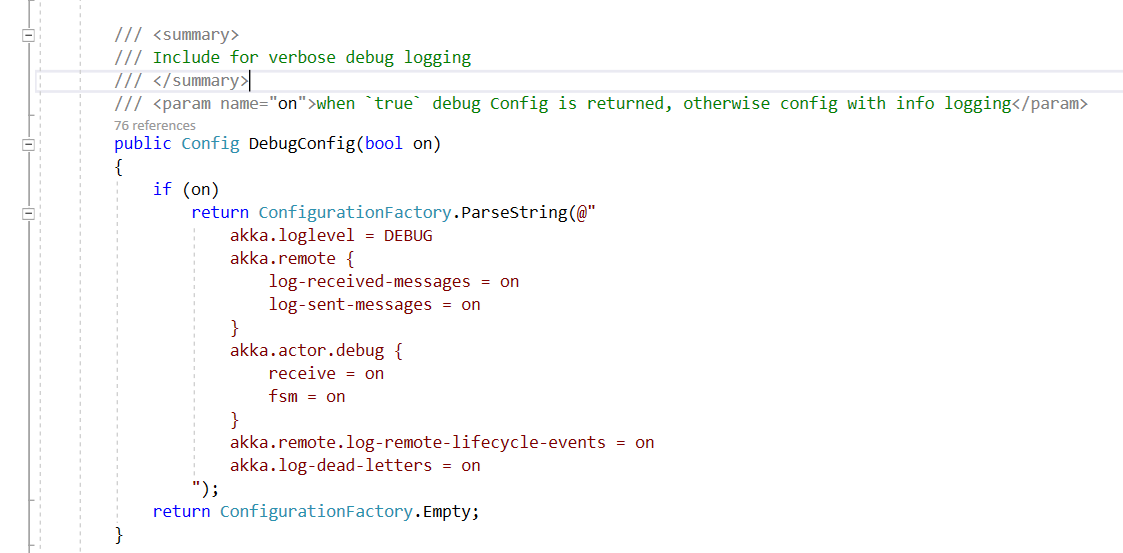
- Logs like this one still remain even with loglevel set to WARNING
[INFO][30-Nov-20 12:57:01][Thread 0040][akka://TestRunnerLogging/system/IO-TCP/$a] Message [SocketAsyncEventArgs] without sender to akka://TestRunnerLogging/system/IO-TCP/$a was not delivered. [1] dead letters encountered. If this is not an expected behavior then akka://TestRunnerLogging/system/IO-TCP/$a may have terminated unexpectedly. This logging can be turned off or adjusted with configuration settings 'akka.log-dead-letters' and 'akka.log-dead-letters-during-shutdown'.
Any ideea how to turn them off? loglevel / stdout-loglevel / the 2 HOCON settings mentioned in the message don't seem to affect them
How should i proceed with them?
razvangoga
on 30 Nov 2020
@razvangoga Could you create a PR with your current changes? So that we could see how it is going and give you some feedback?
As for all this specs logging under debugging level - how about implementing filtering on the MultiNodeTestRunner itself?
This specs (their actor systems) are running in separate subprocesses, and the MNTR process is aggregating their logs and doing output to the console/test output providers.
So, this might be a good idea to make log level filtering on the MNTR side itself - letting the specs to log events as they do right now, but allowing MTNR to filter the logs he will pass to the outputs.
This way, we can make log level filtering simpler, and allow developers to write multi-node specs with any log levels they want.
What to you think about it?
IgorFedchenko
on 30 Nov 2020
pr opened here
razvangoga
on 30 Nov 2020
@razvangoga Thanks! So, I think I understood your changes right in the comment above. Left you some summary comment here: https://github.com/akkadotnet/akka.net/pull/4644/files#r532771147
IgorFedchenko
on 30 Nov 2020
@IgorFedchenko @razvangoga I have created a WIP PR for this.
Kindly review
 eaba
on 3 Dec 2020
eaba
on 3 Dec 2020
@eaba Left you a review there. @razvangoga you can also take a look at that, so that we all could be on the same page: https://github.com/akkadotnet/akka.net/pull/4651#pullrequestreview-543988173
IgorFedchenko
on 3 Dec 2020
@IgorFedchenko all good from my side, things were clear since we spoke on Friday.
looking into how thr MNTR outputs the received logs i've come upon the TimelineLogCollectorActor, more specifically the Receive < PrintToConsole > method. The actor collects the RedirectedStandardOutput from the NTR child processes.
At the moment the logging is simply done by Console.WriteLine. This could be changed to log via the Context.GetLogger() like here - issue is that the log lines are raw strings, so one would need to parse them (maybe with regex?) to see what level they originally had so you can pipe them to the correct .Info or .Warning method.
I'm not exactly sure at the moment how Context.GetLogger() is configured, but it should work in principle (and allow you to have one master logs filter config).
What are your thoughts on this approach?
LE : reading further in the codebase, i see that this parsing is already done in the class LogMessageInfo - i'll try to do the changes and see how it goes
razvangoga
on 3 Dec 2020
@razvangoga Yep, that is pretty much possible that this TimelineLogCollectorActor is what we need. He is receiving LogMessages, and this messages already do have log level (ah, I see your comment is updated - you found that too). So this is the one thing that could be just filtered with log level, passed to MNTR process via command line parameter for example.
Another thing I am thinking about is - was there any other actors that were receiving that log events from NTR child processes? Or they were somehow just written to the output during the execution? Because if so, we will need to apply filtering there too - probably, we should do that right after LogMessageInfo is created, since log level is already parsed there.
Anyway, I see that you are doing great - looking forward to see your PR update!
IgorFedchenko
on 3 Dec 2020
One I found so far is the TcpLoggingServer - this one seems to log the TCP communication (which is always logged as Info). Stuff like this:

I'm not sure at the moment about the other actors / synks...
razvangoga
on 3 Dec 2020
@IgorFedchenko ok so it works by switching the TimelineLogCollectorActor from Console.Writeline to loggig with the Context.Logger with one side-efect:

The MNTR logger adds it's own metadata (red line) in front of the log line received from the NTR (green line).
Looking now to see if there is a way to trim it.
LE : PR is here
LE2 : doing this shrinks the log to 12k lines output_full_03.log
razvangoga
on 3 Dec 2020
@razvangoga Well, all we need from MNTR is writing logs into standard output I guess - this is how it writes logs when you are running it on your own PC, or how it is writing output on Azure Devops. Why not to just filter incoming events on TimelineLogCollectorActor side? I do not remember the codebase very well right now (I can look at it later if you want), but if the only actor that is outputing logs into the output console is this actor, and he is receiving LogMessage events with log level set - we can just ignore messages with log level below the one we need?
I understood the idea with Context.Logger (it has log level filtering built in), but should be use this logger with it's internal actor instead of plain console writing just for filtering logs?
IgorFedchenko
on 3 Dec 2020
@IgorFedchenko i could do it like that too. The Context.Logger thing came _from another actor in the same MNTR project that is doing it_.
From what i see so far, each actor / sink / listener has it's own way of handling outputting / filtering - not sure if this was intended.
I'll update the PR
LE : PR updated
razvangoga
on 3 Dec 2020
Aaronontheweb
on 9 Dec 2020
Related issues
 balcko
·
5Comments
balcko
·
5Comments
 carol-braileanu
·
4Comments
carol-braileanu
·
4Comments
 Ralf1108
·
5Comments
Ralf1108
·
5Comments
 netogallo
·
7Comments
netogallo
·
7Comments
 mariosangiorgio
·
3Comments
mariosangiorgio
·
3Comments