We're gonna have many input fields throughout the application which are necessary for the user to manage values related to shapes' properties.
This value input fields should behave in a particular way to allow users to use them efficiently.
Expected Behavior
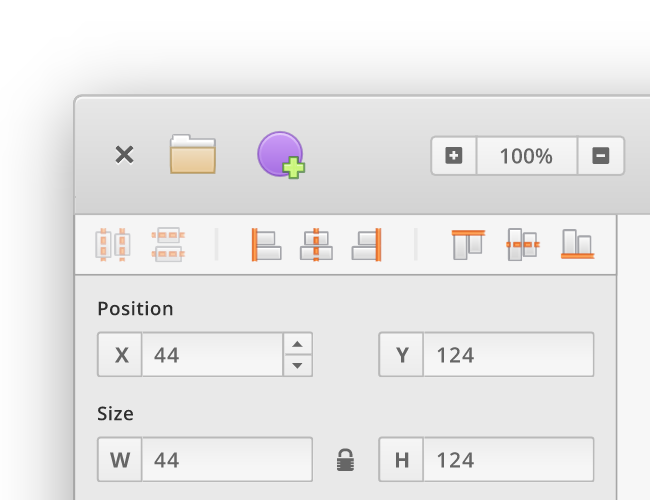
- Clickable arrows should appear ONLY when the field is hovered with the mouse to allow users to increase/decrease the amount without typing.
- In case of a prefix or suffix attached to the value (%, °, etc.), those elements shouldn't be selectable.
- No other character other than numbers and the period symbol should be allowed. The cursor shouldn't move like it does now if a non-allowed character is typed.
- Having the ability to specify a max amount limit to the field.
If the field is selected/has focus
- Pressing the up and down arrow keys on the keyboard should increase/decrease the value accordingly.
- Pressing the up and down arrow keys on the keyboard while holding the SHIFT modifier, should increase/decrease the value by 10.
- If the mouse is hovered and the field is selected, using the mouse wheel should increase/decrease the amount based on velocity and delta.
- Pressing TAB on the keyboard should select the next closest input field in the same panel.
Example Screenshot
 Alecaddd
All 12 comments
I think your points make sense for the most part, but what about fields that support multiple suffixes, e.g. px and % for responsive designs? Also, I still think the labels look too much like buttons—perhaps actually give them a reason to look like that by allowing them to be clicked and dragged to increase/decrease the value, similar to how blender does it for example?
Also, I think the "step" for shift+arrow should be configurable, a lot of people use 8-based systems instead of 10-based.
Keep up the great work!
 amxmln
on 22 Apr 2019
amxmln
on 22 Apr 2019
@Alecaddd I trust your judgement.But I would advise against any suggestion to use the left-click & hold to drag left or right feature as Inkscape implements. This causes lots of accidental triggering of extreme skews. In Inkscape this often causes me to skew the "blur" way too far, and it's frustrating. I wonder if it's only me who ends up doing this after years of use.
On the other hand, GIMP also uses this input triggering and the sensitivity seems to never cause the same issue. I wonder if this is do to GTK+ vs QT?
 DroWnThePoor
on 22 Apr 2019
DroWnThePoor
on 22 Apr 2019
If the mouse is hovered and the field is selected, using the mouse wheel should increase/decrease the amount based on velocity and delta.
Please make sure this does not make scrolling more difficult though, especially on touchpads. Why not modifier+scroll?
 cunidev
on 22 Apr 2019
cunidev
on 22 Apr 2019
@DroWnThePoor Inkscape and GIMP are both GTK.
 cassidyjames
on 22 Apr 2019
cassidyjames
on 22 Apr 2019
No other character other than numbers and the period symbol should be allowed. The cursor shouldn't move like it does now if a non-allowed character is typed.
What is about negative values, like -0.5? I think also the period symbol should be language based. In most countries it is a comma instead of a dot. -0.5 = -0,5 (https://en.wikipedia.org/wiki/Decimal_separator#Arabic_numerals)
Are input fields only limited to numeric inputs? What is about inputs for hex values?
Personally, I like mathematically calculations in input fields, like in Sketch. @Alecaddd does you plan such feature too? Part of that feature could be the behaviour which @amxmln has mentioned: Automatic calculation from relative number e.g. 100% into an absolute value e.g. px.
 nitramr
on 22 Apr 2019
nitramr
on 22 Apr 2019
What is about negative values
Of course those will be accepted, thanks for pointing that out.
I think also the period symbol should be language based.
I'm against this as it adds unnecessary complexity when storing and converting values for our SVG canvas and file format. These formats use a period for decimals, and having a converter based on the used language is an extra step I'd like to avoid. Other professional apps like Sketch and Figma always use the period no matter the user's language.
Personally, I like mathematically calculations in input fields
We'll consider this for sure, but not for version 1 as we won't have any responsive features available for the first release.
Alecaddd
on 23 Apr 2019
@Alecaddd I don’t think having calculations in input fields requires having any responsive features. Inkscape allows for things like 12*48 in input fields and so does Figma. I agree that you shouldn’t store the comma as a comma but a period, but I feel like it would be the best experience for international users if the commas would be automatically converted to periods upon entering. That’s how Figma does it for example. The key benefit is that on QWERTZ-Keyboards with a num-block for example, there is no way to insert a period, but a comma and I personally like to use the num-block if I’m entering values manually.
@nitramr re the responsiveness, I was actually thinking of not having them converted, but rather actually keeping them as percentages, so the values update on resizing the parent for example. I think Invision Studio allows for that. However I agree that that’s not a v1 feature, but rather something for later. It should still be taken into consideration when designing the limits for the input fields however, I think.
amxmln
on 23 Apr 2019
A little update regarding this implementation as I think a bit of UI improvements is necessary.
This is the mock-up
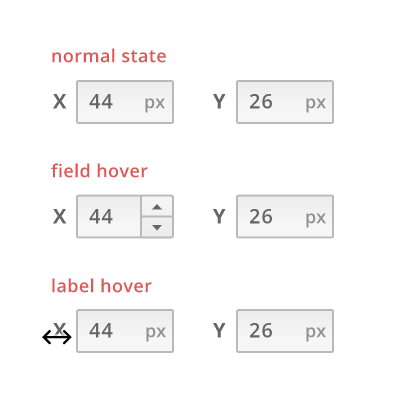
- Labels should be outside the input field.
- Units should be inside the input field but unselectable and not writable.
- When the user hovers the input field, spinner buttons (is that the name) appear to offer easy increase/decrease value decrease without typing.
- Hovering over the labels will change the cursors and allow a click and drag action to quickly change the value.
I think this new UI with the few paradigms baked into these, will cover most use cases for the first release.
Thoughts?
Alecaddd
on 19 May 2019
I think that makes much more sense than the first version. I would still suggest keeping the underlying architecture flexible to perhaps allow other units in the future.
Will calculations (i.e. value + 2 * (32 - 12)) be supported at some point? I think that's a pretty standard and essential feature that's found in pretty much every design application I have used.
amxmln
on 21 May 2019
Will calculations (i.e. value + 2 * (32 - 12)) be supported at some point?
Yes, that's something we will add in a follow up bug right after this UI lands on master.
Alecaddd
on 10 Jul 2019
Left to do:
- [x] Show spin button on field hover
- [ ] Implement click and drag on the input label to increase/decrease amount
 albfan
on 22 Sep 2019
albfan
on 22 Sep 2019
Sweet, I'll take care of these two things left.
Here's the mockup:
Since these fields don't usually have a min and max value, I prefer to not show a sliding bar like in Inkscape or Godot. While a sliding bar is good for visual reference, it doesn't really make sense having a value range for these fields that can even span from -100000 to 1000000.
Side note, another thing to implement is allowing negative values.
Alecaddd
on 23 Sep 2019
Related issues
 TixieBorg
·
4Comments
Alecaddd
·
3Comments
Alecaddd
·
6Comments
Alecaddd
·
4Comments
Alecaddd
·
3Comments
TixieBorg
·
4Comments
Alecaddd
·
3Comments
Alecaddd
·
6Comments
Alecaddd
·
4Comments
Alecaddd
·
3Comments
Most helpful comment
Of course those will be accepted, thanks for pointing that out.
I'm against this as it adds unnecessary complexity when storing and converting values for our SVG canvas and file format. These formats use a period for decimals, and having a converter based on the used language is an extra step I'd like to avoid. Other professional apps like Sketch and Figma always use the period no matter the user's language.
We'll consider this for sure, but not for version 1 as we won't have any responsive features available for the first release.