Having just re Installed my windows 10 PC I proceeded to install
- Visual Studio 2017 enterprise v. 15.9.0, with windows 8.1 SDK
- Unreal Engine 4.21.0
- AirSim
but running the build.cmd I get the following error:
r:\program files\airsim\mavlinkcom\common_utils\type_utils.hpp(50): fatal error C1001: An internal error has occurred i n the compiler. [R:\Program Files\AirSim\MavLinkCom\MavLinkCom.vcxproj]
(compiler file 'd:\agent_work\3\s\src\vctools\compiler\cxxfe\sl\p1\c\types.c', line 4563)
To work around this problem, try simplifying or changing the program near the locations listed above.
Please choose the Technical Support command on the Visual C++
Help menu, or open the Technical Support help file for more information
r:\program files\airsim\mavlinkcom\common_utils\type_utils.hpp(59): note: see reference to class template instantiati
on 'mavlink_utils::type_utils::detail::has_begin_end' being compiled
ThreadUtils.cpp
AdHocConnection.cpp
AdHocConnectionImpl.cpp
Any one know what is wrong?
 Waarbubble
All 17 comments
I have the exact same issue. It looks like we're missing some Visual Studio component or something... I'll let you know when I find the solution :)
EDIT: [Just to give more context about the problem]
How to reproduce
(According to official documentation: https://github.com/Microsoft/AirSim/tree/master/Unity)
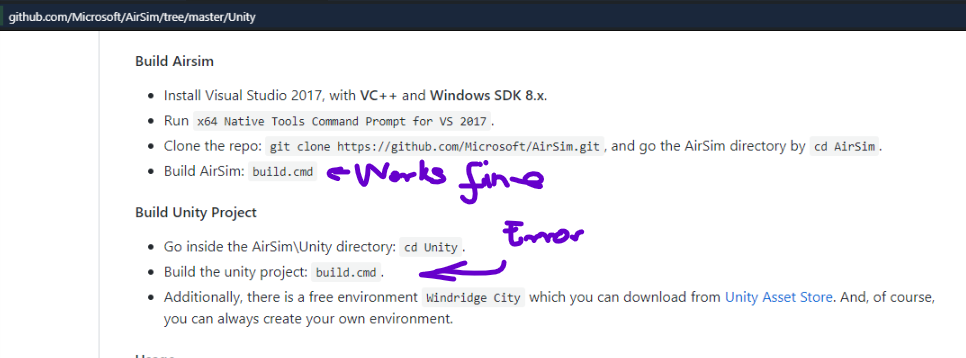
cd AirSim\Unity
build.cmd
Output from x64 Native Tools Command Prompt

 micmarty
on 14 Nov 2018
micmarty
on 14 Nov 2018
i have the exact same issue too -.-
 forestscorpion
on 15 Nov 2018
forestscorpion
on 15 Nov 2018
me too
 nicksunyang
on 15 Nov 2018
nicksunyang
on 15 Nov 2018
I'm having the same issue, already when running 'build.cmd' in root folder the first time.
 simach
on 15 Nov 2018
simach
on 15 Nov 2018
Same error for me, but even from the root folder of the AirSim
I tried with versions 1.2.1 and 1.2.0 with no difference.
 arguskos
on 15 Nov 2018
arguskos
on 15 Nov 2018
I reinstall vs2017 , the problem can't be fixed
nicksunyang
on 15 Nov 2018
i also use Unreal Engine 4.18.3, uninstalled 4.19.2
nicksunyang
on 15 Nov 2018
A work around i found was to install visual studio 2017 v 15.6.8
Waarbubble
on 15 Nov 2018
Hey everyone. Yeah, the issue is with VS 2017 15.9.0, which was released a couple days back on Nov 13.
I tested with 15.8.9, and things do compile.
Please uninstall 15.9.0 and install 15.8.9, as explained here (links for 15.8.9 therein)
https://docs.microsoft.com/en-us/visualstudio/productinfo/installing-an-earlier-release-of-vs2017
Also, note that you need Unreal version 4.18, not 4.21.
We're looking into what is causing the error at Microsoft, please use anything <=15.8.9 till then. Thanks @Waarbubble for reporting the issue and the fix. Updating readme for the same.
Tagging @sytelus @lovettchris. this is the issue we discussed.
 madratman
on 15 Nov 2018
madratman
on 15 Nov 2018
I have the same errors ,and my Installation Environment is vs2017_15.3 +Unreal version 4.18.do I change vs2017_15.3 to vs2017_15.8.9?
 jindegithub
on 18 Nov 2018
jindegithub
on 18 Nov 2018
@jindegithub Did you install win sdk 8.1 and VC++, while installing VS 2017?
madratman
on 19 Nov 2018
@jindegithub Did you install win sdk 8.1 and VC++, while installing VS 2017?
Thank you for your reply! I added C++ development desktop, Windows 8.1 SDK and Unreal Engine Installer while installing vs2017 professional.
jindegithub
on 20 Nov 2018
@jindegithub hmm, that's weird that it still is not compiling.
@bmalhigh fixed the issue causing the C1001 error as can be seen here. Can you try a git pull --rebase and build.cmd again?
Wait, looking at the sentence a bit closely - if you meant you selected unreal / game development while installing VS, I think you shouldn't do that. Unreal should be installed with the Epic Games Installer separately, not via the VS installer.
If you installed it separately, let's try pulling and building again.
madratman
on 20 Nov 2018
I have also been experiencing this same issue. What is the latest status on this?
EDIT: Actually, my error has been with running the clean_rebuild.bat script for AIrSim v1.2.0 and v1.2.1. I have not tested this for Unity. However, the same compiler error is raised as the one shown above.
 james-mchugh
on 21 Nov 2018
james-mchugh
on 21 Nov 2018
@james-mchugh I mentioned the latest status in the last comment "bmalhigh fixed the issue causing the C1001 error as can be seen here.
Did you try git pull and built again?
madratman
on 21 Nov 2018
@madratman I have been able to get it to build now, but like @jindegithub, I too had to install Unreal Engine Launcher through VS despite having it installed through Epic Games Launcher. It looks like this issue has been experienced by someone else as well #1188. I am not sure why this is.
james-mchugh
on 21 Nov 2018
Hmm I actually wonter if the C++ compiler it open source: I ran into this issue myself when I:
- created an empty static lib project.
- enabled modules TS and added
/module:exportas an additional option. - Enabled PDB with edit and continue and the options related to that.
Results:
1>d:\agent\_work\4\s\src\vctools\Compiler\CxxFE\sl\p1\c\ModuleWriter.cpp:4862: sorry: not yet implemented
1>src\_internaltypes.cxx(788): fatal error C1001: An internal error has occurred in the compiler.
1>(compiler file 'd:\agent\_work\4\s\src\vctools\Compiler\CxxFE\sl\p1\c\ModuleUtilities.h', line 25)
1> To work around this problem, try simplifying or changing the program near the locations listed above.
1>Please choose the Technical Support command on the Visual C++
1> Help menu, or open the Technical Support help file for more information
 AraHaan
on 17 Jul 2019
AraHaan
on 17 Jul 2019
Related issues
 LSBOSS
·
3Comments
LSBOSS
·
3Comments
 M-Kasem
·
3Comments
M-Kasem
·
3Comments
 ShukuiZhang
·
4Comments
ShukuiZhang
·
4Comments
 zywOwO
·
3Comments
zywOwO
·
3Comments
 vinbo
·
4Comments
vinbo
·
4Comments
Most helpful comment
Hey everyone. Yeah, the issue is with
VS 2017 15.9.0, which was released a couple days back on Nov 13.I tested with
15.8.9, and things do compile.Please uninstall
15.9.0and install15.8.9, as explained here (links for 15.8.9 therein)https://docs.microsoft.com/en-us/visualstudio/productinfo/installing-an-earlier-release-of-vs2017
Also, note that you need Unreal version
4.18, not4.21.We're looking into what is causing the error at Microsoft, please use anything
<=15.8.9till then. Thanks @Waarbubble for reporting the issue and the fix. Updating readme for the same.Tagging @sytelus @lovettchris. this is the issue we discussed.