I've been trying to obtain a point cloud which I then want to use to obtain an occupancy map but I'm missing something in the reprojection stage. point_cloud seems to be what I want but I can't find the point_cloud.py file.
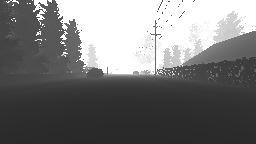
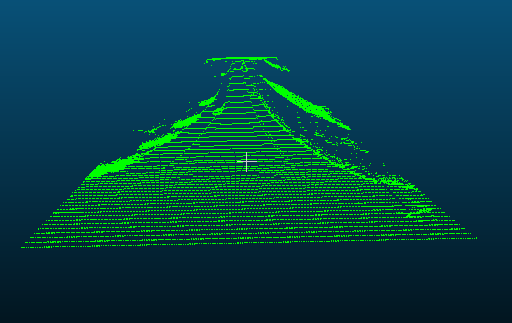
This depth map gives me the following point cloud using the projection matrix proposed here https://github.com/Microsoft/AirSim/issues/778:

side view | top view
:-------------------------:|:-------------------------:
 |
| 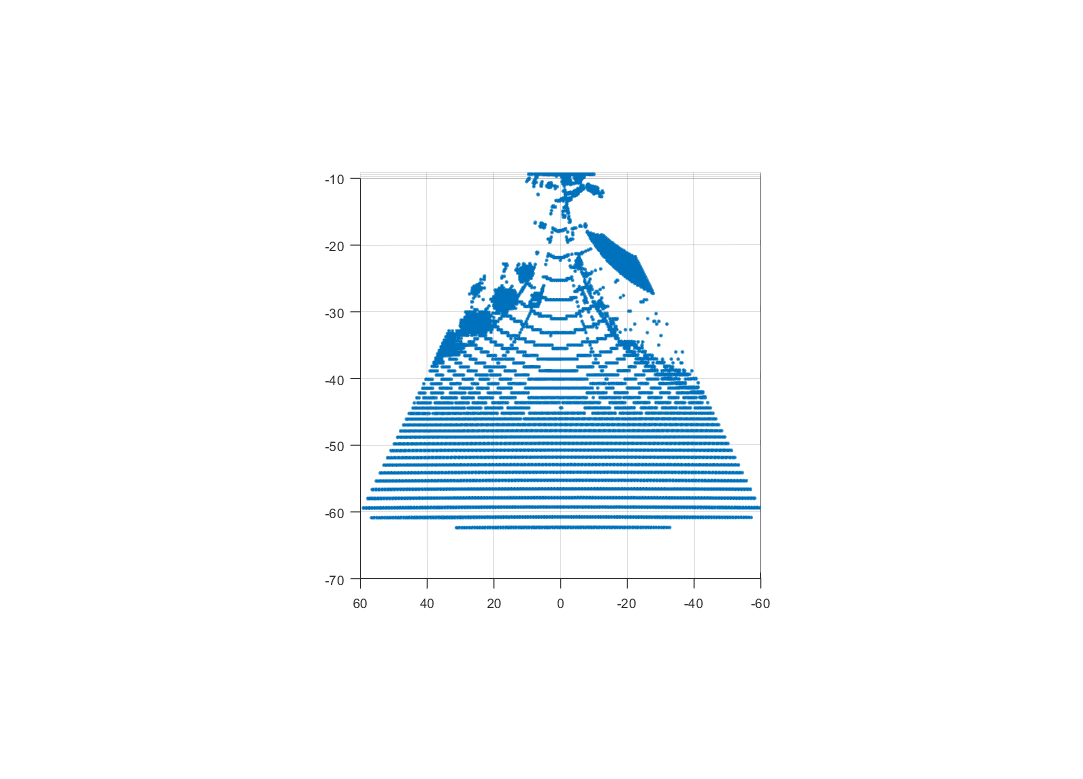
I understand the projection matrix mentioned above but I can't figure out how it should be to give me what I want. Especially the top-down view shows that the generated point cloud is very skewed. How does the projection matrix need to be such that the top-down view is spatially correct?
The goal would be to use the depth map to generate a point cloud similar to lidar which I can then use to generate an occupancy map. At this point I'm not even sure if this is possible?
Any help would be appreciated!
 lucala
All 12 comments
I have added a function to compute camera projection matrix (see code). This function is direct adaptation of BuildProjectionMatrix function being used inside the Unreal code that computes 4x4 matrix using FOV, width, height and near plan. However I'm just not sure if this is correct. One reason is that it never uses far plan. I'm also not sure if matrix is in the form that you need. You can help us review this code and test it out!
Sample usage of above function is here.
 sytelus
on 27 Jun 2018
sytelus
on 27 Jun 2018
@sytelus I cannot access both the code links you mention in the earlier post. Can you re-locate them? Thank you.
 nalinraut
on 1 Feb 2019
nalinraut
on 1 Feb 2019
@sytelus , The links to the code are broken, could you help re-locate them ? Thank You
 v-prgmr
on 23 Apr 2019
v-prgmr
on 23 Apr 2019
@sytelus , The links to the code are broken, could you help re-locate them ? Thank You.
 orangelx
on 11 Jul 2019
orangelx
on 11 Jul 2019
@lucala hey, could you solved this problem?
orangelx
on 3 Dec 2019
@orangelx,
Check this out, if you have the camera intrinsics.
https://codereview.stackexchange.com/questions/79032/generating-a-3d-point-cloud
v-prgmr
on 3 Dec 2019
@orangelx,
Check this out, if you have the camera intrinsics.
https://codereview.stackexchange.com/questions/79032/generating-a-3d-point-cloud
@v-prgmr How can i get the camera intrinsics in Airsim?
orangelx
on 3 Dec 2019
@orangelx,
I am not sure how the camera intrinsics can be obtained from AirSim, check other threads if someone has mentioned about intrinsic parameters.
v-prgmr
on 4 Dec 2019
Please try my post here :
https://github.com/unrealcv/unrealcv/issues/14#issuecomment-487346581
 stavBodik
on 9 Dec 2019
stavBodik
on 9 Dec 2019
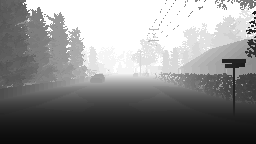
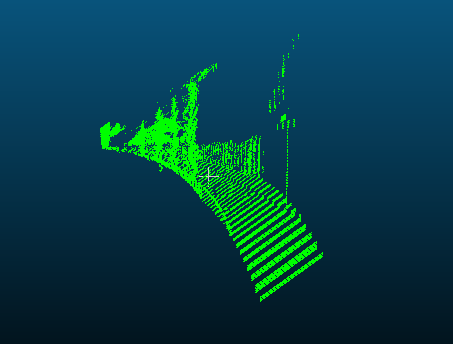
@stavBodik hi, I change the point_cloud.py to get the point cloud file. But I get the same wrong result. Is the depth Image is wrong? Or the matrix? thank you.
import airsim

import cv2
import time
import sys
import math
import numpy as np
from PIL import Image


############################################
########## This is work in progress! #######
############################################

outputFile = "cloud_01.asc"
color = (0, 255, 0)
rgb = "%d %d %d" % color

Width=256
Height=144
focal_length=Width/2
B=20

projectionMatrix =  np.array([
        [1, 0, 0, -Width/2],
        [0, 1, 0, -Height/2],
        [0, 0, 0, focal_length],
        [0, 0, -1/B, 0]
    ])


def printUsage():
    print("Usage: python point_cloud.py [cloud.txt]")


def savePointCloud(image, fileName):
    f = open(fileName, "w")
    for x in range(image.shape[0]):
        for y in range(image.shape[1]):
            pt = image[x, y]
            if (math.isinf(pt[0]) or math.isnan(pt[0])):
                # skip it
                None
            else:
                f.write("%f %f %f %s\n" % (pt[0], pt[1], pt[2] - 1, rgb))
    f.close()


for arg in sys.argv[1:]:
    cloud.txt = arg
client = airsim.MultirotorClient()
client.confirmConnection()
client.enableApiControl(True)
client.armDisarm(True)


responses = client.simGetImages([airsim.ImageRequest(0, airsim.ImageType.DepthPlanner, pixels_as_float=True)])
response = responses[0]
img1d = np.array(response.image_data_float, dtype=np.float)
img1d = img1d * 3.5 + 30
img1d[img1d > 255] = 255
img2d = np.reshape(img1d, (responses[0].height, responses[0].width))
depth = np.array(img2d, dtype=np.uint8)


Image3D = cv2.reprojectImageTo3D(depth, projectionMatrix)
savePointCloud(Image3D, outputFile)
print("saved " + outputFile)
airsim.wait_key("Press any key to exit")
sys.exit(0)
orangelx
on 9 Dec 2019
@stavBodik hi, I change the point_cloud.py to get the point cloud file. But I get the same wrong result. Is the depth Image is wrong? Or the matrix? thank you.
import airsim

import cv2
import time
import sys
import math
import numpy as np
from PIL import Image


############################################
########## This is work in progress! #######
############################################

outputFile = "cloud_01.asc"
color = (0, 255, 0)
rgb = "%d %d %d" % color

Width=256
Height=144
focal_length=Width/2
B=20

projectionMatrix =  np.array([
        [1, 0, 0, -Width/2],
        [0, 1, 0, -Height/2],
        [0, 0, 0, focal_length],
        [0, 0, -1/B, 0]
    ])


def printUsage():
    print("Usage: python point_cloud.py [cloud.txt]")


def savePointCloud(image, fileName):
    f = open(fileName, "w")
    for x in range(image.shape[0]):
        for y in range(image.shape[1]):
            pt = image[x, y]
            if (math.isinf(pt[0]) or math.isnan(pt[0])):
                # skip it
                None
            else:
                f.write("%f %f %f %s\n" % (pt[0], pt[1], pt[2] - 1, rgb))
    f.close()


for arg in sys.argv[1:]:
    cloud.txt = arg
client = airsim.MultirotorClient()
client.confirmConnection()
client.enableApiControl(True)
client.armDisarm(True)


responses = client.simGetImages([airsim.ImageRequest(0, airsim.ImageType.DepthPlanner, pixels_as_float=True)])
response = responses[0]
img1d = np.array(response.image_data_float, dtype=np.float)
img1d = img1d * 3.5 + 30
img1d[img1d > 255] = 255
img2d = np.reshape(img1d, (responses[0].height, responses[0].width))
depth = np.array(img2d, dtype=np.uint8)


Image3D = cv2.reprojectImageTo3D(depth, projectionMatrix)
savePointCloud(Image3D, outputFile)
print("saved " + outputFile)
airsim.wait_key("Press any key to exit")
sys.exit(0)
Hey were you ever able to solve the issue?
 EdwinMeriaux
on 21 Jun 2020
EdwinMeriaux
on 21 Jun 2020
@stavBodik hi, I change the point_cloud.py to get the point cloud file. But I get the same wrong result. Is the depth Image is wrong? Or the matrix? thank you.
import airsim

import cv2
import time
import sys
import math
import numpy as np
from PIL import Image


############################################
########## This is work in progress! #######
############################################

outputFile = "cloud_01.asc"
color = (0, 255, 0)
rgb = "%d %d %d" % color

Width=256
Height=144
focal_length=Width/2
B=20

projectionMatrix =  np.array([
        [1, 0, 0, -Width/2],
        [0, 1, 0, -Height/2],
        [0, 0, 0, focal_length],
        [0, 0, -1/B, 0]
    ])


def printUsage():
    print("Usage: python point_cloud.py [cloud.txt]")


def savePointCloud(image, fileName):
    f = open(fileName, "w")
    for x in range(image.shape[0]):
        for y in range(image.shape[1]):
            pt = image[x, y]
            if (math.isinf(pt[0]) or math.isnan(pt[0])):
                # skip it
                None
            else:
                f.write("%f %f %f %s\n" % (pt[0], pt[1], pt[2] - 1, rgb))
    f.close()


for arg in sys.argv[1:]:
    cloud.txt = arg
client = airsim.MultirotorClient()
client.confirmConnection()
client.enableApiControl(True)
client.armDisarm(True)


responses = client.simGetImages([airsim.ImageRequest(0, airsim.ImageType.DepthPlanner, pixels_as_float=True)])
response = responses[0]
img1d = np.array(response.image_data_float, dtype=np.float)
img1d = img1d * 3.5 + 30
img1d[img1d > 255] = 255
img2d = np.reshape(img1d, (responses[0].height, responses[0].width))
depth = np.array(img2d, dtype=np.uint8)


Image3D = cv2.reprojectImageTo3D(depth, projectionMatrix)
savePointCloud(Image3D, outputFile)
print("saved " + outputFile)
airsim.wait_key("Press any key to exit")
sys.exit(0)
Hi,
did you solve it?
 BrellenZhou
on 16 Nov 2020
BrellenZhou
on 16 Nov 2020
Related issues
 HereIsPatrick
·
3Comments
HereIsPatrick
·
3Comments
 LSBOSS
·
3Comments
LSBOSS
·
3Comments
 machenxiang
·
3Comments
machenxiang
·
3Comments
 ShukuiZhang
·
4Comments
ShukuiZhang
·
4Comments
 Mayankm96
·
4Comments
Mayankm96
·
4Comments
Most helpful comment
@sytelus I cannot access both the code links you mention in the earlier post. Can you re-locate them? Thank you.