Airsim: setting.json can not be changed(be rewritten everytime) SOLVED.
The path of the setting.json is C:\Users\chen9\OneDrive\文档\AirSim.
win10 Home
vs2015 pro3
The problem is only produced in my laptop. My desktop is fine. No matter what I change in setting.json, whenever I run the binary (for example AirsimNH), it would be written as default value like this:

Could anyone solve this problem?
 allen9273
All 10 comments
I think this is probably happening due to asian characters in file path. Unfortunately we can't reproduce this issue on English versions. You can help s debug this, however. The relevant line of code is here:
 sytelus
on 9 May 2018
sytelus
on 9 May 2018
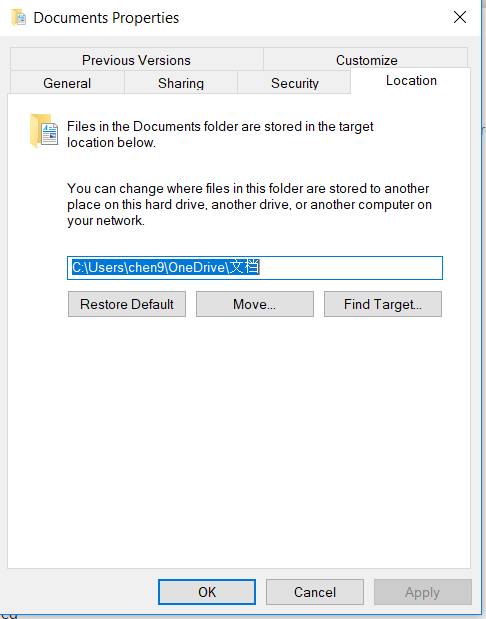
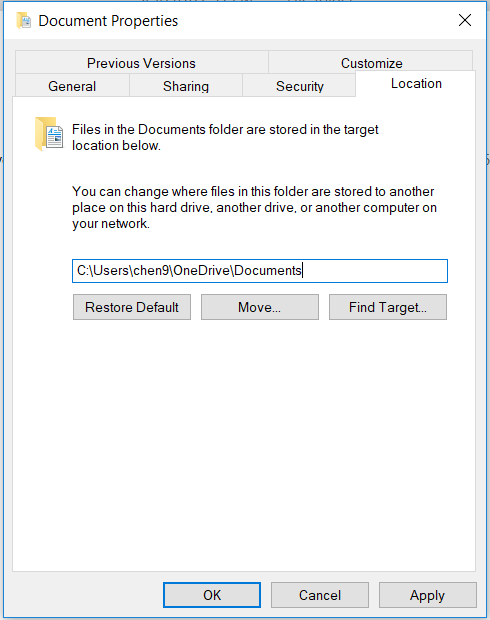
Thanks for your reply. I have found the solution. Because of the Asian characters in file path, just right click on the "Documents"-"Properties" - "Location" , you will find the path content Asian characters. Just modify it to English, click on "OK". Everything will be fine.
allen9273
on 9 May 2018
There might be side effect to this because you are renaming you document folder. For example, other applications which has set its path to location before you renamed might not work properly.
sytelus
on 14 May 2018
This is the path of my settings.json C:\Users\risheng\Documents\AirSim. Still the problem exists.
 Beijingsheng
on 8 Aug 2018
Beijingsheng
on 8 Aug 2018
The Users folder is currently showing 用户, however it is Users when I check the path. I tried to change 用户 but it's a default folder and its name can't be changed.
Beijingsheng
on 8 Aug 2018

Can you copy your path C:\Users\risheng\Documents\AirSim here and enter, check if the folder content settings?
allen9273
on 8 Aug 2018
It works, in fact I just changed the display language from Chinese to English so I suppose there shouldn't be any Chinese character in the path?
Beijingsheng
on 8 Aug 2018
Yeah, chinese characters have caused errors reported in a few more issues as well. Let's stick to English.
Closing this as it's resolved. please comment/re-open as needed.
 madratman
on 23 Jan 2019
madratman
on 23 Jan 2019
I use English and still have the same issue my file part is: C:\Users\4567\Documents\AirSim
Please help!!!
 damilolah
on 16 Aug 2019
damilolah
on 16 Aug 2019

copy your path C:\Users\4567\Documents\AirSim here and enter, check if the folder content settings?
allen9273
on 17 Aug 2019
Related issues
 vinbo
·
4Comments
vinbo
·
4Comments
 Kim-BongSu
·
3Comments
Kim-BongSu
·
3Comments
 HereIsPatrick
·
3Comments
HereIsPatrick
·
3Comments
 zywOwO
·
3Comments
zywOwO
·
3Comments
 Mayankm96
·
4Comments
Mayankm96
·
4Comments
Most helpful comment
Thanks for your reply. I have found the solution. Because of the Asian characters in file path, just right click on the "Documents"-"Properties" - "Location" , you will find the path content Asian characters. Just modify it to English, click on "OK". Everything will be fine.

