Hi,
I am wondering if there is any way to freeze the simulation. I am asking because if I use an online RL algorithm then the quality of the simulation is very bad. What I mean by that is this:
i) I reset
ii) I get observations
iii) I get action based on those observations
iv) I apply this action for 1 sec
v) I get reward and new obersvations
(I update model based on reward and obs)
vi) I get the new action based on those  new observations
vii) I take new action for 1 sec
viii) I get reward and new obersvations
and so on...
My problem right now is that in the simulation, 1sec should pass by during iv) and vii), so that the action I choose afterward it based on the observation right after that action, but now I choose the action based on the obs not right after the action but 1sec + computation_time after the start of the action. And when I use clockspeed = 5.0 that computation_time becomes very important
I hope this is clear enough.
What I want to know is: is there a way to freeze the simulation between 2actions, just like the simulation "freezes" in OPENAI Gym, making it a really continuous process.
Please let me know if my question is not clear enough,
Thanks :)
 Pierrolo
All 10 comments
I am also interested in an answer to this question as I have exactly the same problem.
Just the time step in my case is, at least for now, 1e-3.
 zbenic
on 6 May 2018
zbenic
on 6 May 2018
Please take a look at Pause and Continue APIs: https://github.com/Microsoft/AirSim/blob/master/docs/apis.md#pause-and-continue-apis
 sytelus
on 9 May 2018
sytelus
on 9 May 2018
Hi,
Thanks, this is exactly what I am looking for. Unfortunately, it is not working. The example script pause_continue_drone is not working. Return this kinf or error :
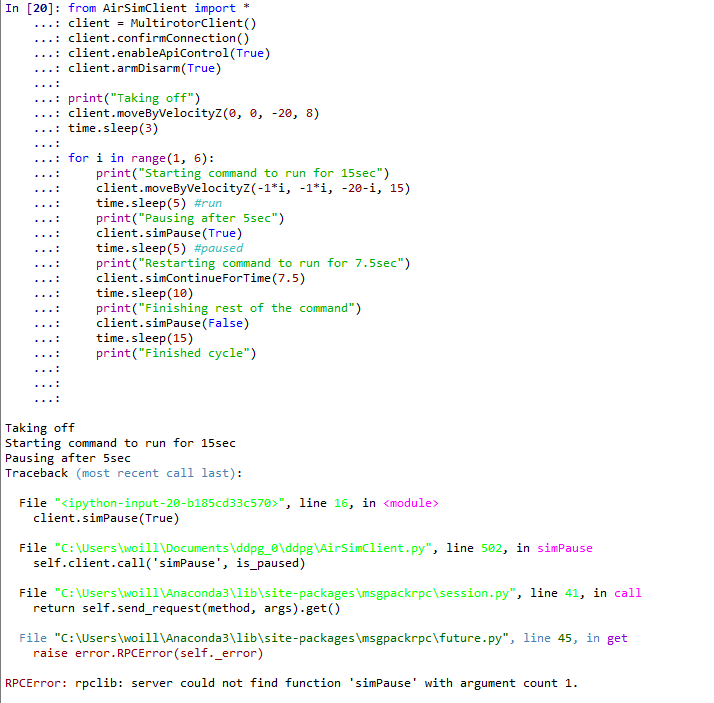
Thanks for you help
Pierrolo
on 9 May 2018
Have you migrated to VS2017 and Unreal 4.18 and rebuild everything?
I did that and I can get it to run.
My question is, when we pause the engine and later we resume, is the complete quadcopter state preserved, i.e. does the quadcopter resume the simulation with the exact linear and angular speeds and accelerations as it had in the moment of hitting pause?
zbenic
on 12 May 2018
Yes, I think @Pierrolo doesn't have the latest code.
@zbenic - yes, complete state is preserved!
sytelus
on 14 May 2018
I also get the same error as @Pierrolo after do git pull a moment ago.
Do I need to rebuild AirSim again?
Thank you.
 pienrojp
on 17 May 2018
pienrojp
on 17 May 2018
Hi, so I rebuild AirSim and updated to UE4. 18 and now it works just fine, maybe try doing that and it should be OK I figure
Pierrolo
on 17 May 2018
Hi, thank you very much.
I am using Ubuntu 16.04 and the AirSim document states that it only support UE 4.17.
Hope this function is also available with UE 4.17 :-)
Will try rebuild AirSim tomorrow.
pienrojp
on 17 May 2018
Hi,
So the pause options works for the drone but not for the environment, it doesn't pause the moving object... Anybody got an idea?
Very much appreciated,
Pierre
Pierrolo
on 28 May 2018
Pause and continue will only work for physics based object. Making this as new feature request for pausing all animations in environment as well.
sytelus
on 17 Oct 2018
Related issues
 ShukuiZhang
·
4Comments
ShukuiZhang
·
4Comments
 zywOwO
·
3Comments
zywOwO
·
3Comments
 p3jawors
·
3Comments
p3jawors
·
3Comments
 Mayankm96
·
4Comments
Mayankm96
·
4Comments
 MattChanTK
·
3Comments
MattChanTK
·
3Comments