Airsim: RPC Link Error when Packaging on Linux
Hi there,
I am trying to package Linux binary for users who do not have Unreal. However I encountered the following RPC link error:
UATHelper: Packaging (Linux): UnrealBuildTool: /data/UnrealProjects/Blocks/Plugins/AirSim/Source/AirLib/deps/rpclib/lib/librpc.a(this_handler.cc.o): In function rpc::this_handler()':
UATHelper: Packaging (Linux): UnrealBuildTool:
/home/user/Research/AirSim/external/rpclib/lib/rpc/this_handler.cc:10: undefined reference to__cxa_thread_atexit'
I have successfully packaged binary on Windows, this issue only happens on Linux. Could you please show me how to add the link library to solve this issue? Thanks a lot.
 kuanting
All 13 comments
This was traced to rpclib and then to a problem in Unreal's toolchain. Please see this: https://github.com/rpclib/rpclib/issues/140. Tamas's suggestion was to include below code in one of the cpp files in AirSim instead of rpclib. You can try that out and see if it works. If it does then please let us know (or send us pull request).
extern "C" int __cxa_thread_atexit(void (*func)(), void *obj,
                                   void *dso_symbol) {
  int __cxa_thread_atexit_impl(void (*)(), void *, void *);
  return __cxa_thread_atexit_impl(func, obj, dso_symbol);
}
Related thread of StackOverflow:
Related issue on UE4 forums: https://answers.unrealengine.com/questions/724025/ue-toolchain-needs-to-include-lsupc.html
 sytelus
on 9 Nov 2017
sytelus
on 9 Nov 2017
I ran into the same thing. I tried the code fix suggested by @sytelus, but I could not get AirLib to compile. I added it to a few files (AirSim.cpp, CameraDirector.cpp, its own file), and I got the same linker error, only when compiling AirSim.
I found a solution. @kuanting, I assume that you already have a source build for UE4, as cross compiling for linux from windows is only supported with source builds when using plugins. Also, I assume you've already gone through the steps here to set up your environment.
In this case, the easiest way to pass the needed linker flags is to modify the UnrealBuildTool to include the linker flags. For this flag, I went into $/Programs/UnrealBuildTool/Linux/LinuxToolChain.cs, went to the function "LinkFiles", and changed this line
string ExternalLibraries = "";
to this
string ExternalLibraries = " -lstdc++ -lsupc++ ";
This was around line 1150 for me, but will vary slightly depending on which version of the UnrealBuildTool you have. Note that the unreal build tool needs to be build manually by right-clicking on the Unreal Build Tool project and selecting "Build" - it's not build by default when the entire solution is built. This passed the necessary linker flags and allowed me to package the project for linux. I was able to package on a windows 7 box and run on Ubuntu 16.04.
 mitchellspryn
on 10 Dec 2017
mitchellspryn
on 10 Dec 2017
@mitchellspryn I did the steps to cross compile from Windows. One snag I hit was to generate binaries for MavLinkCom.a and rpc.a. These are the dependency that is compiled outside of Unreal build and does not exist on Windows machine. I'm wondering how you had generated these two files...
sytelus
on 15 Dec 2017
I built the project on my Linux box, and copied the assemblies to the proper location in the plugin. I'm not sure if that's a scalable / general solution, but it worked in my case.
One thing to note: on windows, I used clang 4.0, but it looks like the default on linux is 3.9. It still seems to work fine, however, ¯_(ツ)_/¯
mitchellspryn
on 16 Dec 2017
Should be resolved in recent rpclib upgrade
sytelus
on 12 Apr 2018
@MitchellSternke I followed your suggestion to edit"string ExternalLibraries = " -lstdc++ -lsupc++ ";" but that didn't work for me. I recompiled for Linux from within unreal engine. What Unreal Build Tool are you referring to?
 AloshkaD
on 8 Jun 2018
AloshkaD
on 8 Jun 2018
I think you might have quoted the wrong Mitchell...
The unreal build tool is the custom build tool that you use to build the unreal engine and the associated game projects. If you're trying to cross compile for linux, you should already have built the unreal engine from source, and have the unreal build tool project at$/Programs/UnrealBuildTool. You can see if the linker flags are actually getting passed by adding Console.WriteLine() statements into the build tool; they'll show up in the output when packaging the project.
mitchellspryn
on 8 Jun 2018
@mitchellspryn Oooops, thanks man :). I've compiled UE from source because I previously had it installed using the game launcher and I also included "C:\airsim\v10_clang-5.0.0-centos7\" in var "LINUX_MULTIARCH_ROOT."
I followed your recommendation of editing ExternalLibraries in LinuxToolChain.cs , which is for me is located in "D:\UnrealEngine\Engine\Source\Programs\UnrealBuildTool\Platform\Linux" The onlything that I couldn't do is build the UnrealBuildTool . When I right click on it in VS I don't see a build option.
AloshkaD
on 11 Jun 2018
Your project should look like the attached image. In that case, just right click on the C# project and click build.
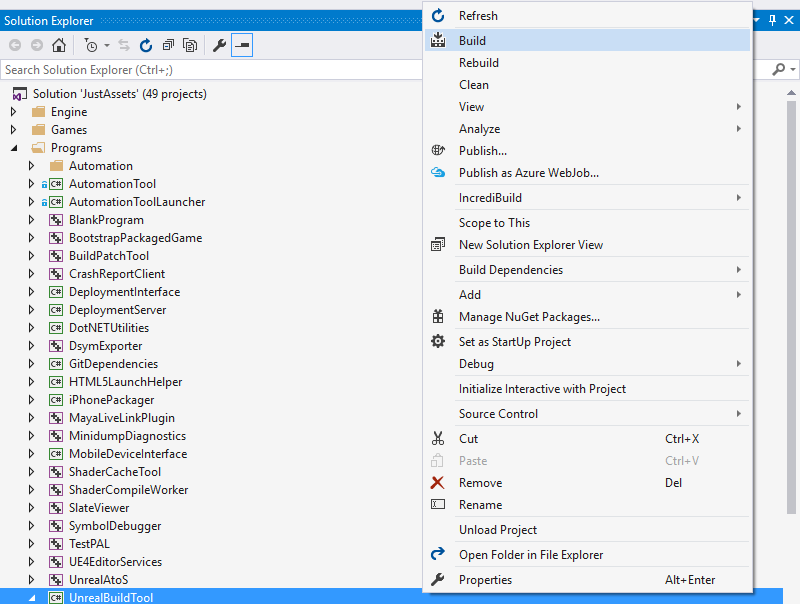
If you don't see all those projects, you may still be using your downloaded build of the binary instead of the version you built from source. In that case, try switching the unreal engine version to your source build (close VS, right click on the .uproject, select "Switch Unreal Engine version.")
mitchellspryn
on 11 Jun 2018
I ran into this same issue.
Adding the code @sytelus suggested above to AirSim.cpp resolved it.
 TritonSailor
on 12 Jun 2018
TritonSailor
on 12 Jun 2018
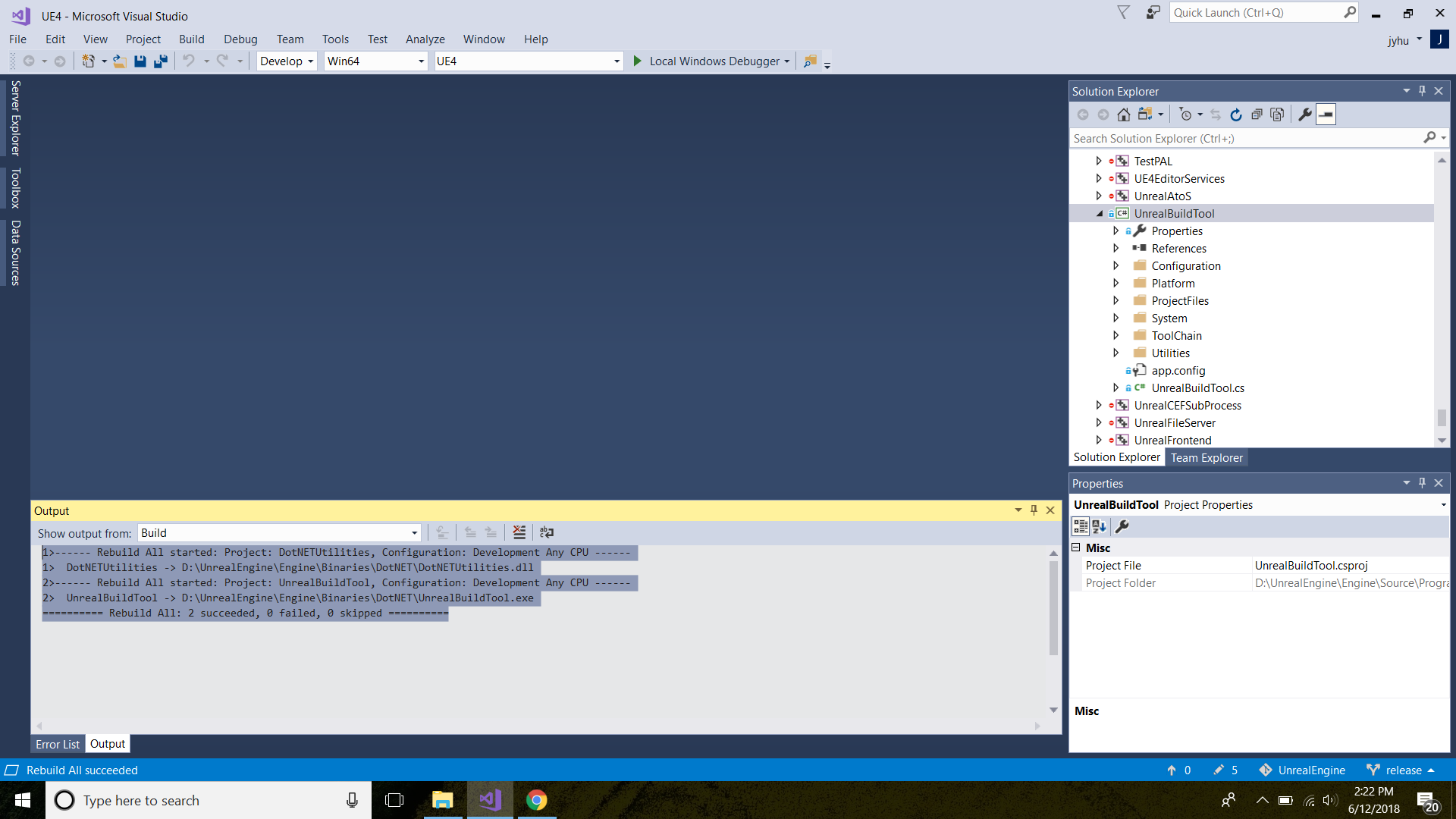
@mitchellspryn It successfully builds
I updated clang v10 to v11 and changed the environment to point to the new clang. This helped me resolved errors with the crosstoolchain being old when I build the airsm simulation project for linux. But at some point the build fails and I get this error below which I'm still googling how it should be fixed .

AloshkaD
on 12 Jun 2018
@TritonSailor Thanks for the update.
AloshkaD
on 12 Jun 2018
@sytelus suggestion didn't work for me, I added the code to this_handler.cc and to AirSim.cpp as @TritonSailor suggested but the error wasn't changed.
@mitchellspryn suggestion introduced a new error(below) even after I built UnrealBuildTool.
I'm using UE4.19 compiled from source on windows with clang V11 . I compiled it for both win and linux on the same machine and successfully packaged the airsim project for win. The error shows up when packaging for linux from UE.
UATHelper: Packaging (Linux):   ------------------------------
UATHelper: Packaging (Linux):   Performing 1 actions (4 in parallel)
UATHelper: Packaging (Linux):   [1/1] Link (lld) LandscapeMountains
UATHelper: Packaging (Linux):   C:\airsim\v11_clang-5.0.0-centos7\x86_64-unknown-linux-gnu\bin\ld.lld.exe: error: unknown argument: --start-group-lstdc++
PackagingResults: Error: unknown argument: --start-group-lstdc++
UATHelper: Packaging (Linux):   clang++.exe: error: linker command failed with exit code 1 (use -v to see invocation)
PackagingResults: Error: linker command failed with exit code 1 (use -v to see invocation)
UATHelper: Packaging (Linux):   ERROR: UBT ERROR: Failed to produce item: C:\Users\A\Documents\Unreal Projects\LandscapeMountains\Binaries\Linux\LandscapeMountains
PackagingResults: Error: UBT ERROR: Failed to produce item: C:\Users\A\Documents\Unreal Projects\LandscapeMountains\Binaries\Linux\LandscapeMountains
UATHelper: Packaging (Linux):   Total build time: 7.98 seconds (Local executor: 0.00 seconds)
UATHelper: Packaging (Linux): Took 8.3774205s to run UnrealBuildTool.exe, ExitCode=5
UATHelper: Packaging (Linux): ERROR: Command failed (Result:5): D:\UnrealEngine\Engine\Binaries\DotNET\UnrealBuildTool.exe LandscapeMountains Linux Development -Project="C:\Users\A\Documents\Unreal Projects\LandscapeMountains\LandscapeMountains.uproject"  "C:\Users\A\Documents\Unreal Projects\LandscapeMountains\LandscapeMountains.uproject" -NoUBTMakefiles  -
remoteini="C:\Users\A\Documents\Unreal Projects\LandscapeMountains" -skipdeploy -noxge -NoHotReload -ignorejunk. See logfile for details: 'UnrealBuildTool-2018.06.17-12.13.17.txt'
UATHelper: Packaging (Linux):        (see D:\UnrealEngine\Engine\Programs\AutomationTool\Saved\Logs\UAT_Log.txt for full exception trace)
PackagingResults: Error: Command failed (Result:5): D:\UnrealEngine\Engine\Binaries\DotNET\UnrealBuildTool.exe LandscapeMountains Linux Development -Project="C:\Users\A\Documents\Unreal Projects\LandscapeMountains\LandscapeMountains.uproject"  "C:\Users\A\Documents\Unreal Projects\LandscapeMountains\LandscapeMountains.uproject" -NoUBTMakefiles  -remoteini="C
:\Users\A\Documents\Unreal Projects\LandscapeMountains" -skipdeploy -noxge -NoHotReload -ignorejunk. See logfile for details: 'UnrealBuildTool-2018.06.17-12.13.17.txt'
UATHelper: Packaging (Linux): AutomationTool exiting with ExitCode=5 (5)
UATHelper: Packaging (Linux): BUILD FAILED
PackagingResults: Error: Unknown Error

AloshkaD
on 17 Jun 2018
Related issues
 git-moeen
·
4Comments
git-moeen
·
4Comments
 p3jawors
·
3Comments
p3jawors
·
3Comments
 vinbo
·
4Comments
vinbo
·
4Comments
 HereIsPatrick
·
3Comments
HereIsPatrick
·
3Comments
 Kim-BongSu
·
4Comments
Kim-BongSu
·
4Comments
Most helpful comment
I ran into the same thing. I tried the code fix suggested by @sytelus, but I could not get AirLib to compile. I added it to a few files (AirSim.cpp, CameraDirector.cpp, its own file), and I got the same linker error, only when compiling AirSim.
I found a solution. @kuanting, I assume that you already have a source build for UE4, as cross compiling for linux from windows is only supported with source builds when using plugins. Also, I assume you've already gone through the steps here to set up your environment.
In this case, the easiest way to pass the needed linker flags is to modify the UnrealBuildTool to include the linker flags. For this flag, I went into $/Programs/UnrealBuildTool/Linux/LinuxToolChain.cs, went to the function "LinkFiles", and changed this line
string ExternalLibraries = "";to this
string ExternalLibraries = " -lstdc++ -lsupc++ ";This was around line 1150 for me, but will vary slightly depending on which version of the UnrealBuildTool you have. Note that the unreal build tool needs to be build manually by right-clicking on the Unreal Build Tool project and selecting "Build" - it's not build by default when the entire solution is built. This passed the necessary linker flags and allowed me to package the project for linux. I was able to package on a windows 7 box and run on Ubuntu 16.04.