Airsim: Unable to Generate Blocks Worlds Example Environment
I attempted to follow instructions as outlined here. It looks like copying the built AirSim plugin was succesful (those results are not shown), it just failed during the generation of the solution file. It seems to be looking for something in the Registry when running GenerateProjectFiles.bat. Thanks for any help!
Environment: Windows 10 X64
Unreal Engine: 4.16.3
AirSim: Master
 cmd /c GenerateProjectFiles.bat

@ C:\Users\Jerem\Documents\UMICH\Research\AirSim\Unreal\Environments\Blocks
> setlocal

@ C:\Users\Jerem\Documents\UMICH\Research\AirSim\Unreal\Environments\Blocks
> del /q gen_temp.txt
Could Not Find C:\Users\Jerem\Documents\UMICH\Research\AirSim\Unreal\Environments\Blocks\gen_temp.txt

@ C:\Users\Jerem\Documents\UMICH\Research\AirSim\Unreal\Environments\Blocks
> powershell -command "& { (Get-ItemProperty 'Registry::HKEY_CLASSES_ROOT\Unreal.ProjectFile\shell\rungenproj' -Name 'Icon' ).'Icon' }"  1>gen_temp.txt

@ C:\Users\Jerem\Documents\UMICH\Research\AirSim\Unreal\Environments\Blocks
> set /p gen_bin= 0<gen_temp.txt

@ C:\Users\Jerem\Documents\UMICH\Research\AirSim\Unreal\Environments\Blocks
> del /q gen_temp.txt
[Get-ItemProperty] was unexpected at this time.

@ C:\Users\Jerem\Documents\UMICH\Research\AirSim\Unreal\Environments\Blocks
>               Get-ItemProperty : Cannot find path 'HKEY_CLASSES_ROOT\Unreal.ProjectFile\shell\rungenproj' because it does not exist.
At line:1 char:6
+ & { (Get-ItemProperty 'Registry::HKEY_CLASSES_ROOT\Unreal.ProjectFile ...
+      ~~~~~~~~~~~~~~~~~~~~~~~~~~~~~~~~~~~~~~~~~~~~~~~~~~~~~~~~~~~~~~~~
    + CategoryInfo          : ObjectNotFound: (HKEY_CLASSES_RO...hell\rungenproj:String) [Get-ItemProperty], ItemNotFo
   undException
    + FullyQualifiedErrorId : PathNotFound,Microsoft.PowerShell.Commands.GetItemPropertyCommand
  /projectfiles C:\Users\Jerem\Documents\UMICH\Research\AirSim\Unreal\Environments\Blocks\%f

Jerem@LAPTOP-RIC64UK2 C:\Users\Jerem\Documents\UMICH\Research\AirSim\Unreal\Environments\Blocks
> pause
Press any key to continue . . .
As a workaround I followed the Linux Instructions and opened up the Blocks.uproject and was prompted to rebuild.
 JeremyBYU
All 5 comments
This is strange, I have never seen this or reported. Could you please confirm if you are running this from Visual Studio x64 Command Prompt? Another possibility is that Unreal Engine is not installed properly on your m/c. On my m/c I have below registry keys after install but I suppose your m/c doesn't:
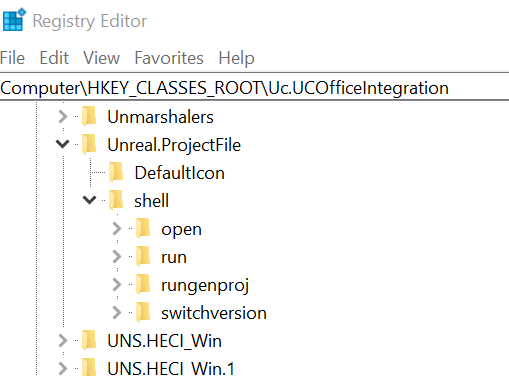
So one thing to try is simply reinstall UE4.
Another thing to try is right click on .uproject file and you should see "Generate Project Files" option. Try clicking on it. If you don't then its definitely install issue.
 sytelus
on 6 Oct 2017
sytelus
on 6 Oct 2017
Yep, you were absolutely right. These registry entries did not exist for me (Unreal.ProjectFile). I did a reboot, launched Epic Launcher again and a prompt appeared saying "Unreal Engine files are not associated, would you like to associate them?". I said yes, and now the keys have been magically created!
Thanks for you quick response and help!
JeremyBYU
on 6 Oct 2017
Hi simply run UnrealVersionSelector-Win64-Shipping.exe located at ...\Engine\Binaries\Win64\ and voila check regedit you will see all the entries as sometimes you might also need to build UE from source
 mayank-technical
on 16 Apr 2019
mayank-technical
on 16 Apr 2019
I encountered a similar challenge and creating a default .uproject helped me resolve this issue.
 harnix
on 14 Mar 2020
harnix
on 14 Mar 2020
I found a similar challenge. The answer from @leighswift in this forum solved my problem. By now, it's the most upvoted answer there.
 leommiranda
on 5 Apr 2020
leommiranda
on 5 Apr 2020
Related issues
 LSBOSS
·
3Comments
LSBOSS
·
3Comments
 HereIsPatrick
·
3Comments
HereIsPatrick
·
3Comments
 Mayankm96
·
4Comments
Mayankm96
·
4Comments
 M-Kasem
·
3Comments
M-Kasem
·
3Comments
 MattChanTK
·
3Comments
MattChanTK
·
3Comments
Most helpful comment
Yep, you were absolutely right. These registry entries did not exist for me (
Unreal.ProjectFile). I did a reboot, launched Epic Launcher again and a prompt appeared saying "Unreal Engine files are not associated, would you like to associate them?". I said yes, and now the keys have been magically created!Thanks for you quick response and help!