Airflow: AWS Hook does not accept config profiles with arn_roles
Apache Airflow version: 1.10.12
Environment:
- Cloud provider or hardware configuration: AWS EC2
- OS : CentOS Linux 7 (Core)
- Kernel ): 3.10.0-957.1.3.el7.x86_64
What happened:
set connection extras in ui with:
{"role_arn": "arn:aws:iam::account_id:role/some_role", "region_name": "xxx", "credential_source": "Ec2InstanceMetada"}
I have a custom plugin that calls the AWS Hook.
error from task log:
botocore.exceptions.ClientError: An error occurred (AccessDenied) when calling the AssumeRole operation: User: arn:aws:iam::account_id:user/[email protected] is not authorized to perform: sts:AssumeRole on resource: arn:aws:iam::account_id:role/some_role
What you expected to happen:
retrieve temporary access credentials.
How to reproduce it:
with an EC2 and AWS STS Role setup you can set a profile in the extra section in the connections ui with a role_arn but no access_key or secret_key.
Anything else we need to know:
following the boto3 documentation you can set a profile name as an argument in the boto3 session object.
eg.
import boto3
session = boto3.Session(profile_name='crossaccount')
s3 = session.resource('s3')
where the format of the profile is
# In ~/.aws/config
[profile crossaccount]
role_arn=arn:aws:iam:...
credential_source: "Ec2InstanceMetadata"
This works.
Possible Solution
Extend AWS Hook to look for "role_arn:" within config section.
 TKorr
TKorr
All 7 comments
Thanks for opening your first issue here! Be sure to follow the issue template!
![boring-cyborg[bot] picture](https://avatars3.githubusercontent.com/in/50386?v=4&s=40) boring-cyborg[bot]
on 21 Sep 2020
boring-cyborg[bot]
on 21 Sep 2020
Can I assign you to this task? This looks like a problem worth solving.
 mik-laj
on 21 Sep 2020
mik-laj
on 21 Sep 2020
sure
TKorr
on 21 Sep 2020
@TKorr I assigned you to this ticket :-)
mik-laj
on 21 Sep 2020
Hey @TKorr it seems to me that your problem is AWS IAM related at this point.
You have two roles, Assumer and Target (assumer assumes the target role). In this example, the Target role must have a Trust Relationship saying that the Assumer role is allowed to assume it.
Here's an example from my IAM console
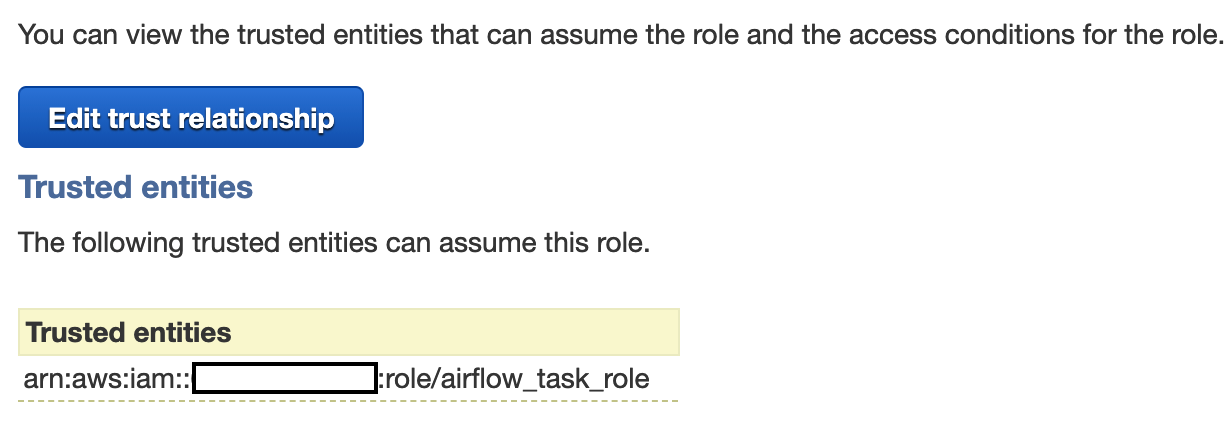
In it, I am allowing airflow_task_role (a role under which my Airflow worker is running) to assume another role which would grant certain permissions (S3 access in my case).
The issue with the missing token and STS credentials (which PR #11227 is trying to solve) only showed itself after I was able to assume the role. In your case you can't even assume the role from Airflow.
 ivica-k
on 2 Oct 2020
ivica-k
on 2 Oct 2020
Yes, I can't even assume the role. we are running Airflow on an EC2 instance so need to retrieve temporary security credentials from Amazon EC2 instance metadata.
TKorr
on 22 Oct 2020
Cool, that's what I figured. You need to allow other principals to assume that role in the Trust Relationship; go to the role you want to assume, click on Trust relationship and paste this (replacing uppercase text of course)
{
  "Version": "2012-10-17",
  "Statement": [
    {
      "Sid": "AssumeRole",
      "Effect": "Allow",
      "Principal": {
        "AWS": "arn:aws:iam::ACCOUNT-ID:role/NAME-OF-ROLE-THAT-YOU-WANT-TO-ALLOW"
      },
      "Action": "sts:AssumeRole"
    }
  ]
}
Lemme know how it goes.
ivica-k
on 22 Oct 2020
Related issues
 ryanahamilton
·
3Comments
mik-laj
·
4Comments
ryanahamilton
·
3Comments
mik-laj
·
4Comments
 xOnelinx
·
4Comments
xOnelinx
·
4Comments
 grbinho
·
3Comments
grbinho
·
3Comments
 hagope
·
4Comments
hagope
·
4Comments
Most helpful comment
Can I assign you to this task? This looks like a problem worth solving.