Aiohttp: ImportError: cannot import name 'HeadersParser' from 'aiohttp.http'
Long story short
Trying to import aio.http using from aiohttp import web causes python to crash with the titular error.
Steps to reproduce
Open a .py file, import the library.
Your environment
OS: Windows 10 Enterprise
Python version 3.7.4
Aiohttp version 3.6.1
Programming Environment: VSCode
Fails when running the python script via command line (i.e., python aiohttpfile.py) or running from VSCode. Does not fail when running in debug mode in visual studio code.
 tmello01
All 17 comments
how did you install aiohttp?
 webknjaz
on 8 Oct 2019
webknjaz
on 8 Oct 2019
@webknjaz Via pip: pip install aiohttp
tmello01
on 8 Oct 2019
And what was the console output? What are the packages that exist in the env where you run your app? Obviously, VSCode manages some venv which is different from non-debug mode or from what you use in the terminal directly.
webknjaz
on 9 Oct 2019
Traceback (most recent call last):

  File "c:/Users/TMello/Desktop/DeIcer/Python/socketserver.py", line 1, in <module>
    from aiohttp import web

  File "C:\Users\TMello\AppData\Local\Programs\Python\Python37-32\lib\site-packages\aiohttp\__init__.py", line 6, in <module>
    from .client import BaseConnector as BaseConnector

  File "C:\Users\TMello\AppData\Local\Programs\Python\Python37-32\lib\site-packages\aiohttp\client.py", line 32, in <module>
    from . import hdrs, http, payload

  File "C:\Users\TMello\AppData\Local\Programs\Python\Python37-32\lib\site-packages\aiohttp\http.py", line 1, in <module>
    import http.server

  File "C:\Users\TMello\AppData\Local\Programs\Python\Python37-32\lib\http\server.py", line 102, in <module>
    import socketserver

  File "c:\Users\TMello\Desktop\DeIcer\Python\socketserver.py", line 1, in <module>
    from aiohttp import web

  File "C:\Users\TMello\AppData\Local\Programs\Python\Python37-32\lib\site-packages\aiohttp\web.py", line 13, in <module>
    from .web_app import Application as Application

  File "C:\Users\TMello\AppData\Local\Programs\Python\Python37-32\lib\site-packages\aiohttp\web_app.py", line 38, in <module>
    from .web_log import AccessLogger

  File "C:\Users\TMello\AppData\Local\Programs\Python\Python37-32\lib\site-packages\aiohttp\web_log.py", line 10, in <module>
    from .web_request import BaseRequest

  File "C:\Users\TMello\AppData\Local\Programs\Python\Python37-32\lib\site-packages\aiohttp\web_request.py", line 35, in <module>
    from .multipart import BodyPartReader, MultipartReader

  File "C:\Users\TMello\AppData\Local\Programs\Python\Python37-32\lib\site-packages\aiohttp\multipart.py", line 35, in <module>
    from .http import HeadersParser

ImportError: cannot import name 'HeadersParser' from 'aiohttp.http' (C:\Users\TMello\AppData\Local\Programs\Python\Python37-32\lib\site-packages\aiohttp\http.py)
This is the full Traceback that it gives me. This comes after using this command to start the program:
python.exe socketserver.py
Oh, so it's windows...
webknjaz
on 9 Oct 2019
Yes, is that an issue? Should I try it on linux?
tmello01
on 9 Oct 2019
Well, almost everyone uses Linux anyway. And also you're the first one reporting this kind of issue.
I'd be more interested in a more full log of pip install and pip list.
webknjaz
on 9 Oct 2019
Also, does this still happen if you downgrade aiohttp?
webknjaz
on 9 Oct 2019
pip list:
Package             Version
------------------- ---------
aenum               2.2.1
aiodns              2.0.0
aiohttp             3.6.1
AnyQt               0.0.10
appdirs             1.4.3
argh                0.26.2
astroid             2.2.5
async-timeout       3.0.1
attrs               19.2.0
canopen             0.9.0
cchardet            2.1.4
certifi             2019.6.16
cffi                1.12.3
chardet             3.0.4
colorama            0.4.1
colorzero           1.1
confapp             1.1.11
cycler              0.10.0
defusedxml          0.6.0
dill                0.3.0
Django              2.2.5
django-allauth      0.40.0
django-jfu-pyforms  2.0.9.1
docutils            0.15.2
filelock            3.0.12
gitdb2              2.0.5
GitPython           3.0.2
gpiozero            1.5.1
guizero             1.0.0
idna                2.8
isort               4.3.21
jedi                0.15.1
Kivy                1.11.1
kivy-deps.angle     0.1.9
kivy-deps.glew      0.1.12
kivy-deps.gstreamer 0.1.17
kivy-deps.sdl2      0.1.22
Kivy-Garden         0.1.4
kiwisolver          1.1.0
lazy-object-proxy   1.4.1
matplotlib          3.1.1
mccabe              0.6.1
multidict           4.5.2
natsort             6.0.0
numpy               1.17.1
oauthlib            3.1.0
opencv-python       3.4.5.20
Orquestra           1.4
parso               0.5.1
pathtools           0.1.2
Pillow              6.1.0
pip                 19.2.3
praw                6.3.1
prawcore            1.0.1
pycares             3.0.0
pycparser           2.19
PyForms             4.0.3
PyForms-GUI         4.904.152
PyForms-Terminal    4.0.10
PyForms-Web         4.1.5
Pygments            2.4.2
pygubu              0.9.8.2
pylint              2.3.1
PyOpenGL            3.1.0
pyparsing           2.4.2
pypiwin32           223
Pypubsub            4.0.3
PyQt5               5.13.0
PyQt5-sip           4.19.18
PyQtWebEngine       5.13.0
python-can          3.3.1
python-dateutil     2.8.0
python-dotenv       0.10.3
python-engineio     3.9.3
python-socketio     4.3.1
python3-openid      3.1.0
pytz                2019.2
pywin32             224
PyYAML              5.1.2
QScintilla          2.11.2
requests            2.22.0
requests-oauthlib   1.2.0
rope                0.14.0
setuptools          41.2.0
simplejson          3.16.0
six                 1.12.0
smbus2              0.2.3
smmap2              2.0.5
sorl-thumbnail      12.5.0
sqlparse            0.3.0
typed-ast           1.4.0
update-checker      0.16
urllib3             1.25.3
virtualenv          16.7.5
visvis              1.11.2
watchdog            0.9.0
websocket-client    0.56.0
wheel               0.33.6
windows-curses      2.0
wrapt               1.11.2
yarl                1.3.0
Reinstalling the package via pip gives this output:
Collecting aiohttp
  Using cached https://files.pythonhosted.org/packages/ac/d8/c50e43565f139a68b358386d84f7a66e5c72e5d885271a002d402ea2062a/aiohttp-3.6.1-cp37-cp37m-win32.whl
Collecting attrs>=17.3.0 (from aiohttp)
  Using cached https://files.pythonhosted.org/packages/6b/e8/2ecaf86b128a34e225807f03b22664302937ab826bd3b7eccab6754d29ea/attrs-19.2.0-py2.py3-none-any.whl
Collecting chardet<4.0,>=2.0 (from aiohttp)
  Using cached https://files.pythonhosted.org/packages/bc/a9/01ffebfb562e4274b6487b4bb1ddec7ca55ec7510b22e4c51f14098443b8/chardet-3.0.4-py2.py3-none-any.whl
Collecting async-timeout<4.0,>=3.0 (from aiohttp)
  Using cached https://files.pythonhosted.org/packages/e1/1e/5a4441be21b0726c4464f3f23c8b19628372f606755a9d2e46c187e65ec4/async_timeout-3.0.1-py3-none-any.whl
Collecting multidict<5.0,>=4.5 (from aiohttp)
  Using cached https://files.pythonhosted.org/packages/f9/ff/75a54f8ca2378ed79f9bf94a6212248a14bbc0009da2803e4d01af1791bf/multidict-4.5.2-cp37-cp37m-win32.whl
Collecting yarl<2.0,>=1.0 (from aiohttp)
  Using cached https://files.pythonhosted.org/packages/93/c7/2289309ac07b1ea6c31b141ab9883de5bc575b00eee18a582ca4552f3248/yarl-1.3.0-cp37-cp37m-win32.whl
Collecting idna>=2.0 (from yarl<2.0,>=1.0->aiohttp)
  Using cached https://files.pythonhosted.org/packages/14/2c/cd551d81dbe15200be1cf41cd03869a46fe7226e7450af7a6545bfc474c9/idna-2.8-py2.py3-none-any.whl
Installing collected packages: attrs, chardet, async-timeout, multidict, idna, yarl, aiohttp
  Found existing installation: attrs 19.2.0
    Uninstalling attrs-19.2.0:
      Successfully uninstalled attrs-19.2.0
  Found existing installation: chardet 3.0.4
    Uninstalling chardet-3.0.4:
      Successfully uninstalled chardet-3.0.4
  Found existing installation: async-timeout 3.0.1
    Uninstalling async-timeout-3.0.1:
      Successfully uninstalled async-timeout-3.0.1
  Found existing installation: multidict 4.5.2
    Uninstalling multidict-4.5.2:
      Successfully uninstalled multidict-4.5.2
  Found existing installation: idna 2.8
    Uninstalling idna-2.8:
      Successfully uninstalled idna-2.8
  Found existing installation: yarl 1.3.0
    Uninstalling yarl-1.3.0:
      Successfully uninstalled yarl-1.3.0
  Found existing installation: aiohttp 3.6.1
    Uninstalling aiohttp-3.6.1:
      Successfully uninstalled aiohttp-3.6.1
Successfully installed aiohttp-3.6.1 async-timeout-3.0.1 attrs-19.2.0 chardet-3.0.4 idna-2.8 multidict-4.5.2 yarl-1.3.0
I'll try downgrading to an older version.
tmello01
on 9 Oct 2019
Downgrading to 3.0.1 installs fine, but gives a different error when running:
Traceback (most recent call last):
  File "c:/Users/TMello/Desktop/DeIcer/Python/socketserver.py", line 1, in <module>
    from aiohttp import web
  File "C:\Users\TMello\AppData\Local\Programs\Python\Python37-32\lib\site-packages\aiohttp\__init__.py", line 6, in <module>
    from .client import *  # noqa
  File "C:\Users\TMello\AppData\Local\Programs\Python\Python37-32\lib\site-packages\aiohttp\client.py", line 16, in <module>
    from . import client_exceptions, client_reqrep
  File "C:\Users\TMello\AppData\Local\Programs\Python\Python37-32\lib\site-packages\aiohttp\client_reqrep.py", line 17, in <module>
    from . import hdrs, helpers, http, multipart, payload
  File "C:\Users\TMello\AppData\Local\Programs\Python\Python37-32\lib\site-packages\aiohttp\http.py", line 1, in <module>
    import http.server
  File "C:\Users\TMello\AppData\Local\Programs\Python\Python37-32\lib\http\server.py", line 102, in <module>
    import socketserver
  File "c:\Users\TMello\Desktop\DeIcer\Python\socketserver.py", line 1, in <module>
    from aiohttp import web
  File "C:\Users\TMello\AppData\Local\Programs\Python\Python37-32\lib\site-packages\aiohttp\web.py", line 8, in <module>
    from . import (helpers, web_app, web_exceptions, web_fileresponse,
  File "C:\Users\TMello\AppData\Local\Programs\Python\Python37-32\lib\site-packages\aiohttp\web_app.py", line 12, in <module>
    from .web_middlewares import _fix_request_current_app
  File "C:\Users\TMello\AppData\Local\Programs\Python\Python37-32\lib\site-packages\aiohttp\web_middlewares.py", line 3, in <module>
    from aiohttp.web_exceptions import HTTPMovedPermanently
  File "C:\Users\TMello\AppData\Local\Programs\Python\Python37-32\lib\site-packages\aiohttp\web_exceptions.py", line 1, in <module>
    from .web_response import Response
  File "C:\Users\TMello\AppData\Local\Programs\Python\Python37-32\lib\site-packages\aiohttp\web_response.py", line 16, in <module>
    from .http import RESPONSES, SERVER_SOFTWARE, HttpVersion10, HttpVersion11
ImportError: cannot import name 'RESPONSES' from 'aiohttp.http' (C:\Users\TMello\AppData\Local\Programs\Python\Python37-32\lib\site-packages\aiohttp\http.py)
I'd guess that you have something weird in your environment, maybe in PYTHONPATH env var or so.
Oh, and the path in your traceback points to a system-wide site-packages. It's a best practice to you a virtualenv per project. It's a bad idea to manipulate the system site-packages as you can break some things that may rely on it being in a healthy state.
webknjaz
on 9 Oct 2019
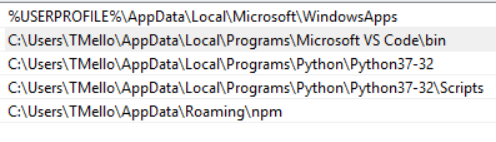
These are the things in my PATH. There doesn't seem to be a python path variable. I should create a virtual envrionment, however. Thanks for the tip.
If I create a virtualenv for the project, it should work in isolation of system-wide projects, correct?
tmello01
on 9 Oct 2019
If I create a virtualenv for the project, it should work in isolation of system-wide projects, correct?
By default, yes.
webknjaz
on 9 Oct 2019
Alright, I setup virtual env, and after activating it, tried to run the script again. The error I got is the same as the original one:
python-traceback
Traceback (most recent call last):
  File "socketserver.py", line 1, in <module>
    from aiohttp import web
  File "C:\Users\TMello\Desktop\DeIcer-Virtualenv\ENV\lib\site-packages\aiohttp\__init__.py", line 6, in <module>
    from .client import BaseConnector as BaseConnector
  File "C:\Users\TMello\Desktop\DeIcer-Virtualenv\ENV\lib\site-packages\aiohttp\client.py", line 32, in <module>
    from . import hdrs, http, payload
  File "C:\Users\TMello\Desktop\DeIcer-Virtualenv\ENV\lib\site-packages\aiohttp\http.py", line 1, in <module>
    import http.server
  File "c:\users\tmello\appdata\local\programs\python\python37-32\Lib\http\server.py", line 102, in <module>
    import socketserver
  File "C:\Users\TMello\Desktop\DeIcer-Virtualenv\ENV\bin\socketserver.py", line 1, in <module>
    from aiohttp import web
  File "C:\Users\TMello\Desktop\DeIcer-Virtualenv\ENV\lib\site-packages\aiohttp\web.py", line 13, in <module>
    from .web_app import Application as Application
  File "C:\Users\TMello\Desktop\DeIcer-Virtualenv\ENV\lib\site-packages\aiohttp\web_app.py", line 38, in <module>
    from .web_log import AccessLogger
  File "C:\Users\TMello\Desktop\DeIcer-Virtualenv\ENV\lib\site-packages\aiohttp\web_log.py", line 10, in <module>
    from .web_request import BaseRequest
  File "C:\Users\TMello\Desktop\DeIcer-Virtualenv\ENV\lib\site-packages\aiohttp\web_request.py", line 35, in <module>
    from .multipart import BodyPartReader, MultipartReader
  File "C:\Users\TMello\Desktop\DeIcer-Virtualenv\ENV\lib\site-packages\aiohttp\multipart.py", line 35, in <module>
    from .http import HeadersParser
ImportError: cannot import name 'HeadersParser' from 'aiohttp.http' (C:\Users\TMello\Desktop\DeIcer-Virtualenv\ENV\lib\site-packages\aiohttp\http.py)
tmello01
on 9 Oct 2019
Have you checked the contents of this file? (C:\Users\TMello\Desktop\DeIcer-Virtualenv\ENV\lib\site-packages\aiohttp\http.py)
Does it actually have HeadersParser inside?
Also, try importing from aiohttp.http import HeadersParser just in case.
Oh, and have you tried doing this under a 64-bit Python interpreter?
N.B. Since it's Windows, I'd not be surprised if there's some software (antivirus?) trying to mangle files having http in their names... To me, Windows will always stay this Python/dev-unfriendly env. My personal advice is to use some GNU/Linux based dev env.
webknjaz
on 9 Oct 2019
The mention of HeadersParser in that http.py file is this:
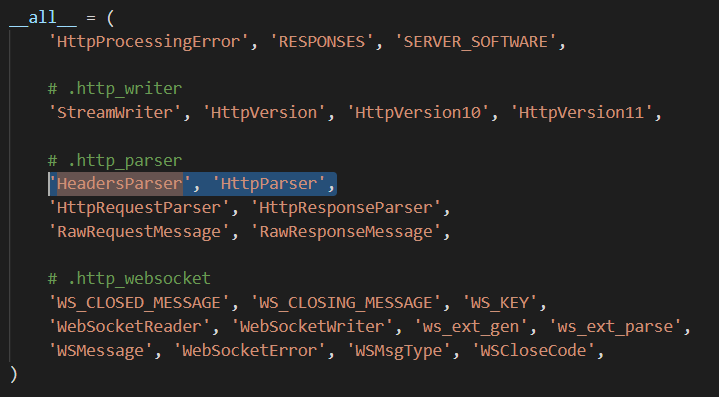
Importing HeadersParser directly doesn't seem to help.
edit: Sorry, there is also a line that is from .http_parser import HeadersParser as HeadersParser, and in that http_parser.py file, there is a HeadersParser class.
tmello01
on 9 Oct 2019
I found the issue after going down a bit of a rabbit hole of dependencies.
My python file (called socketserver.py), is the same as one of the files the library is trying to import. (this specific import was happening in server.py) This created a circular dependency, which was causing the error. Renaming my file to something different fixed the issue.
Thanks for the help, @webknjaz
tmello01
on 9 Oct 2019
Related issues
 AtomsForPeace
·
5Comments
AtomsForPeace
·
5Comments
 JoseKilo
·
3Comments
JoseKilo
·
3Comments
 Codeberg-AsGithubAlternative-buhtz
·
3Comments
Codeberg-AsGithubAlternative-buhtz
·
3Comments
 ahuigo
·
5Comments
ahuigo
·
5Comments
 kr41
·
4Comments
kr41
·
4Comments
Most helpful comment
I found the issue after going down a bit of a rabbit hole of dependencies.
My python file (called socketserver.py), is the same as one of the files the library is trying to import. (this specific import was happening in server.py) This created a circular dependency, which was causing the error. Renaming my file to something different fixed the issue.
Thanks for the help, @webknjaz