Afwall: DNS request failure when VPN connection enabled
Hi,
I have configure VPN connection to my router.
When I establish this connection the mobile device fails to resolve any internet domain.
After disabling the firewall everything works like expected.
In AFWall+ log there's only one record related to DNS: 1020 mDNS.
However I'm not sure if this is the relevant service where the blocking applies.
How can I identify what is blocking communication with DNS when VPN is enabled?
THX
 cmonty14
All 9 comments
I have the same issue on Android 8.1 (LineageOS 15.1). Uninstalling AFWall+ doesn't help.
 Tobias-B-Besemer
on 7 Feb 2019
Tobias-B-Besemer
on 7 Feb 2019
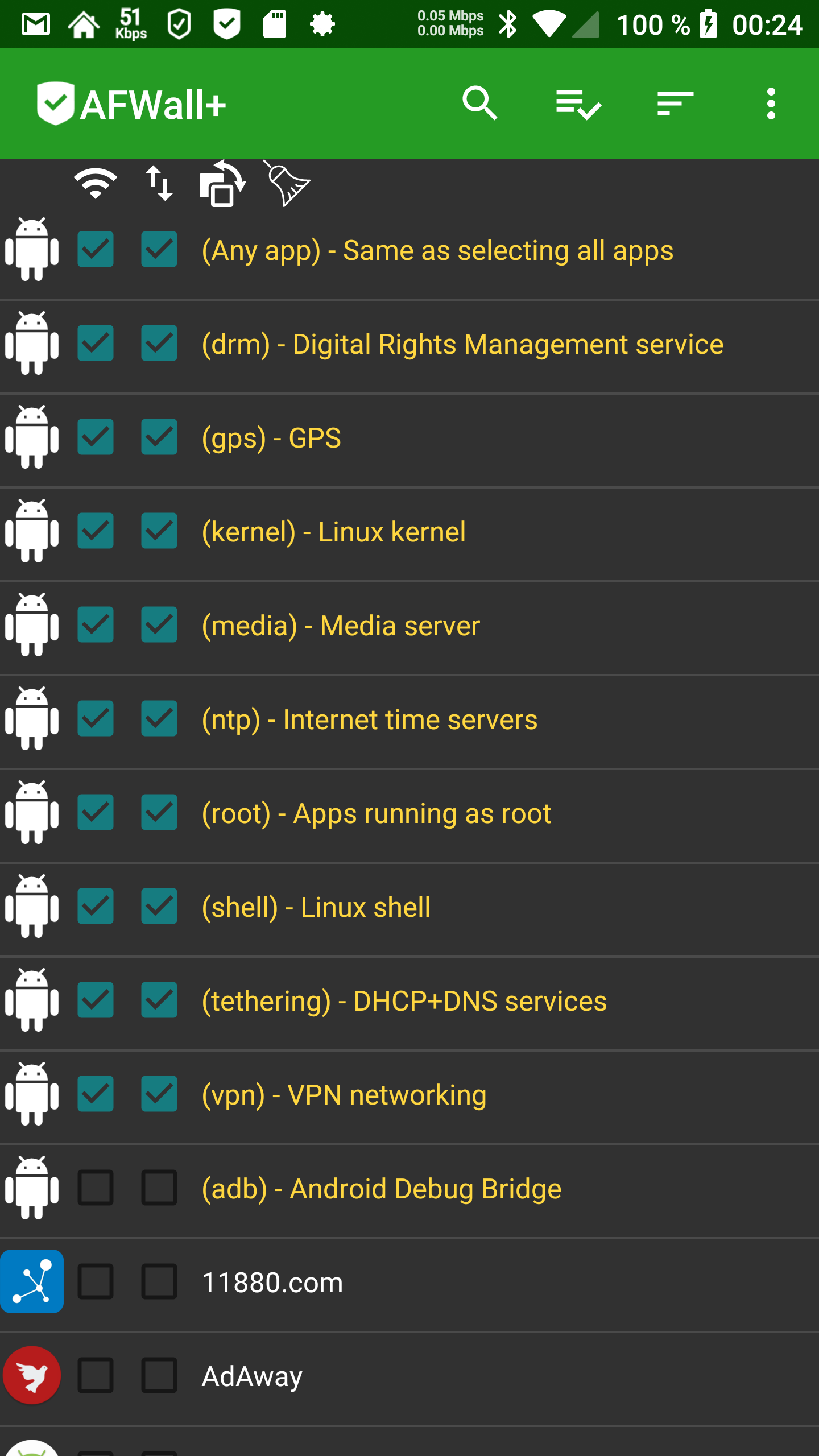
Allow "root" apps to connect.
 ukanth
on 7 Feb 2019
ukanth
on 7 Feb 2019
I thought when I have selected "Any app", that this includes everything, but isn't, right?
My plan is to just disallow IPv6 for every app (as first step) that they can't bypass the IPv4 VPN, later force them to take the VPN (make sure they do)...
...and then maybe use AFWall+ as designed, to block some single apps, too.
I have now checked "root apps", but got a DNS_PROBE_FINISHED_NO_INTERNET again in Chrome...
But I guess I have multiple issues with AFWall+ at the same time on my device...
E.g. I'm running LineageOS 15.1 on my device and I saw in different bugs that there seems to be some problems with devices running LineageOS 14.1+...
...maybe I have the "Google is rewriting the IPTables rules"-Issue, too?
Is it at all possible to block (all) IPv6 traffic with AFWall+?
I read in a other issue, that for some things IPv6 support must be enabled...
I can provide more (system) logs (e.g. with the SysLog app), if needed...
Btw.: I think the uninstall bug I have reported in my issue should be fixed with a high priority as short as possible. Because uninstalling AFWall+ don't fix my connection problems I have since I have installed AFWall+ and so I have to wait for any fix of AFWall+ that solves the problem, or have to manufacturing reset my device again, because I don't get that bug (IPTables rules?) anymore out of my system.
Tobias-B-Besemer
on 8 Feb 2019
A other error msg I get in Chrome is: ERR_NAME_NOT_RESOLVED
...and then a DNS_PROBE_FINISHED_NO_INTERNET again, even if I have AFWall+ disabled...
Tobias-B-Besemer
on 8 Feb 2019
Here are some logs when I have no internet connection after reboot at all even when AFWall+ is deactivated.
AFWall+ problem report - v3.0.4.txt
2019-02-08_04.00-AFWall_.zip
Tobias-B-Besemer
on 8 Feb 2019
You can block ipv6 completely using preference -> Rules and connectivity (control ipv6)
According to the logs, AFWall rules are not there, which means it's not doing anything on your device.
ukanth
on 9 Feb 2019
Maybe I deleted the rules for testing before I made the logs, I'm not sure.
Is it possible that if I switch between the iptables of the system and these from AFWall+, that the rules doesn't get deleted first (e.g. in the system version) before they get written in the other version?
Or is it possible, that when Google rewrites the rules, that they have made a snapshot, with old rules before, and rewrite now these rules?
Here are some new logs when I have connectivity problems and a screenshot of what I have at the moment configured in AFWall+.
AFWall+ problem report - v3.0.4 - 3.txt
Tobias-B-Besemer
on 11 Feb 2019
Btw.: If "Any app" doesn't mean "Any app", it should be IMHO renamed to "Any user app" or something similar...
(...maybe "All other apps"...?)
Tobias-B-Besemer
on 11 Feb 2019
Even in the logs you provided there are no chains/rules related to AFWall+
After selecting the checkboxes, you need to press apply rules from menu. Otherwise rules won't be applied.
ukanth
on 11 Feb 2019
Related issues
 Gitoffthelawn
·
4Comments
Gitoffthelawn
·
4Comments
 BlessDeix92
·
3Comments
BlessDeix92
·
3Comments
 haroon-ali
·
4Comments
haroon-ali
·
4Comments
 MrGlasspoole
·
3Comments
MrGlasspoole
·
3Comments
 n90p
·
6Comments
n90p
·
6Comments