Afwall: WiFi is diconnectiong every few minutes (Pixel 3)
Phone: Google Pixel 3
Android-Version: 9 (December Update) - Stock
AFWall+ Version: v3.0.4
Magisk-Version: v18.0
If AFWall+ is enabled on my Pixel 3 the WiFi is disconnecting every few minutes and comes back a few seconds later.
When i deactivate AFWall+ everything is working fine without any abort of the WiFi (test ran many hours).
I captured a logcat (via MatLog) and also exported the rules from AFWall+.
2018-12-25-12-39-30.txt
IPv4rules.log
IPv6rules.log
If you need something else, feel free to ask.
I would be happy, if you can take a look into that.
Thank you very much!
 yoshi7
All 14 comments
Your logcat and afwall rules doesn't sync. I couldn't find what's going on.
 ukanth
on 26 Dec 2018
ukanth
on 26 Dec 2018
Sorry! Here are the logs of the same event.
timestamp when the error occurred: about 20:27:58
yoshi7
on 26 Dec 2018
This seems to be an issue with concurrent modification of iptables rules by Google and AFWall+. Try disabling "Active rules" in AFWall+ and see if you still experience frequent disconnect.
ukanth
on 27 Dec 2018
Doesn't disabling "Active Rules" disable the finer control I have in the firewall? As in, it won't allow me to control LAN separately from wifi, and roaming and vpn etc.
Do we have a handle on where the concurrent modification occurs? May be we can detect it, and wait for Google to finish its thing and then apply out rules?
But I am not even sure of the concurrency part? I have a stable working wifi connection, I enable afwall and apply the rules. Why is google updating rules at this time? wifi has been up for a while, so there is no connection state change.
 devsk
on 27 Dec 2018
devsk
on 27 Dec 2018
@devsk , Yes you will loose finer control. AFWall+ handles concurrent modification of iptables with multiple retries ( around 10 times for each rule ). But seems like Google is not doing it. They are just trying to use iptables-restore to restore the rules at the time AFWall+ trying to apply the rules on network change.
This was my understanding by logs provided in this thread. I don't own Pixel device, so I can't debug in more detail manner.
ukanth
on 27 Dec 2018
So, when the network change happens, do the afwall applied rules stay in place or they get replaced by iptables-restore run by google? If they are restoring from a different location they saved their rules in than the rules that afwall put in, afwall is as good as dead. We need to find a solution to this issue...:(
devsk
on 27 Dec 2018
AFWall+ and Google/Android uses it's own chains. They don't override afwall created rules.
The problem is iptables does not allow multiple programs to alter rules at same time (concurrent).
That's why I'm asking you all to check if disabling active rules works without issue, then we can find a solution on this ?
ukanth
on 27 Dec 2018
ok, got it. Let me try that and I will get back to you.
devsk
on 27 Dec 2018
OK, disabling "Active Rules" does not help.
What works: What I see is that there are drops shown for processes owned by root. So, I enabled access for root owned processes, and now I haven't seen the wifi disconnecting and reconnecting in last 10 minutes. Otherwise, it just reconnects within 2-3 mins.
So, here is the question for you: How do you handle daemons which are running as uid 0 but need valid access to network AND disallow apps which have been given root access through superuser daemon (in supersu or magisk)?
How do we find out which uid 0 daemon is it that's causing this trouble? Is it possible to special case it through process name instead of UID?
devsk
on 27 Dec 2018
Hmm... There was nothing on the logs related to root process. We can't get which app is running as root daemon unless superuser management app. But most of the network calls are initiated as nonroot process (magisk as an example) in Android.
How do we find out which uid 0 daemon is it that's causing this trouble?
It's hard. Generally don't interfere with core apps on AFWall+ (kernel/root etc.,). You can still control system apps and user apps.
ukanth
on 27 Dec 2018
So, the only option to move forward is to allow "Apps running as root"?
I think that's a very loose firewall. I mean I give root access to some apps thinking that they can not really send out stuff because of afwall, so its OK
But now that I think about it more, I think its useless. If the app has root, it can very well punch a hole in afwall's iptables rules and get around afwall...:-)
devsk
on 27 Dec 2018
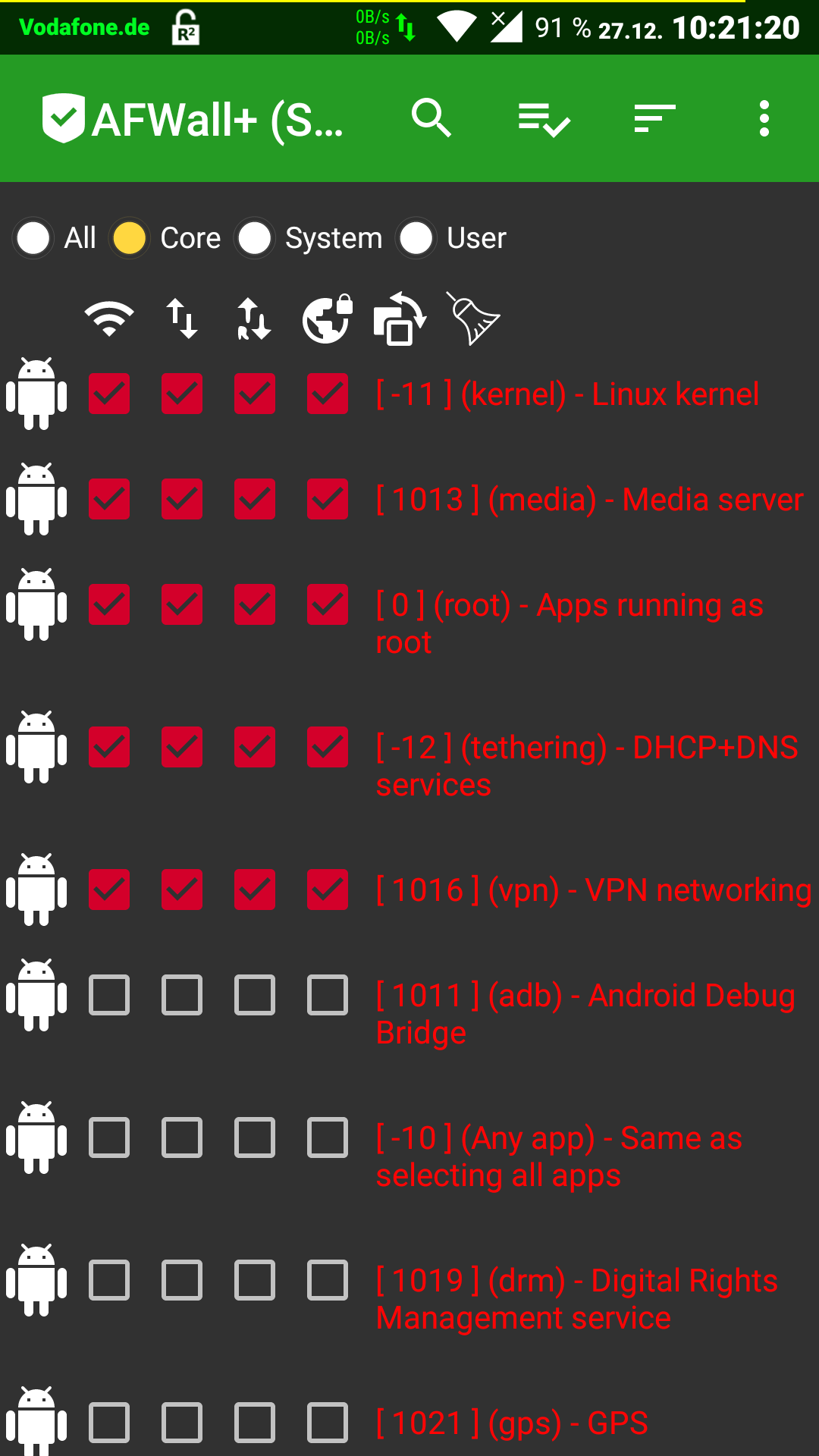
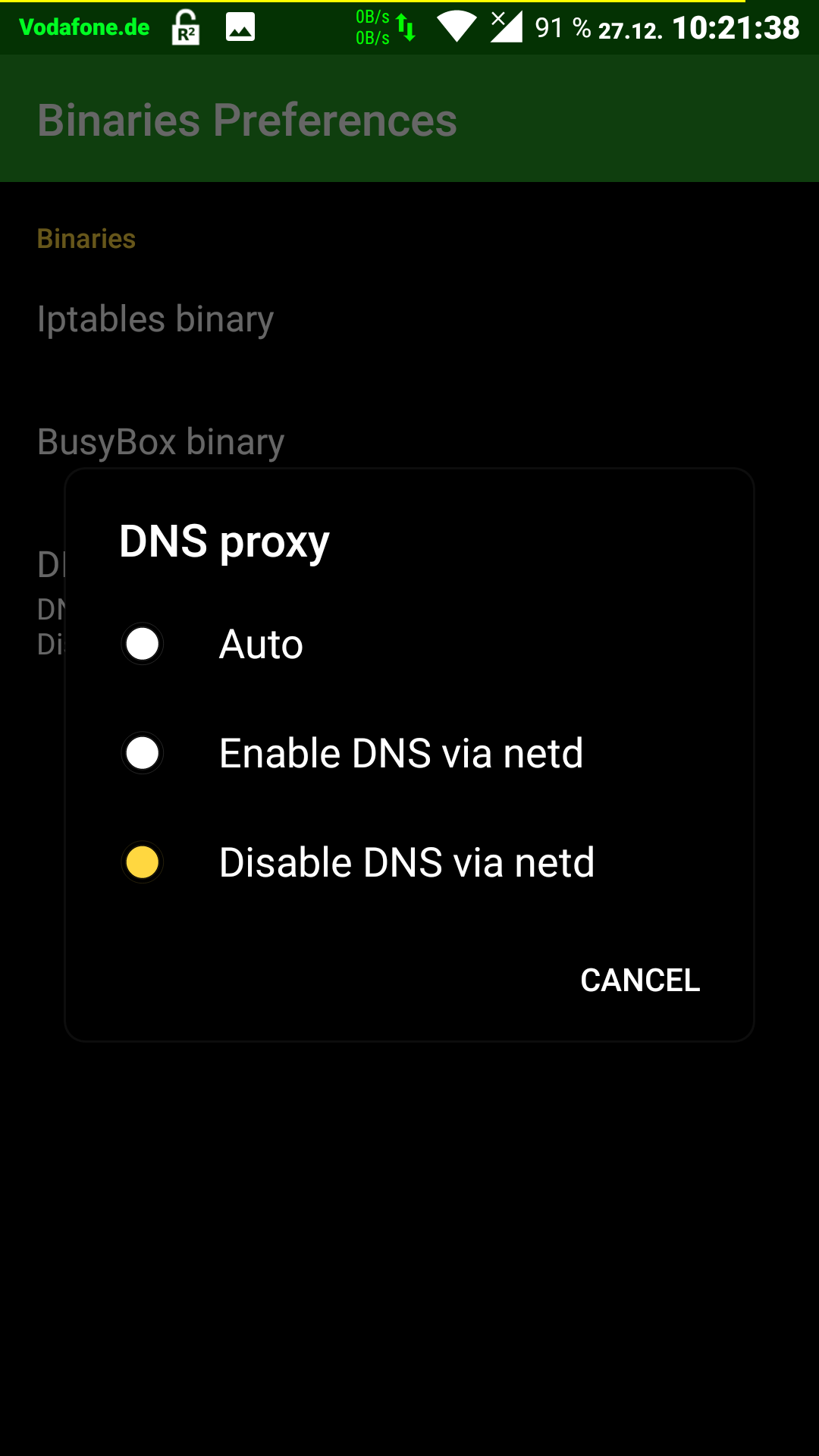
I don't know if it's useful in this context but "[0] (root) - Apps running as root" is always enabled on my devices. Reason: For DNS proxy, I've always "DNS via netd" disabled. (Refer to screenshots).
By my information, since Android 4.3 DNS requests are routed via the netd daemon by default. And the netd-(root) service works similar to a proxy respectively tunnel; and due to the "DNS tunnel" AFWall+ is unable to match a respective DNS request to an app respectively a specific UID. therefore unable to block such DNS requests. As far as I see, due to the disabled "DNS via netd" all DNS request are sent via UID [0] and AFWall+ is able to match the request. And in order to be able to still surf the web or to receive emails, "[0] (root) - Apps running as root" is always enabled.
 OswaldBoelcke
on 27 Dec 2018
OswaldBoelcke
on 27 Dec 2018
The option "Disable DNS via netd" should technically avoid DNS requests coming from netd and hence no packets would be generated by UID 0, and hence the issue discussed here won't happen. But it looks like this option does not do what it says or I don't understand what it means.
devsk
on 27 Dec 2018
The option "Disable DNS via netd" should technically avoid DNS requests coming from netd and hence no packets would be generated by UID 0, and hence the issue discussed here won't happen. But it looks like this option does not do what it says or I don't understand what it means.
Exactly, you're absolutely right. If DNS via netd is enabled, all root apps can make their DNS requests but these are by-passing AFWall+ they have access to the internet but additionally AFWall+ doesn't log.
If DNS via netd is disabled root apps are unable to generate DNS requests i.e. unable to e.g. surf the web or to communicate via email. As I want to be able to do both but also AFWall+ not to be by-passed I granted permissions to UID [0] in order to get a name resolution. From my understanding there's an alternative if e.g. "dnsproxy2" (https://github.com/cernekee/dnsproxy2) gets installed.
OswaldBoelcke
on 27 Dec 2018
Related issues
 manfred3000
·
6Comments
manfred3000
·
6Comments
 BlessDeix92
·
3Comments
BlessDeix92
·
3Comments
 haroon-ali
·
4Comments
haroon-ali
·
4Comments
 someone-somenet-org
·
4Comments
someone-somenet-org
·
4Comments
 MrGlasspoole
·
3Comments
MrGlasspoole
·
3Comments