Aframe: axismove event returns incorrect values in Oculus Quest
Description:
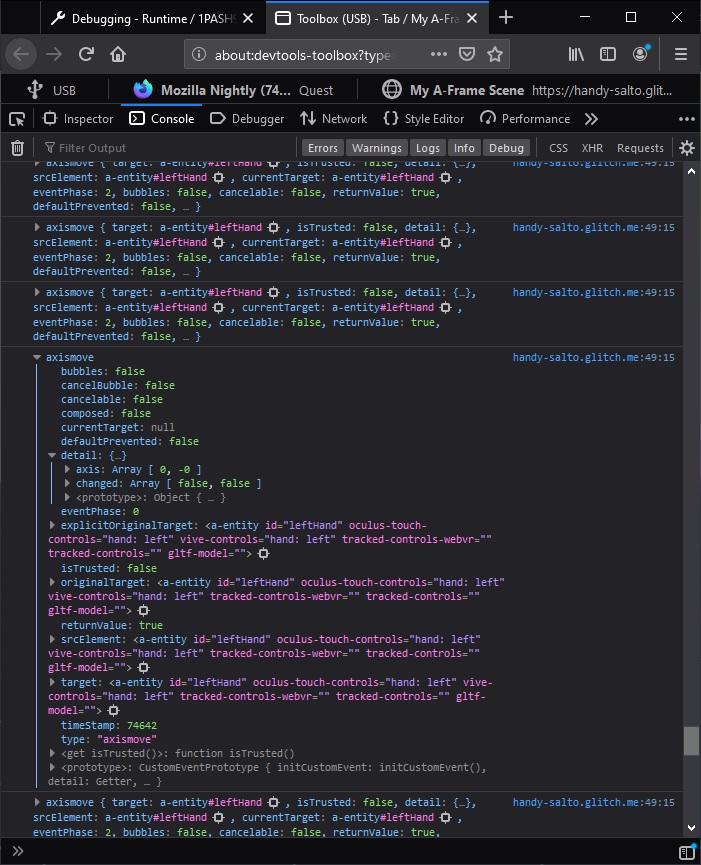
the axismove event always returns incorrect axis [0, 0, 0, -0] and incorrect changed [false, false, false, false] in Oculus Browser in Oculus Quest.
It also returns incorrect axis [0, -0] and incorrect changed [false, false] in Firefox Reality.
- A-Frame Version: 1.0.4
- Platform / Device: Oculus Browser and Firefox Reality in Oculus Quest
- Reproducible Code Snippet or URL:
<head>
  <title>My A-Frame Scene</title>
  <script src="https://aframe.io/releases/1.0.4/aframe.min.js"></script>
  <script src="https://unpkg.com/[email protected]/dist/aframe-environment-component.min.js"></script>
</head>
<body>
  <a-scene>
    <a-entity id="rig" position="0 0 0">
      <a-camera id="head" look-controls-enabled wasd-controls-enabled mouse-cursor cursor="rayOrigin: mouse"
      >
      </a-camera>
      <a-entity id="rightHand" laser-controls="hand: right">
      </a-entity>
      <a-entity id="leftHand" oculus-touch-controls="hand: left" vive-controls="hand: left"
      ></a-entity>
    </a-entity>
    <a-entity environment="preset: contact"></a-entity>
  </a-scene>
  <script>
    let leftHand= document.querySelector("a-entity[id='leftHand']");
    leftHand.addEventListener("axismove", evt => {
      console.log(evt);
    });
    let rightHand = document.querySelector("a-entity[id='rightHand']");
    rightHand .addEventListener("axismove", evt => {
      console.log(evt);
    });
  </script>
</body>

 Sujoy-Ghosh
>All comments
Thanks for catching this issue. While a04ae40 does fix some of this issue, Oculus Browser is delivering the x and y axis values as the third and fourth elements of gamepad.axes with the first two being 0. Because tracked controls is only being initialised with a 3 element array
the fourth element (up,down) axis value is not getting propagated. Before I open up a PR I just wanted to spend a bit more time checking to see if there are any other related thumbstick/axes issues floating around.
 Galadirith
on 28 Apr 2020
Galadirith
on 28 Apr 2020
Related issues
 RangerMauve
·
4Comments
RangerMauve
·
4Comments
 greggman
·
4Comments
greggman
·
4Comments
 minchnew
·
3Comments
minchnew
·
3Comments
 beyerz
·
3Comments
beyerz
·
3Comments
 ngokevin
·
4Comments
ngokevin
·
4Comments
Most helpful comment
Thanks for catching this issue. While a04ae40 does fix some of this issue, Oculus Browser is delivering the x and y axis values as the third and fourth elements of
gamepad.axeswith the first two being 0. Because tracked controls is only being initialised with a 3 element arrayhttps://github.com/aframevr/aframe/blob/fef42bf922ea47132f8ecbd3171bb0ca5b9365e8/src/components/tracked-controls-webxr.js#L30
the fourth element (up,down) axis value is not getting propagated. Before I open up a PR I just wanted to spend a bit more time checking to see if there are any other related thumbstick/axes issues floating around.